
1. தயாரிப்பு முடிந்துவிட்டதுview
The A-ZONE AZB4 Wireless Outdoor Security Camera System provides comprehensive surveillance with its 13.3-inch IPS monitor and four 3MP cameras. Designed for easy installation without complex wiring, this system features advanced functionalities such as audio recording, multiple recording modes, motion detection, and remote viewing capabilities. The IP66 waterproof and dustproof rating ensures reliable performance in various outdoor conditions.

படம் 1: மேல்view of the A-ZONE Wireless Outdoor Security Camera System, showing the 13.3-inch monitor and four cameras.
முக்கிய அம்சங்கள்:
- எளிதான அமைவு: Wireless connection between cameras and NVR. Pre-paired for plug-and-play functionality. No internet required for local viewing.
- உயர் தீர்மானம்: 3MP (2048x1536) cameras with a 13.3-inch IPS monitor for clear, detailed images.
- இரவு பார்வை: 24 infrared LEDs and IR-CUT for clear night vision up to 20 meters.
- ஆடியோ பதிவு: Built-in microphone for simultaneous video and audio recording.
- பல பதிவு முறைகள்: Continuous, motion detection, schedule, manual, and infrared recording options.
- விரிவாக்கக்கூடிய அமைப்பு: 8-channel NVR supports up to 8 cameras (4 included, 4 expandable).
- Repeater Function: Extends Wi-Fi range for cameras, doubling communication distance.
- வானிலை எதிர்ப்பு: IP66 waterproof and dustproof rating for outdoor use.
- தொலை கண்காணிப்பு: View வாழ்க footage and playback via mobile app.
2. தொகுப்பு உள்ளடக்கங்கள்
கீழே பட்டியலிடப்பட்டுள்ள அனைத்து பொருட்களும் உங்கள் தொகுப்பில் சேர்க்கப்பட்டுள்ளதா என்பதைச் சரிபார்க்கவும். ஏதேனும் பொருட்கள் காணவில்லை அல்லது சேதமடைந்திருந்தால், வாடிக்கையாளர் ஆதரவைத் தொடர்பு கொள்ளவும்.
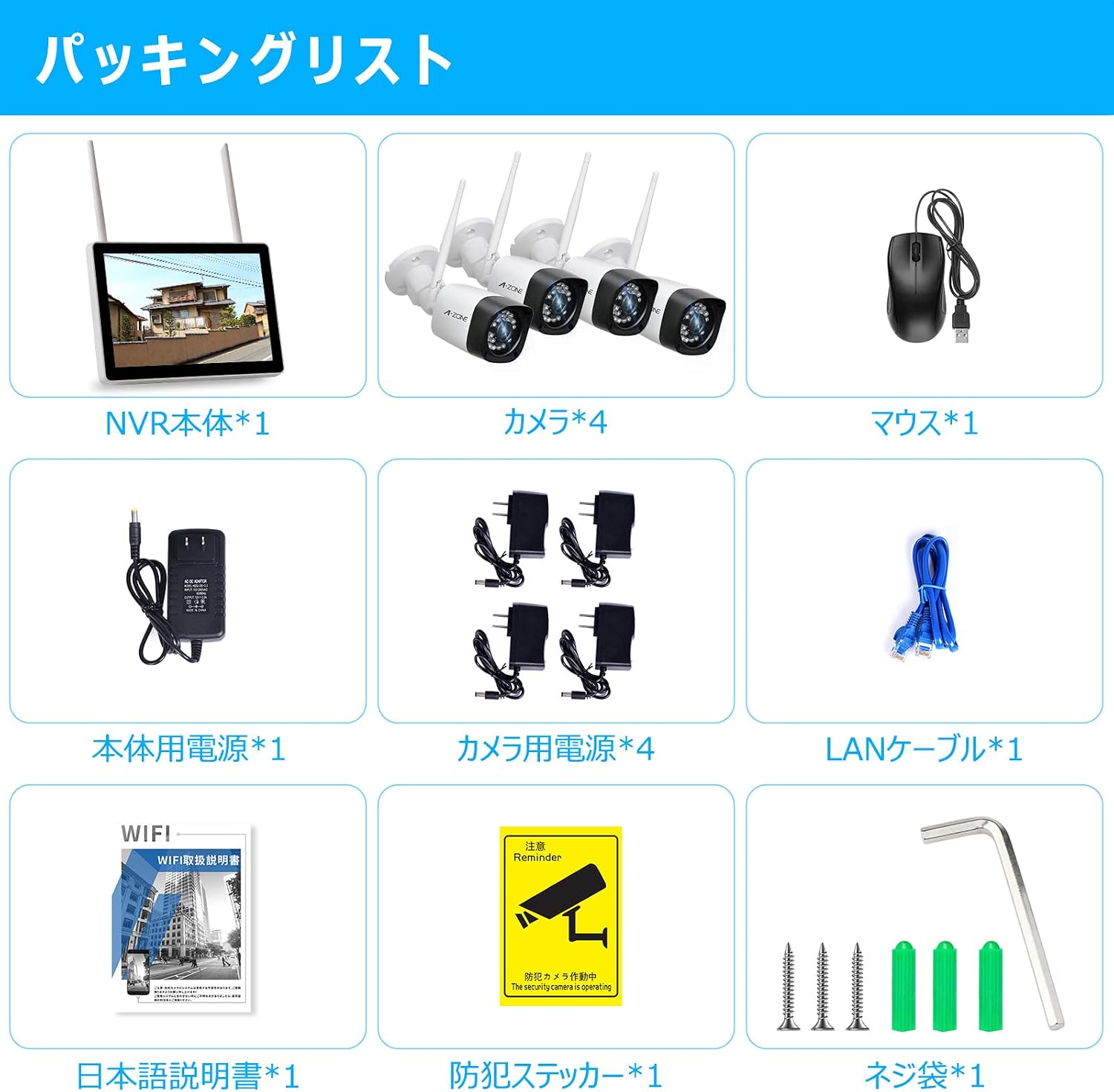
படம் 2: தொகுப்பு உள்ளடக்கங்களின் காட்சி பிரதிநிதித்துவம்.
உள்ளடக்கப்பட்ட பொருட்கள்:
- 1x 13.3-inch IPS NVR Monitor
- 4x 3MP Wireless Cameras
- 1x NVR பவர் அடாப்டர்
- 4x Camera Power Adapters
- 1x யூ.எஸ்.பி மவுஸ்
- 1x LAN Cable
- 1x Instruction Manual (Japanese)
- 1x Security Sticker
- பெருகிவரும் திருகுகள் மற்றும் பாகங்கள்
Video: Introduction of Accessories
Video 1: This video provides a detailed introduction to the accessories included in the 10-inch monitor wireless security camera set. It demonstrates each component and its purpose, helping users identify all parts before installation.
3. அமைவு வழிமுறைகள்
The A-ZONE security camera system is designed for easy installation. Follow these steps to set up your system.
3.1 கேமரா நிறுவல்
Cameras can be mounted on walls or ceilings using the provided screws. Ensure the mounting location provides a clear view and stable Wi-Fi signal.

Figure 3: Illustration of camera installation and connection points on the NVR.
Video: Wireless Security Camera Installation Demo
Video 2: This video demonstrates the step-by-step process of installing a wireless security camera, including marking drill points, drilling, inserting anchors, and securing the camera with screws.
3.2 கணினி இணைப்பு
Connect the cameras to the NVR and power outlets. The system is pre-paired, so cameras should automatically connect to the NVR once powered on.

Figure 4: Close-up of the NVR monitor's ports, including HDMI, LAN, USB, and power input.
Video: Initial Operation Procedure
Video 3: This video guides users through the initial setup and connection of the security camera system, including connecting power, LAN cables, and the mouse, followed by language selection and camera detection on the monitor.
4. இயக்க வழிமுறைகள்
Learn how to use the various features of your A-ZONE security camera system.
4.1 பதிவு முறைகள்
The system offers five recording modes to suit your surveillance needs:
- தொடர் பதிவு: பதிவுகள் 24/7.
- மோஷன் கண்டறிதல் பதிவு: Records automatically when motion is detected. Customize sensitivity and detection areas to reduce false alarms.
- அட்டவணை பதிவு: Set specific time periods for recording.
- கைமுறையாக பதிவு செய்தல்: Start recording manually via the monitor.
- Infrared Recording: Records clear images in complete darkness using infrared.

Figure 5: Visual representation of the various recording modes available.
4.2 தொலைநிலை Viewing
Monitor your property remotely using the dedicated mobile application on your smartphone or tablet, or via PC.

Figure 6: Screenshot showing remote viewing of camera feeds on a smartphone.
Video: Product Function Introduction
Video 4: This video highlights the key functions of the product, including motion detection, remote viewing, and night vision capabilities.
4.3 இரவு பார்வை
The cameras are equipped with 24 infrared LEDs and IR-CUT technology, automatically switching between day and night modes to provide clear images even in complete darkness up to 20 meters.

Figure 7: Comparison of day and night vision footage from the camera, demonstrating clarity in low-light conditions.
5. பராமரிப்பு
Regular maintenance ensures optimal performance and longevity of your security camera system.
- சுத்தமான லென்ஸ்கள்: Periodically wipe camera lenses with a soft, damp தூசி மற்றும் கறைகளை அகற்ற துணி.
- இணைப்புகளைச் சரிபார்க்கவும்: Ensure all power and network cables are securely connected and free from damage.
- மென்பொருள் புதுப்பிப்புகள்: Check for and install any available firmware updates for the NVR and cameras to enhance security and features.
- சேமிப்பு மேலாண்மை: வழக்கமாக மறுview பதிவு செய்யப்பட்ட footage and manage storage space on the 1TB HDD. Back up important recordings as needed.
- மின்சாரம்: Ensure cameras and NVR receive stable power. Avoid exposing power adapters to extreme weather.
6. சரிசெய்தல்
If you encounter issues with your A-ZONE security camera system, refer to the following common troubleshooting steps:
- மானிட்டரில் படம் இல்லை:
- Check if the NVR monitor is powered on.
- Ensure all cameras are powered on and within range of the NVR.
- Verify camera-NVR pairing. If necessary, re-pair cameras according to the full manual.
- மோசமான படத்தின் தரம்:
- கேமரா லென்ஸ்களை சுத்தம் செய்யவும்.
- கேமராவின் புலத்தில் தடைகளைச் சரிபார்க்கவும் view.
- Ensure cameras are receiving sufficient power.
- இயக்கக் கண்டறிதல் எச்சரிக்கைகள் இல்லை:
- Verify motion detection settings in the NVR menu or mobile app.
- Adjust sensitivity and detection areas.
- Ensure the mobile app has notification permissions enabled.
- ரிமோட் Viewசிக்கல்கள்:
- Ensure the NVR is connected to the internet via the LAN port.
- உங்கள் வீட்டு இணைய இணைப்பைச் சரிபார்க்கவும்.
- Update the mobile app to the latest version.
- Wi-Fi Signal Weakness:
- Utilize the repeater function of the cameras to extend signal range.
- Relocate cameras or NVR to minimize obstacles.
For more detailed troubleshooting or persistent issues, please refer to the full instruction manual or contact customer support.
7. விவரக்குறிப்புகள்
| அம்சம் | விளக்கம் |
|---|---|
| பிராண்ட் | A-ZONE |
| மாதிரி எண் | AZB4 |
| இணைப்பு தொழில்நுட்பம் | வயர்லெஸ் |
| வீடியோ பிடிப்பு தீர்மானம் | 1536p (3MP) |
| சிறப்பு அம்சம் | நீர்ப்புகா (IP66) |
| தயாரிப்பு பரிமாணங்கள் (LxWxH) | 30 x 20 x 30 செ.மீ |
| தொடர்பு இடைமுகம் | வயர்லெஸ் |
| வீடியோ பிக்சல்கள் | 1536p |
| கேமரா விளக்கம் | முன், பின் |
| இரவு பார்வை | ஆம் |
| பதிவு முறைமைகள் | Schedule, Manual |
| உள்ளிட்ட கூறுகள் | 1/2-Inch Collet (Note: This seems like a generic item, actual components are listed in Package Contents) |
| லென்ஸ் வகை | வைட் ஆங்கிள் லென்ஸ் |
8. உத்தரவாதம் & ஆதரவு
A-ZONE is committed to providing high-quality products and excellent customer service.
8.1 தயாரிப்பு உத்தரவாதம்
இந்த தயாரிப்பு ஒரு உடன் வருகிறது 2 வருட தர உத்தரவாதம். Our security cameras are PSE and technical compliance certified, and undergo approximately 48 hours of operation testing before shipment to ensure reliability.
8.2 வாடிக்கையாளர் ஆதரவு
If you have any questions or concerns during your purchase or use of the product, please do not hesitate to contact us. We recommend reviewing the instruction manual before using the product for quick and correct operation.
தொடர்பு முறைகள்:
- Contact the seller directly through your order history.
- Use the email address or LINE contact information provided in the instruction manual.