
1. அறிமுகம்
This manual provides instructions for the Keychron K14 mechanical keyboard. The K14 is a 70% layout, 72-key keyboard designed for both Mac and Windows operating systems, offering both Bluetooth wireless and USB wired connectivity. It features an RGB backlight, an aluminum frame, and Gateron G Pro Brown mechanical switches.

படம்: முடிந்ததுview of the Keychron K14 mechanical keyboard highlighting its 70% layout, wireless/wired modes, multi-device connectivity, Gateron G Pro switches, RGB lighting, Mac/Windows compatibility, and USB-C plug.
2. தொகுப்பு உள்ளடக்கங்கள்
Verify that all items are present in your Keychron K14 package:
- Keychron K14 Mechanical Keyboard
- யூ.எஸ்.பி டைப்-சி கேபிள்
- கீகாப் புல்லர்
- ஸ்விட்ச் புல்லர் (ஹாட்-ஸ்வாப் செய்யக்கூடிய பதிப்பாக இருந்தால்)
- Extra Keycaps for Windows/Mac operating systems
- பயனர் கையேடு
3. தயாரிப்பு அம்சங்கள்
3.1. 70% Layout and Key Cluster
The K14 features a compact 70% layout with 72 keys, providing a smaller footprint while retaining essential navigation keys such as Home, End, and Arrow keys, similar to a tenkeyless keyboard.

படம்: ஒரு நெருக்கமான படம் view of the Keychron K14 keyboard, illustrating its 70% layout which includes dedicated navigation keys such as Insert, Home, End, Delete, Page Up, Page Down, and arrow keys.
3.2. Gateron G Pro Brown Switches
The keyboard is equipped with Gateron G Pro Brown mechanical switches, known for their tactile feedback. These switches offer a durable lifespan of up to 50 million keystrokes.

Image: Specifications for the Gateron G Pro mechanical Brown Switch, detailing operating force (55±15gf), pre-travel (2±0.6mm), tactile behavior, gentle sound level, pre-lubed status (Yes), and a lifespan of up to 50 million keystrokes.
3.3. பணிச்சூழலியல் வடிவமைப்பு
The K14 features two-level adjustable feet, allowing for typing angles of 6º and 9º. This design, combined with an inclined bottom frame, provides ergonomic support for extended typing comfort.

படம்: ஒரு பக்கம் view of the Keychron K14 keyboard, illustrating its two-level adjustable feet that allow for typing angles of 6 and 9 degrees, enhancing ergonomic support.
4 அமைவு
4.1. விசைப்பலகையை இணைத்தல்
The Keychron K14 supports both Bluetooth wireless and USB Type-C wired connections.
4.1.1. புளூடூத் இணைப்பு
- Ensure the keyboard's mode switch (located on the side) is set to "BT" (Bluetooth).
- Press and hold the "Fn" + "1" (or "2" or "3") keys for 4 seconds to enter pairing mode. The backlight will flash rapidly.
- On your device (smartphone, laptop, iPad), enable Bluetooth and search for "Keychron K14".
- Select the keyboard to pair. The backlight will stop flashing upon successful connection.
- The keyboard can connect to up to 3 devices. Use "Fn" + "1", "Fn" + "2", or "Fn" + "3" to switch between paired devices.
4.1.2. கம்பி இணைப்பு
- விசைப்பலகையின் பயன்முறை சுவிட்ச் "கேபிள்" ஆக அமைக்கப்பட்டிருப்பதை உறுதிசெய்யவும்.
- Connect the provided USB Type-C cable from the keyboard to your computer's USB port.
- The keyboard will automatically be recognized and function as a wired keyboard.

Image: The Keychron K14 keyboard shown connecting wirelessly to a desktop computer, laptop, and smartphone, indicating compatibility with Mac and Windows operating systems.

Image: The Keychron K14 keyboard displayed with icons representing its dual connectivity options: wireless Bluetooth and wired USB-C.
4.2. இயக்க முறைமை சுவிட்ச்
The K14 includes a switch to toggle between Mac and Windows layouts. Locate the OS switch on the side of the keyboard and set it to the appropriate operating system for optimal key functionality.
4.3. விசைப்பலகை கோணத்தை சரிசெய்தல்
The keyboard features two-level adjustable feet. Flip out the feet to select between 6º and 9º typing angles to suit your ergonomic preference.
5. ஆபரேஷன்
5.1. பின்னொளி கட்டுப்பாடு
The Keychron K14 features RGB backlighting with 19 different types of lighting effects. Use the dedicated backlight key (often marked with a lightbulb icon) or function key combinations to cycle through effects, adjust brightness, and change colors.
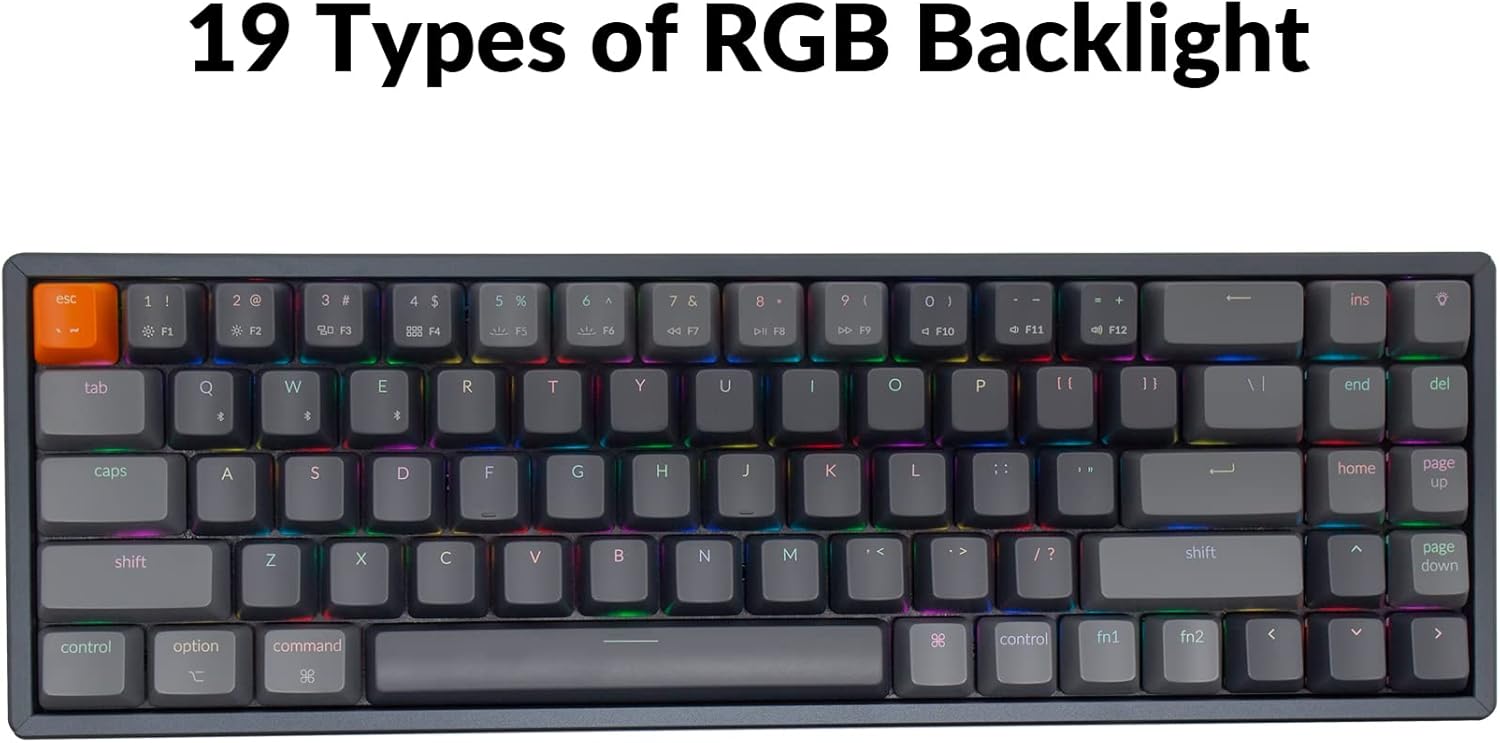
Image: The Keychron K14 keyboard illuminated with a multi-color RGB backlight, demonstrating its various lighting capabilities.
5.2. Multimedia Keys
Access multimedia functions (e.g., volume control, play/pause) using the Fn key in combination with the designated function row keys. Refer to the keycap legends for specific functions.
5.3. N-கீ ரோல்ஓவர் (NKRO)
The K14 supports N-key rollover (NKRO) in wired mode, allowing all keys to be registered simultaneously. In wireless mode, it supports 6-key rollover (6KRO).
6. பேட்டரி மேலாண்மை
The Keychron K14 is equipped with a 4000 mAh battery, providing up to 240 hours of usage with the backlight off. Connect the keyboard via the USB Type-C cable to charge the battery. The charging indicator will show the charging status.

Image: A close-up of the Keychron K14 keyboard with a prominent overlay indicating its 4000 mAh battery capacity.
7. பராமரிப்பு
To ensure the longevity and optimal performance of your Keychron K14 keyboard, follow these maintenance guidelines:
- சாவி மூடிகளை சுத்தம் செய்தல்: Use a keycap puller to remove keycaps. Clean them with a mild soap solution and a soft cloth. Ensure they are completely dry before reattaching.
- விசைப்பலகை உடலை சுத்தம் செய்தல்: Use a soft, dry, lint-free cloth to wipe the aluminum frame and other surfaces. For stubborn dirt, a slightly damp துணியைப் பயன்படுத்தலாம், ஆனால் அதிகப்படியான ஈரப்பதத்தைத் தவிர்க்கவும்.
- தூசி அகற்றுதல்: கீகேப்கள் மற்றும் சுவிட்சுகளுக்கு இடையில் உள்ள தூசி மற்றும் குப்பைகளை அகற்ற அழுத்தப்பட்ட காற்றைப் பயன்படுத்தவும்.
- சேமிப்பு: நீண்ட நேரம் பயன்படுத்தப்படாதபோது, விசைப்பலகையை நேரடி சூரிய ஒளி மற்றும் தீவிர வெப்பநிலையிலிருந்து விலகி, உலர்ந்த, குளிர்ந்த இடத்தில் சேமிக்கவும்.
- திரவங்களை தவிர்க்கவும்: The keyboard is not water-resistant. Keep liquids away to prevent damage.
8. சரிசெய்தல்
If you encounter issues with your Keychron K14 keyboard, refer to the following common solutions:
8.1. விசைப்பலகை பதிலளிக்கவில்லை
- இணைப்பைச் சரிபார்க்கவும்: Ensure the USB cable is securely connected or that Bluetooth is properly paired.
- பேட்டரி நிலை: If using Bluetooth, check if the battery is charged. Connect the USB cable to charge.
- பயன்முறை சுவிட்ச்: Verify the keyboard's mode switch is set correctly (BT for Bluetooth, Cable for wired).
- மறுதொடக்கம்: Try restarting your computer or device and the keyboard.
8.2. Bluetooth Disconnection Issues
- குறுக்கீடு: விசைப்பலகையை உங்கள் சாதனத்திற்கு அருகில் நகர்த்தி, குறுக்கீட்டை ஏற்படுத்தக்கூடிய பிற வயர்லெஸ் சாதனங்களிலிருந்து விலகி வைக்கவும்.
- மறு ஜோடி: Unpair the keyboard from your device's Bluetooth settings and then re-pair it.
- நிலைபொருள்: Check the official Keychron website for any available firmware updates for your K14 model.
8.3. Keys Not Registering or Double Typing
- Clean Switches: Dust or debris under the keycap or switch can cause issues. Use compressed air.
- சுவிட்ச் மாற்று: If you have a hot-swappable version, try replacing the problematic switch with a spare one.
8.4. பின்னொளி வேலை செய்யவில்லை
- பிரகாசம்: Ensure the backlight brightness is not set to the lowest level.
- செயல்பாட்டு விசைகள்: Try cycling through backlight modes and brightness levels using the designated function key combinations.
9. விவரக்குறிப்புகள்
| அம்சம் | விவரம் |
|---|---|
| பிராண்ட் | கீக்ரான் |
| மாதிரி எண் | K14C3 |
| தளவமைப்பு | 70% (72 விசைகள்) |
| இணைப்பு | Bluetooth 5.1 & USB Type-C Wired |
| மாறுகிறது | Gateron G Pro Brown Mechanical |
| பின்னொளி | RGB (19 types) |
| பிரேம் மெட்டீரியல் | அலுமினியம் |
| பேட்டரி திறன் | 4000 mAh |
| பேட்டரி ஆயுள் | 240 மணிநேரம் வரை (பின்னொளி அணைக்கப்படும்) |
| சரிசெய்யக்கூடிய பாதங்கள் | Yes (6º and 9º) |
| என்-கீ ரோல்ஓவர் | NKRO (Wired), 6KRO (Wireless) |
| இணக்கமான சாதனங்கள் | மடிக்கணினி, ஸ்மார்ட்போன், டேப்லெட் |
| இயக்க முறைமைகள் | மேக், விண்டோஸ் |
10. உத்தரவாதம் மற்றும் ஆதரவு
Keychron products are covered by a limited warranty. For specific warranty terms, duration, and support inquiries, please refer to the official Keychron webதளத்தில் அல்லது அவர்களின் வாடிக்கையாளர் சேவையை நேரடியாகத் தொடர்பு கொள்ளவும். உத்தரவாதக் கோரிக்கைகளுக்கு உங்கள் வாங்கியதற்கான ஆதாரத்தை வைத்திருங்கள்.
அதிகாரி Webதளம்: www.keychron.com