
Sinotimer Tm630S-2
Sinotimer TM630S-2 Digital Programmable Timer Switch User Manual
Model: TM630S-2
1. அறிமுகம்
The Sinotimer TM630S-2 is a versatile 7-day weekly programmable digital timer switch designed for automatic control of various electrical equipment. It features a built-in battery for memory retention during power failures, high accuracy, and strong anti-jamming capabilities. This manual provides detailed instructions for the setup, operation, and maintenance of your TM630S-2 timer switch.
This device is ideal for controlling streetlights, neon signs, water heaters, air conditioners, electric cookers, agricultural facilities, and broadcasting equipment, offering precise scheduling with up to 16 ON/OFF settings per day or week.

படம் 1: கோணல் view of the Sinotimer TM630S-2 Digital Timer Switch, showing the LCD display and control buttons.
2. தயாரிப்பு முடிந்துவிட்டதுview
The TM630S-2 features an LCD display for time and program settings, along with several buttons for configuration. It is designed for DIN-rail mounting, making it suitable for integration into electrical panels.

படம் 2: முன் view of the Sinotimer TM630S-2, highlighting its 220V compatibility and button layout.
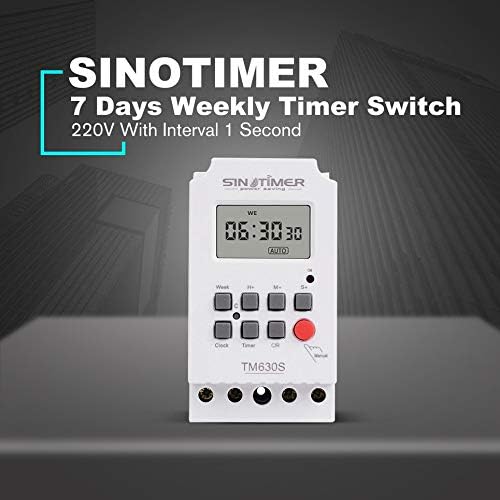
Figure 3: The Sinotimer TM630S-2, marketed as a 7-day weekly timer switch with 1-second interval capability.

Figure 4: The TM630S-2 showcasing its key features, including automatic switching, low consumption, high-accuracy CMOS chip, and compliance with IEC 60367 and CE standards.
3. நிறுவல் மற்றும் அமைவு
3.1 மவுண்டிங்
The TM630S-2 is designed for DIN-rail mounting. Ensure the mounting location is secure, dry, and within the specified operating temperature range.

Figure 5: Technical drawing illustrating the dimensions and DIN-rail mounting mechanism of the TM630S-2.
3.2 வயரிங்
எச்சரிக்கை: All wiring should be performed by a qualified electrician and in accordance with local electrical codes. Ensure power is disconnected before wiring to prevent electric shock.
The TM630S-2 supports 220V AC power supply. Connect the input power and the load according to the wiring diagram provided on the device and below.
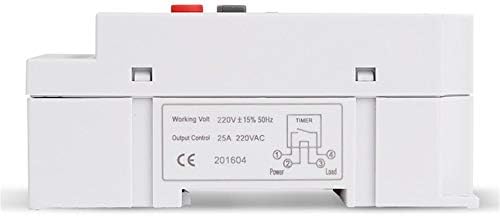
படம் 6: கீழே view of the TM630S-2, displaying the wiring diagram for input power and household appliances, along with product specifications.
- Connect the Live (L) and Neutral (N) wires of the 220V AC power supply to the input terminals.
- Connect the Live (L) and Neutral (N) wires of the appliance (load) to be controlled to the output terminals.
- அனைத்து இணைப்புகளும் பாதுகாப்பாகவும் சரியாகவும் காப்பிடப்பட்டிருப்பதை உறுதி செய்யவும்.
4. இயக்க வழிமுறைகள்
4.1 பொத்தான் செயல்பாடுகள்
- கடிகாரம்: Used to set the current time and day.
- வாரம்: Selects the day of the week during time or program setting.
- H+: Adjusts hours (for time or program setting).
- M+: Adjusts minutes (for time or program setting).
- S+: Adjusts seconds (for time or program setting).
- டைமர்: Enters program setting mode.
- C/R (Cancel/Recall): Clears current program settings or recalls them.
- கையேடு: Manually switches the output ON/OFF or sets to AUTO mode.
4.2 தற்போதைய நேரம் மற்றும் நாளை அமைத்தல்
- அழுத்திப் பிடிக்கவும் கடிகாரம் பொத்தான்.
- வைத்திருக்கும் போது கடிகாரம், அழுத்தவும் வாரம் வாரத்தின் தற்போதைய நாளை அமைக்க.
- வைத்திருக்கும் போது கடிகாரம், அழுத்தவும் H+ தற்போதைய நேரத்தை அமைக்க.
- வைத்திருக்கும் போது கடிகாரம், அழுத்தவும் M+ தற்போதைய நிமிடத்தை அமைக்க.
- வைத்திருக்கும் போது கடிகாரம், அழுத்தவும் S+ to set the current second.
- விடுவிக்கவும் கடிகாரம் அமைப்புகளைச் சேமிக்க பொத்தானை அழுத்தவும்.
4.3 சுழற்சிகளை இயக்குதல்/நிறுவுதல்
The TM630S-2 supports up to 16 ON/OFF programs. Each program can be set for specific days of the week or for all days.
- அழுத்தவும் டைமர் button once to enter the first ON program setting (display shows "1 ON").
- அழுத்தவும் வாரம் to select the desired day(s) for this program (e.g., Mon-Sun, Mon-Fri, Sat-Sun, etc.).
- அழுத்தவும் H+ மற்றும் M+ to set the desired ON time.
- அழுத்தவும் டைமர் button again to enter the first OFF program setting (display shows "1 OFF").
- அழுத்தவும் வாரம் to select the desired day(s) for this OFF program (usually matches the ON program).
- அழுத்தவும் H+ மற்றும் M+ to set the desired OFF time.
- Repeat steps 1-6 for additional ON/OFF programs (up to 16 pairs).
- தேவையான அனைத்து நிரல்களையும் அமைத்த பிறகு, கடிகாரம் button to exit program mode and return to the current time display.
To clear a specific program, navigate to that program using the டைமர் பொத்தானை அழுத்தவும் சி/ஆர் பொத்தான்.
4.4 கைமுறை கட்டுப்பாடு
அழுத்தவும் கையேடு button to cycle through the output modes:
- On: Output is continuously ON.
- முடக்கு: Output is continuously OFF.
- ஆட்டோ: The timer operates according to the programmed ON/OFF settings. Ensure the timer is in AUTO mode for scheduled operations.
5. பராமரிப்பு
The Sinotimer TM630S-2 is designed for low maintenance. The built-in battery ensures memory retention for up to 60 days during power outages, eliminating the need for frequent time resetting.
- சுத்தம்: சாதனத்தின் வெளிப்புறத்தை சுத்தம் செய்ய மென்மையான, உலர்ந்த துணியைப் பயன்படுத்தவும். சிராய்ப்பு கிளீனர்கள் அல்லது கரைப்பான்களைப் பயன்படுத்த வேண்டாம்.
- பேட்டரி: The internal battery is rechargeable and designed for long-term use. If the display becomes dim or settings are lost frequently during power outages, the battery may be nearing the end of its life. Battery replacement should only be performed by qualified personnel.
- ஆய்வு: Periodically inspect the wiring connections to ensure they remain secure.
6. சரிசெய்தல்
- சாதனம் இயக்கப்படவில்லை:
- Check the main power supply to the device.
- Verify that the wiring connections are correct and secure as per the wiring diagram.
- Programs not executing:
- டைமர் அமைக்கப்பட்டுள்ளதா என்பதை உறுதிப்படுத்தவும் ஆட்டோ பயன்முறையைப் பயன்படுத்தி கையேடு பொத்தான்.
- Double-check the ON/OFF program settings for correct times and days.
- Verify that the current time and day are set correctly on the timer.
- Time drift/inaccuracy:
- The device has an auto time error correction of +/- 30 seconds weekly. Significant deviations may indicate an issue.
- Ensure the device is operating within its specified temperature range (-20℃ to +50℃).
- Display is blank or dim during power outage:
- The internal battery may be depleted or nearing end-of-life. The battery provides backup for up to 60 days. Allow the device to be powered for several hours to recharge the internal battery.
7. விவரக்குறிப்புகள்
| அம்சம் | விவரக்குறிப்பு |
|---|---|
| பிராண்ட் | Sinotimer |
| மாதிரி | TM630S-2 |
| நிறம் | வெள்ளை |
| வெப்பநிலை வரம்பு | -20℃ முதல் +50℃ வரை |
| பவர் சப்ளை | 220VAC (also available in 12VDC option) |
| மின் நுகர்வு | 4.5 VA (அதிகபட்சம்) |
| காட்சி | எல்சிடி |
| தொடர்பை மாற்றுகிறது | 1 மாற்ற சுவிட்ச் |
| நிகழ்ச்சிகள் | 16 ON/OFF settings (daily or weekly) |
| ஹிஸ்டெரிசிஸ் | 2 sec/day (at 25℃) |
| குறைந்தபட்ச இடைவெளி | 1 வினாடி |
| திறன் | 30A 250 வி ஏ.சி. |
| Black-out Memory | 60 days (via built-in rechargeable 3V battery) |
| டைமர் வரம்பு | 1 வினாடி முதல் 168 மணி நேரம் வரை |
| Average Error | 1s/24h (at 25℃) |
| பரிமாணங்கள் (தோராயமாக) | 95 மிமீ (எச்) x 98 மிமீ (டபிள்யூ) x 40 மிமீ (டி) |

படம் 7: எ.காamples of typical applications for the TM630S-2 timer switch, including industrial settings, home automation, and agricultural use.
8. உத்தரவாதம் மற்றும் ஆதரவு
Specific warranty information for the Sinotimer TM630S-2 is not provided within this manual. Please refer to the product packaging, the seller's website (Kiminors), or your purchase receipt for details regarding warranty coverage and terms.
For technical support or further assistance, please contact the vendor or manufacturer through the contact information provided at the point of purchase.
Ask a question about this manual
Ask about setup, troubleshooting, compatibility, parts, safety, or missing instructions. Manuals+ will review the question and use this page’s manual context to help answer it.