
1. தயாரிப்பு முடிந்துவிட்டதுview
The Anderic OEM NSRCFNA21 Smart Remote is an original equipment manufacturer (OEM) replacement remote control specifically designed for various Insignia TV models. This remote provides seamless functionality and user-friendly operation, ensuring reliable control over your television.
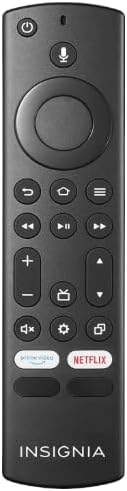
படம் 1.1: The Anderic OEM NSRCFNA21 Smart Remote. This image displays the front view of the black remote control, featuring various buttons for power, voice control, navigation, volume, channel, and dedicated streaming service buttons.
முக்கிய அம்சங்கள் அடங்கும்:
- Original Quality: An authentic OEM product, ensuring performance and reliability comparable to the remote originally supplied with your TV.
- பயனர் நட்பு வடிவமைப்பு: Intuitive buttons and controls for easy navigation, volume adjustment, channel changes, and access to various TV functions.
- நம்பகமான செயல்திறன்: Provides a stable and responsive connection for accurate command execution.
2. அமைவு மற்றும் இணைத்தல் வழிமுறைகள்
To ensure proper functionality, the remote control must be paired with your Insignia TV. Follow these steps carefully:
- டிவியை மீட்டமை: Unplug your Insignia TV from its power source. Wait for approximately 30 seconds.
- Power On TV: Plug the TV back into the power source and turn it on. Allow the TV to fully boot up.
- ஆரம்ப இணைத்தல்: Once the TV has completely booted up and is displaying content, press and hold the வீடு button on the Anderic NSRCFNA21 remote control for up to 30 seconds.
- Remote Update (if prompted): Your TV may display a message indicating that the remote needs an update. If prompted, allow the TV to proceed with the update. This process may take 1 to 3 minutes to complete.
- சரிபார்ப்பு: After the update (if any) and pairing process, test the remote's functions (e.g., volume, channel, navigation) to confirm successful pairing.
If the remote does not pair after following these steps, repeat the process or refer to the troubleshooting section.
3. ரிமோட் கண்ட்ரோலை இயக்குதல்
The Anderic NSRCFNA21 remote control features an intuitive layout for easy operation of your Insignia TV. Below are the general functions of the primary buttons:
- பவர் பட்டன்: டிவியை ஆன் அல்லது ஆஃப் செய்கிறது.
- குரல் கட்டுப்பாட்டு பொத்தான்: உள்ளடக்கத்தைத் தேட அல்லது டிவியைக் கட்டுப்படுத்த குரல் கட்டளைகளைச் செயல்படுத்துகிறது.
- Navigation Pad (Directional Buttons and Select): மெனுக்கள் வழியாக நகர்ந்து உருப்படிகளைத் தேர்ந்தெடுக்கப் பயன்படுகிறது.
- முகப்பு பொத்தான்: Returns to the TV's main home screen.
- பின் பொத்தான்: முந்தைய திரை அல்லது மெனுவுக்குத் திரும்புகிறது.
- Menu/Options Button: Accesses additional menu options or settings.
- வால்யூம் அதிக/கீழ்: Adjusts the TV's audio volume.
- சேனல் மேல்/கீழ்: டிவி சேனல்களை மாற்றுகிறார்.
- முடக்கு பொத்தான்: டிவியின் ஆடியோவை ஒலியடக்கும் அல்லது ஒலியடக்கும்.
- அமைப்புகள் பொத்தான்: டிவியின் அமைப்புகள் மெனுவைத் திறக்கும்.
- உள்ளீடு/மூல பொத்தான்: Changes the TV's input source (e.g., HDMI 1, HDMI 2).
- Dedicated Streaming Service Buttons: Provides quick access to popular streaming applications (e.g., Amazon Prime Video, Netflix).
4. இணக்கத்தன்மை
The Anderic OEM NSRCFNA21 Smart Remote is compatible with the following Insignia TV models:
- NS24DF310NA21
- NS39DF310NA21
- NS50DF710NA21
- NS55DF710NA21
This remote also replaces the following models:
- NSRCFNA19 Rev B Fire
- NSRCFNA19revB
- NSRCFNA21 Fire
- NSRCFNA21 Rev E
- NSRCFNA21-Rev-E
Ensure your TV model is listed above for optimal performance.
5. பராமரிப்பு
Proper maintenance can extend the life and functionality of your remote control.
- பேட்டரி மாற்று: The remote requires two AAA batteries. Replace batteries when the remote's responsiveness decreases or it stops functioning. Ensure correct polarity when inserting new batteries.
- சுத்தம்: Use a soft, dry cloth to clean the remote's surface. Avoid using liquid cleaners or abrasive materials, as these can damage the remote.
- சேமிப்பு: ரிமோட்டை உலர்ந்த இடத்தில் சேமிக்கவும், தீவிர வெப்பநிலை மற்றும் நேரடி சூரிய ஒளியில் இருந்து விலகி வைக்கவும்.
6. சரிசெய்தல்
If you encounter issues with your Anderic NSRCFNA21 Smart Remote, try the following troubleshooting steps:
- ரிமோட் பதிலளிக்கவில்லை:
- Check the batteries. Replace them with fresh AAA batteries, ensuring correct polarity.
- ரிமோட்டுக்கும் டிவியின் சென்சாருக்கும் இடையில் எந்த தடைகளும் இல்லை என்பதை உறுதிப்படுத்திக் கொள்ளுங்கள்.
- Re-attempt the pairing process as described in Section 2.
- இடைப்பட்ட செயல்பாடு:
- இது குறைந்த பேட்டரி சக்தியைக் குறிக்கலாம். பேட்டரிகளை மாற்றவும்.
- நீங்கள் டிவியின் சென்சாரின் பயனுள்ள வரம்பிற்குள் இருப்பதை உறுதிப்படுத்திக் கொள்ளுங்கள்.
- Pairing Fails:
- Confirm your TV model is listed in the compatibility section (Section 4).
- Ensure the TV is fully booted up before attempting to hold the Home button.
- Try unplugging the TV for a longer period (e.g., 1-2 minutes) before plugging it back in and re-attempting pairing.
If problems persist after attempting these steps, contact customer support for further assistance.
7. விவரக்குறிப்புகள்
| பிராண்ட் | ஆண்டெரிக் |
| மாதிரி எண் | NSRCFNA21 Rev B |
| இணக்கமான சாதனங்கள் | Insignia Televisions |
| சக்தி ஆதாரம் | 2 AAA பேட்டரிகள் (தேவை) |
| பொருளின் எடை | 1.76 அவுன்ஸ் |
| தொகுப்பு பரிமாணங்கள் | 6.3 x 2.95 x 0.67 அங்குலம் |
| நிறம் | கருப்பு |
| உற்பத்தியாளர் | Dan's Electronics Etc., Inc. |
8. உத்தரவாதம் மற்றும் ஆதரவு
For warranty information or technical support, please contact the manufacturer, Anderic (Dan's Electronics Etc., Inc.). Refer to the product packaging or the official Anderic webகுறிப்பிட்ட தொடர்பு விவரங்கள் மற்றும் உத்தரவாத விதிமுறைகளுக்கான தளம்.
நீங்கள் பார்வையிடலாம் Anderic Store on Amazon மேலும் தகவலுக்கு.