
1. அறிமுகம்
The MustOOL MT336 is a versatile 2-in-1 True RMS Digital Clamp Meter and Oscilloscope. This device allows for non-contact measurement of AC current waveforms, DC/AC voltage, resistance, capacitance, frequency, and temperature. It features a waveform display for quick analysis and includes functions like diode testing and continuity checks. Designed for safety and efficiency, it is an essential tool for electrical measurements.
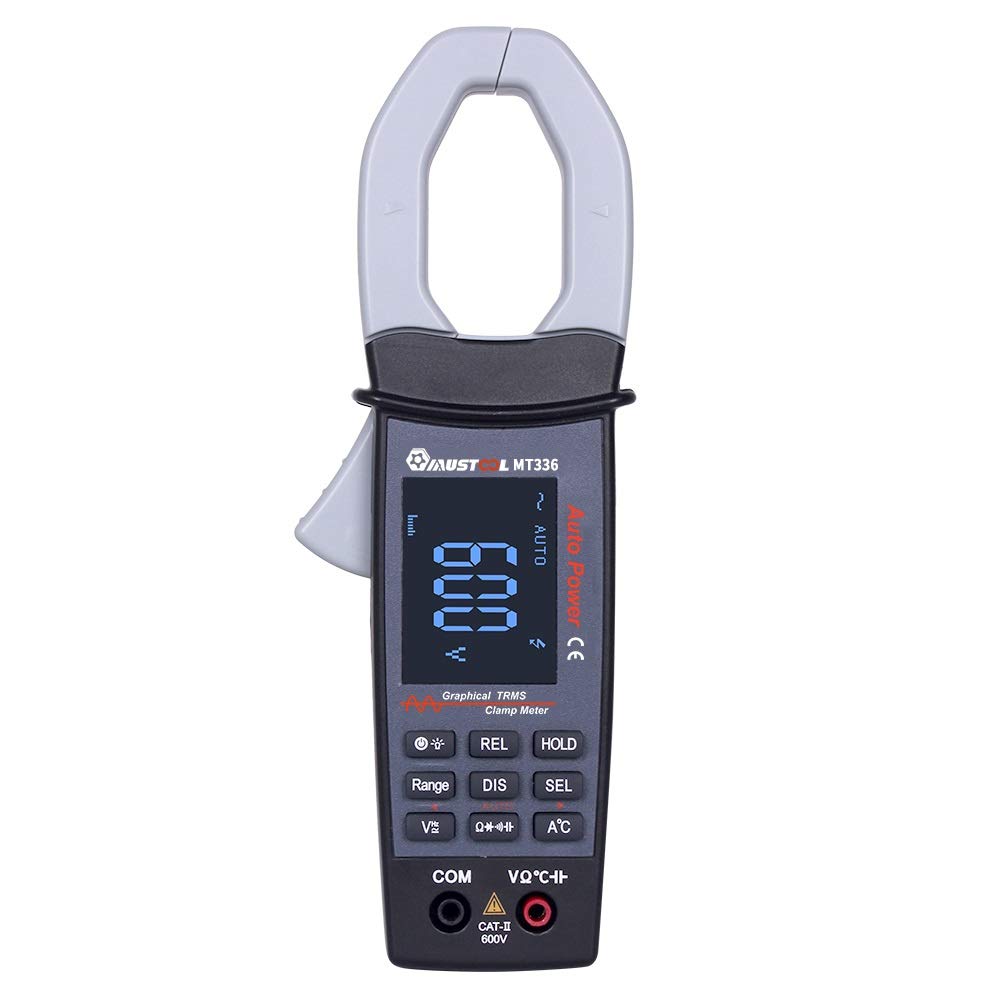
Figure 1: MustOOL MT336 Digital Clamp Meter in use, showing its display.
2. பாதுகாப்பு தகவல்
மின் சோதனை உபகரணங்களைப் பயன்படுத்தும் போது எப்போதும் பாதுகாப்பு முன்னெச்சரிக்கை நடவடிக்கைகளைக் கடைப்பிடிக்கவும். அவ்வாறு செய்யத் தவறினால் மின்சார அதிர்ச்சி, காயம் அல்லது மீட்டர் அல்லது சோதனைக்கு உட்பட்ட உபகரணங்களுக்கு சேதம் ஏற்படலாம்.
- எந்தவொரு செயல்பாட்டிற்கும் அதிகபட்ச உள்ளீட்டு வரம்புகளை மீற வேண்டாம்.
- Ensure the test leads are in good condition and properly connected before use.
- Do not use the meter if it appears damaged or if the battery cover is not properly closed.
- தொகுதியுடன் பணிபுரியும் போது மிகுந்த எச்சரிக்கையுடன் செயல்படவும்tag60V DC அல்லது 30V AC RMSக்கு மேல்.
- மின்தடை, மின்தேக்கம் அல்லது டையோடு அளவீடுகளைச் செய்வதற்கு முன் எப்போதும் சுற்றுக்கான மின்சாரத்தைத் துண்டிக்கவும்.
- பேட்டரி பெட்டியைத் திறப்பதற்கு முன் மீட்டரிலிருந்து சோதனை லீட்களை அகற்றவும்.

படம் 2: பின்புறம் view of the MT336, highlighting safety warnings and battery information.
3. தயாரிப்பு கூறுகள்
The MustOOL MT336 clamp meter includes the following main components:
- Clamp தாடை: For non-contact AC current measurement.
- தூண்டுதல்: cl-ஐத் திறந்து மூடுகிறதுamp தாடை
- LCD காட்சி: Shows measurement readings, waveforms, and function indicators.
- செயல்பாட்டு பொத்தான்கள்: For selecting modes, ranges, and other features.
- Input Jacks (COM, VΩHz): தொகுதிக்கான சோதனை லீட்களை இணைப்பதற்குtage, எதிர்ப்பு, மின்தேக்கம், அதிர்வெண், டையோடு மற்றும் தொடர்ச்சி அளவீடுகள்.
- Temperature Probe Input: For connecting the included temperature probe.
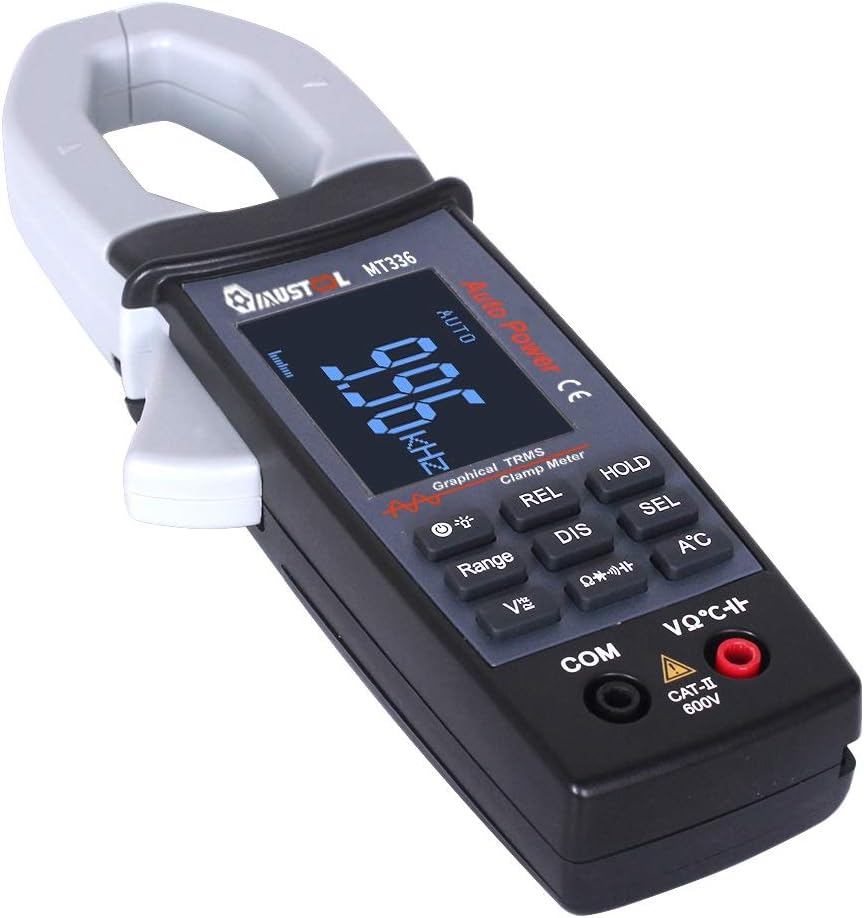
படம் 3: மேல்view of the MT336 clamp meter, showing its main parts.
4 அமைவு
4.1 பேட்டரி நிறுவல்
- Ensure the meter is powered off and no test leads are connected.
- மீட்டரின் பின்புறத்தில் பேட்டரி பெட்டியைக் கண்டறியவும்.
- பேட்டரி பெட்டியின் அட்டையை அவிழ்த்து விடுங்கள்.
- Insert three AAA 1.5V batteries, observing correct polarity.
- பேட்டரி பெட்டியின் அட்டையை மாற்றி, திருகு மூலம் பாதுகாக்கவும்.
4.2 சோதனை லீட்களை இணைத்தல்
தொகுதிக்குtage, மின்தடை, மின்தேக்கம், அதிர்வெண், டையோடு மற்றும் தொடர்ச்சி அளவீடுகள்:
- கருப்பு சோதனை ஈயத்தை செருகவும் COM (பொது) உள்ளீட்டு பலா.
- சிவப்பு சோதனை ஈயத்தை அதில் செருகவும் VΩHz உள்ளீடு பலா.
For temperature measurements, connect the temperature probe to the designated input ports.
5. இயக்க வழிமுறைகள்
5.1 பவர் ஆன்/ஆஃப்
Press the power button to turn the meter on. The meter will automatically shut down after 15 minutes of inactivity to conserve battery life. Press the power button again to turn it off manually.
5.2 ஏசி மின்னோட்ட அளவீடு (Clamp செயல்பாடு)
- Select the AC current mode (usually indicated by 'A~' or a similar symbol).
- cl ஐ திறக்க தூண்டுதலை அழுத்தவும்amp தாடை
- cl-க்குள் ஒரு ஒற்றை கடத்தியை (பல கம்பிகளைக் கொண்ட மின் கம்பி அல்ல) இணைக்கவும்.amp தாடை
- Release the trigger to close the jaw securely around the conductor.
- Read the AC current value and waveform on the display.

Figure 4: Measuring AC current and waveform using the clamp செயல்பாடு.
5.3 ஏசி/டிசி தொகுதிtagஇ அளவீடு
- பிரிவு 4.2 இல் விவரிக்கப்பட்டுள்ளபடி சோதனை லீட்களை இணைக்கவும்.
- பொருத்தமான தொகுதியைத் தேர்ந்தெடுக்கவும்tage mode (DCV or ACV).
- Touch the red and black test probes to the points where voltage அளவிடப்பட வேண்டும்.
- தொகுதியைப் படியுங்கள்tage value on the display. For AC voltage, the waveform may also be displayed.

படம் 5: அளவிடும் ஏசி தொகுதிtage and waveform from a power outlet.
5.4 Resistance, Capacitance, Frequency, Diode, and Continuity
For these functions, ensure the circuit is de-energized before connecting the test leads. Select the desired function using the mode buttons and follow standard measurement procedures for multimeters.
- எதிர்ப்பு (Ω): ஒரு கூறின் மின் எதிர்ப்பை அளவிடுகிறது.
- கொள்ளளவு (F): Measures the capacitance of capacitors.
- அதிர்வெண் (ஹெர்ட்ஸ்): ஒரு AC சிக்னலின் அதிர்வெண்ணை அளவிடுகிறது.
- டையோடு சோதனை: முன்னோக்கிய ஒலியளவைச் சரிபார்க்கிறதுtagஒரு டையோடின் இ துளி.
- தொடர் சோதனை: Indicates if a circuit is complete with a low resistance path (typically with an audible beep).
5.5 வெப்பநிலை அளவீடு
Connect the temperature probe to the meter's designated input. Select the temperature function and place the probe tip on the object or area to be measured. The temperature will be displayed in Celsius or Fahrenheit.
6. பராமரிப்பு
6.1 சுத்தம் செய்தல்
Wipe the meter with a dry, soft cloth. Do not use abrasives or solvents. Keep the input terminals free of dirt and moisture.
6.2 பேட்டரி மாற்று
When the low battery indicator appears on the display, replace the batteries as described in Section 4.1. Use three new AAA 1.5V batteries.
6.3 சேமிப்பு
If the meter is not used for an extended period, remove the batteries to prevent leakage and damage. Store the meter in a cool, dry place away from direct sunlight.
7. சரிசெய்தல்
| பிரச்சனை | சாத்தியமான காரணம் | தீர்வு |
|---|---|---|
| மீட்டர் இயக்கப்படவில்லை. | செயலிழந்த அல்லது தவறாக நிறுவப்பட்ட பேட்டரிகள். | சரியான துருவமுனைப்பை உறுதிசெய்து, பேட்டரிகளை மாற்றவும். |
| No reading or "OL" displayed. | Open circuit, out of range, or incorrect function selected. | Check connections, select appropriate range/function, or ensure circuit is closed. |
| துல்லியமற்ற வாசிப்புகள். | Low battery, dirty test leads/terminals, or external interference. | Replace batteries, clean leads/terminals, move away from strong electromagnetic fields. |
| Waveform not displayed correctly. | Signal frequency too high/low, or incorrect range. | Ensure signal is within 1kHz ACV/ACA. Adjust range if available. |
8. விவரக்குறிப்புகள்
பொதுவான விவரக்குறிப்புகள்:
- காட்சி: 128 x 64 LCM with white backlight on black screen (45mm x 35mm)
- சக்தி: 3 x AAA 1.5V பேட்டரிகள்
- தானியங்கி பணிநிறுத்தம்: Approximately 15 minutes of inactivity
- தரவு சேமிப்பு: 100 data points, 10 waveforms
- பரிமாணங்கள்: 78 மிமீ x 210 மிமீ x 36 மிமீ
- எடை: 220g (பேட்டரிகள் இல்லாமல்)
- செயல்படும் சூழல்: 0°C to 40°C; <75% RH
- சேமிப்பு சூழல்: -10°C to 60°C; <90% RH
- பாதுகாப்பு மதிப்பீடு: CAT II 600V
Measurement Specifications (Accuracy ±(rdg + dgt)):
| செயல்பாடு | வரம்பு | துல்லியம் |
|---|---|---|
| டிசி தொகுதிtage | 400mV / 4V / 40V / 400V / 600V | ± (1.5% + 10) |
| ஏசி தொகுதிtagஇ (டிஆர்எம்எஸ்) | 4V / 40V / 400V / 600V | ± (2.0% + 10) |
| ஏசி நடப்பு | 40A / 400A | ± (2.5% + 10) |
| எதிர்ப்பு | 400Ω / 4kΩ / 40kΩ / 400kΩ / 4MΩ / 40MΩ | ± (1.0% + 5) |
| கொள்ளளவு | 4nF / 40nF / 400nF / 4uF / 400uF / 4mF | ± (4.0% + 10) |
| அதிர்வெண் | 9.999Hz முதல் 30kHz வரை | ± (2.0% + 10) |
| வெப்பநிலை | -20℃ முதல் 250℃ வரை | ± (2.0% + 3) |
| டையோடு சோதனை | திறந்த சுற்று தொகுதிtage approx. 3V, max test current approx. 2mA | N/A |
| தொடர்ச்சி சோதனை | Judgment resistance approx. 50Ω | N/A |
| அனலாக் அலைவரிசை | ACV / ACA 1 kHz | N/A |
9. உத்தரவாதம் மற்றும் ஆதரவு
For warranty information and technical support, please refer to the official MustOOL webதளத்தில் அல்லது உங்கள் சில்லறை விற்பனையாளரைத் தொடர்பு கொள்ளவும். வாங்கியதற்கான சான்றாக உங்கள் கொள்முதல் ரசீதை வைத்திருங்கள்.
The package includes: 1x Clamp Meter, 1x Pair of Test Leads, 1x English User Manual, 1x Temperature Probe.