
TAOPON smartwatch zl02
TAOPON Smart Watch User Manual
Model: smartwatch zl02
அறிமுகம்
Thank you for choosing the TAOPON Smart Watch. This device is designed to enhance your daily life with its comprehensive features, including fitness tracking, health monitoring, and smart notifications. This manual provides detailed instructions to help you set up, operate, and maintain your smartwatch for optimal performance.

Figure 1: TAOPON Smart Watch Overview
பெட்டியில் என்ன இருக்கிறது
- TAOPON Smart Watch (with Watch Band)
- சார்ஜிங் கேபிள்
- பயனர் கையேடு
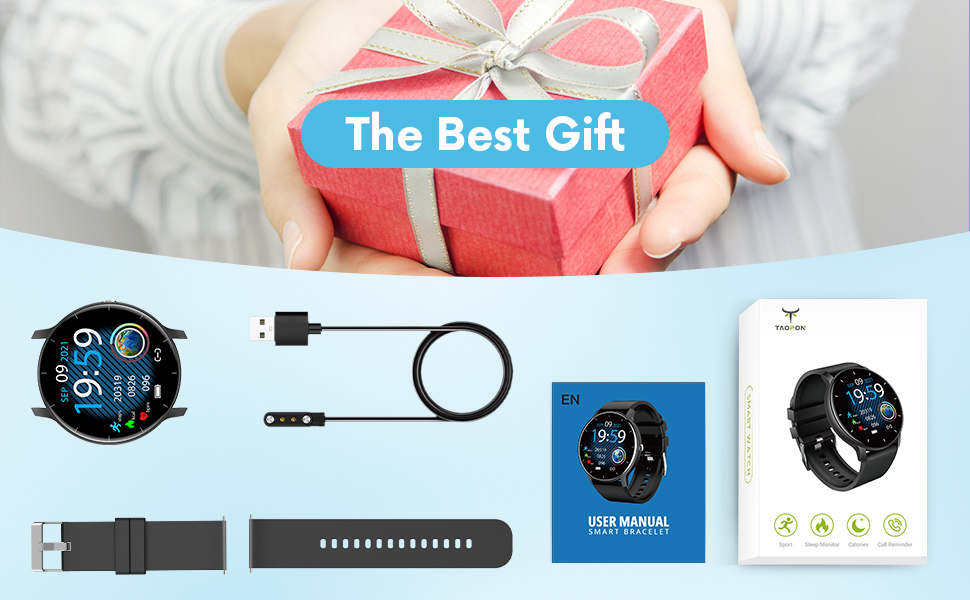
படம் 2: தொகுப்பு உள்ளடக்கம்
அமைவு வழிகாட்டி
1. ஸ்மார்ட் வாட்சை சார்ஜ் செய்தல்
Before first use, fully charge your smartwatch. Connect the magnetic charging cable to the charging points on the back of the watch and plug the USB end into a power adapter (not included) or a computer's USB port. A full charge typically takes about 2 hours and provides up to 7 days of typical use or 30 days of standby time.

Figure 3: Charging the Smart Watch
2. ஆப் நிறுவல் மற்றும் இணைத்தல்
To unlock the full potential of your TAOPON Smart Watch, download and install the "Da Fit" app on your smartphone. The app is compatible with iOS 9.0 & Android 5.0 or higher.
- Scan the QR code in the manual or search for "Da Fit" in your phone's app store (App Store for iOS, Google Play Store for Android).
- Install the "Da Fit" app.
- பயன்பாட்டைத் திறந்து, திரையில் உள்ள வழிமுறைகளைப் பின்பற்றி ஒரு கணக்கை உருவாக்கவும் அல்லது உள்நுழையவும்.
- உங்கள் ஸ்மார்ட்போனில் புளூடூத்தை இயக்கவும்.
- In the "Da Fit" app, navigate to the device section and search for your smartwatch. Select "smartwatch zl02" to pair.
- உங்கள் தொலைபேசியிலும் ஸ்மார்ட்வாட்ச்சிலும் இணைத்தல் கோரிக்கையை உறுதிப்படுத்தவும்.
இணைக்கப்பட்டதும், வாட்ச் உங்கள் தொலைபேசியுடன் நேரத்தையும் தரவையும் ஒத்திசைக்கும்.
இயக்க வழிமுறைகள்
அடிப்படை வழிசெலுத்தல்
- தொடுதிரை: Swipe left/right or up/down to navigate through menus and features.
- பக்க பட்டன்: Press to quickly return to the home screen or turn the screen on/off.
- எழுப்புவதற்கு: The display will automatically light up when you raise your wrist.
Customizing Watch Dials
Your smartwatch offers a variety of pre-installed dials. You can also personalize your watch face by setting your favorite photo as the dial through the "Da Fit" app.

Figure 4: Watch Dial Customization
உடற்தகுதி கண்காணிப்பு
The watch supports 8 sports modes to track your activities:
- நடைபயிற்சி
- ஓடுகிறது
- சைக்கிள் ஓட்டுதல்
- ஸ்கிப்பிங் கயிறு
- பூப்பந்து
- கூடைப்பந்து
- கால்பந்து
- Swimming (IP67 waterproof, suitable for hand washing or rainy days, not for prolonged submersion or hot water)
During exercise, the watch tracks calorie consumption, steps, distance, minutes of activity, and heart rate. Connect to your mobile phone's GPS via the app to record your movement track.

Figure 5: Multiple Sports Modes Tracking
சுகாதார கண்காணிப்பு
The smartwatch accurately tracks real-time health data:
- இதய துடிப்பு கண்காணிப்பு: Records your heart rate throughout the day. You can also measure it in real-time by tapping the heart rate icon on the watch.
- இரத்த ஆக்ஸிஜன் கண்காணிப்பு: Provides SpO2 readings.
- இரத்த அழுத்தம் கண்காணிப்பு: Measures blood pressure levels.
- தூக்க கண்காணிப்பு: Tracks deep sleep, light sleep, and overall sleep duration, showing trends in sleep quality over a week.

Figure 6: Comprehensive Health Monitoring
Smart Features and Tools
The TAOPON Smart Watch offers various convenient tools:
- செய்தி அறிவிப்புகள்: Receive call reminders, SMS, Facebook, Twitter, LinkedIn, WhatsApp, Line, Instagram, etc., by connecting to the "Da Fit" APP. You can reject calls directly from the watch.
- தொலை கேமரா: உங்கள் கைக்கடிகாரத்திலிருந்து உங்கள் தொலைபேசியின் கேமராவை தொலைவிலிருந்து கட்டுப்படுத்தவும்.
- இசை கட்டுப்பாடு: Play, pause, skip tracks on your phone's music player.
- வானிலை முன்னறிவிப்பு: நிகழ்நேர வானிலை அறிவிப்புகளைப் பெறுங்கள்.
- பிடோமீட்டர்: உங்கள் தினசரி அடிகளை எண்ணுகிறது.
- உட்கார்ந்த நினைவூட்டல்: செயலற்ற காலத்திற்குப் பிறகு நகர உங்களை எச்சரிக்கிறது.
- டைமர்: Built-in timer function.
- Deep Breathing Guide: Assists with guided breathing exercises.
- அலாரங்கள்: Set up to 3 alarms directly on the watch.
- சரிசெய்யக்கூடிய பிரகாசம்: உகந்த திரை பிரகாசத்தைத் தனிப்பயனாக்குங்கள் viewing.
- திரையரங்கு முறை: Reduces screen brightness and disables vibrations for undisturbed viewing.

Figure 7: Remote Camera

Figure 8: Music Control
பராமரிப்பு
- சுத்தம்: Regularly wipe your smartwatch and band with a soft, damp துணி. கடுமையான இரசாயனங்கள் அல்லது சிராய்ப்பு பொருட்களைத் தவிர்க்கவும்.
- நீர் எதிர்ப்பு: The watch is IP67 waterproof, meaning it is effective against splashes and can be worn during hand washing or rainy days. It is not recommended for showering with hot water, diving, or prolonged submersion.
- பேட்டரி பராமரிப்பு: To prolong battery life, avoid extreme temperatures and do not allow the battery to fully drain frequently. Charge the watch regularly.
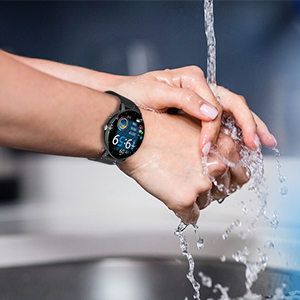
படம் 9: IP67 நீர் எதிர்ப்பு
சரிசெய்தல்
- கடிகாரம் இயக்கப்படவில்லை: கடிகாரம் முழுமையாக சார்ஜ் செய்யப்பட்டுள்ளதா என்பதை உறுதிப்படுத்திக் கொள்ளுங்கள். அதை சார்ஜிங் கேபிள் மற்றும் ஒரு மின் மூலத்துடன் குறைந்தது 30 நிமிடங்களுக்கு இணைக்கவும்.
- தொலைபேசியுடன் இணைக்க முடியவில்லை:
- உங்கள் தொலைபேசியில் புளூடூத் இயக்கப்பட்டிருப்பதையும், கடிகாரம் வரம்பிற்குள் இருப்பதையும் உறுதிசெய்யவும்.
- உங்கள் தொலைபேசி மற்றும் ஸ்மார்ட்வாட்சை மறுதொடக்கம் செய்யுங்கள்.
- Check if the "Da Fit" app is updated to the latest version.
- If previously paired, try unpairing the device from your phone's Bluetooth settings and re-pairing through the app.
- தவறான சுகாதாரத் தரவு:
- உங்கள் மணிக்கட்டில், மணிக்கட்டு எலும்பிலிருந்து ஒரு விரல் அகலத்தில் கடிகாரம் இறுக்கமாக அணிந்திருப்பதை உறுதிசெய்து கொள்ளுங்கள்.
- Keep the sensor clean and free from debris.
- Note that health monitoring features are for reference only and should not be used for medical diagnosis.
- அறிவிப்புகள் வரவில்லை:
- Check app permissions in your phone settings to ensure "Da Fit" has access to notifications.
- Verify that notification settings are enabled within the "Da Fit" app for specific applications.
- உங்கள் தொலைபேசியுடன் புளூடூத் வழியாக கடிகாரம் இணைக்கப்பட்டுள்ளதா என்பதை உறுதிப்படுத்திக் கொள்ளுங்கள்.
விவரக்குறிப்புகள்
| அம்சம் | விவரம் |
|---|---|
| மாதிரி எண் | smartwatch zl02 |
| திரை அளவு | 1.28 அங்குலங்கள் (தெரியும் திரை மூலைவிட்டம்: 2" / 4 செ.மீ) |
| தீர்மானம் | 240*240 பிக்சல் |
| பேட்டரி திறன் | 200mAh லித்தியம் பாலிமர் (சேர்க்கப்பட்டுள்ளது) |
| பேட்டரி ஆயுள் | 7 days (typical use), 30 days (standby) |
| நீர்ப்புகா மதிப்பீடு | IP67 |
| இணக்கத்தன்மை | iOS 9.0 & Android 5.0 or higher |
| இணைப்பு | புளூடூத் |
| பொருளின் எடை | 110 கிராம் (3.88 அவுன்ஸ்) |
| தயாரிப்பு பரிமாணங்கள் | 6.18 x 4.02 x 1.06 அங்குலம் |
| உற்பத்தியாளர் | TAOPON |
முக்கியமான பாதுகாப்பு தகவல்
- சாதனத்தை பிரிக்கவோ, சரிசெய்யவோ அல்லது மாற்றவோ முயற்சிக்காதீர்கள்.
- சாதனத்தை தீவிர வெப்பநிலை, நேரடி சூரிய ஒளி மற்றும் திறந்த தீப்பிழம்புகளிலிருந்து விலக்கி வைக்கவும்.
- வலுவான தாக்கங்கள் அல்லது சாதனத்தை கைவிடுவதைத் தவிர்க்கவும்.
- குழந்தைகளுக்கு எட்டாத இடத்தில் வைக்கவும்.
- உள்ளூர் விதிமுறைகளின்படி சாதனத்தையும் அதன் பேட்டரியையும் அப்புறப்படுத்துங்கள். வீட்டுக் கழிவுகளுடன் அப்புறப்படுத்த வேண்டாம்.
- Consult a medical professional before starting any new exercise regimen or if you have any health concerns. The health monitoring data is for reference only.
உத்தரவாதம் மற்றும் ஆதரவு
For warranty information, technical support, or customer service inquiries, please refer to the contact details provided on the product packaging or the official TAOPON webஉத்தரவாதக் கோரிக்கைகளுக்கு உங்கள் வாங்கியதற்கான ஆதாரத்தை வைத்திருங்கள்.
Ask a question about this manual
Ask about setup, troubleshooting, compatibility, parts, safety, or missing instructions. Manuals+ will review the question and use this page’s manual context to help answer it.