
அறிமுகம்
Thank you for choosing the Mcdodo MC-7050 20W PD GoPower MagSafe 5000mAh Power Bank. This portable charger is designed to provide convenient and efficient power to your devices, featuring both wired USB-C Power Delivery and MagSafe-compatible wireless charging. Please read this manual carefully before use to ensure proper operation and to maximize the lifespan of your device.
பாதுகாப்பு தகவல்
- பவர் பேங்கை அதிக வெப்பநிலை, நேரடி சூரிய ஒளி அல்லது நெருப்புக்கு வெளிப்படுத்த வேண்டாம்.
- சாதனத்தை கீழே போடுதல், தாக்குதல் அல்லது பிரித்தல் ஆகியவற்றைத் தவிர்க்கவும்.
- தண்ணீர் மற்றும் பிற திரவங்களிலிருந்து விலகி இருங்கள்.
- பவர் பேங்க் சேதமடைந்தாலோ அல்லது வீங்கியிருந்தாலோ பயன்படுத்த வேண்டாம்.
- குழந்தைகளுக்கு எட்டாத இடத்தில் வைக்கவும்.
- சான்றளிக்கப்பட்ட சார்ஜிங் கேபிள்கள் மற்றும் அடாப்டர்களை மட்டுமே பயன்படுத்தவும்.
- உள்ளூர் விதிமுறைகளின்படி பவர் பேங்கை பொறுப்புடன் அப்புறப்படுத்துங்கள்.
தொகுப்பு உள்ளடக்கங்கள்
பின்வரும் பொருட்களுக்கு தொகுப்பைச் சரிபார்க்கவும்:
- Mcdodo MC-7050 20W PD GoPower MagSafe 5000mAh Power Bank
- USB-C முதல் USB-C சார்ஜிங் கேபிள்
- பயனர் கையேடு
தயாரிப்பு முடிந்துவிட்டதுview
Familiarize yourself with the components of your Mcdodo MC-7050 Power Bank:

Image: Mcdodo MC-7050 Power Bank shown with its integrated kickstand extended, displaying the MagSafe charging area on the front. This view highlights the compact design and the stand feature for convenient use.
- MagSafe Wireless Charging Area: Central circular area for magnetic wireless charging.
- பவர் பட்டன்: பவர் பேங்கை இயக்கி பேட்டரி அளவை சரிபார்க்கிறது.
- LED குறிகாட்டிகள்: மீதமுள்ள பேட்டரி திறனைக் காட்டவும்.
- யூ.எஸ்.பி-சி போர்ட்: Used for both charging the power bank and charging other devices.
- ஒருங்கிணைந்த கிக்ஸ்டாண்ட்: Allows the power bank to stand upright, useful for viewing content while charging wirelessly.

படம்: ஒரு கோணம் view of the Mcdodo MC-7050 Power Bank, clearly showing the USB-C input/output port on the side and the power button located near the top edge. The kickstand is also visible in this perspective.
அமைவு
பவர் பேங்கின் ஆரம்ப சார்ஜிங்
- Connect the provided USB-C cable to the USB-C port on the power bank.
- Connect the other end of the USB-C cable to a compatible USB power adapter (not included). For optimal charging speed, use a Power Delivery (PD) compatible adapter.
- The LED indicators will illuminate to show the charging status. All LEDs will be solid when fully charged.
- முதல் பயன்பாட்டிற்கு முன் பவர் பேங்கை முழுமையாக சார்ஜ் செய்ய பரிந்துரைக்கப்படுகிறது.
இயக்க வழிமுறைகள்
பேட்டரி அளவை சரிபார்க்கிறது
Press the power button once to check the remaining battery capacity. The LED indicators will light up to show the current charge level.
Wired Charging (USB-C Output)
- Connect your device's charging cable to the USB-C port on the power bank.
- கேபிளின் மறுமுனையை உங்கள் சாதனத்துடன் இணைக்கவும்.
- பவர் பேங்க் தானாகவே உங்கள் சாதனத்தை சார்ஜ் செய்யத் தொடங்கும். இல்லையென்றால், பவர் பட்டனை ஒரு முறை அழுத்தவும்.
வயர்லெஸ் சார்ஜிங் (MagSafe இணக்கமானது)
- Ensure your device is compatible with MagSafe or Qi wireless charging.
- Align your MagSafe-compatible device (e.g., iPhone 12 series or newer) with the circular MagSafe charging area on the power bank. The magnets will help align it correctly.
- பவர் பேங்க் தானாகவே வயர்லெஸ் சார்ஜிங்கைத் தொடங்கும். இல்லையென்றால், பவர் பட்டனை ஒரு முறை அழுத்தவும்.
- The integrated kickstand can be used to prop up your phone while wirelessly charging.
பராமரிப்பு
- சுத்தம்: பவர் பேங்கின் மேற்பரப்பை சுத்தம் செய்ய மென்மையான, உலர்ந்த துணியைப் பயன்படுத்தவும். கடுமையான இரசாயனங்கள் அல்லது சிராய்ப்புப் பொருட்களைப் பயன்படுத்த வேண்டாம்.
- சேமிப்பு: நேரடி சூரிய ஒளி மற்றும் அதிக வெப்பநிலையிலிருந்து விலகி, குளிர்ந்த, உலர்ந்த இடத்தில் பவர் பேங்கை சேமிக்கவும்.
- பேட்டரி ஆரோக்கியம்: To maintain battery health, fully charge and discharge the power bank at least once every three months if not in regular use.
சரிசெய்தல்
- பவர் பேங்க் சார்ஜ் ஆகவில்லை:
- சார்ஜிங் கேபிள் பவர் பேங்க் மற்றும் பவர் அடாப்டர் இரண்டிலும் பாதுகாப்பாக இணைக்கப்பட்டுள்ளதா என்பதை உறுதிப்படுத்தவும்.
- வேறு USB-C கேபிள் அல்லது பவர் அடாப்டரை முயற்சிக்கவும்.
- பவர் அடாப்டர் சரியாகச் செயல்படுகிறதா எனச் சரிபார்க்கவும்.
- பவர் பேங்கிலிருந்து சாதனம் சார்ஜ் ஆகவில்லை:
- பவர் பேங்கில் போதுமான சார்ஜ் இருப்பதை உறுதி செய்து கொள்ளவும்.
- Press the power button to activate charging.
- உங்கள் சாதனத்திற்கு வேறு சார்ஜிங் கேபிளை முயற்சிக்கவும்.
- Ensure your device is properly aligned for wireless charging.
- Remove any thick phone cases that might interfere with wireless charging.
- மெதுவாக சார்ஜ் செய்தல்:
- Ensure you are using a fast-charging compatible cable and adapter for both the power bank and your device.
- Some devices may limit charging speed when using wireless charging.
விவரக்குறிப்புகள்
| அம்சம் | விவரக்குறிப்பு |
|---|---|
| மாதிரி பெயர் | MC-7050 |
| பேட்டரி திறன் | 5000 mAh |
| இணைப்பான் வகை | USB வகை-C |
| முக்கிய அம்சங்கள் | Fast Charging, Wireless Charging (MagSafe compatible) |
| சக்தி வெளியீடு | 20W பவர் டெலிவரி (PD) |
| சக்தி ஆதாரம் | பேட்டரியால் இயங்கும் |
| துறைமுகங்களின் எண்ணிக்கை | 1 (USB-C for input/output, plus wireless charging) |
| இணக்கமான தொலைபேசி மாதிரிகள் | Compatible with all phones (wired), MagSafe compatible phones (wireless) |
| மறுபயன்பாடு | ரீசார்ஜ் செய்யக்கூடியது |
| தயாரிப்பு எடை | 0.18 கிலோ |
| தயாரிப்பு பரிமாணங்கள் (L x W x H) | 10.7 செமீ x 6.7 செமீ x 1.7 செ.மீ |
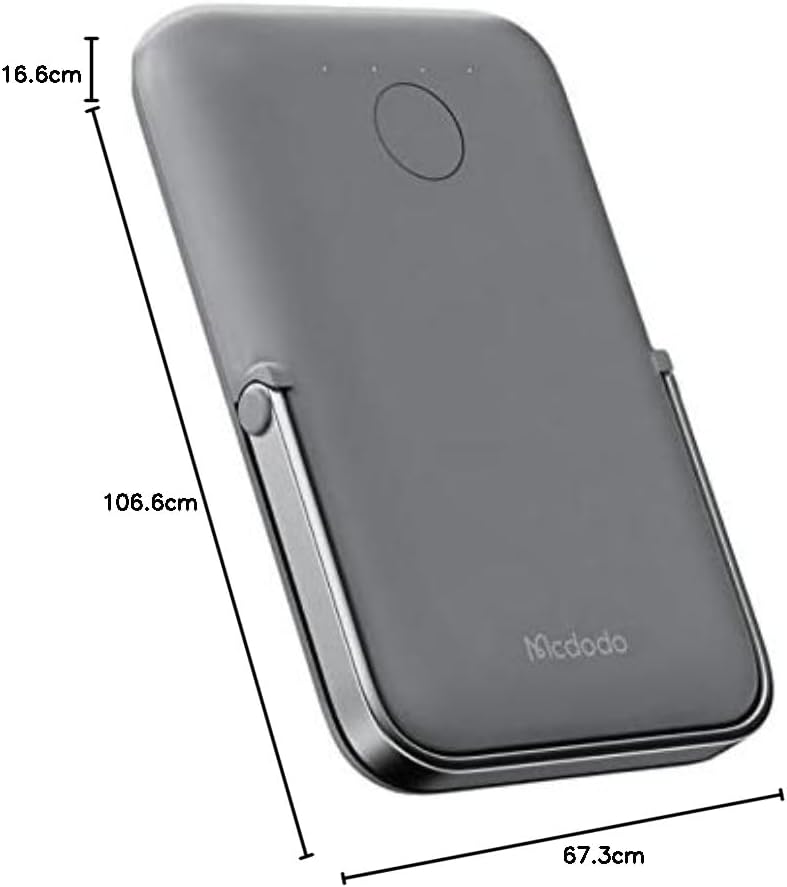
படம்: மேலிருந்து கீழ் view of the Mcdodo MC-7050 Power Bank illustrating its compact dimensions, approximately 10.7 cm in length, 6.7 cm in width, and 1.7 cm in thickness.
உத்தரவாதம் மற்றும் ஆதரவு
For warranty information and technical support, please refer to the warranty card included in your product packaging or visit the official Mcdodo webவாங்கியதற்கான சான்றாக உங்கள் கொள்முதல் ரசீதை வைத்திருங்கள்.
Mcdodo Official Webதளம்: www.mcdodo.com