
1. அறிமுகம்
Thank you for choosing the LEICKE DJ Roxxx Portable Bluetooth Speaker. This manual provides essential information for setting up, operating, and maintaining your speaker. Please read it carefully before use to ensure optimal performance and longevity of your device.
2. பாதுகாப்பு வழிமுறைகள்
- ஸ்பீக்கரை தீவிர வெப்பநிலை, நேரடி சூரிய ஒளி அல்லது அதிக ஈரப்பதத்திற்கு வெளிப்படுத்த வேண்டாம்.
- பேச்சாளரைக் கீழே தள்ளுவதையோ அல்லது வலுவான தாக்கங்களுக்கு உட்படுத்துவதையோ தவிர்க்கவும்.
- ஸ்பீக்கரை நீங்களே பிரித்தெடுக்கவோ அல்லது சரிசெய்யவோ முயற்சிக்காதீர்கள். இது உத்தரவாதத்தை ரத்து செய்யும்.
- Keep the speaker away from water and liquids. While splashproof, it is not waterproof and should not be submerged.
- வழங்கப்பட்ட சார்ஜிங் கேபிள் அல்லது அதற்கு சமமானதை மட்டும் பயன்படுத்தவும்.
3. தொகுப்பு உள்ளடக்கங்கள்
பின்வரும் பொருட்களுக்கு தொகுப்பைச் சரிபார்க்கவும்:
- LEICKE DJ Roxxx Portable Bluetooth Speaker
- USB சார்ஜிங் கேபிள்
- Auxiliary Audio Cable (3.5mm Stereo Plug)
- கராபினர்
- அறிவுறுத்தல் கையேடு
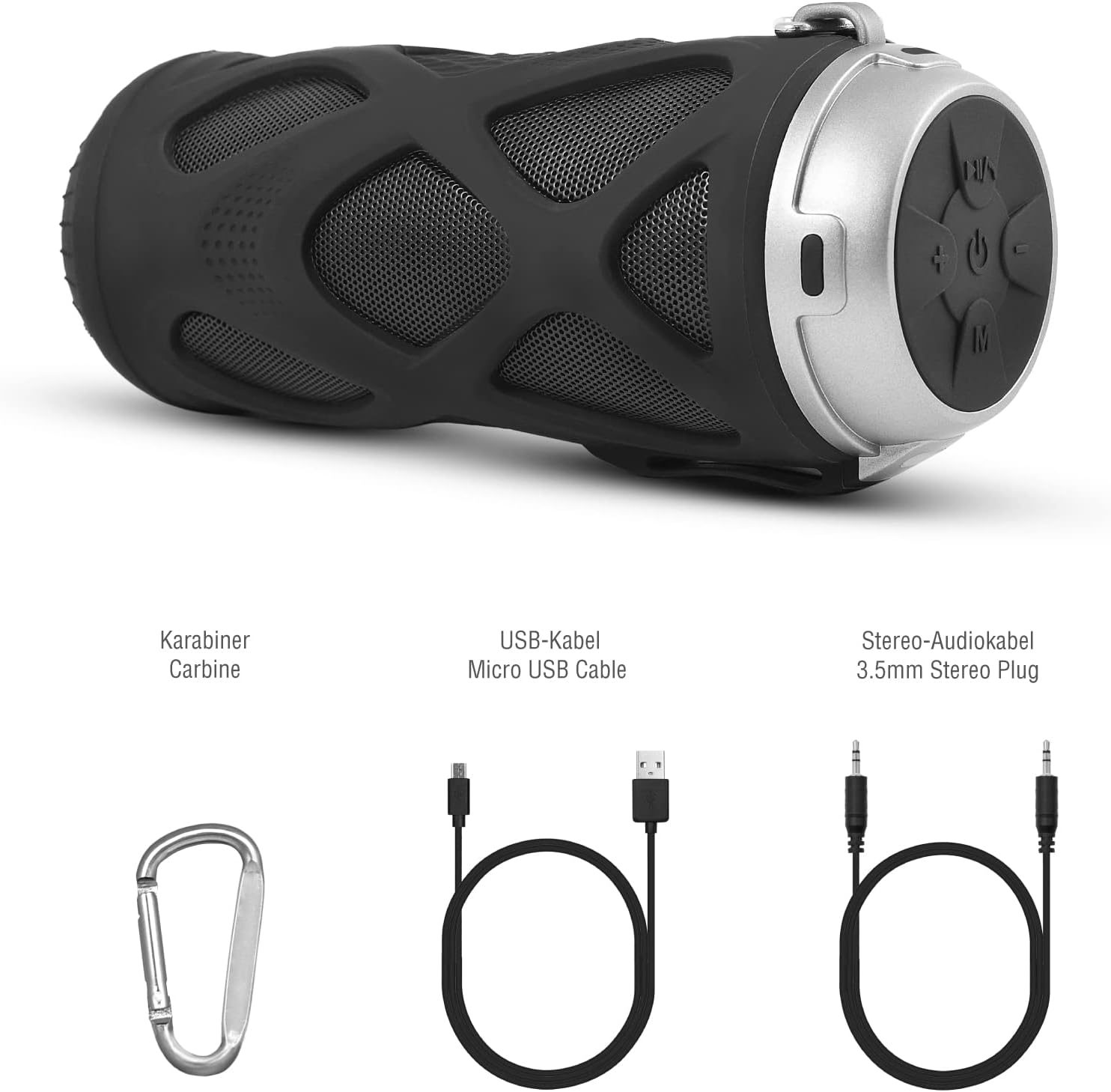
படம் 3.1: துணைக்கருவிகள் அடங்கும்
4. தயாரிப்பு முடிந்துவிட்டதுview
4.1 கண்ட்ரோல் பேனல்

படம் 4.1: கண்ட்ரோல் பேனல் தளவமைப்பு
- ஆன்/ஆஃப் பட்டன்: ஸ்பீக்கரை இயக்க அல்லது அணைக்கச் செய்கிறது.
- Play/Pause/Call/Voice Assistant Button: Controls music playback, answers/ends calls, and activates voice assistant (Siri/Google Assistant).
- ஒலியளவைக் குறை / முந்தைய டிராக் பொத்தான்: ஒலியளவைக் குறைக்கிறது அல்லது முந்தைய டிராக்கிற்குச் செல்கிறது.
- ஒலியளவை அதிகரிக்கும் / அடுத்த டிராக் பொத்தான்: ஒலியளவை அதிகரிக்கிறது அல்லது அடுத்த டிராக்கிற்குச் செல்கிறது.
- பயன்முறை பொத்தான்: Switches between Bluetooth, MicroSD/TF, Aux, and FM Radio modes.
4.2 துறைமுகங்கள் மற்றும் குறிகாட்டிகள்
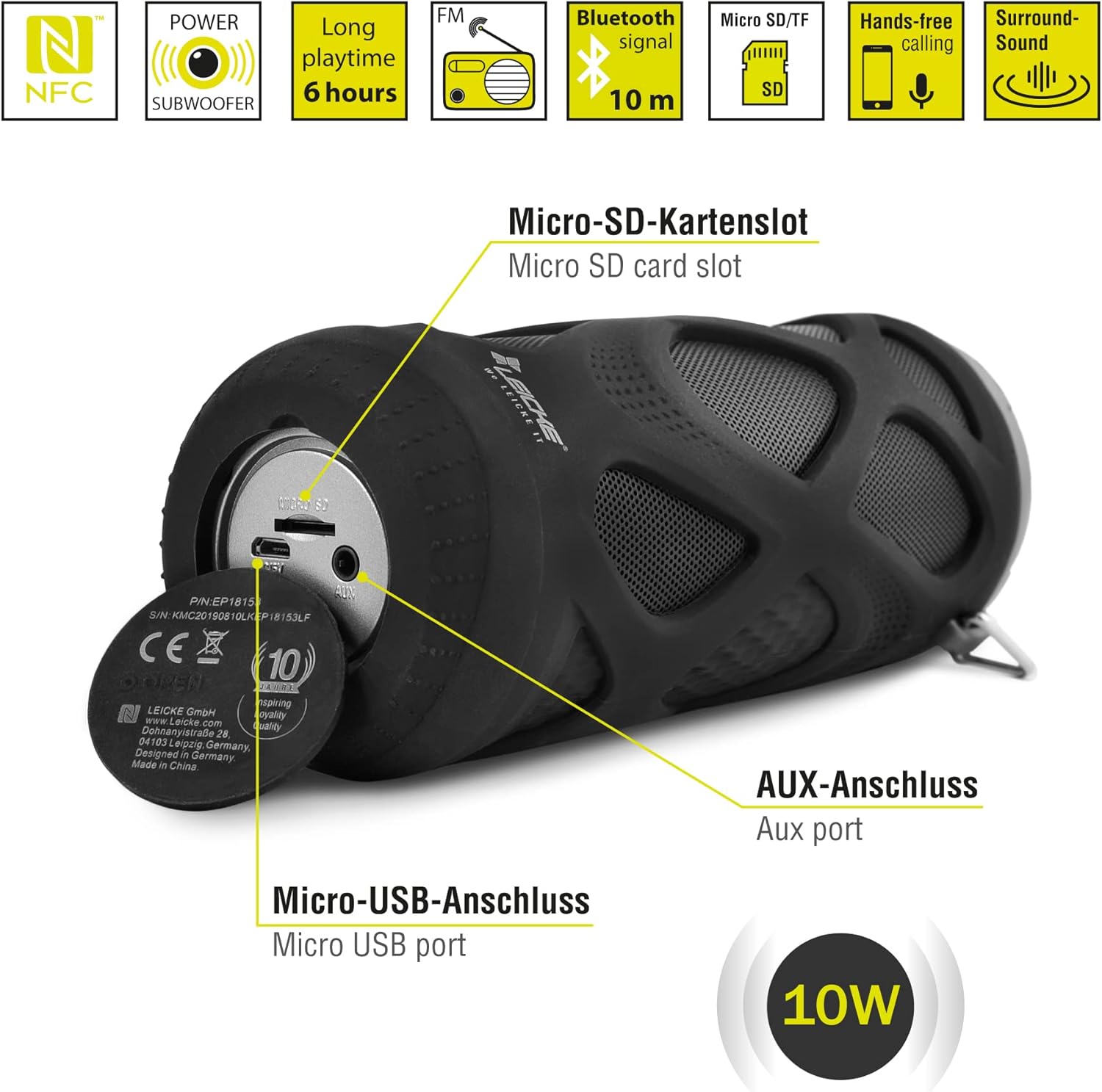
படம் 4.2: துறைமுகங்கள் முடிந்துவிட்டனview
- Micro SD/TF Card Slot: Insert a Micro SD or TF card for MP3 playback.
- ஆக்ஸ் போர்ட்: Connect external audio devices using the 3.5mm auxiliary cable.
- மைக்ரோ USB போர்ட்: ஸ்பீக்கரை சார்ஜ் செய்யப் பயன்படுகிறது.
- LED காட்டி: (Typically near the charging port or control panel) Indicates power status, charging status, and Bluetooth pairing status.
5. அமைப்பு மற்றும் செயல்பாடு
5.1 ஸ்பீக்கரை சார்ஜ் செய்தல்
- சார்ஜிங் கேபிளின் மைக்ரோ USB முனையை ஸ்பீக்கரின் மைக்ரோ USB போர்ட்டுடன் இணைக்கவும்.
- Connect the USB-A end to a USB power adapter (not included) or a computer's USB port.
- The LED indicator will typically show red while charging and turn off or change color when fully charged.
- A full charge takes approximately 2-3 hours and provides up to 6 hours of playtime.
5.2 பவர் ஆன்/ஆஃப்
- பவர் ஆன் செய்ய: அழுத்திப் பிடிக்கவும் ஆன்/ஆஃப் பொத்தான் for a few seconds until you hear an audible prompt and the LED indicator lights up.
- பவர் ஆஃப் செய்ய: அழுத்திப் பிடிக்கவும் ஆன்/ஆஃப் பொத்தான் again for a few seconds until you hear an audible prompt and the LED indicator turns off.
5.3 ப்ளூடூத் இணைத்தல்
- Ensure the speaker is powered on and in Bluetooth mode (the LED indicator will typically flash blue). If not, press the பயன்முறை பொத்தான் புளூடூத் பயன்முறைக்கு மாற.
- உங்கள் ஸ்மார்ட்போன், டேப்லெட் அல்லது பிற புளூடூத்-இயக்கப்பட்ட சாதனத்தில், புளூடூத் அமைப்புகளுக்குச் செல்லவும்.
- தேடுங்கள் available devices and select "LEICKE DJ Roxxx" from the list.
- Once paired, the LED indicator will stop flashing and remain solid blue, and you will hear a confirmation sound.
- சாதனம் வரம்பிற்குள் இருந்து, புளூடூத் இயக்கப்பட்டிருந்தால், ஸ்பீக்கர் இயக்கப்பட்டிருக்கும் போது கடைசியாக இணைக்கப்பட்ட சாதனத்துடன் தானாகவே மீண்டும் இணைக்கப்படும்.
5.4 MicroSD/TF Card Playback
- Insert a Micro SD or TF card (pre-loaded with MP3 audio files) into the Micro SD/TF card slot.
- The speaker will automatically switch to MicroSD/TF mode and begin playing music. If not, press the பயன்முறை பொத்தான் to select MicroSD/TF mode.
- பயன்படுத்தவும் விளையாடு/இடைநிறுத்தம், வால்யூம் அப்/அடுத்த ட்ராக், மற்றும் தொகுதி டவுன்/முந்தைய டிராக் பிளேபேக்கைக் கட்டுப்படுத்த பொத்தான்கள்.
5.5 AUX உள்ளீடு
- Connect one end of the 3.5mm auxiliary cable to the speaker's AUX port.
- Connect the other end to the headphone jack of your audio device (e.g., MP3 player, laptop).
- The speaker will automatically switch to AUX mode. If not, press the பயன்முறை பொத்தான் AUX பயன்முறையைத் தேர்ந்தெடுக்க.
- Volume can be controlled via the speaker or your connected device. Track control must be done from the connected device.
5.6 FM வானொலி செயல்பாடு
- அழுத்தவும் பயன்முறை பொத்தான் repeatedly until you enter FM Radio mode.
- FM பயன்முறையில், அழுத்தவும் ப்ளே/பாஸ் பட்டன் once to automatically scan and save available FM stations. The speaker will then play the first saved station.
- பயன்படுத்தவும் வால்யூம் அப்/அடுத்த ட்ராக் மற்றும் தொகுதி டவுன்/முந்தைய டிராக் சேமிக்கப்பட்ட நிலையங்களுக்கு இடையில் மாற பொத்தான்கள்.
5.7 ட்ரூ வயர்லெஸ் ஸ்டீரியோ (TWS) செயல்பாடு
The LEICKE DJ Roxxx speaker supports TWS pairing, allowing you to connect two DJ Roxxx speakers for a stereo sound experience (20W total output).

படம் 5.1: உண்மையான வயர்லெஸ் ஸ்டீரியோ (TWS) இணைத்தல்
- Ensure both DJ Roxxx speakers are powered on and in Bluetooth pairing mode (LED flashing blue).
- ஸ்பீக்கர்களில் ஒன்றில், அழுத்திப் பிடிக்கவும் பயன்முறை பொத்தான் for a few seconds until you hear a pairing tone. The speakers will attempt to connect to each other.
- Once successfully paired, you will hear a confirmation sound, and the LED indicator on one speaker will flash blue (master), while the other will be solid blue (slave).
- Now, connect your device to the master speaker via Bluetooth as described in section 5.3. Both speakers will play audio in stereo.
6. இயக்க வழிமுறைகள்
6.1 இசை பின்னணி
- விளையாடு/இடைநிறுத்தம்: அழுத்தவும் ப்ளே/பாஸ் பட்டன் ஒருமுறை.
- அடுத்த ட்ராக்: அழுத்திப் பிடிக்கவும் வால்யூம் அப் / அடுத்த ட்ராக் பட்டன்.
- முந்தைய ட்ராக்: அழுத்திப் பிடிக்கவும் வால்யூம் டவுன் / முந்தைய டிராக் பட்டன்.
- ஒலியை பெருக்கு: அழுத்தவும் வால்யூம் அப் / அடுத்த ட்ராக் பட்டன் சுருக்கமாக.
- ஒலியை குறை: அழுத்தவும் வால்யூம் டவுன் / முந்தைய டிராக் பட்டன் சுருக்கமாக.
6.2 ஹேண்ட்ஸ்-ஃப்ரீ அழைப்பு
- பதில் அழைப்பு: அழைப்பு வரும்போது, அழுத்தவும் ப்ளே/இடைநிறுத்தம்/அழைப்பு பொத்தான் ஒருமுறை.
- அழைப்பை முடிக்கவும்: அழைப்பின் போது, அழுத்தவும் ப்ளே/இடைநிறுத்தம்/அழைப்பு பொத்தான் ஒருமுறை.
- அழைப்பை நிராகரி: When a call comes in, press and hold the ப்ளே/இடைநிறுத்தம்/அழைப்பு பொத்தான் 2 வினாடிகளுக்கு.
- கடைசி எண்ணை மீண்டும் அனுப்பவும்: In standby mode, double-press the ப்ளே/இடைநிறுத்தம்/அழைப்பு பொத்தான்.
6.3 குரல் உதவியாளரை செயல்படுத்துதல்
- With one click, you can activate Siri (iOS) or Google Assistant (Android) on your connected smartphone. Press the Play/Pause/Call/Voice Assistant button ஒருமுறை செயல்படுத்த.
7. பராமரிப்பு
7.1 சுத்தம் செய்தல்
- Wipe the speaker with a soft, dry, or slightly damp துணி.
- சிராய்ப்பு கிளீனர்கள், ஆல்கஹால் அல்லது ரசாயன கரைப்பான்களைப் பயன்படுத்த வேண்டாம், ஏனெனில் இவை மேற்பரப்பை சேதப்படுத்தும்.
- சார்ஜ் செய்வதற்கு முன் அல்லது பிற சாதனங்களை இணைப்பதற்கு முன் அனைத்து போர்ட்களும் உலர்ந்திருப்பதை உறுதிசெய்யவும்.
7.2 சேமிப்பு
- நேரடி சூரிய ஒளி மற்றும் அதிக வெப்பநிலையிலிருந்து விலகி குளிர்ந்த, உலர்ந்த இடத்தில் ஸ்பீக்கரை சேமிக்கவும்.
- நீண்ட நேரம் சேமித்து வைத்தால், பேட்டரியின் ஆரோக்கியத்தைப் பராமரிக்க ஒவ்வொரு சில மாதங்களுக்கும் சுமார் 50% பேட்டரியை சார்ஜ் செய்யவும்.
7.3 நீர் எதிர்ப்பு
The LEICKE DJ Roxxx speaker is designed to be splashproof, offering protection against light rain or splashes. It is நீர்ப்புகா இல்லை and should not be submerged in water or exposed to heavy rain. Ensure the port cover is securely closed to maintain splash resistance.

படம் 7.1: Splashproof Design for Outdoor Use
8. சரிசெய்தல்
| பிரச்சனை | சாத்தியமான காரணம் | தீர்வு |
|---|---|---|
| ஸ்பீக்கர் இயக்கப்படவில்லை. | குறைந்த பேட்டரி. | ஸ்பீக்கரை குறைந்தது 30 நிமிடங்களுக்கு சார்ஜ் செய்யவும். |
| புளூடூத் வழியாக இணைக்க முடியாது. | ஸ்பீக்கர் இணைத்தல் பயன்முறையில் இல்லை; சாதனம் புளூடூத் முடக்கப்பட்டுள்ளது; சாதனத்திலிருந்து வெகு தொலைவில் உள்ளது. | Ensure speaker is in Bluetooth mode (flashing blue LED). Turn on Bluetooth on your device. Move speaker closer to device (within 10m). Forget previous pairings on your device and try again. |
| ஒலி இல்லை. | Volume too low; incorrect mode; device not playing. | Increase speaker and device volume. Ensure correct mode (Bluetooth, AUX, MicroSD). Check if audio is playing on your source device. |
| மோசமான எஃப்எம் வானொலி வரவேற்பு. | பலவீனமான சமிக்ஞை; குறுக்கீடு. | Move the speaker to a different location. Re-scan for stations. |
| மைக்ரோ எஸ்டி கார்டு அங்கீகரிக்கப்படவில்லை. | Card not inserted correctly; unsupported format; corrupted files. | அட்டையை மீண்டும் செருகவும். உறுதி செய்யவும். files are in MP3 format. Try a different MicroSD card. |
9. விவரக்குறிப்புகள்
| மாதிரி பெயர் | DJ Roxxx |
| மாதிரி எண் | B09P4Z5MN5 |
| பிராண்ட் | லீக் |
| இணைப்பு தொழில்நுட்பம் | புளூடூத் |
| வயர்லெஸ் கம்யூனிகேஷன் டெக்னாலஜி | புளூடூத் |
| பேச்சாளர் வகை | போர்ட்டபிள் புளூடூத் ஸ்பீக்கர் |
| அதிகபட்ச ஸ்பீக்கர் வெளியீட்டு சக்தி | 10 வாட்ஸ் |
| கட்டுப்பாட்டு முறை | தொட்டுணரக்கூடிய பொத்தான்கள் |
| சிறப்பு அம்சங்கள் | Integrated Microphone, Portable Wireless, MicroSD/TF Player, Aux Input, FM Radio, Hands-Free Calling, Voice Assistant Support, TWS Function, Splashproof |
| சக்தி ஆதாரம் | மின்சார கேபிள் (ரீசார்ஜபிள் பேட்டரி) |
| தயாரிப்பு பரிமாணங்கள் (L x W x H) | 7 x 7 x 18 செ.மீ |
| பொருளின் எடை | 400 கிராம் |
| பரிந்துரைக்கப்பட்ட பயன்பாடுகள் | ஸ்மார்ட்போன் அல்லது டேப்லெட்டுக்கு |
| இணக்கமான சாதனங்கள் | மடிக்கணினி, ஸ்மார்ட்போன் |
| நீர்ப்புகா | False (Splashproof only) |
10. உத்தரவாதம் மற்றும் ஆதரவு
LEICKE products come with a standard manufacturer's warranty. For detailed warranty information, please refer to the warranty card included in your package or visit the official LEICKE webதளம்.
If you encounter any issues or have questions regarding your LEICKE DJ Roxxx speaker, please contact LEICKE customer support:
- உற்பத்தியாளர்: லீக்
- விற்பனையாளர்: LEICKE - Leipzig (as per Amazon listing)
- ஆதரவு: Refer to the official LEICKE website or contact information provided with your purchase for the most up-to-date support channels.