
1. தயாரிப்பு முடிந்துவிட்டதுview
This replacement remote control is designed to function as a direct substitute for your original Yamaha remote. It comes pre-programmed with all the essential functions of the original RAV477, RAV501, RAV504, RX-A730, RX-V675, and RX-V773 remote controls, requiring no setup or pairing. Simply insert batteries, and it is ready for immediate use.
1.1 இணக்கமான மாதிரிகள்
This remote control is compatible with the following Yamaha models:
- YAMAHA RAV477
- YAMAHA RAV501
- YAMAHA RAV504
- YAMAHA RX-A730
- YAMAHA RX-V675
- YAMAHA RX-V773
2. தொடங்குதல்
2.1 பேட்டரி நிறுவல்
The remote control requires two AAA alkaline batteries (not included). Follow these steps to install them:
- ரிமோட் கண்ட்ரோலின் பின்புறத்தில் பேட்டரி பெட்டியைக் கண்டறியவும்.
- தாழ்ப்பாளை அழுத்தி, பேட்டரி கவரை கீழ்நோக்கி நகர்த்தி அதைத் திறக்கவும்.
- இரண்டு AAA பேட்டரிகளைச் செருகவும், நேர்மறை (+) மற்றும் எதிர்மறை (-) முனையங்கள் பெட்டியின் உள்ளே உள்ள அடையாளங்களுடன் சரியாக சீரமைக்கப்படுவதை உறுதிசெய்யவும்.
- அது பாதுகாப்பாக கிளிக் செய்யும் வரை பேட்டரி அட்டையை மீண்டும் இடத்திற்கு ஸ்லைடு செய்யவும்.
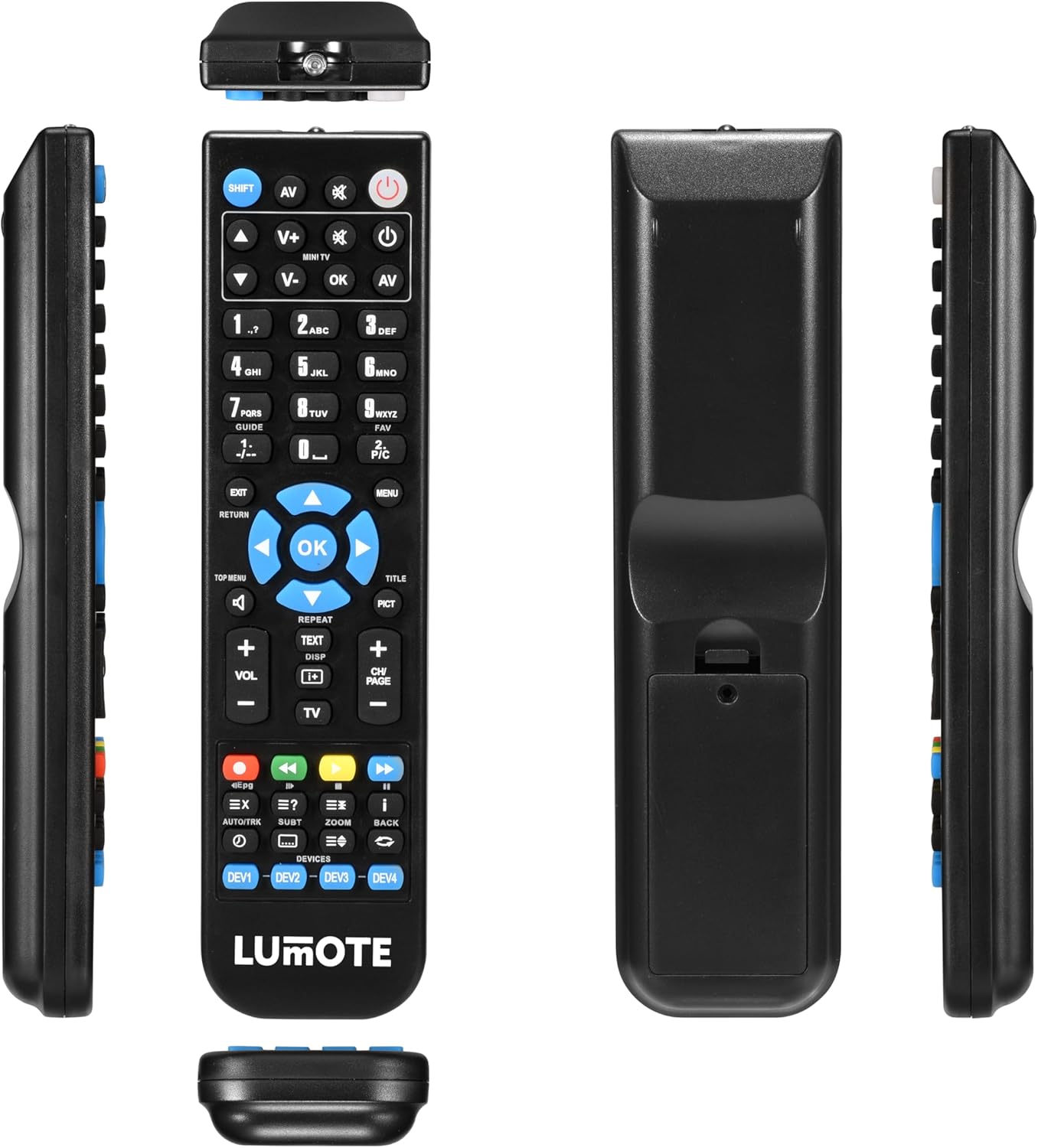
Image: The Generic Replacement Remote Control, displaying its front, back, and side profiles. The battery compartment is visible on the back.
3. இயக்க வழிமுறைகள்
3.1 அடிப்படை செயல்பாடு
Once batteries are installed, the remote control is ready for use. Point the remote directly at your Yamaha audio/video receiver or compatible device. Ensure there are no obstructions between the remote and the device's infrared sensor.
3.2 பொத்தான் செயல்பாடுகள்
The remote control features a comprehensive set of buttons designed to replicate the functionality of your original Yamaha remote. Below is a general guide to common button groups:
- ஆற்றல் பொத்தானை (சக்தி): சாதனத்தை ஆன் அல்லது ஆஃப் செய்கிறது.
- Input Select Buttons (e.g., AV, TV, DVD): ஆடியோ/வீடியோ உள்ளீட்டு மூலத்தைத் தேர்ந்தெடுக்கிறது.
- Volume Control (தொகுதி + / -): ஒலி அளவை சரிசெய்கிறது.
- முடக்கு பொத்தான் (முடக்கு): ஆடியோவை முடக்குகிறது அல்லது ஒலியை முடக்குகிறது.
- எண் அட்டை (0-9): For direct input of channel numbers or other numerical selections.
- வழிசெலுத்தல் பொத்தான்கள் (மேல், கீழ், இடது, வலது, சரி): மெனுக்களில் செல்லவும் தேர்வுகளை உறுதிப்படுத்தவும் பயன்படுகிறது.
- Menu/Setup Buttons (MENU, SETUP, RETURN, EXIT): Accesses device menus, navigates back, or exits current screens.
- Media Control Buttons (PLAY, PAUSE, STOP, REW, FF, SKIP): Controls playback of media (e.g., CD, DVD, USB).
- Function Buttons (e.g., SHIFT, TOP MENU, TITLE, PICT): Specific functions related to device operation or display modes.
4. பராமரிப்பு மற்றும் பராமரிப்பு
- சுத்தம்: Wipe the remote control with a soft, dry cloth. Do not use abrasive cleaners, solvents, or alcohol, as these can damage the surface.
- பேட்டரி மாற்று: ரிமோட்டின் பதில் மெதுவாகும்போது அல்லது வேலை செய்வதை நிறுத்தும்போது பேட்டரிகளை மாற்றவும். எப்போதும் இரண்டு பேட்டரிகளையும் ஒரே நேரத்தில் ஒரே மாதிரியான புதிய பேட்டரிகளால் மாற்றவும்.
- சேமிப்பு: If the remote control will not be used for an extended period, remove the batteries to prevent leakage and potential damage. Store in a cool, dry place away from direct sunlight.
- ஈரப்பதத்தைத் தவிர்க்கவும்: ரிமோட் கண்ட்ரோலை தண்ணீர் மற்றும் அதிக ஈரப்பதத்திலிருந்து விலக்கி வைக்கவும்.
5. சரிசெய்தல்
உங்கள் ரிமோட் கண்ட்ரோலில் சிக்கல்களை சந்தித்தால், பின்வரும் பொதுவான தீர்வுகளைப் பார்க்கவும்:
- ரிமோட் பதிலளிக்கவில்லை:
- பேட்டரிகள் சரியான துருவமுனைப்புடன் சரியாகச் செருகப்பட்டுள்ளதா எனச் சரிபார்க்கவும்.
- Replace the batteries with fresh AAA alkaline batteries.
- Ensure there are no obstructions between the remote control and the device's infrared sensor.
- Make sure you are pointing the remote directly at the device.
- குறுகிய இயக்க வரம்பு:
- பேட்டரிகளை மாற்றவும். பலவீனமான பேட்டரிகள் ரிமோட்டின் பயனுள்ள வரம்பைக் குறைக்கலாம்.
- Ensure the remote's infrared emitter and the device's sensor are clean and unobstructed.
- வேலை செய்யாத குறிப்பிட்ட செயல்பாடுகள்:
- Verify that the function you are trying to use is supported by your specific Yamaha model.
- Some advanced functions might require specific settings on your Yamaha device. Refer to your Yamaha device's original manual.
6. தொழில்நுட்ப விவரக்குறிப்புகள்
| பிராண்ட் | பொதுவான |
| இணைப்பு தொழில்நுட்பம் | அகச்சிவப்பு |
| கட்டுப்படுத்தி வகை | ரிமோட் கண்ட்ரோல் |
| அதிகபட்ச வரம்பு | 10 மீட்டர் |
| பேட்டரி விளக்கம் | Alkaline (AAA) |
| பொருட்களின் எண்ணிக்கை | 1 |
| UPC | 037203302044 |
7. உத்தரவாதத் தகவல்
இந்த தயாரிப்பு ஒரு உடன் வருகிறது 12 மாத உத்தரவாதம் from the date of purchase. This warranty covers manufacturing defects under normal use. It does not cover damage caused by misuse, accidents, unauthorized modifications, or battery leakage. Please retain your proof of purchase for warranty claims.
8. வாடிக்கையாளர் ஆதரவு
If you encounter any issues not covered in this manual or require further assistance, please contact your retailer or the point of purchase for support. Provide your product model and a detailed description of the issue to facilitate a quicker resolution.