
அறிமுகம்
This manual provides essential information for the safe and effective use of your Vividia CT-6010 LCD/WiFi Flexible Two-Way Articulating Inspection Camera Borescope Videoscope. Please read these instructions carefully before operating the device and retain them for future reference.

Figure 1: Vividia CT-6010 Borescope main unit with flexible probe.
அமைவு
1. பிரித்தெடுத்தல் மற்றும் கூறு அடையாளம் காணல்
Carefully unpack all items from the packaging. Ensure all components are present and undamaged. The package typically includes:
- Vividia CT-6010 Main Unit with LCD Display
- Flexible Articulating Probe (6mm diameter, 1.0m length)
- பவர் அடாப்டர்/சார்ஜர்
- USB கேபிள்
- கேரிங் கேஸ்
- தோள்பட்டை

Figure 2: Contents of the Vividia CT-6010 package.
2. சாதனத்தை சார்ஜ் செய்தல்
Before first use, fully charge the device. Connect the power adapter to the டிசி இன் port on the main unit and plug it into a power outlet. The charging indicator will show the charging status.
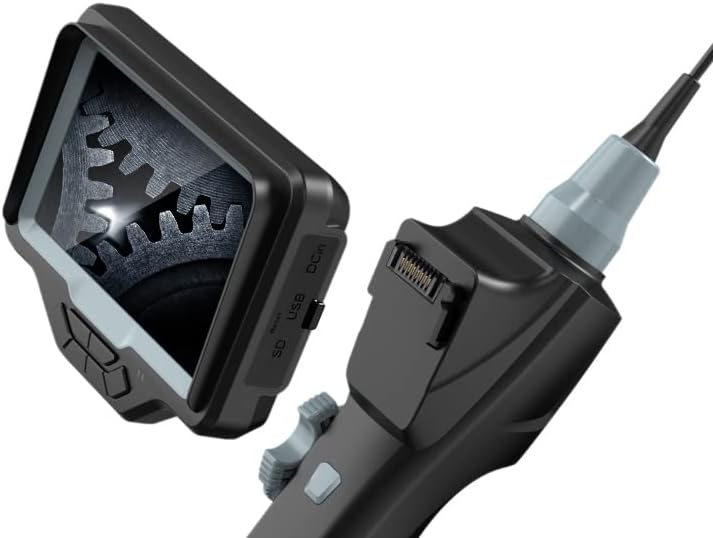
Figure 3: DC In port for charging, along with SD and USB ports.
3. SD கார்டைச் செருகுதல்
To save photos and videos, insert a compatible Micro SD card (not included) into the SD card slot on the side of the main unit. Ensure the card is inserted correctly until it clicks into place.
4. ஆன் / ஆஃப் செய்தல்
அழுத்திப் பிடிக்கவும் சக்தி button located on the control panel to turn the device on or off. The LCD screen will illuminate upon startup.
5. WiFi Connection (Optional)
The CT-6010 features built-in WiFi for connecting to iPhone, iPad, or Android devices. Follow these steps:
- Turn on the CT-6010 device.
- உங்கள் மொபைல் சாதனத்தில் வைஃபையை இயக்கவும்.
- தேடுங்கள் the CT-6010's WiFi network (usually named 'Vividia_XXXX').
- Connect to the network using the provided password (refer to the device screen or a sticker on the unit).
- Open the dedicated Vividia app on your mobile device to view the live feed and control functions.

படம் 4: எ.காample of WiFi connection to a mobile device.
இயக்க வழிமுறைகள்
1. அடிப்படைக் கட்டுப்பாடுகள்
The main unit features several buttons for operation:
- பவர் பட்டன்: சாதனத்தை ஆன்/ஆஃப் செய்கிறது.
- சரி பொத்தான்: Confirms selections in the menu or captures media.
- மெனு பட்டன்: சாதன அமைப்புகளை அணுகும்.
- லைட் பட்டன் (*): Adjusts the brightness of the LED lights on the probe tip.
- Photo/Video Capture Button: A dedicated button on the handle for quick photo or video recording.

Figure 5: Location of the Photo/Video Capture button.
2. ஆய்வு மூட்டுவலி
The CT-6010 features a two-way articulating probe. Use the articulation knob on the handle to precisely control the bending direction of the probe tip. The probe can bend more than 180 degrees in two directions, allowing for comprehensive inspection of hard-to-reach areas.
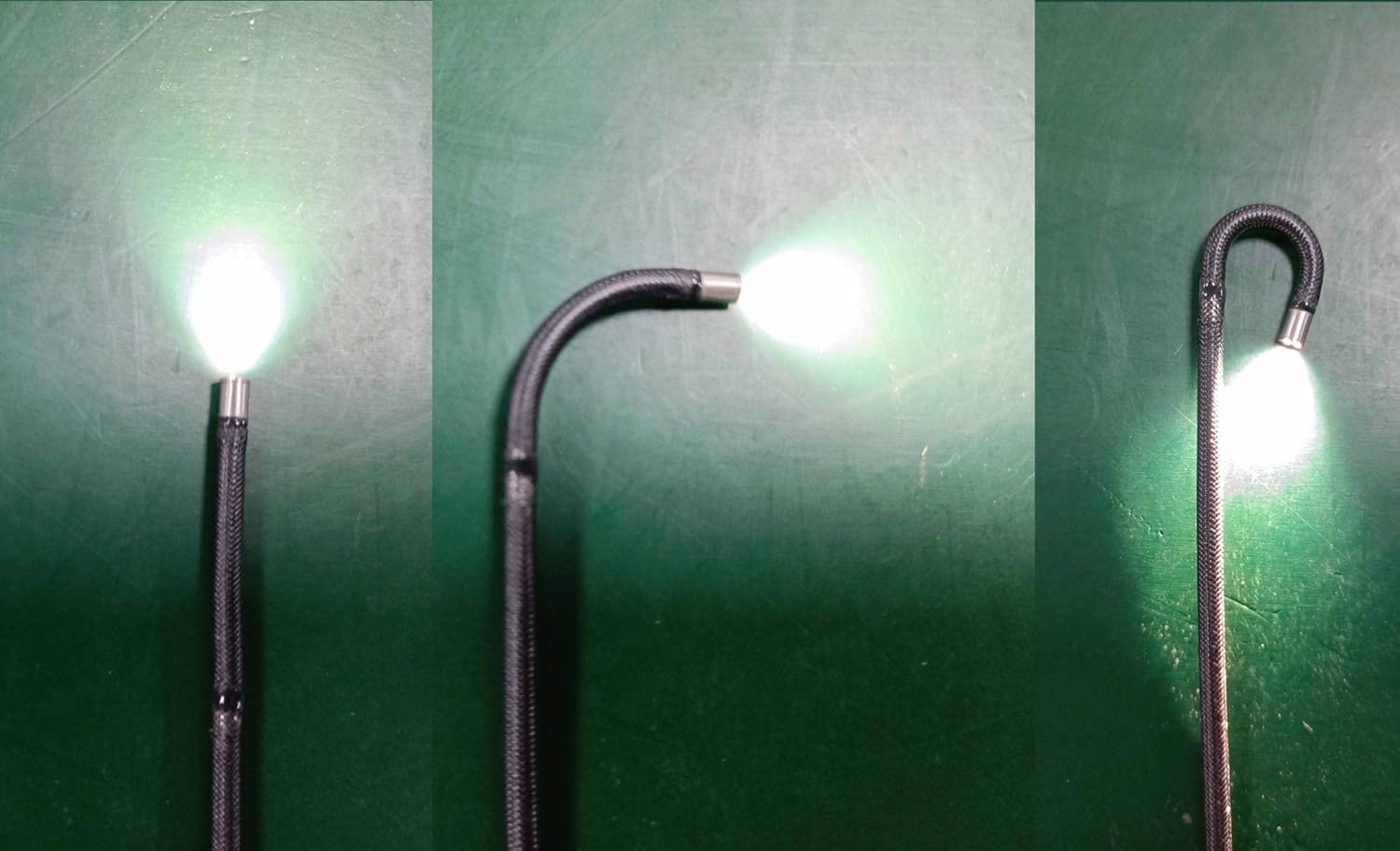
படம் 6: எ.காamples of probe articulation.

Figure 7: Close-up of the articulating probe tip.
3. Adjusting Illumination
அழுத்தவும் * (Light) button to cycle through different brightness levels for the LED lights at the probe tip. Adjust the illumination to achieve optimal visibility in various inspection environments.
4. புகைப்படங்கள் மற்றும் வீடியோக்களைப் பிடித்தல்
போது viewநேரடி ஊட்டத்தைப் பதிவிறக்க, புகைப்படம்/வீடியோ பிடிப்பு பொத்தான் on the handle to take a still image. To record a video, press and hold the button briefly to start recording, and press it again to stop. Captured media is saved to the inserted SD card.
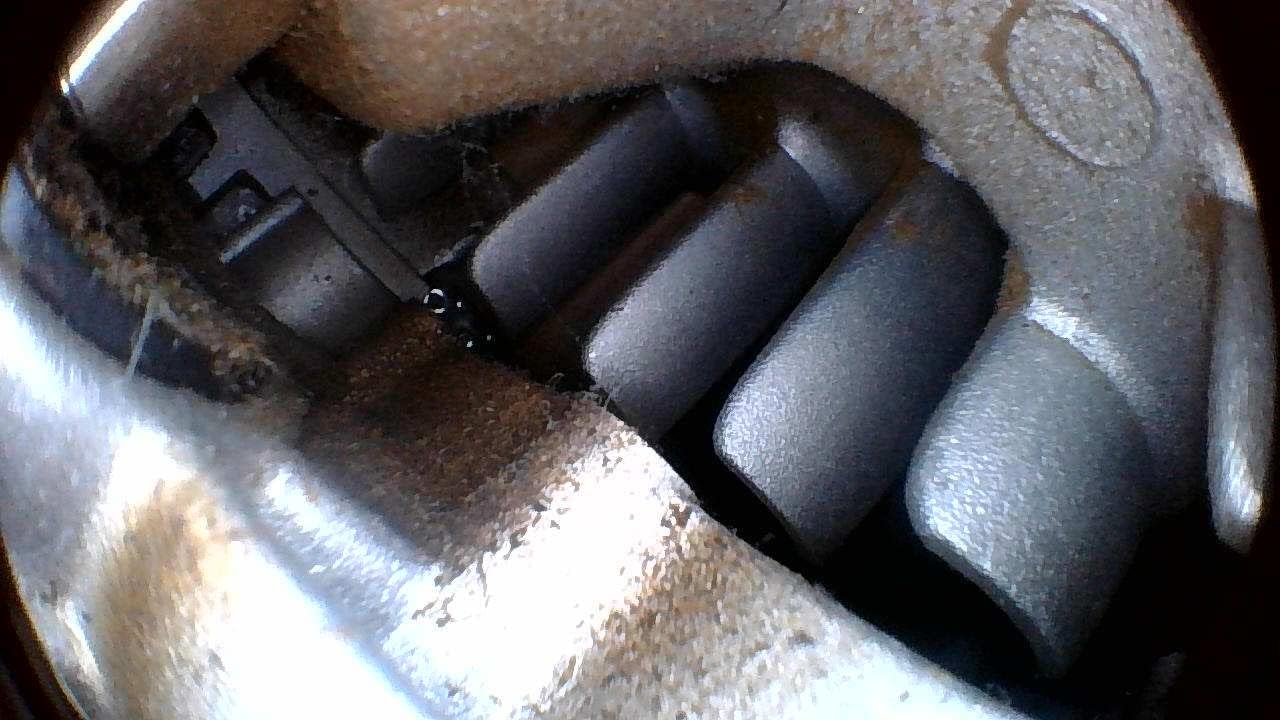
படம் 8: எ.காample of an inspection view.
5. மெனு வழிசெலுத்தல் மற்றும் அமைப்புகள்
அழுத்தவும் மெனு button to access device settings. Use the directional buttons (often integrated with OK/Light buttons) to navigate through options such as resolution, date/time, language, and playback. Press OK தேர்வுகளை உறுதிப்படுத்த மற்றும் மெனு மீண்டும் வெளியேற.
பராமரிப்பு
1. சுத்தம் செய்தல்
- ஆய்வு: ஒவ்வொரு பயன்பாட்டிற்கும் பிறகு, புரோப் மற்றும் கேமரா லென்ஸை மென்மையான, டி-துண்டு கொண்டு மெதுவாக துடைக்கவும்.amp cloth. For stubborn dirt, use a mild cleaning solution. Ensure no liquid enters the main unit.
- முக்கிய அலகு: Wipe the main unit with a dry, soft cloth. Avoid using abrasive cleaners or solvents.
2. பேட்டரி பராமரிப்பு
பேட்டரி ஆயுளை நீட்டிக்க:
- Charge the device fully before long periods of storage.
- மிகவும் சூடான அல்லது குளிர்ந்த சூழலில் சாதனத்தை சேமிப்பதைத் தவிர்க்கவும்.
- If not used for an extended period, charge the battery every 3-6 months.
3. சேமிப்பு
Store the CT-6010 in its carrying case in a cool, dry place, away from direct sunlight and extreme temperatures. Ensure the probe is coiled loosely and not sharply bent to prevent damage.
4. நீர் எதிர்ப்பு
The flexible probe is rated IP67 waterproof, meaning it can withstand immersion in water up to 1 meter for 30 minutes. The main unit is NOT waterproof. Do not immerse the main unit in water or expose it to heavy rain.
சரிசெய்தல்
| பிரச்சனை | சாத்தியமான காரணம் | தீர்வு |
|---|---|---|
| சாதனம் இயங்கவில்லை. | பேட்டரி குறைவாக உள்ளது; பவர் பட்டனை சரியாக அழுத்தவில்லை. | Charge the device fully; Press and hold the Power button for a few seconds. |
| திரையில் படம் இல்லை. | Probe not connected properly; Camera lens obstructed/dirty. | Ensure the probe is securely connected; Clean the camera lens. |
| WiFi connection fails. | Incorrect password; App not installed; Device out of range. | Verify WiFi password; Install the correct Vividia app; Move closer to the device. |
| Probe articulation is stiff or stuck. | அடைப்பு; இயந்திரப் பிரச்சினை. | Do not force the articulation. Gently retract the probe and check for obstructions. If the issue persists, contact support. |
| மோசமான பட தரம். | Insufficient lighting; Dirty lens; Incorrect focus (if adjustable). | Adjust LED brightness; Clean the camera lens; Ensure proper distance from object. |
விவரக்குறிப்புகள்
| அம்சம் | விவரம் |
|---|---|
| ஆய்வு விட்டம் | 6 மிமீ (0.236 அங்குலம்) |
| ஆய்வு நீளம் | 1.0 மீட்டர் (3.3 அடி) |
| கேமரா தீர்மானம் | HD 1280x720 |
| கலைச்சொற்கள் | 2-way, max. bending angle >180 degrees |
| இணைப்பு | Built-in WiFi (for iPhone, iPad, Android) |
| நீர்ப்புகா மதிப்பீடு | IP67 (ஆய்வுக்கு மட்டும்) |
| காட்சி | ஒருங்கிணைந்த எல்சிடி |
| வீடியோ பிடிப்பு தீர்மானம் | 720p |
| கேமரா ஃப்ளாஷ் | உள்ளமைக்கப்பட்ட எல்.ஈ |
| உற்பத்தியாளர் | விவிடியா டெக்னாலஜிஸ் |
| முதல் தேதி கிடைக்கும் | ஜனவரி 12, 2022 |

Figure 9: Probe diameter measurement.

Figure 10: Probe length illustration.
உத்தரவாதம் மற்றும் ஆதரவு
உத்தரவாத தகவல்
The Vividia CT-6010 is covered by a manufacturer's warranty. Please refer to the warranty card included with your product or visit the official Vividia Technologies webவிரிவான உத்தரவாத விதிமுறைகள் மற்றும் நிபந்தனைகளுக்கான தளம்.
வாடிக்கையாளர் ஆதரவு
For technical assistance, troubleshooting beyond this manual, or warranty claims, please contact Vividia Technologies customer support. Contact information can typically be found on the manufacturer's webதளத்தில் அல்லது உங்கள் தயாரிப்பு ஆவணத்தில்.