
லாஜிடெக் 960-001441
லாஜிடெக் பிரியோ 300 முழு HD Webகேம் பயனர் கையேடு
மாடல்: 960-001441 | பிராண்ட்: லாஜிடெக்
1. அறிமுகம்
The Logitech Brio 300 is a Full HD webcam designed to enhance your video meeting experience. It features 1080p resolution for natural image quality, RightLight 2 auto light correction to adapt to various lighting conditions, and a noise-reducing microphone for clear audio. The integrated privacy shutter provides instant control over your camera's visibility. This webcam is certified for popular video conferencing platforms such as Zoom, Microsoft Teams, and Google Meet, ensuring seamless integration and hassle-free meetings.
2. பெட்டியில் என்ன இருக்கிறது
- Logitech Brio 300 Webcam (Off-White)
- Integrated USB-C Cable (5 ft / 1.5 m)
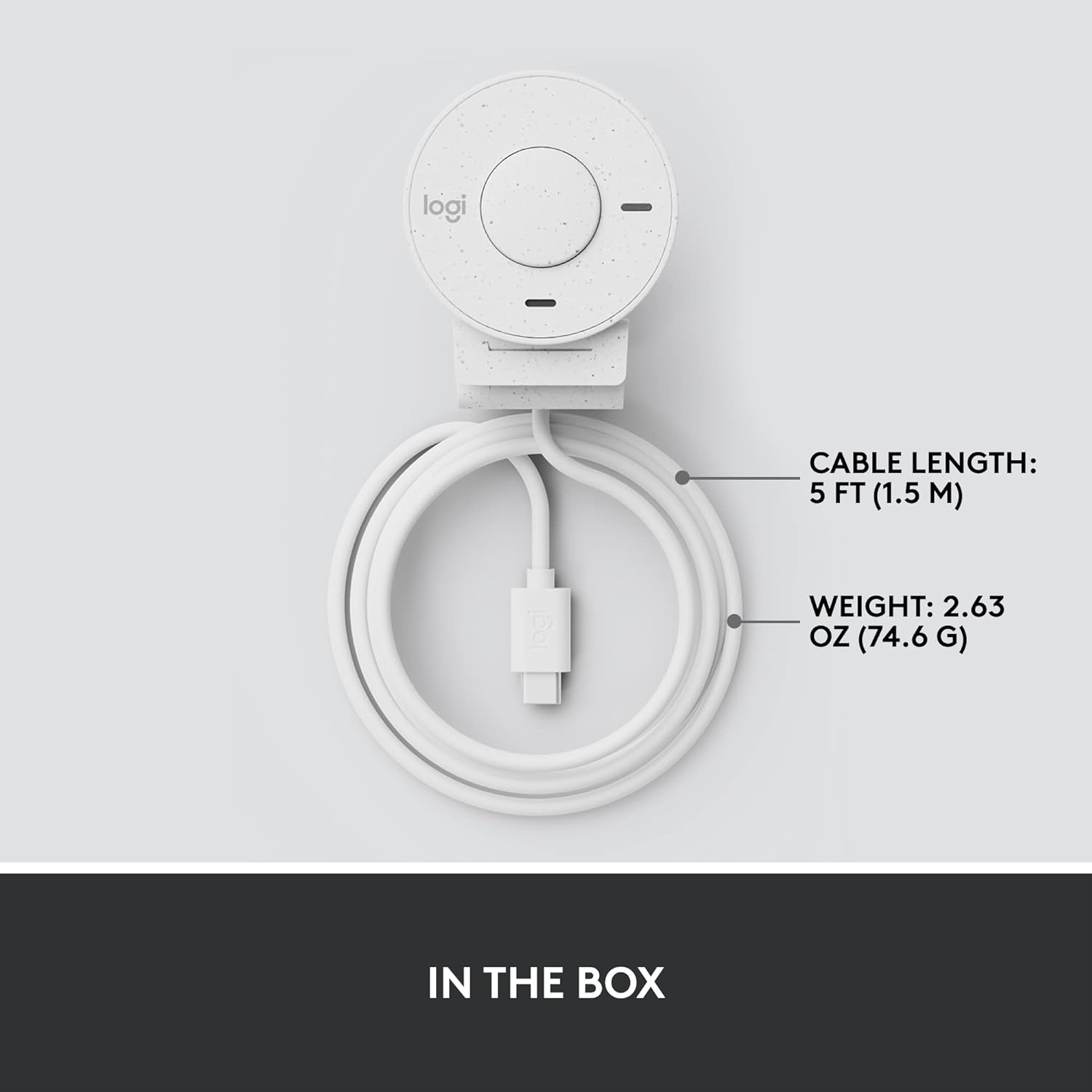
Figure 2.1: Logitech Brio 300 webcam with its integrated USB-C cable, showing the compact design and cable length.
3 அமைவு
3.1. வேலை வாய்ப்பு
Position the Logitech Brio 300 webcam on your monitor or laptop screen. The integrated mounting clip is designed to securely fit various screen thicknesses without scratching, thanks to its rubberized pads.

Figure 3.1: The Logitech Brio 300 webcam, showing its design and how it sits on a monitor.
3.2 இணைப்பு
Connect the integrated USB-C cable from the webcam directly to an available USB-C port on your computer. The webcam is plug-and-play, meaning it should be automatically recognized by your operating system (Windows, macOS, Chrome OS).
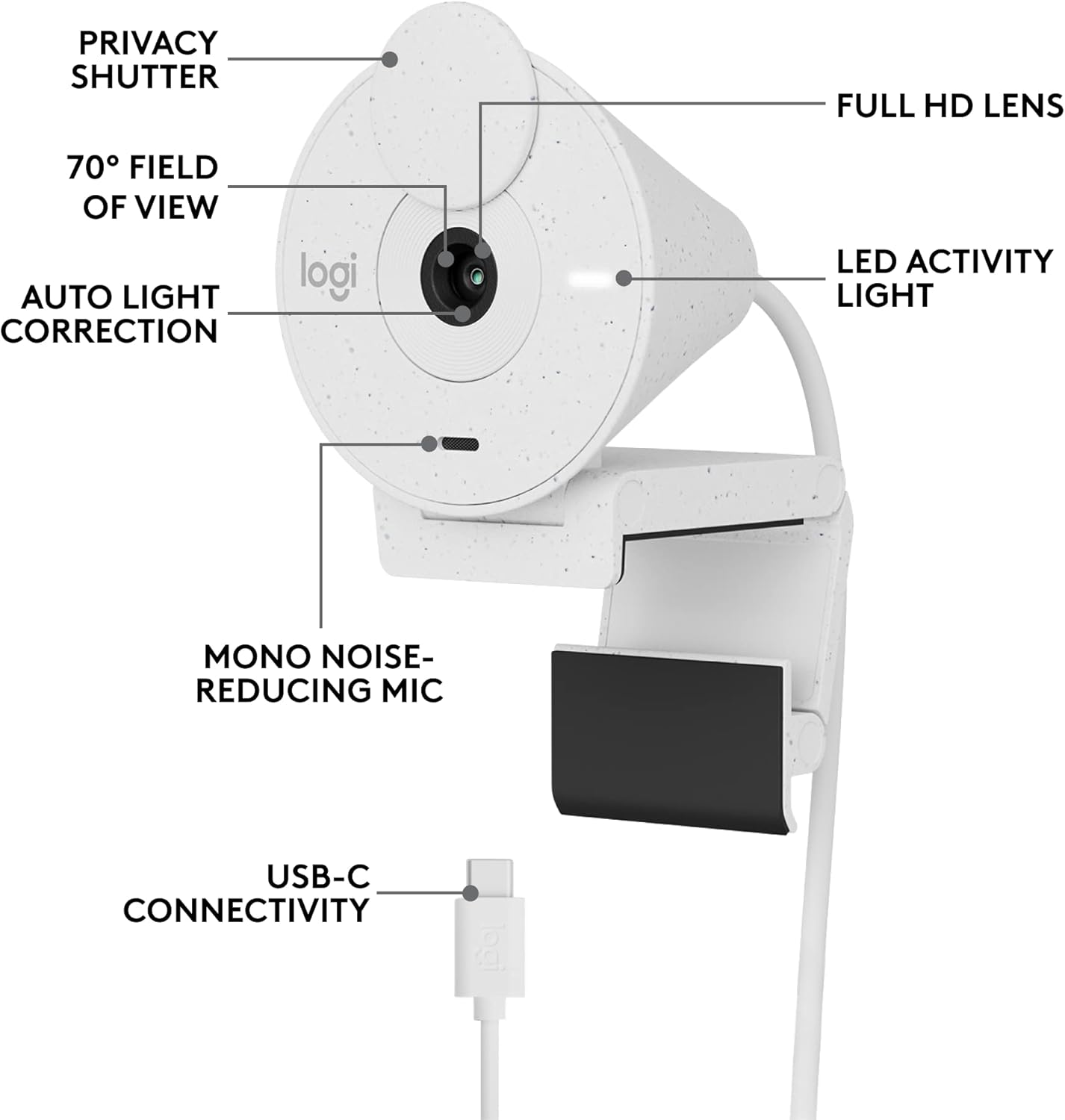
படம் 3.2: விரிவானது view of the Logitech Brio 300, highlighting its USB-C connectivity and other key components.
3.3. Software Installation (Optional but Recommended)
For advanced customization and optimal performance, download and install the free Logi Tune application from the official Logitech website. Logi Tune allows you to adjust color, image quality, and other settings for your webகேம்.
வருகை Logitech Logi Tune மென்பொருளை பதிவிறக்கம் செய்ய.
4. இயக்குதல் Webகேமரா
4.1. தனியுரிமை ஷட்டர்
The Brio 300 features an integrated privacy shutter. To cover the lens and ensure privacy, simply spin the circular cover over the lens. Spin it back to uncover the lens when you are ready to use the camera.
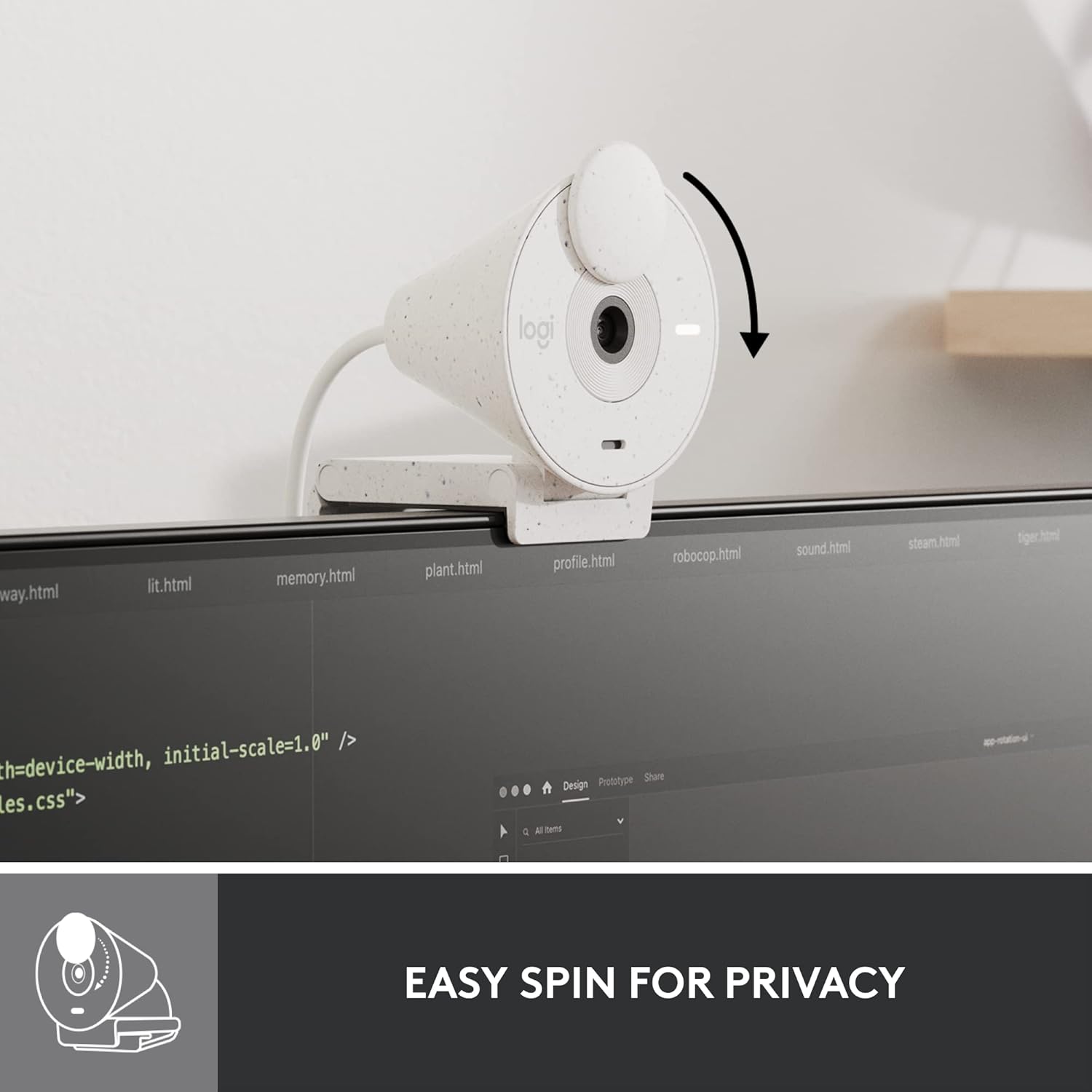
Figure 4.1: Demonstrating the easy-to-use spin privacy shutter on the Brio 300.
4.2. Auto Light Correction (RightLight 2)
தி webcam is equipped with RightLight 2 technology, which automatically adjusts to poor lighting conditions. This ensures you appear clear and well-lit, even in dim environments.

Figure 4.2: Visual representation of the Brio 300's auto light correction feature improving image quality in low light.
4.3. சத்தம் குறைப்பு மைக்ரோஃபோன்
The integrated mono microphone features noise reduction, suppressing background sounds to ensure your voice is heard clearly during calls.
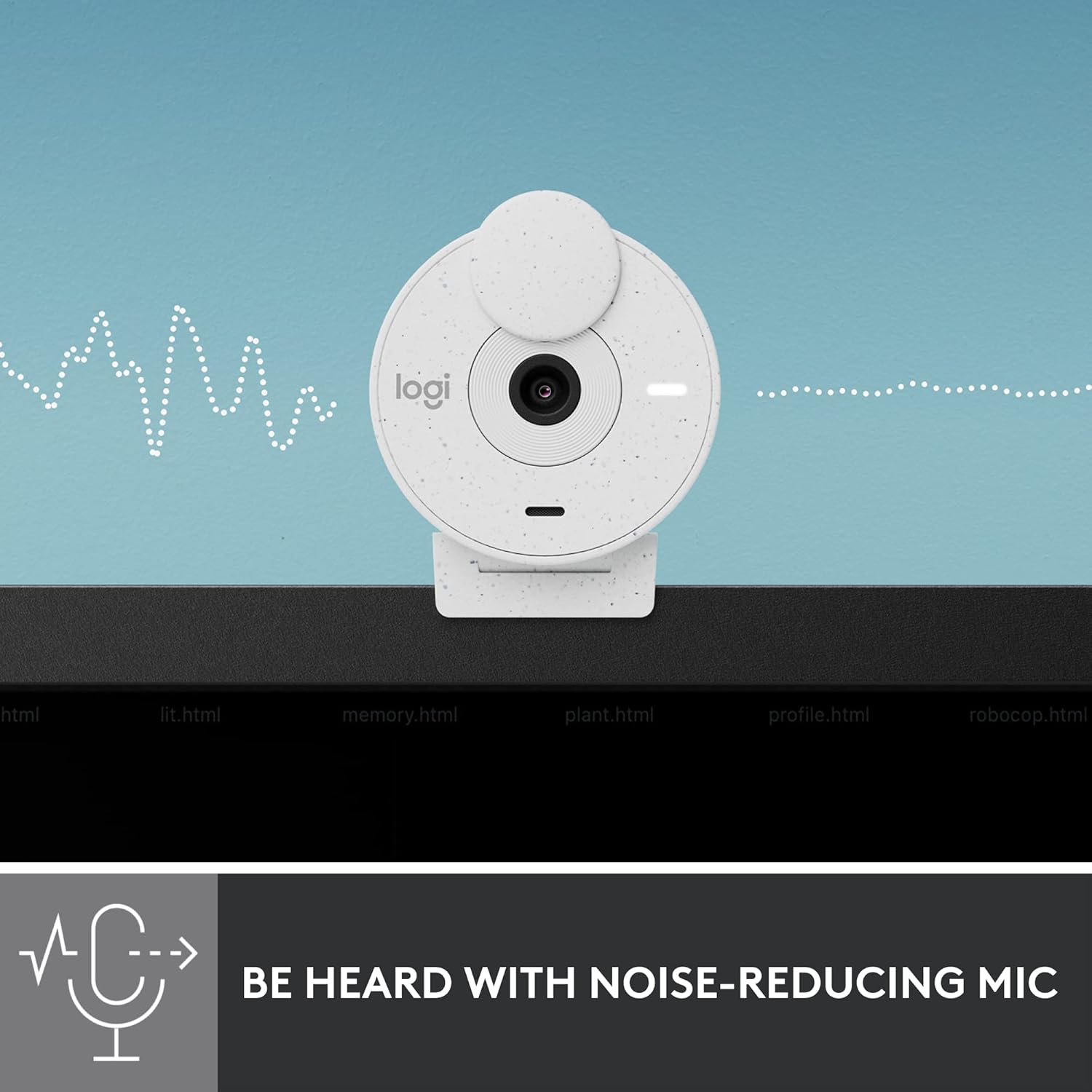
Figure 4.3: Illustration of the Brio 300's noise-reducing microphone capturing clear audio.
4.4. இணக்கத்தன்மை
The Brio 300 is certified for Zoom, Microsoft Teams, and Google Meet, ensuring broad compatibility with most video conferencing platforms.

Figure 4.4: The Brio 300 is certified for major meeting platforms, including Zoom, Microsoft Teams, and Google Meet.
5. பராமரிப்பு
To ensure the longevity and optimal performance of your Logitech Brio 300 webcam, follow these simple maintenance guidelines:
- லென்ஸை சுத்தம் செய்தல்: கேமரா லென்ஸை மென்மையான, பஞ்சு இல்லாத துணியால் மெதுவாகத் துடைக்கவும். பிடிவாதமான கறைகளுக்கு, சிறிது dampலென்ஸ் சுத்தம் செய்யும் கரைசலுடன் துணியை மூடவும். சிராய்ப்பு பொருட்கள் அல்லது கடுமையான இரசாயனங்கள் பயன்படுத்துவதைத் தவிர்க்கவும்.
- உடலை சுத்தம் செய்தல்: உடலை சுத்தம் செய்ய மென்மையான, உலர்ந்த துணியைப் பயன்படுத்தவும். webகேமரா. திரவ கிளீனர்களை நேரடியாக சாதனத்தில் பயன்படுத்த வேண்டாம்.
- சேமிப்பு: When not in use, especially during travel, ensure the privacy shutter is closed to protect the lens. Store the webதீவிர வெப்பநிலையிலிருந்து விலகி, சுத்தமான, உலர்ந்த இடத்தில் கேமை வைக்கவும்.
6. சரிசெய்தல்
If you encounter issues with your Logitech Brio 300, try the following troubleshooting steps:
- வீடியோ/ஆடியோ இல்லை:
- Ensure the USB-C cable is securely connected to both the webகேம் மற்றும் உங்கள் கணினி.
- Check if the privacy shutter is open.
- என்பதை சரிபார்க்கவும் webcam is selected as the primary video and audio device in your video conferencing application settings (e.g., Zoom, Microsoft Teams, Google Meet).
- இணைக்க முயற்சிக்கவும் webcam to a different USB-C port or a different computer to rule out port or system issues.
- மோசமான வீடியோ தரம்:
- Ensure adequate lighting in your environment. While RightLight 2 helps, sufficient ambient light is crucial for optimal image quality.
- பராமரிப்புப் பிரிவில் விவரிக்கப்பட்டுள்ளபடி கேமரா லென்ஸை சுத்தம் செய்யவும்.
- புதுப்பிக்கவும் webcam drivers and the Logi Tune software to the latest version.
- Check your internet connection speed, as a slow connection can affect video streaming quality.
- மோசமான ஆடியோ தரம்:
- மைக்ரோஃபோன் தடைபடாமல் பார்த்துக் கொள்ளுங்கள்.
- உங்கள் சூழலில் பின்னணி இரைச்சலைக் குறைக்கவும்.
- Adjust microphone levels in your computer's sound settings or Logi Tune.
7. விவரக்குறிப்புகள்
| அம்சம் | விவரம் |
|---|---|
| அதிகபட்ச திரை தெளிவுத்திறன் | FHD (1080p) |
| வீடியோ பிடிப்பு தீர்மானம் | 1080p |
| புகைப்பட சென்சார் தொழில்நுட்பம் | CMOS |
| இணைப்பு தொழில்நுட்பம் | USB-C |
| சிறப்பு அம்சம் | Low Light Correction (RightLight 2) |
| ஒலிவாங்கி | Mono, Noise Reduction |
| Privacy Feature | ஒருங்கிணைந்த தனியுரிமை ஷட்டர் |
| பொருளின் எடை | 3.99 அவுன்ஸ் |
| தயாரிப்பு பரிமாணங்கள் | 4.6 x 3.5 x 2.7 அங்குலம் |
| பொருள் | Minimum 48% Post-Consumer Recycled Plastic |
8. உத்தரவாதம் மற்றும் ஆதரவு
The Logitech Brio 300 webcam comes with a limited hardware warranty. For detailed warranty information, technical support, and frequently asked questions, please visit the official Logitech support website or refer to the full user manual available in PDF format.
அதிகாரப்பூர்வ பயனர் கையேடு (PDF): இங்கே பதிவிறக்கவும்
For software support and customization, download the Logi Tune application.
Ask a question about this manual
Ask about setup, troubleshooting, compatibility, parts, safety, or missing instructions. Manuals+ will review the question and use this page’s manual context to help answer it.