
NACON 10946680
NACON Asymmetric Wireless Controller for PlayStation 4
மாடல்: 10946680
அறிமுகம்
Thank you for choosing the NACON Asymmetric Wireless Controller for PlayStation 4. This controller is officially licensed for PlayStation 4 and designed to provide an immersive gaming experience with its unique asymmetric stick layout and wireless connectivity. This manual will guide you through the setup, operation, maintenance, and troubleshooting of your new controller.
பெட்டியில் என்ன இருக்கிறது
உங்கள் தொகுப்பின் உள்ளடக்கங்களைச் சரிபார்த்து, அனைத்துப் பொருட்களும் இருப்பதை உறுதிசெய்யவும்:
- NACON Asymmetric Wireless Controller
- USB ரிசீவர்
- USB சார்ஜிங் கேபிள்
- விரைவு தொடக்க வழிகாட்டி (இந்த டிஜிட்டல் கையேட்டில் சேர்க்கப்படவில்லை)
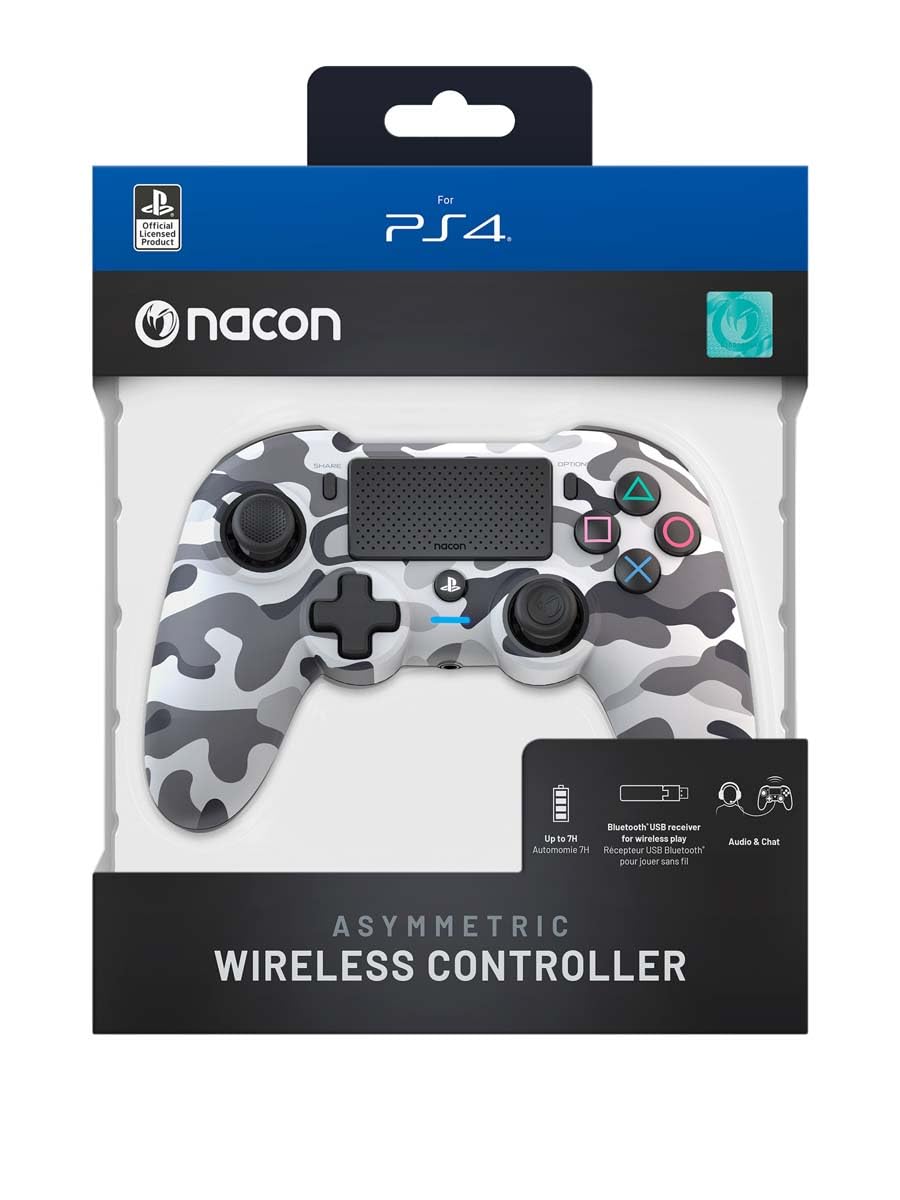
Image: The NACON Asymmetric Wireless Controller shown in its retail packaging, highlighting the product and its key features.
அமைவு
1. கட்டுப்படுத்தியை சார்ஜ் செய்தல்
Before first use, fully charge the controller. Connect the small end of the USB charging cable to the controller's charging port and the larger end to a USB port on your PlayStation 4 console or a compatible USB wall adapter. The LED indicator on the controller will show charging status and turn off when fully charged.
2. Connecting to PlayStation 4 (Wireless)
- Insert the USB Receiver into an available USB port on your PlayStation 4 console.
- Press the PlayStation button on the controller. The controller will automatically attempt to pair with the USB Receiver.
- Once successfully paired, the LED indicator on the controller will illuminate steadily, indicating a stable connection.
3. Connecting to PC (Wireless)
The controller can also be used with a PC. Insert the USB Receiver into an available USB port on your PC. The controller should be recognized automatically by Windows as a standard gamepad. Drivers may be installed automatically.

படம்: முன்பக்கம் view of the NACON Asymmetric Wireless Controller, showcasing its button layout and asymmetric stick design.
கட்டுப்படுத்தியை இயக்குதல்
பொத்தான் தளவமைப்பு மற்றும் செயல்பாடுகள்
The NACON Asymmetric Wireless Controller features a familiar PlayStation button layout with an ergonomic asymmetric stick configuration for enhanced comfort and precision.
- இடது அனலாக் ஸ்டிக்: Used for movement and navigation.
- வலது அனலாக் ஸ்டிக்: Used for camera control and aiming.
- திசை திண்டு (டி-பேட்): துல்லியமான திசை உள்ளீட்டிற்கு.
- செயல் பொத்தான்கள் (முக்கோணம், வட்டம், குறுக்கு, சதுரம்): Standard PlayStation action buttons.
- L1/R1 பொத்தான்கள்: தோள்பட்டை பொத்தான்கள்.
- L2/R2 Triggers: Analog triggers for precise input.
- பகிர் பொத்தான்: Access sharing features on PS4.
- விருப்பங்கள் பொத்தான்: Access in-game menus and options.
- பிளேஸ்டேஷன் பட்டன்: Power on/off the controller, access PS4 Home Menu.
- டச் பேட்: Interactive surface for specific game functions.
பேட்டரி காட்டி
The controller includes an LED indicator that provides information on battery status. Refer to the Quick Start Guide for specific LED patterns and their meanings (e.g., low battery, charging, fully charged).
பராமரிப்பு
சுத்தம் செய்தல்
உங்கள் கட்டுப்படுத்தியை சுத்தம் செய்ய, மென்மையான, உலர்ந்த துணியைப் பயன்படுத்தவும். பிடிவாதமான அழுக்குக்கு, சிறிது dampen the cloth with water. Do not use harsh chemicals, abrasive cleaners, or solvents, as these can damage the controller's finish and internal components.
சேமிப்பு
When not in use, store the controller in a cool, dry place away from direct sunlight and extreme temperatures. Avoid placing heavy objects on the controller.
பேட்டரி பராமரிப்பு
To prolong battery life, avoid fully discharging the controller frequently. If storing for an extended period, charge the battery to approximately 50% before storage and recharge every few months.
சரிசெய்தல்
| பிரச்சனை | சாத்தியமான தீர்வு |
|---|---|
| கட்டுப்படுத்தி இணைக்கப்படவில்லை. |
|
| Controller does not charge. |
|
| பொத்தான்கள் அல்லது குச்சிகள் செயல்படவில்லை. |
|
கட்டுப்படுத்தியை மீட்டமைத்தல்
If the controller is unresponsive or behaving erratically, a soft reset may resolve the issue. Locate the small reset button (often a pinhole) on the back or underside of the controller. Use a thin, pointed object (like a paperclip) to press and hold the button for a few seconds. Then, re-pair the controller with your console.
விவரக்குறிப்புகள்
- மாதிரி எண்:
- 10946680
- இணைப்பு:
- Wireless (via USB Receiver)
- இணக்கத்தன்மை:
- பிளேஸ்டேஷன் 4, பிசி
- Dimensions (Controller):
- தோராயமாக 6.89 x 2.76 x 8.27 அங்குலங்கள் (17.5 x 7 x 21 செமீ)
- Weight (Controller):
- தோராயமாக 14.1 அவுன்ஸ் (400 கிராம்)
- உற்பத்தியாளர்:
- நேகான்
- முதலில் கிடைக்கும் தேதி:
- ஜூலை 6, 2022
உத்தரவாதம் மற்றும் ஆதரவு
For warranty information, technical support, or further assistance with your NACON Asymmetric Wireless Controller, please visit the official NACON webதளத்தில் அல்லது அவர்களின் வாடிக்கையாளர் ஆதரவை நேரடியாகத் தொடர்பு கொள்ளவும். உத்தரவாதக் கோரிக்கைகளுக்கு உங்கள் வாங்கியதற்கான ஆதாரத்தை வைத்திருங்கள்.
Official NACON Webதளம்: www.nacongaming.com
Ask a question about this manual
Ask about setup, troubleshooting, compatibility, parts, safety, or missing instructions. Manuals+ will review the question and use this page’s manual context to help answer it.