
அறிமுகம்
This manual provides detailed instructions for the installation, operation, and maintenance of your Everycom EC-901 80mm Thermal POS Receipt Printer. Please read this manual thoroughly before using the printer to ensure proper functionality and to prevent damage.
பாதுகாப்பு தகவல்
- Ensure the printer is connected to a power source with the correct voltage.
- பிரிண்டரை தண்ணீரிலோ அல்லது அதிக ஈரப்பதத்திலோ வெளிப்படுத்த வேண்டாம்.
- அச்சுப்பொறியை நேரடி சூரிய ஒளியில் அல்லது வெப்ப மூலங்களுக்கு அருகில் வைப்பதைத் தவிர்க்கவும்.
- Use only specified thermal paper for optimal performance and to prevent damage to the print head.
- பிரிண்டரை நீங்களே பிரிக்கவோ அல்லது சரிசெய்யவோ முயற்சிக்காதீர்கள். தகுதிவாய்ந்த சேவை பணியாளர்களைத் தொடர்பு கொள்ளவும்.
தொகுப்பு உள்ளடக்கங்கள்
தொகுப்பில் அனைத்து பொருட்களும் உள்ளதா என சரிபார்க்கவும்:
- Everycom EC-901 Thermal POS Receipt Printer
- Roll paper × 1 Roll (for initial testing)
- CD-ROM (containing Drivers, Utility Software, Manuals)
- காகித வழிகாட்டி
- Paper Bearing
- USB கேபிள்
- பவர் அடாப்டர் கேபிள்
தயாரிப்பு முடிந்துவிட்டதுview
The Everycom EC-901 is a compact 80mm (3-inch) thermal POS receipt printer designed for efficient and reliable printing. It features a USB and LAN interface for versatile connectivity.

படம் 1: முன் view of the Everycom EC-901 Thermal POS Receipt Printer.
முக்கிய அம்சங்கள்:
- வேகமாக அச்சிடும் வேகம்: Up to 160mm per second for quick receipt output.
- எளிதான காகித ஏற்றுதல்: Drop-in paper loading mechanism for quick and easy media changes.
- சிறிய வடிவமைப்பு: Low space requirement with an integrated power supply.
- Variable Paper Width: Supports 80mm paper width.
- இணைப்பு: USB and LAN interface options.
- உயர் தெளிவுத்திறன்: 203 x 203 DPI for clear print quality.
- குறைந்த இரைச்சல் நிலைகள்: Operates quietly, suitable for various work environments.

Figure 2: Top-open design for easy paper roll installation.
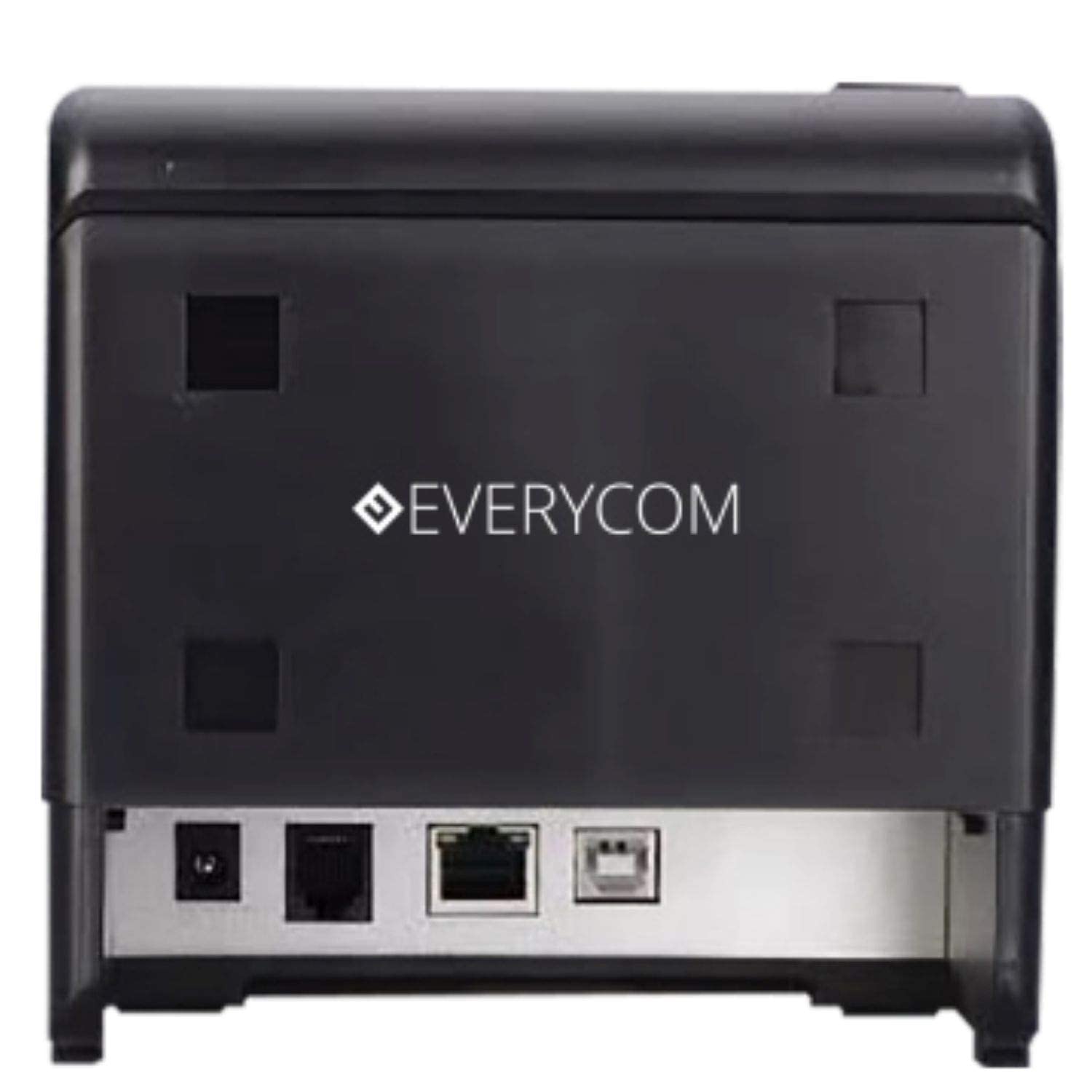
படம் 3: பின்புறம் view showing USB and LAN connectivity ports.

Figure 4: The EC-901 printer is designed for low noise operation.

Figure 5: The EC-901 printer features an easy-to-use design for paper installation.
அமைவு
1. அச்சுப்பொறியை இணைத்தல்
- Connect the power adapter cable to the printer's power port and then plug it into a suitable electrical outlet.
- For USB connection: Connect one end of the USB cable to the printer's USB port and the other end to your computer.
- For LAN connection: Connect an Ethernet cable to the printer's LAN port and the other end to your network router or switch.
- Turn on the printer using the power switch located on the front or side of the device.
2. காகிதச் சுருளை நிறுவுதல்
- Open the printer cover by pressing the release button or lifting the cover.
- Insert the thermal paper roll into the compartment with the paper feeding from the bottom and exiting towards the front.
- கட்டரைத் தாண்டி ஒரு சிறிய அளவு காகிதத்தை வெளியே இழுக்கவும்.
- அச்சுப்பொறி மூடி சரியான இடத்தில் சொடுக்கும் வரை உறுதியாக மூடவும்.
3. இயக்கி நிறுவல்
Insert the provided CD-ROM into your computer's CD/DVD drive. Follow the on-screen instructions to install the printer drivers and utility software. Drivers are typically compatible with Windows operating systems, including Windows 10.
இயக்க வழிமுறைகள்
காட்டி விளக்குகள்:
- சக்தி: அச்சுப்பொறி இயக்கப்பட்டிருப்பதைக் குறிக்கிறது.
- பிழை: Lights up or flashes to indicate an error (e.g., print head overheating, cover open).
- காகிதம்: Indicates low paper or no paper.
அடிப்படை அச்சிடுதல்:
Once the printer is connected and drivers are installed, you can print receipts from your POS software or any application that supports printing. Ensure the Everycom EC-901 is selected as the default printer or the desired printer in your application's print settings.
பராமரிப்பு
அச்சுப்பொறியை சுத்தம் செய்தல்:
- Turn off the printer and disconnect the power cable before cleaning.
- மென்மையான, பஞ்சு இல்லாத துணியைப் பயன்படுத்தவும்ampened with isopropyl alcohol to gently clean the thermal print head. Allow it to dry completely before use.
- Wipe the exterior of the printer with a soft, dry cloth. Do not use abrasive cleaners.
Replacing Paper:
When the PAPER indicator lights up or printing becomes faint, replace the paper roll following the steps outlined in the "Installing the Paper Roll" section.
சரிசெய்தல்
| பிரச்சனை | சாத்தியமான காரணம் | தீர்வு |
|---|---|---|
| அச்சுப்பொறி இயக்கப்படவில்லை. | Power cable disconnected or power outlet issue. | மின் கேபிள் இணைப்புகளைச் சரிபார்க்கவும். மின் இணைப்பு செயல்படுகிறதா என்பதை உறுதிப்படுத்தவும். |
| No printing or blank output. | No paper, paper loaded incorrectly, or print head issue. | Check paper roll and ensure it's loaded correctly. Clean the print head if necessary. Verify printer drivers are installed. |
| PAPER indicator is on. | Paper roll is empty or low. | காகித ரோலை மாற்றவும். |
| ERROR indicator is on. | Printer cover open, print head overheating, or other internal error. | Ensure the printer cover is closed properly. Turn off the printer, wait a few minutes for it to cool down, then restart. If the issue persists, contact support. |
| கணினியால் அச்சுப்பொறி அங்கீகரிக்கப்படவில்லை. | Driver not installed or USB/LAN cable issue. | Reinstall printer drivers. Check USB/LAN cable connections. Try a different port or cable. |
விவரக்குறிப்புகள்
| அம்சம் | விவரம் |
|---|---|
| மாதிரி பெயர் | EC-901 |
| அச்சிடும் தொழில்நுட்பம் | வெப்ப |
| அச்சு ஊடகம் | Paper (plain thermal) |
| அதிகபட்ச மீடியா அளவு | 3 அங்குலம் (80 மிமீ) |
| அதிகபட்ச அச்சு வேகம் | 160 மிமீ / நொடி |
| தீர்மானம் | 203 x 203 டிபிஐ |
| இணைப்பு தொழில்நுட்பம் | USB, LAN Interface |
| அச்சுப்பொறி வெளியீடு | ஒரே வண்ணமுடையது |
| இயக்க முறைமை | Windows 10 (and compatible with other Windows versions) |
| தயாரிப்பு பரிமாணங்கள் (LxWxH) | 19.8 x 14.8 x 14.8 செ.மீ |
| பொருளின் எடை | 1.8 கிலோ |
| சிறப்பு அம்சம் | Without Auto cutter |
உத்தரவாதம் மற்றும் ஆதரவு
For technical assistance, warranty claims, or any product-related inquiries, please contact Everycom customer support.
- கட்டணமில்லா எண்: 1800 121 4480
- வேலை நேரம்: Monday - Saturday, 10:00 AM - 6:30 PM (Except on Public Holidays)