
Cherry JD-8560US-0
CHERRY Stream Desktop Recharge Keyboard and Mouse Wireless Combo
Model: JD-8560US-0
அறிமுகம்
The CHERRY Stream Desktop Recharge Keyboard and Mouse Wireless Combo offers extended functionality, quiet keystroke, and a modern design. This premium wireless version features a convenient charging function for both the keyboard and mouse.
The keyboard and mouse utilize NiMH rechargeable batteries, providing months of use on a single charge. Both devices can be recharged via USB-C, allowing for uninterrupted work.

Image: The CHERRY Stream Desktop Recharge Keyboard and Mouse Wireless Combo in white, showcasing both the full-size keyboard and the ergonomic mouse.
தொகுப்பு உள்ளடக்கங்கள்
- CHERRY Stream Desktop Recharge Keyboard (White)
- CHERRY Stream Desktop Recharge Mouse (White)
- USB-C சார்ஜிங் கேபிள்
- USB ரிசீவர்
- NiMH Rechargeable Batteries (pre-installed or included)
- அறிவுறுத்தல் கையேடு (இந்த ஆவணம்)
அமைவு
1. சாதனங்களை சார்ஜ் செய்தல்
Before initial use, it is recommended to fully charge both the keyboard and the mouse.
- Connect the supplied USB-C cable to the charging port on the keyboard (located on the top edge) and to a USB power source (e.g., computer USB port, USB wall adapter).
- Connect the supplied USB-C cable to the charging port on the mouse (located on the front edge) and to a USB power source.
- The charging indicator light on each device will show charging status (refer to the indicator section for details).

படம்: பக்கம் views of the keyboard and mouse, highlighting their respective USB-C charging ports.
2. USB ரிசீவரை இணைத்தல்
The keyboard and mouse connect wirelessly via a single USB receiver.
- Locate the USB receiver, typically stored within the mouse's battery compartment for safekeeping during transport.
- உங்கள் கணினியில் கிடைக்கும் USB போர்ட்டில் USB ரிசீவரைச் செருகவும்.
- உங்கள் இயக்க முறைமை தானாகவே தேவையான இயக்கிகளைக் கண்டறிந்து நிறுவ வேண்டும்.
3. Powering On the Devices
- For the keyboard, locate the On/Off switch on the top edge and slide it to the 'On' position.
- For the mouse, locate the On/Off switch on the underside and slide it to the 'On' position.
- The devices should automatically connect to the USB receiver.

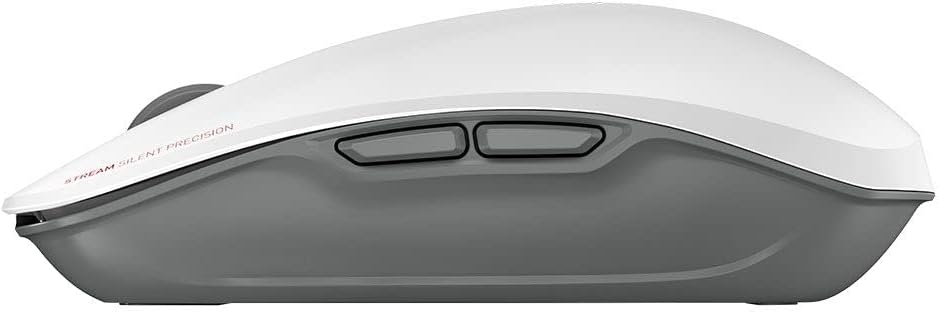
படம்: மேல் view of the CHERRY Stream mouse, showing its ergonomic design.
இயக்க வழிமுறைகள்
விசைப்பலகை செயல்பாடுகள்
The CHERRY Stream keyboard features a full-size layout with dedicated function keys and media controls.
- செயல்பாட்டு விசைகள் (F1-F12): These keys may have secondary functions (e.g., media control, volume, brightness) accessible by pressing the Fn ஒரே நேரத்தில் முக்கிய.
- எண் விசைப்பலகை: For efficient data entry.
- Quiet Keystroke: Designed for a quiet typing experience, ideal for office environments.
சுட்டி செயல்பாடுகள்
The CHERRY Stream mouse provides precise tracking and comfortable use.
- Left and Right Click: Standard mouse buttons.
- சுருள் சக்கரம்: For vertical scrolling. The scroll wheel also functions as a middle click button.
- பக்க பொத்தான்கள்: Two programmable side buttons for enhanced productivity (functionality may vary by operating system or software).
- AES குறியாக்கம்: The mouse features Advanced Encryption Standard (AES) for secure data transmission.

Image: The CHERRY Stream mouse, highlighting its AES encryption capability.
பராமரிப்பு
சுத்தம் செய்தல்
To maintain the performance and appearance of your CHERRY Stream combo:
- சுத்தம் செய்வதற்கு முன் உங்கள் கணினியிலிருந்து சாதனங்களைத் துண்டிக்கவும்.
- ஒரு மென்மையான, பஞ்சு இல்லாத துணியை சிறிது டி பயன்படுத்தவும்ampதண்ணீர் அல்லது லேசான துப்புரவுக் கரைசலுடன் நிரப்பப்பட்டது.
- கடுமையான இரசாயனங்கள், சிராய்ப்பு கிளீனர்கள் அல்லது கரைப்பான்களைப் பயன்படுத்துவதைத் தவிர்க்கவும்.
- சாதனங்களை தண்ணீரில் அல்லது வேறு எந்த திரவத்திலும் மூழ்கடிக்க வேண்டாம்.
பேட்டரி பராமரிப்பு
The devices use NiMH rechargeable batteries. Proper care ensures long battery life:
- Recharge the batteries when the low battery indicator appears.
- Avoid completely draining the batteries frequently.
- சாதனங்களை நீண்ட நேரம் சேமித்து வைத்தால், அவற்றை சுமார் 50% வரை சார்ஜ் செய்து, குளிர்ந்த, உலர்ந்த இடத்தில் சேமிக்கவும்.
- The batteries are user-replaceable. Refer to the battery compartment for instructions on replacement.

Image: The CHERRY Stream keyboard and mouse, emphasizing their long-lasting rechargeable batteries.
சரிசெய்தல்
| பிரச்சனை | சாத்தியமான காரணம் | தீர்வு |
|---|---|---|
| சாதனங்கள் பதிலளிக்கவில்லை. |
|
|
| Lag or delayed response. |
|
|
| Keys not working or mouse not tracking. |
|
|
விவரக்குறிப்புகள்
- பிராண்ட்: செர்ரி
- மாதிரி: ஜேடி-8560US-0
- நிறம்: வெள்ளை
- இணைப்பு தொழில்நுட்பம்: வயர்லெஸ் (USB ரிசீவர்)
- சிறப்பு அம்சம்: Rechargeable NiMH Batteries, AES Encryption
- இணக்கமான சாதனங்கள்: மடிக்கணினி, தனிப்பட்ட கணினி
- Product Dimensions (Keyboard): 18.2 x 6.53 x 1.34 அங்குலம்
- Item Weight (Combo): 3.09 பவுண்டுகள்
- உற்பத்தியாளர்: செர்ரி
- பிறப்பிடமான நாடு: சீனா
- முதல் தேதி கிடைக்கும்: பிப்ரவரி 16, 2022
உத்தரவாத தகவல்
CHERRY products are manufactured with high-quality materials and undergo strict quality control. For detailed warranty information, please refer to the official CHERRY webதளத்தில் அல்லது அவர்களின் வாடிக்கையாளர் ஆதரவைத் தொடர்பு கொள்ளவும். உத்தரவாதக் கோரிக்கைகளுக்கு உங்கள் வாங்கியதற்கான ஆதாரத்தை வைத்திருங்கள்.
ஆதரவு
For further assistance, technical support, or to download the latest drivers and software (such as CHERRY Keys software), please visit the official CHERRY webதளம்:
You can also find additional resources and FAQs on the CHERRY brand store on Amazon:
Ask a question about this manual
Ask about setup, troubleshooting, compatibility, parts, safety, or missing instructions. Manuals+ will review the question and use this page’s manual context to help answer it.