
1. தயாரிப்பு முடிந்துவிட்டதுview
The Prolink DL-7203E is a portable LTE Mobile Wi-Fi device designed to provide high-speed wireless connectivity on the go. It functions as a 4G router, allowing multiple devices to connect to the internet via a SIM card. Additionally, it features a built-in power bank function for charging other devices.
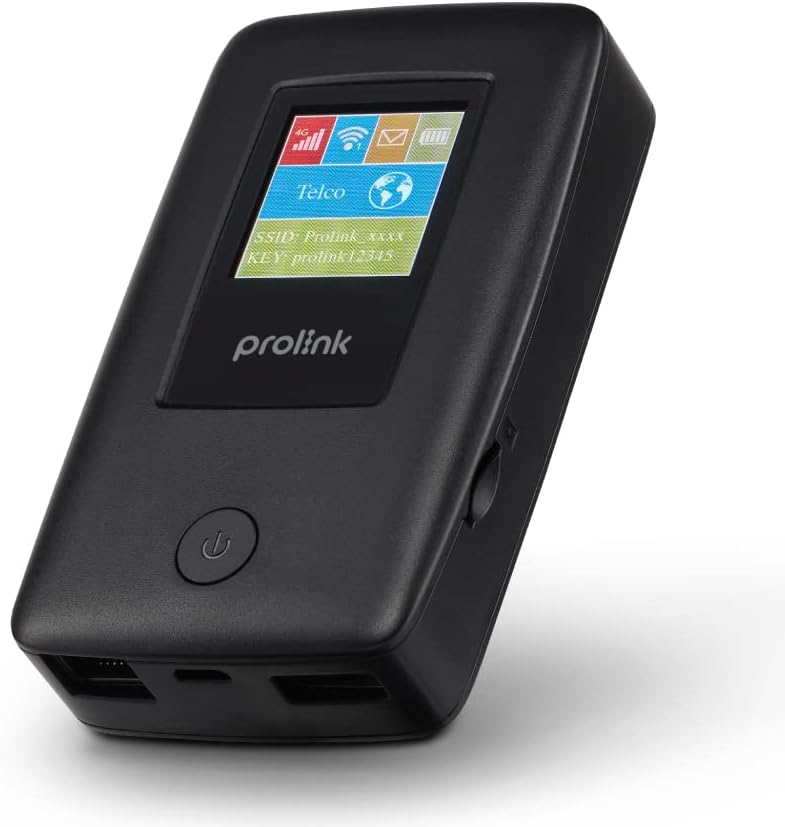
Figure 1.1: Prolink DL-7203E LTE Mobile Wi-Fi device.

Figure 1.2: Key features and capabilities of the Prolink DL-7203E.
தொகுப்பு உள்ளடக்கங்கள்
- Prolink DL-7203E LTE Mobile Wi-Fi Device
- USB சார்ஜிங் கேபிள்
- விரைவு தொடக்க வழிகாட்டி (இந்த கையேட்டில் சேர்க்கப்படவில்லை)
2 சாதன தளவமைப்பு
Familiarize yourself with the various components and ports of your DL-7203E device.

படம் 2.1: முன் மற்றும் பக்கம் view of the Prolink DL-7203E with labeled components.
- LCD Screen Indicator: Displays signal strength, battery level, Wi-Fi status, and network information.
- சிம் கார்டு ஸ்லாட்: Insert your Nano SIM card here.
- RJ45 LAN/WAN Port: For wired Ethernet connection to devices or an existing network.
- சார்ஜிங் போர்ட் (USB-C): Connect the provided USB cable for charging the device.
- USB Type-A Port (Output): Used for the power bank function to charge other devices.
- பவர் பட்டன்: சாதனத்தை ஆன்/ஆஃப் செய்ய அழுத்திப் பிடிக்கவும்.
3. அமைவு வழிகாட்டி
3.1 சிம் கார்டைச் செருகுதல்
- சாதனம் அணைக்கப்பட்டுள்ளதா என்பதை உறுதிப்படுத்தவும்.
- சாதனத்தின் பக்கவாட்டில் சிம் கார்டு ஸ்லாட்டைக் கண்டறியவும்.
- Carefully insert your Nano SIM card into the slot until it clicks into place. Ensure the correct orientation as indicated on the device.
- Close the SIM card slot cover if applicable.
3.2 சாதனத்தை சார்ஜ் செய்தல்
- Connect the provided USB charging cable to the USB-C charging port on the DL-7203E.
- கேபிளின் மறுமுனையை USB பவர் அடாப்டருடன் (சேர்க்கப்படவில்லை) அல்லது கணினியின் USB போர்ட்டுடன் இணைக்கவும்.
- The battery indicator on the LCD screen will show charging status. A full charge provides up to 25 hours of connectivity.
3.3 பவர் ஆன்/ஆஃப்
- பவர் ஆன் செய்ய: எல்சிடி திரை ஒளிரும் வரை பவர் பட்டனை அழுத்திப் பிடிக்கவும்.
- பவர் ஆஃப் செய்ய: Press and hold the Power button until the device shuts down.

Figure 3.1: The Auto APN feature enables plug-and-play functionality in over 185 countries.
4. ஆபரேஷன்
4.1 Wi-Fi வழியாக சாதனங்களை இணைத்தல்
- Ensure the DL-7203E is powered on and has an active internet connection (indicated by the signal icon on the LCD).
- உங்கள் Wi-Fi இயக்கப்பட்ட சாதனத்தில் (ஸ்மார்ட்போன், மடிக்கணினி, டேப்லெட்), கிடைக்கக்கூடிய Wi-Fi நெட்வொர்க்குகளைத் தேடுங்கள்.
- Select the SSID (network name) displayed on the DL-7203E's LCD screen.
- Enter the Wi-Fi Key (password) also displayed on the LCD screen.
- Your device should now be connected to the internet. The DL-7203E supports up to 16 Wi-Fi devices simultaneously.

Figure 4.1: Share internet connection with up to 16 devices simultaneously.
4.2 பவர் பேங்காகப் பயன்படுத்துதல்
The DL-7203E can double as a portable power bank to charge your mobile devices.
- Connect your mobile device's charging cable to the USB Type-A output port on the DL-7203E.
- The DL-7203E will begin charging your device.

Figure 4.2: The DL-7203E can charge your devices on the go.
4.3 Connecting via LAN/WAN Port
The RJ45 port allows for wired connectivity.
- லேன் பயன்முறை: Connect a device (e.g., laptop, desktop) to the DL-7203E via an Ethernet cable for a wired internet connection.
- WAN பயன்முறை: Connect the DL-7203E to an existing wired network (e.g., hotel Ethernet) to share that internet connection wirelessly.
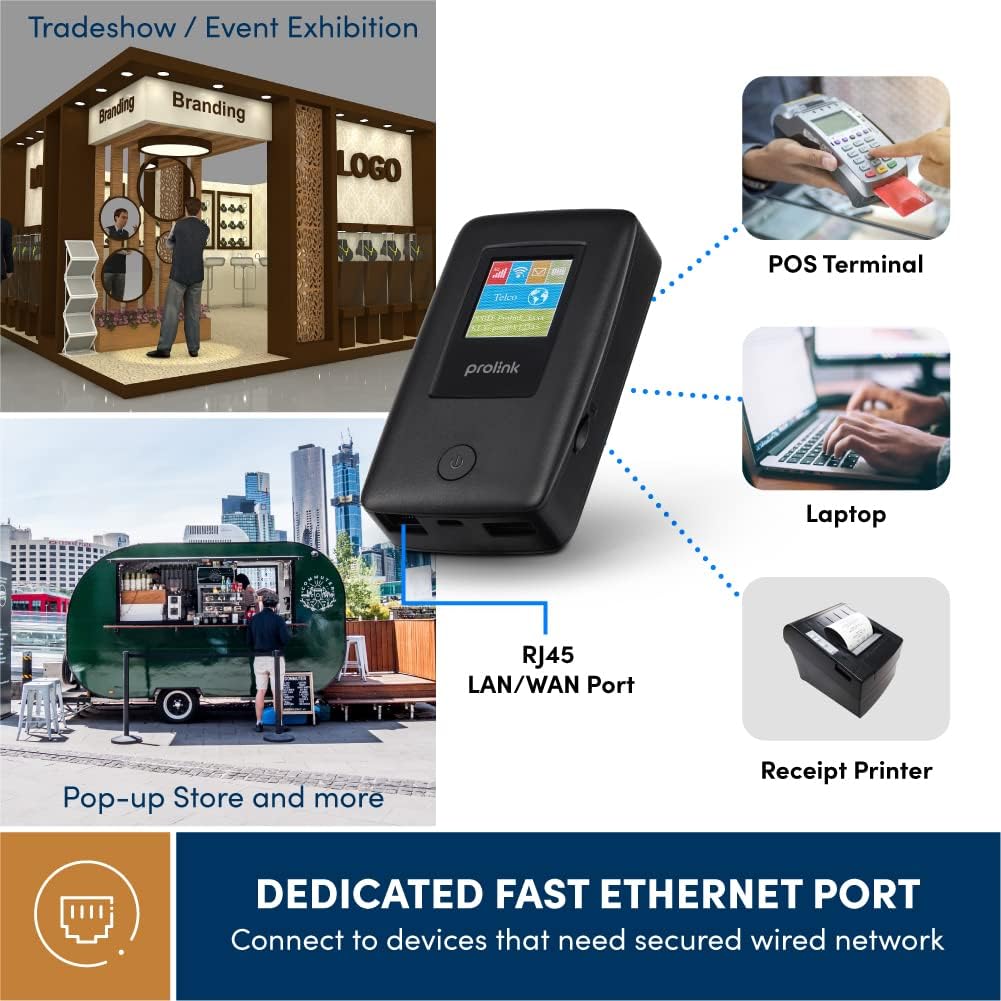
Figure 4.3: Utilize the dedicated Ethernet port for secured wired network connections.
4.4 File Sharing via MicroSD Card
The built-in microSD card slot supports up to 64GB, allowing for easy file பகிர்தல்.
- நியமிக்கப்பட்ட ஸ்லாட்டில் மைக்ரோ எஸ்டி கார்டைச் செருகவும்.
- Access the shared content wirelessly from connected devices through the device's web interface or the mProMifi App.

Figure 4.4: Share media content wirelessly across your network via a microSD card.
4.5 Using the mProMifi App
For enhanced control and monitoring, download the mProMifi App (available for devices with P/N: LTE-DL7203E-E, S/N starting from "265201" or later). The app allows you to manage settings, view இணைக்கப்பட்ட சாதனங்கள் மற்றும் தரவு பயன்பாட்டைக் கண்காணிக்கவும்.
5 முக்கிய அம்சங்கள்
- Fast Connection: Enjoy high-speed connectivity of up to 150Mbps via LTE and up to 300Mbps via Wi-Fi hotspot.
- நீட்டிக்கப்பட்ட பேட்டரி ஆயுள்: Equipped with a 5200mAh (or 6000mAh for updated models) battery, providing up to 25 hours of continuous connectivity.
- பல பயனர் அணுகல்: Share your internet connection with up to 16 Wi-Fi enabled devices simultaneously.
- பயணத்திற்கு ஏற்றது: Supports automatic APN configuration for over 185 countries, making it ideal for international travel.
- பவர் பேங்க் செயல்பாடு: Charge your smartphones and other USB-powered devices on the go.
- ஈதர்நெட் போர்ட்: Provides a reliable wired connection for devices without wireless capabilities or for sharing an existing wired network.
- மைக்ரோ எஸ்டி கார்டு ஸ்லாட்: Supports up to 64GB for convenient wireless file பகிர்தல்.

Figure 5.1: Enjoy extended connectivity with up to 25 hours of battery life.

Figure 5.2: The compact design allows you to stay connected wherever you are.
6. பராமரிப்பு
- சுத்தம்: Use a soft, dry cloth to clean the device. Avoid liquid cleaners or aerosols.
- பேட்டரி பராமரிப்பு: To prolong battery life, avoid exposing the device to extreme temperatures. If storing for a long period, charge the battery to about 50% before storage.
- சேமிப்பு: நேரடி சூரிய ஒளி மற்றும் ஈரப்பதத்திலிருந்து குளிர்ந்த, உலர்ந்த இடத்தில் சாதனத்தை சேமிக்கவும்.
7. சரிசெய்தல்
பொதுவான சிக்கல்கள் மற்றும் தீர்வுகள்
| பிரச்சனை | சாத்தியமான காரணம் | தீர்வு |
|---|---|---|
| இணைய இணைப்பு இல்லை | No SIM card inserted, SIM card not activated, poor signal, incorrect APN settings. | Ensure SIM is correctly inserted and active. Move to an area with better signal. The device has Auto APN, but if issues persist, check network provider settings. |
| வைஃபையுடன் இணைக்க முடியவில்லை | தவறான Wi-Fi கடவுச்சொல், சாதனம் ரூட்டரிலிருந்து வெகு தொலைவில் உள்ளது, Wi-Fi முடக்கப்பட்டுள்ளது. | Verify Wi-Fi password. Move closer to the DL-7203E. Ensure Wi-Fi is enabled on the device. |
| Battery Not Charging / Draining Quickly | Faulty cable/adapter, high usage, old battery. | Try a different USB cable and power adapter. Reduce the number of connected devices or usage time. Contact support if battery life significantly degrades. |
| Device Freezes / Unresponsive | மென்பொருள் கோளாறு. | Perform a soft reset by holding the power button until the device restarts. If persistent, a factory reset might be needed (refer to advanced settings via web இடைமுகம்). |
8. விவரக்குறிப்புகள்
| அம்சம் | விவரம் |
|---|---|
| மாதிரி பெயர் | DL-7203E (LTE-DL7203E) |
| பிராண்ட் | புரோலிங்க் |
| வயர்லெஸ் கம்யூனிகேஷன் | 4G LTE, Wi-Fi (802.11ac) |
| Wi-Fi வேகம் | 300Mbps வரை |
| LTE வேகம் | 150Mbps வரை |
| பேட்டரி திறன் | 5200mAh (updated models 6000mAh) |
| பேட்டரி ஆயுள் | 25 மணி நேரம் வரை |
| அதிகபட்ச வைஃபை பயனர்கள் | 16 |
| சிம் கார்டு வகை | நானோ சிம் |
| துறைமுகங்கள் | RJ45 LAN/WAN, USB-C Charging, USB Type-A Output |
| MicroSD Support | 64 ஜிபி வரை |
| பரிமாணங்கள் (L x W x H) | 15.4 x 9.2 x 4.4 செ.மீ |
| எடை | 161 கிராம் |
| நிறம் | கருப்பு |
9. உத்தரவாதம் மற்றும் ஆதரவு
Prolink products come with a local warranty and technical support. For any inquiries or assistance, please contact Prolink support.

Figure 9.1: Prolink Official Store support information.
- மின்னஞ்சல் ஆதரவு: support@prolink2u.com
- தொலைபேசி ஆதரவு: (65) 6357 0666
- For the most up-to-date support information, please visit the official Prolink website or your regional Prolink support page.