
1. அறிமுகம்
This manual provides detailed instructions for the setup, operation, and maintenance of your KECAG 10.1 Inch Digital Picture Frame. Please read this manual thoroughly before using the device to ensure proper functionality and to maximize your user experience. Keep this manual for future reference.
2. தயாரிப்பு முடிந்துவிட்டதுview
2.1 முக்கிய அம்சங்கள்
- 10.1 Inch 1080P HD IPS Screen: Features a 1920x1080 resolution with a 180° wide-angle IPS display for clear viewபல்வேறு கோணங்களில் இருந்து பார்க்கப்படுகிறது.
- மல்டிமீடியா பின்னணி: Supports photo slideshows, video playback, and music playback.
- மோஷன் சென்சார்: Automatically turns the frame on/off based on detected movement to conserve energy.
- Timing On/Off Function: Allows scheduled power on and off times.
- Versatile Media Support: Compatible with SD cards and USB flash drives.
- பயனர் நட்பு இடைமுகம்: Simple main menu for easy navigation.
- ரிமோட் கண்ட்ரோல்: Provides convenient operation from a distance.
- கூடுதல் செயல்பாடுகள்: Includes calendar and alarm features.
2.2 தொகுப்பு உள்ளடக்கம்
- KECAG 10.1 Inch Digital Picture Frame
- 32ஜிபி USB ஃபிளாஷ் டிரைவ்
- ரிமோட் கண்ட்ரோல்
- பவர் அடாப்டர்
- பயனர் கையேடு

படம் 2.2.1: The KECAG 10.1 Inch Digital Picture Frame displaying a family photo, accompanied by its remote control.
3 அமைவு
3.1 மின் இணைப்பு
- Locate the power adapter included in the package.
- Connect the small end of the power adapter cable to the DC IN port on the back of the digital picture frame.
- பவர் அடாப்டரின் மறுமுனையை ஒரு நிலையான மின் நிலையத்தில் செருகவும்.
- The frame will automatically power on or enter standby mode.
3.2 Inserting Media (USB Drive or SD Card)
The digital picture frame supports both USB flash drives and SD cards for media playback.
- Identify the USB port and SD card slot on the side or back of the frame.
- For a USB drive: Carefully insert the USB flash drive into the USB port.
- For an SD card: Insert the SD card into the SD card slot with the metal contacts facing down, until it clicks into place.
- Ensure the media is inserted correctly to avoid damage.

படம் 3.2.1: Illustrated steps for connecting media (USB/SD card) and power to the digital picture frame.
3.3 Initial Power On and Language Settings
- Once powered on, the frame may display a language selection screen.
- Use the remote control's navigation buttons (Up/Down/Left/Right) to select your preferred language.
- அழுத்தவும் உள்ளிடவும் உங்கள் தேர்வை உறுதிப்படுத்த பொத்தான்.
4. இயக்க வழிமுறைகள்
4.1 ரிமோட் கண்ட்ரோல் செயல்பாடுகள்
The remote control allows for convenient navigation and setting adjustments. Ensure the remote is aligned with the infrared sensor on the frame during use.
- பட்டியல்: Access the main menu or return to the previous menu.
- புகைப்படம்: Directly enter photo playback mode.
- இசை: Directly enter music playback mode.
- திரைப்படம்: Directly enter video playback mode.
- வெளியேறு: Exit current function or menu.
- உள்ளிடவும்: Confirm selection or play/pause media.
- அமைவு: கணினி அமைப்புகளை அணுகவும்.
- வழிசெலுத்தல் பொத்தான்கள் (மேல்/கீழ்/இடது/வலது): மெனுக்கள் மற்றும் விருப்பங்கள் மூலம் செல்லவும்.
- VOL+/VOL-: Adjust volume during video or music playback.
4.2 முதன்மை மெனு வழிசெலுத்தல்
From the main menu, you can select different functions:
- படம்: View photos in a slideshow.
- இசை: ஆடியோவை இயக்கவும் files.
- நாட்காட்டி: Display calendar and set alarms.
- அமைப்புகள்: சாதன விருப்பங்களை உள்ளமைக்கவும்.

படம் 4.2.1: The digital picture frame's interface showing options for Calendar, Photo/Video, and Music playback.
4.3 Photo Playback
- பிரதான மெனுவிலிருந்து, தேர்ந்தெடுக்கவும் படம் அல்லது அழுத்தவும் புகைப்படம் ரிமோட்டில் உள்ள பொத்தான்.
- The frame will automatically start a slideshow of photos found on the inserted media.
- பின்னணி வரிசை: In settings, you can choose between Shuffle, Sequential, or Repeat All.
- மாற்றம் விளைவுகள்: Select from various effects like Up/Down, Mosaic, Left/Right, or Random.
- படம் முன்view: Access a thumbnail view of your photos.
- பட சுழற்சி: Adjust the orientation of images (vertical/horizontal).
- திரை பிரகாசம்: Adjust the display brightness in the settings menu.
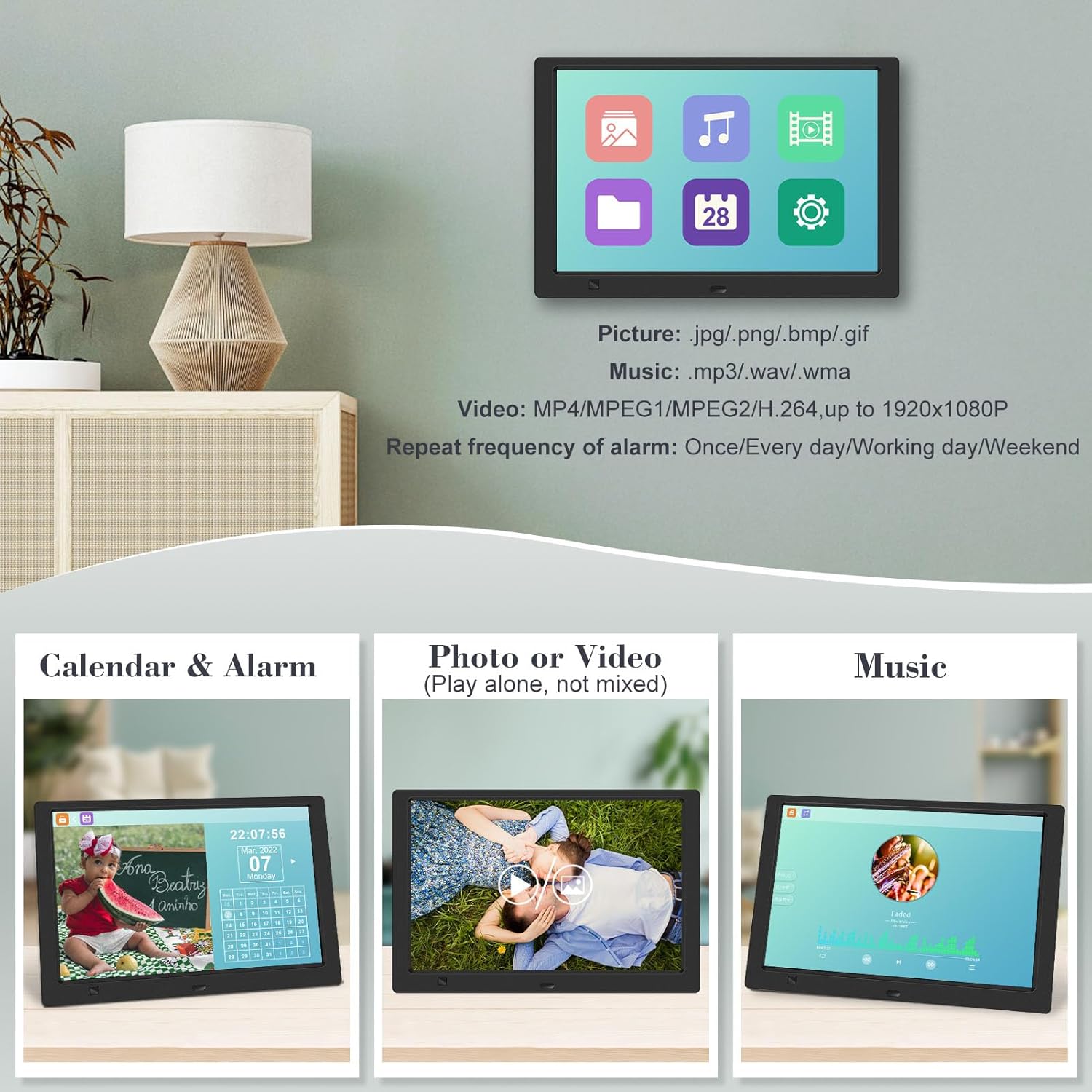
படம் 4.3.1: The digital picture frame displaying a photo slideshow with background music and various image transition options.

படம் 4.3.2: Visual representation of slideshow and image preview options, including settings for playback order, display scale, picture rotation, time window, and screen brightness adjustment.
4.4 Video and Music Playback
- பிரதான மெனுவிலிருந்து, தேர்ந்தெடுக்கவும் திரைப்படம் or இசை, or use the corresponding buttons on the remote.
- விரும்பிய இடத்திற்கு செல்லவும் file using the remote control and press உள்ளிடவும் விளையாட.
- Supported video formats: MP4/MPEG1/MPEG2/H.264 up to 1920x1080.
- Supported music formats: MP3/WAV/WMA.
4.5 மோஷன் சென்சார் செயல்பாடு
The motion sensor helps save energy by automatically turning the frame on or off.
- To enable/disable the motion sensor, go to the அமைப்புகள் மெனு.
- Select the motion sensor option and toggle it On or Off.
- When enabled, the frame will power on when movement is detected and turn off after a period of inactivity.
4.6 Timing On/Off Function
Set specific times for the frame to automatically power on and off.
- அணுகவும் அமைப்புகள் மெனு.
- Locate the Timing On/Off function.
- Set your desired power-on time and power-off time. You can also configure this for specific days (e.g., weekdays, weekends, every day).

படம் 4.6.1: Demonstrates the smart motion sensor turning on the frame when movement is detected and the timing on/off function for scheduled operation.
5. பராமரிப்பு
5.1 திரையை சுத்தம் செய்தல்
திரையைச் சுத்தம் செய்ய, மென்மையான, உலர்ந்த, பஞ்சு இல்லாத துணியால் மெதுவாகத் துடைக்கவும். பிடிவாதமான அடையாளங்களுக்கு, சிறிது dampதுணியை தண்ணீரில் அல்லது திரை-பாதுகாப்பான துப்புரவு கரைசலில் நனைக்கவும். கடுமையான இரசாயனங்கள் அல்லது சிராய்ப்பு பொருட்களைப் பயன்படுத்துவதைத் தவிர்க்கவும்.
5.2 பொது பராமரிப்பு
- Keep the frame away from direct sunlight, heat sources, and excessive moisture.
- சாதனத்தை கைவிடுவதையோ அல்லது வலுவான தாக்கங்களுக்கு உட்படுத்துவதையோ தவிர்க்கவும்.
- Do not attempt to disassemble the frame; this will void the warranty.
- சாதனத்தைச் சுற்றி சரியான காற்றோட்டத்தை உறுதிப்படுத்தவும்.
6. சரிசெய்தல்
If you encounter issues with your digital picture frame, please refer to the following common problems and solutions:
| பிரச்சனை | சாத்தியமான காரணம் | தீர்வு |
|---|---|---|
| சட்டகம் இயக்கப்படவில்லை. | பவர் அடாப்டர் இணைக்கப்படவில்லை அல்லது அவுட்லெட் பழுதடைந்துள்ளது. | Ensure the power adapter is securely connected to the frame and a working electrical outlet. Try a different outlet. |
| No photos/videos/music displayed. | No media inserted, media not recognized, or unsupported file வடிவம். | Ensure a USB drive or SD card is properly inserted. Check if files are in supported formats (JPG/PNG/BMP/GIF for photos; MP4/MPEG1/MPEG2/H.264 for video; MP3/WAV/WMA for music). Try reformatting the media (backup data first). |
| ரிமோட் கண்ட்ரோல் வேலை செய்யவில்லை. | Battery depleted, remote not aimed correctly, or sensor obstructed. | Replace the remote control battery. Ensure the remote is pointed directly at the frame's infrared sensor. Remove any obstructions between the remote and the frame. |
| திரை காலியாகவோ அல்லது உறைந்ததாகவோ உள்ளது. | தற்காலிக மென்பொருள் கோளாறு. | Unplug the power adapter, wait 10 seconds, then plug it back in to restart the frame. |
7. விவரக்குறிப்புகள்
| அம்சம் | விவரக்குறிப்பு |
|---|---|
| திரை அளவு | 10.1 அங்குலம் |
| தீர்மானம் | 1920 x 1080 (1080p HD IPS) |
| தோற்ற விகிதம் | 16:9 |
| Viewing கோணம் | 180° |
| இணக்கமான சாதனங்கள் | SD Card, USB Drive |
| ஆதரிக்கப்படும் புகைப்பட வடிவங்கள் | JPG, PNG, BMP, GIF |
| ஆதரிக்கப்படும் வீடியோ வடிவங்கள் | MP4, MPEG1, MPEG2, H.264 (up to 1920x1080) |
| ஆதரிக்கப்படும் இசை வடிவங்கள் | MP3, WAV, WMA |
| மோஷன் சென்சார் | ஆம் |
| பொருள் மாதிரி எண் | KECAG-CA-001 |
| தயாரிப்பு பரிமாணங்கள் | 6.4 x 9.7 x 0.99 அங்குலம் |
| பொருளின் எடை | 1.59 பவுண்டுகள் |
| பேட்டரிகள் (ரிமோட்) | 1 லித்தியம் மெட்டல் பேட்டரி (சேர்க்கப்பட்டுள்ளது) |
| உற்பத்தியாளர் | KECAG |
8. உத்தரவாதம் மற்றும் ஆதரவு
For warranty information, please refer to the documentation included with your product packaging. KECAG provides 24-hour customer service to assist with any issues or questions you may have regarding your digital picture frame. Please contact customer support for assistance.