
Comfee PAC 12000
காம்ஃபி மொபைல் ஏர் கண்டிஷனர் PAC 12000 பயனர் கையேடு
Model: PAC 12000 | Brand: Comfee
1. அறிமுகம் மற்றும் முடிந்துவிட்டதுview
Thank you for choosing the Comfee PAC 12000 Mobile Air Conditioner. This versatile 3-in-1 unit provides cooling, dehumidifying, and fan functions, designed to create a comfortable indoor environment. With a powerful 12000 BTU (3.5 kW) cooling capacity, it is suitable for rooms up to 43m . This manual provides essential information for safe operation, installation, maintenance, and troubleshooting.

படம்: முன்பக்கம் view of the Comfee PAC 12000 Mobile Air Conditioner.
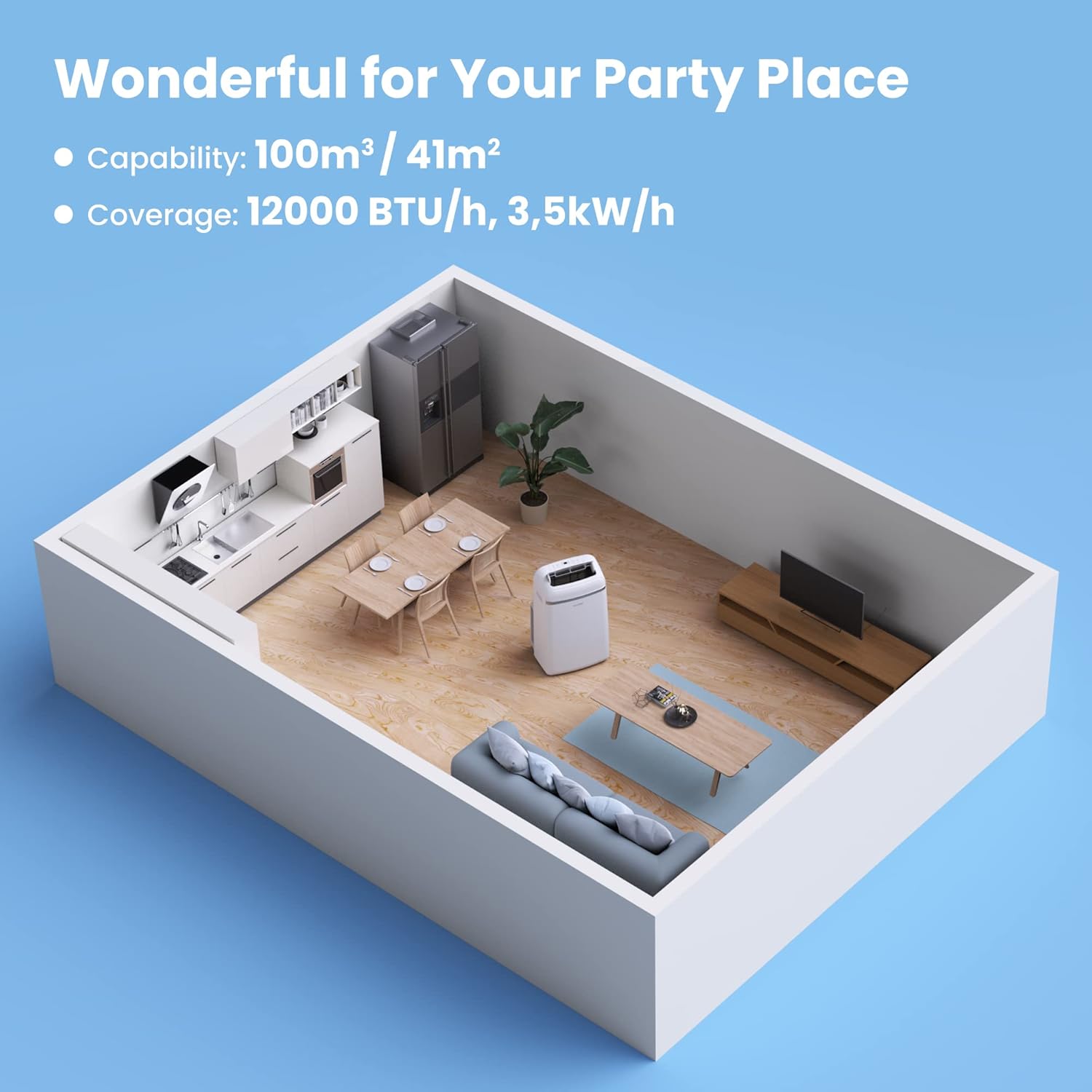
Image: The Comfee PAC 12000 Mobile Air Conditioner providing comfort in a living room setting.
2. பாதுகாப்பு தகவல்
Before operating the appliance, please read all safety instructions carefully to prevent injury or damage. This appliance uses R290 refrigerant, which is environmentally friendly but flammable. Do not attempt to repair or modify the unit yourself. Always consult a qualified professional for service.
- அலகு ஒரு நிலையான, நிலை மேற்பரப்பில் வைக்கப்படுவதை உறுதிசெய்க.
- காற்று நுழைவாயில்கள் அல்லது கடைகளைத் தடுக்க வேண்டாம்.
- வெப்ப மூலங்கள் மற்றும் நேரடி சூரிய ஒளியிலிருந்து அலகு விலகி வைக்கவும்.
- சுத்தம் அல்லது பராமரிப்பதற்கு முன், சாதனத்தை அவிழ்த்து விடுங்கள்.
- சேதமடைந்த மின் கம்பி அல்லது பிளக் கொண்டு செயல்பட வேண்டாம்.

Image: Certifications for the Comfee PAC 12000, highlighting its R290 Eco Friendly refrigerant, GS, and TÜV SÜD safety marks.

Image: The Comfee PAC 12000 uses R290, an eco-friendly refrigerant, reducing global warming potential by 98% compared to previous generations.
3. தயாரிப்பு கூறுகள் மற்றும் பாகங்கள்
The Comfee PAC 12000 comes with all necessary components for quick setup and operation.

Image: Diagram showing all included accessories for the Comfee PAC 12000.
சேர்க்கப்பட்ட பாகங்கள்:
- சாதன அடாப்டர்
- வெளியேற்ற குழாய் அடாப்டர்
- சாளர ஸ்லைடர் அடாப்டர்
- வெளியேற்ற குழாய்
- Holder for Wire Winding
- Self-adhesive Foam Seal
- Screws, Bolts, Dowels
- Non-adhesive Foam Seal
- சுவர் அவுட்லெட் அடாப்டர்
- ரிமோட் கண்ட்ரோல்
- சாளர ஸ்லைடர்
- குழாய் வடிகட்டவும்
4. அமைவு மற்றும் நிறுவல்
The Comfee PAC 12000 is designed for easy installation, adapting to various window shapes to efficiently exhaust hot air.
நிறுவல் படிகள்:
- சாளரத்தைத் தயாரிக்கவும்: Install the window slider adapter in your window opening.
- வெளியேற்றும் குழாயை இணைக்கவும்: வெளியேற்றக் குழாயை யூனிட்டின் வெளியேற்றும் போர்ட்டிலும், பின்னர் சாளர ஸ்லைடர் அடாப்டரிலும் இணைக்கவும்.
- சீல் இடைவெளிகள்: Use the provided foam seals to seal any gaps around the window opening to prevent hot air from re-entering the room.
- அலகை நிலைநிறுத்துங்கள்: Place the unit on a flat, stable surface, ensuring there is adequate space around it for proper airflow. The integrated casters allow for flexible positioning.

Image: The Comfee PAC 12000 is easy to install and adapts to various window shapes.

Image: Step-by-step guide for installing the exhaust hose with the window slider adapter.

Image: The four casters on the underside allow for flexible positioning of the unit.
5. இயக்க வழிமுறைகள்
The Comfee PAC 12000 offers multiple operating modes and convenient controls for optimal comfort.
கண்ட்ரோல் பேனல் மற்றும் ரிமோட் கண்ட்ரோல்:

படம்: முடிந்ததுview of the remote control and the unit's top control panel for easy operation.
இயக்க முறைகள்:
- குளிரூட்டும் முறை: உங்கள் அறைக்கு சக்திவாய்ந்த குளிர்ச்சியை வழங்குகிறது.
- ஈரப்பத நீக்க முறை: Reduces humidity levels, ideal for damp சூழல்கள்.
- ரசிகர் பயன்முறை: Circulates air with 3 adjustable fan speeds.
- நுண்ணறிவு முறை: Automatically adjusts settings to maintain optimal room climate and save energy.
- தூக்க முறை: வசதியான தூக்கத்திற்காக சரிசெய்யப்பட்ட அமைப்புகளுடன் அமைதியாக இயங்குகிறது.

Image: Visual representation of the four main operating modes: Intelligent, Cooling, 3 Speeds Fan, and Dehumidification.

Image: Intelligent Mode automatically maintains desired room climate and saves energy, while Cooling Mode provides rapid cooling with 12000 BTU/h.

Image: Fan Mode refreshes room air with desired fan speed, and Dehumidification Mode offers effective dehumidifying with 84L/24h capacity.
கூடுதல் அம்சங்கள்:
- 24 மணி நேர டைமர்: Set the desired operating time in advance, so you can enjoy a comfortable and dry environment upon your return.
- என்னைப் பின்தொடர் செயல்பாடு: The remote control acts as a thermostat, sensing the temperature around you and optimizing the unit's operation to maintain your comfort.
- ஆட்டோ ஸ்விங்: The adjustable air outlet grille ensures optimal air distribution.

Image: Illustration of the 24-hour timer function, allowing pre-setting of operation times.

Image: The 'Follow Me' function on the remote control optimizes temperature around you for smart comfort.
6. பராமரிப்பு
Regular maintenance ensures the longevity and efficient operation of your Comfee PAC 12000.
வடிகட்டி சுத்தம்:
The removable filter on the back of the unit should be cleaned regularly to maintain air quality and unit efficiency. Wash the filter with water and mild detergent, then allow it to dry completely before reinserting.

Image: Cleaning the removable filter on the back of the unit helps maintain clean and fresh air.
பொது பராமரிப்பு:
- வெளிப்புறத்தை ஒரு மென்மையான, டி மூலம் துடைக்கவும்amp துணி. கடுமையான இரசாயனங்கள் அல்லது சிராய்ப்பு கிளீனர்களைப் பயன்படுத்த வேண்டாம்.
- எந்த சுத்தம் செய்வதற்கு முன்பும் அலகு துண்டிக்கப்பட்டுள்ளதா என்பதை உறுதிப்படுத்திக் கொள்ளுங்கள்.
- For long-term storage, drain any accumulated water, clean the filter, and store the unit in a dry place.

Image: The automatic restart feature ensures the unit resumes operation with previous settings after a power outage.
7. சரிசெய்தல்
If you encounter issues with your Comfee PAC 12000, refer to the following common troubleshooting tips. For more detailed information, please consult the full product manual or contact customer support.
| பிரச்சனை | சாத்தியமான காரணம் | தீர்வு |
|---|---|---|
| அலகு இயக்கப்படவில்லை | No power supply; Power cord not plugged in; Unit is in standby mode. | மின் இணைப்புச் சாக்கெட்டைச் சரிபார்க்கவும்; மின் கம்பி பாதுகாப்பாகச் செருகப்பட்டுள்ளதா என்பதை உறுதிப்படுத்தவும்; மின் பொத்தானை அழுத்தவும். |
| போதுமான குளிர்ச்சி இல்லை | Air filter is dirty; Exhaust hose is not properly installed or sealed; Room size is too large; Doors/windows are open. | Clean the air filter; Check exhaust hose installation and seal all gaps; Ensure unit is appropriate for room size; Close all doors and windows. |
| அலகு சத்தமாக இருக்கிறது | Unit is not on a level surface; Air filter is dirty; Fan speed is too high. | Place unit on a level surface; Clean the air filter; Reduce fan speed. |
| நீர் கசிவு | Drain plug is open or loose; Water tank is full (in dehumidifying mode). | Ensure drain plug is securely closed; Empty the water tank. |
8. விவரக்குறிப்புகள்
Detailed technical specifications for the Comfee PAC 12000 Mobile Air Conditioner.

படம்: முடிந்ததுview of key features including larger capacity, energy efficiency, 24h timer, sleep mode, intelligent mode, and dehumidification mode, along with dimensions.
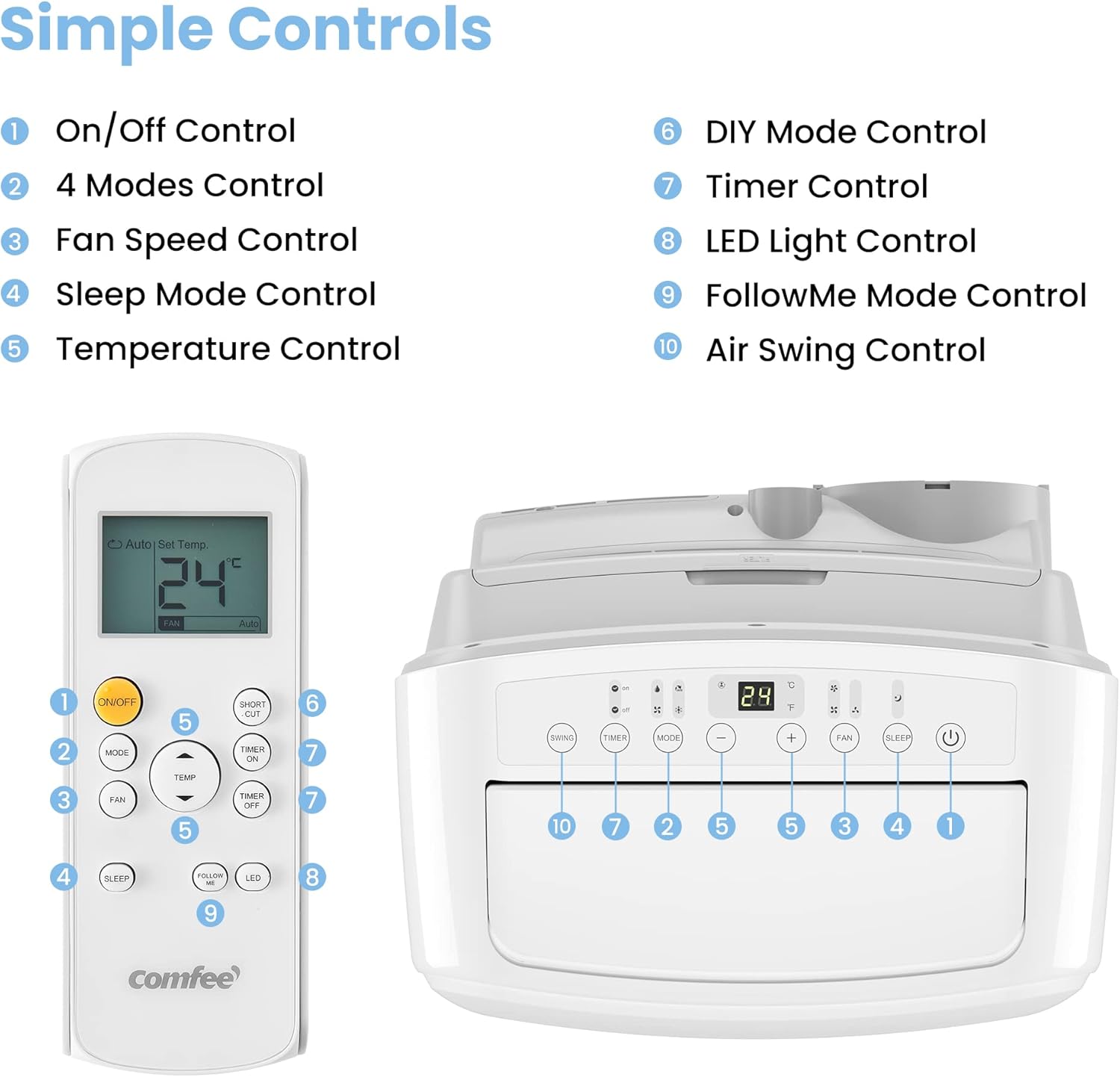
Image: Diagram illustrating the recommended room coverage for the Comfee PAC 12000.
| விவரக்குறிப்பு | மதிப்பு |
|---|---|
| மாதிரி எண் | பிஏசி 12000 |
| குளிரூட்டும் திறன் | 12000 BTU / 3.5 kW |
| பரிந்துரைக்கப்பட்ட அறை அளவு | Up to 43m (117m ) |
| செயல்பாடுகள் | Cooling, Dehumidifying, Fan |
| மின் நுகர்வு | 1350 வாட்ஸ் |
| தொகுதிtage | 230 வோல்ட் |
| இரைச்சல் நிலை | 63 டி.பி |
| குளிரூட்டி | R290 (Eco Friendly) |
| தயாரிப்பு பரிமாணங்கள் (L x W x H) | 46.7 x 39.7 x 76.5 செ.மீ |
| பொருளின் எடை | 33 கிலோகிராம் |
| ஆற்றல் திறன் விகிதம் (EER) | 2.6 |
| ஆற்றல் வகுப்பு | A |

Image: Detailed dimensions of the Comfee PAC 12000 unit.
9. உத்தரவாதம் மற்றும் ஆதரவு
The Comfee PAC 12000 Mobile Air Conditioner comes with a 3 வருட உத்தரவாதம், உங்கள் வாங்குதல் தொடர்பான மன அமைதியை உறுதி செய்கிறது.
For technical support, warranty claims, or any questions not covered in this manual, please contact Comfee customer service. Refer to your purchase documentation for specific contact details or visit the official Comfee webதளம்.
உத்தரவாத நோக்கங்களுக்காக உங்கள் கொள்முதல் ஆதாரத்தை வைத்திருங்கள்.
Ask a question about this manual
Ask about setup, troubleshooting, compatibility, parts, safety, or missing instructions. Manuals+ will review the question and use this page’s manual context to help answer it.