
அறிமுகம்
The GRAUGEAR G-PS5HS04 is an M.2 NVMe SSD heatsink cover specifically engineered for the PlayStation 5. This product is designed to improve the thermal performance of an SSD installed in the console's expansion slot, utilizing a copper heat pipe and aluminum fins for efficient heat dissipation. Proper cooling helps maintain optimal SSD performance and extends its lifespan.

Image: The GRAUGEAR PS5 SSD Heatsink Cover positioned next to a PlayStation 5 console, highlighting its design for improved heat dissipation.
இணக்கத்தன்மை
This heatsink cover is compatible with the original PlayStation 5 console (Disc Edition and Digital Edition, models CFI-1000, CFI-1100, CFI-1200). It is பொருந்தாது with the newer PS5 Slim console (CFI-2000 series).
The heatsink supports both single-sided and double-sided M.2 NVMe SSDs in various sizes: 2230, 2242, 2260, 2280, and 22110.

Image: A visual guide indicating compatibility with the original PlayStation 5 (Disc and Digital Editions) and incompatibility with the PS5 Slim console.
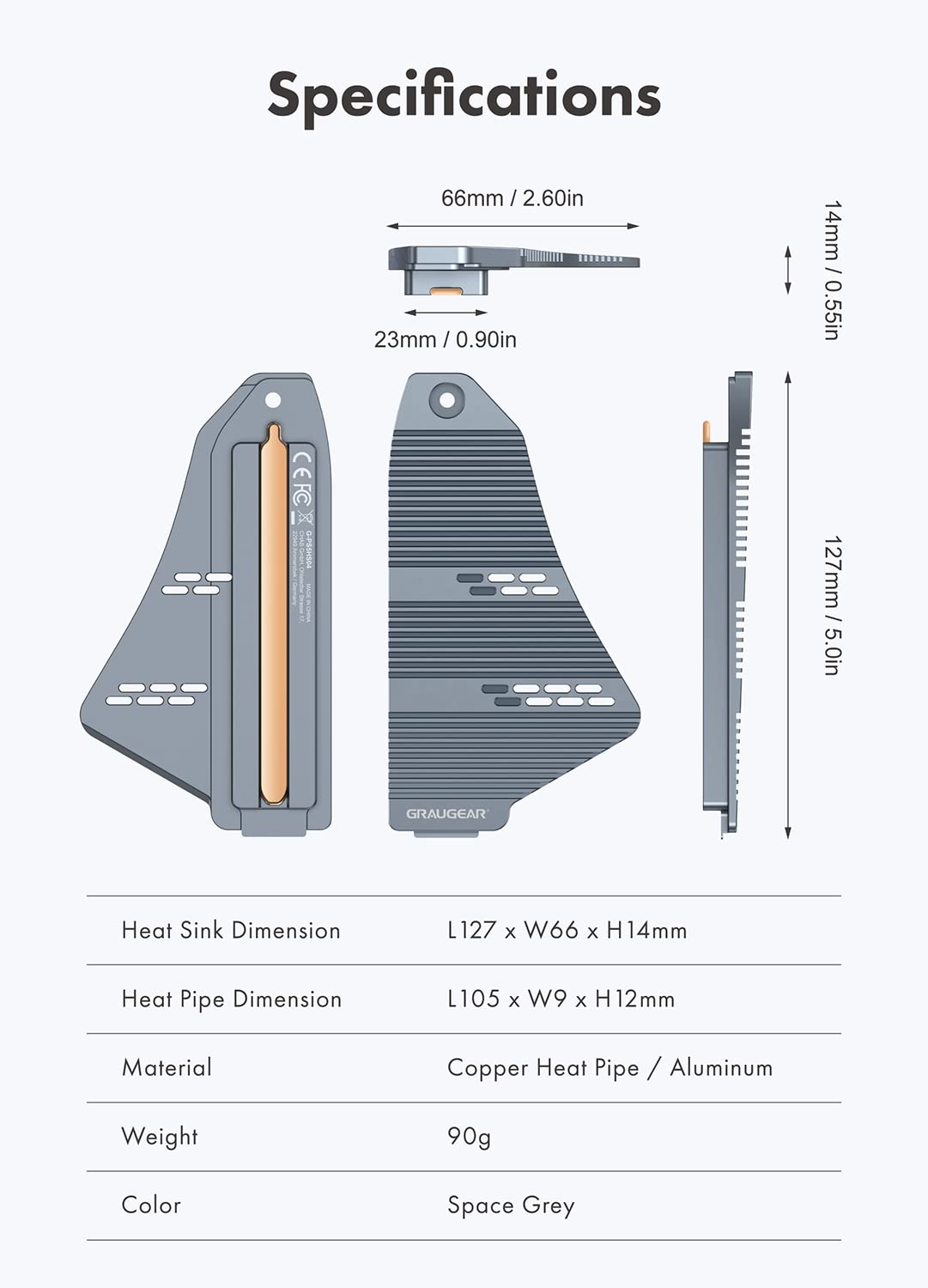
Image: An illustration demonstrating the supported M.2 NVMe SSD form factors (2230, 2242, 2260, 2280, 22110).
தொகுப்பு உள்ளடக்கங்கள்
தொகுப்பில் அனைத்து பொருட்களும் உள்ளதா என்பதை சரிபார்க்கவும்:
- GRAUGEAR PS5 M.2 NVMe SSD Heatsink Cover (G-PS5HS04)
- Thermal Pads (Single-sided blue: 1.0mm, 4.8W/m-k)
- Thermal Pads (Single-sided pink: 1.5mm, 3.6W/m-k)
- ஸ்க்ரூட்ரைவர்
- திருகுகள்
- உத்தரவாத அட்டை
- பயனர் கையேடு
- EVA திண்டு

படம்: ஒரு முழுமையானது view of the package contents, including the heatsink cover, thermal pads, screwdriver, screws, warranty card, and user manual.
அமைவு மற்றும் நிறுவல்
Follow these steps to install the GRAUGEAR PS5 SSD Heatsink Cover and your M.2 NVMe SSD into your PlayStation 5 console.
- Prepare the PS5: Power off your PlayStation 5 console and disconnect all cables. Place the console on a soft cloth on a flat surface.
- PS5 அட்டையை அகற்றவும்: Carefully remove the side cover of your PS5 to access the M.2 expansion slot. Refer to your PS5 console's official guide for detailed instructions on cover removal.
- Remove the Expansion Slot Cover: Unscrew and remove the small metal cover over the M.2 expansion slot.
- Install the EVA Pad: Place the supportive EVA Pad into the M.2 NVMe SSD slot.
- M.2 SSD ஐ செருகவும்: Gently insert your M.2 NVMe SSD into the expansion slot at an angle, then push it down until it clicks into place. Secure it with the provided SSD mounting screw.
- வெப்பப் பட்டைகளைப் பயன்படுத்துங்கள்: Select the appropriate thermal pads (1.0mm or 1.5mm) based on your SSD's thickness. Remove the protective films from both sides of the thermal pads and carefully place them onto the SSD surface. Ensure full contact.
- Install the Heatsink Cover: Align the GRAUGEAR heatsink cover over the SSD and thermal pads. Gently press down to ensure good contact between the heatsink and the thermal pads.
- Secure the Heatsink: Use the provided screws and screwdriver to secure the heatsink cover in place. Do not overtighten.
- Reassemble PS5: Replace the PS5 side cover and reconnect all cables.

Image: The heatsink being carefully placed over an M.2 SSD within the PlayStation 5's expansion slot.

Image: A diagram illustrating the process of securing the heatsink cover with screws.
நிறுவல் வீடியோ வழிகாட்டி
Video: An official GRAUGEAR installation guide demonstrating the steps to install the PS5 SSD heatsink cover and M.2 SSD.
இயக்கக் கோட்பாடுகள்
The GRAUGEAR G-PS5HS04 heatsink cover employs a combination of a copper heat pipe and aluminum fins to effectively manage heat generated by your M.2 NVMe SSD.
- Copper Heat Pipe: The integrated copper heat pipe provides maximum cooling performance through direct touch heat transfer. Its flat machined surface ensures even contact with the SSD, rapidly conducting heat away from the components.
- Aluminum Fins: The plate-fin heat exchanger design of the aluminum body ensures efficient thermal conduction. These fins increase the surface area for heat dissipation, reducing the SSD's temperature by up to 50%.
- Integrated Cooling: The heatsink's design works in conjunction with the PS5's internal cooling system, allowing fresh air to flow over the heatsink and further enhance cooling efficiency.
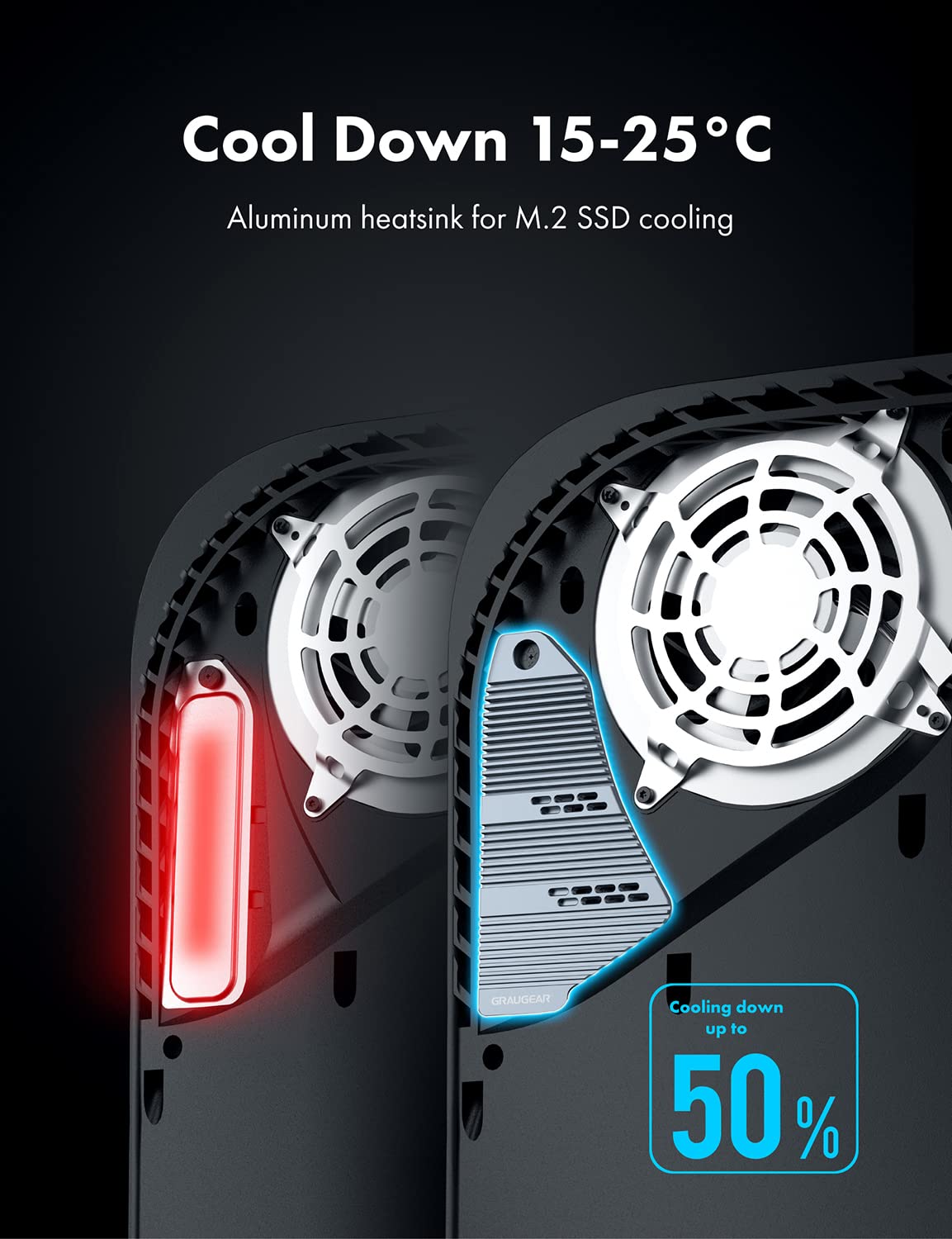
Image: A visual representation of the heatsink's cooling capability, showing a temperature reduction of 15-25°C for the M.2 SSD.

Image: A diagram illustrating the direct contact heat transfer from the SSD to the heatsink's copper heat pipe and then to the aluminum structure.

Image: An illustration depicting the revolutionary cooling process where the aluminum heatsink dissipates heat, and the PS5's cooling system ensures fresh airflow.

Image: A comparative diagram highlighting the temperature difference and improved ventilation with the GRAUGEAR heat pipe cooler versus the standard PlayStation 5 cover.
பராமரிப்பு
To ensure continued optimal performance of your GRAUGEAR PS5 SSD Heatsink Cover, consider the following maintenance tips:
- தூசி அகற்றுதல்: Periodically inspect the heatsink fins for dust accumulation. Use compressed air or a soft brush to gently remove any dust, ensuring unobstructed airflow.
- Thermal Pad Integrity: While thermal pads are designed for long-term use, if you ever need to remove and re-install the heatsink, it is recommended to replace the thermal pads to ensure optimal heat transfer.
- சுற்றுச்சூழல் காரணிகள்: Ensure your PS5 console is placed in a well-ventilated area, away from direct heat sources, to further aid in overall system cooling.
சரிசெய்தல்
Here are answers to some common questions regarding PS5 SSDs and heatsinks:
- Does PS5 SSD overheat?
The PS5 SSD can reach temperatures of up to 71 degrees Celsius. Excessively high temperatures may affect the life of the SSD, so using a heatsink is beneficial for maintaining lower operating temperatures. - Do I really need a heatsink for NVMe SSD?
While not all consumer SSDs require a heatsink, for high-performance NVMe SSDs, especially when used in demanding environments like the PS5, a heatsink helps prevent thermal throttling and prolongs the SSD's lifespan by keeping temperatures within optimal ranges. - How can I improve my PS5 cooling?
Sony recommends installing a heatsink to the internal PS5 SSD to maintain performance. A heatsink works by cooling down the SSD and transferring heat away from the device. Additionally, ensure proper console ventilation and keep the console's vents clear of obstructions.
விவரக்குறிப்புகள்
| அம்சம் | விவரம் |
|---|---|
| பிராண்ட் | GRAUGEAR |
| மாதிரி | G-PS5HS04 |
| Cooler Heatsink Material | Copper Heat Pipe / Aluminum |
| தயாரிப்பு பரிமாணங்கள் (L x W x H) | 5" x 2.6" x 0.55" (127மிமீ x 66மிமீ x 14மிமீ) |
| Heat Pipe Dimension (L x W x H) | 105 மிமீ x 9 மிமீ x 12 மிமீ |
| பொருளின் எடை | 3.18 அவுன்ஸ் (90 கிராம்) |
| Cooler Heatsink Compatibility | PS5 M.2 NVMe SSD (2230, 2242, 2260, 2280, 22110) |
| மவுண்டிங் வகை | Slot Mount |
| உள்ளிட்ட கூறுகள் | Heatsink cover, thermal pads, screwdriver, screws, warranty card, user manual, EVA pad |

Image: Detailed specifications and dimensions of the GRAUGEAR PS5 SSD Heatsink Cover.
உத்தரவாதம் மற்றும் ஆதரவு
GRAUGEAR products are designed for reliability and performance. This product comes with a standard warranty. Please refer to the included warranty card for specific terms and conditions.
For technical support, troubleshooting assistance, or warranty claims, please contact GRAUGEAR USA customer service. Contact details can typically be found on the GRAUGEAR official website or the warranty card provided in the package.