
1. அறிமுகம்
The ciciglow DC 0-60V Digital Power Meter (100A) is a versatile device designed for measuring voltage, current, power, and other electrical parameters in various DC systems. It features a large, easy-to-read display with adjustable backlight settings and a simple interface for switching between different statistical functions. This meter is suitable for applications in solar energy systems, industrial assembly lines, and automotive environments.

Image 1.1: The ciciglow DC Power Meter demonstrating its wide range of applications in solar energy, recreational vehicles, and industrial settings.
2. பாதுகாப்பு தகவல்
Please read and understand all safety instructions before operating this device. Failure to follow these instructions may result in electric shock, fire, or damage to the product.
- உள்ளீடு தொகுதியை உறுதி செய்யவும்tage and current do not exceed the specified limits of 0-60V DC and 100A.
- சாதனத்தை பிரிக்கவோ அல்லது மாற்றவோ முயற்சிக்காதீர்கள்.
- சாதனத்தை நீர், ஈரப்பதம் மற்றும் தீவிர வெப்பநிலையிலிருந்து விலக்கி வைக்கவும்.
- Use appropriate wiring and connectors for the current and voltage levels involved.
- இணைப்புகளை ஏற்படுத்துவதற்கு அல்லது துண்டிப்பதற்கு முன்பு எப்போதும் மின்சாரத்தைத் துண்டிக்கவும்.
3. தொகுப்பு உள்ளடக்கங்கள்
தொகுப்பில் அனைத்து பொருட்களும் உள்ளதா என சரிபார்க்கவும்:
- 1 x ciciglow DC Digital Power Meter (100A)
- 1 x ஆங்கில பயனர் கையேடு
4. அமைவு மற்றும் இணைப்பு
The power meter is designed for inline measurement. Connect it according to the following instructions:
- Identify the 'IN' and 'OUT' terminals on the meter. The 'IN' side connects to the power source (e.g., battery, solar panel output). The 'OUT' side connects to the load (e.g., inverter, device being powered).
- Connect the positive (+) wire from your power source to the red 'IN' wire of the meter.
- Connect the negative (-) wire from your power source to the black 'IN' wire of the meter.
- Connect the red 'OUT' wire of the meter to the positive (+) input of your load.
- Connect the black 'OUT' wire of the meter to the negative (-) input of your load.
- அனைத்து இணைப்புகளும் பாதுகாப்பாகவும் சரியாகவும் காப்பிடப்பட்டிருப்பதை உறுதி செய்யவும்.

படம் 4.1: கோணல் view of the ciciglow DC Power Meter, illustrating the 'IN' and 'OUT' connection points for power source and load.
5. இயக்க வழிமுறைகள்
Once connected and power is applied, the meter will automatically display real-time measurements.
5.1 காட்சி செயல்பாடுகள்
The large screen displays voltage (V), current (A), and power (W). The lower right section of the display shows additional statistical data.
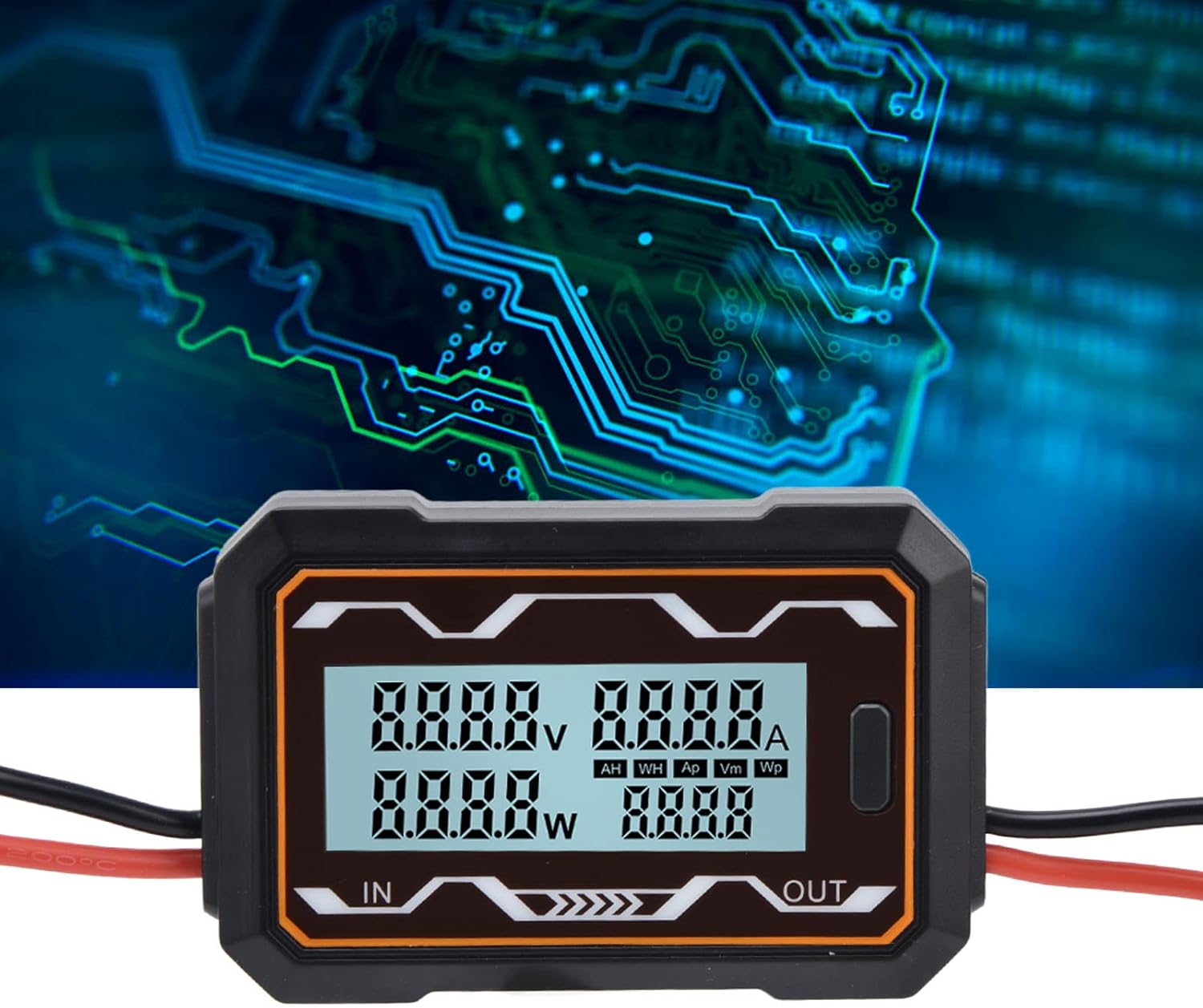
படம் 5.1: நெருக்கமான படம் view of the meter's digital display, highlighting the readouts for voltage, current, power, and the statistical data section.
5.2 Switching Statistical Data
A button located on the side of the meter allows you to cycle through different statistical measurements in the lower right display area. Press the button to switch between the following categories:
- AH: Ampere-hours (accumulated charge)
- WH: Watt-hours (accumulated energy)
- Ap: உச்சம் Amps (maximum current recorded)
- Vm: Minimum Volts (minimum voltage recorded)
- Wp: Peak Watts (maximum power recorded)

படம் 5.2: கோணல் view of the ciciglow DC Power Meter, clearly showing the function button used to cycle through display modes.
5.3 பின்னொளி அமைப்புகள்
The meter's backlight can be configured. Settings for the backlight are saved even when the power is turned off, ensuring your preferences are retained.
6. பராமரிப்பு
To ensure the longevity and accurate operation of your ciciglow DC Power Meter, follow these maintenance guidelines:
- சுத்தம்: சாதனத்தை சுத்தம் செய்ய மென்மையான, உலர்ந்த துணியைப் பயன்படுத்தவும். சிராய்ப்பு கிளீனர்கள் அல்லது கரைப்பான்களைப் பயன்படுத்த வேண்டாம்.
- சேமிப்பு: பயன்பாட்டில் இல்லாதபோது நேரடி சூரிய ஒளி மற்றும் தீவிர வெப்பநிலையிலிருந்து விலகி, குளிர்ந்த, உலர்ந்த இடத்தில் மீட்டரை சேமிக்கவும்.
- ஆய்வு: Periodically check the wiring and connections for any signs of wear, corrosion, or damage.
7. சரிசெய்தல்
If you encounter issues with your ciciglow DC Power Meter, refer to the following common troubleshooting steps:
- காட்சி இல்லை: Check all power connections to ensure they are secure and that the power source is active and within the specified voltage வரம்பு (0-60V DC).
- தவறான வாசிப்புகள்: Verify that the meter is connected correctly (IN to source, OUT to load) and that the wires are properly seated. Ensure the load is drawing current for accurate current and power readings.
- பொத்தான் பதிலளிக்கவில்லை: Ensure the device is powered on. If the button still does not respond, try disconnecting and reconnecting power.
- இடைப்பட்ட வாசிப்புகள்: Check for loose connections or damaged wiring. Ensure the operating environment is stable and free from excessive electrical noise.
சிக்கல்கள் தொடர்ந்தால், வாடிக்கையாளர் ஆதரவைத் தொடர்புகொள்ளவும்.
8. விவரக்குறிப்புகள்
| அம்சம் | விவரக்குறிப்பு |
|---|---|
| பிராண்ட் | ciciglow |
| மாதிரி | 100A |
| உள்ளீடு தொகுதிtagமின் வரம்பு | 0-60 வி டி.சி. |
| தற்போதைய வரம்பு | 100 ஏ |
| பொருள் | ஏபிஎஸ் |
| தயாரிப்பு எடை | தோராயமாக 92 கிராம்கள் |
| தயாரிப்பு பரிமாணங்கள் | தோராயமாக 9.3 x 6 x 2 செ.மீ (3.7 x 2.4 x 0.8 அங்குலம்) |
| சக்தி ஆதாரம் | Solar (Self-powered from DC circuit) |
| அளவீட்டு வகை | மல்டிமீட்டர் (தொகுதிtage, Current, Power, Energy, Charge) |
| Operating Temperature (Upper) | 85 டிகிரி செல்சியஸ் |
| இணக்கம் | IEC 61010-1 |

Image 8.1: The ciciglow DC Power Meter with its approximate dimensions labeled for reference.

படம் 8.2: பின்புறம் view of the ciciglow DC Power Meter, displaying the voltage and current range specifications.
9. உத்தரவாதம் மற்றும் ஆதரவு
Specific warranty information for this product is not provided in this manual. For details regarding warranty coverage, technical support, or service, please refer to the product packaging, the seller's website, or contact ciciglow customer service directly.
You can visit the ciciglow store for more information: ciciglow Store