
Sinotimer TM618N-2
Sinotimer Digital Programmable Timer TM618N-2 User Manual
Model: TM618N-2
1. தயாரிப்பு முடிந்துவிட்டதுview
The Sinotimer TM618N-2 is a versatile 7-day weekly digital programmable timer designed for automated control of electrical equipment. It allows users to set specific daily or weekly schedules for turning devices on and off, ensuring efficient energy management and convenience. This timer is suitable for a wide range of applications, including controlling lighting, heating, ventilation, and other electrical appliances.

படம் 1: முன் view of the Sinotimer TM618N-2 Digital Timer, showing the display and control buttons.
2 முக்கிய அம்சங்கள்
- வாராந்திர நிரல்படுத்தக்கூடியது: Allows up to 16 ON/OFF programs per day or week.
- பல செயல்பாட்டு: Includes Clock display, Timer, Countdown, Automatic weekly time deviation correction, and Sleep mode.
- அதிக திறன்: 16 ஐ ஆதரிக்கிறது Amp / 220 Volt AC loads.
- பரந்த தொகுதிtagஇ இணக்கத்தன்மை: Operates with 220V, 230V, 240V AC.
- உள்ளமைக்கப்பட்ட பேட்டரி: பவர் ou போது அமைப்புகளை வைத்திருக்கிறதுtages (Lithium battery type).
- பல்துறை பயன்பாடுகள்: Ideal for controlling dryers, defrosting equipment, swimming pool pumps, gates, lighting, and more.
3. விவரக்குறிப்புகள்
| அம்சம் | விவரம் |
|---|---|
| மாதிரி | TM618N-2 அறிமுகம் |
| பிராண்ட் | Sinotimer |
| தொகுதிtage | 220V / 230V / 240V ஏசி |
| தற்போதைய மதிப்பீடு | 16 Amp |
| நிரல்களின் எண்ணிக்கை | 16 ஆன்/ஆஃப் நிரல்கள் |
| பொருள் | பிளாஸ்டிக் |
| பேட்டரி வகை | Lithium (internal, non-replaceable by user) |
| நிறம் | Multi-color (typically white/grey) |
4. நிறுவல்
முக்கியமான பாதுகாப்பு அறிவிப்பு: Installation should only be performed by a qualified electrician. Ensure power is disconnected before attempting any wiring.
- மவுண்டிங்: The TM618N-2 is designed for DIN rail mounting or screw mounting. Secure the timer in a suitable electrical enclosure.
- வயரிங்: Refer to the wiring diagram on the back of the unit.
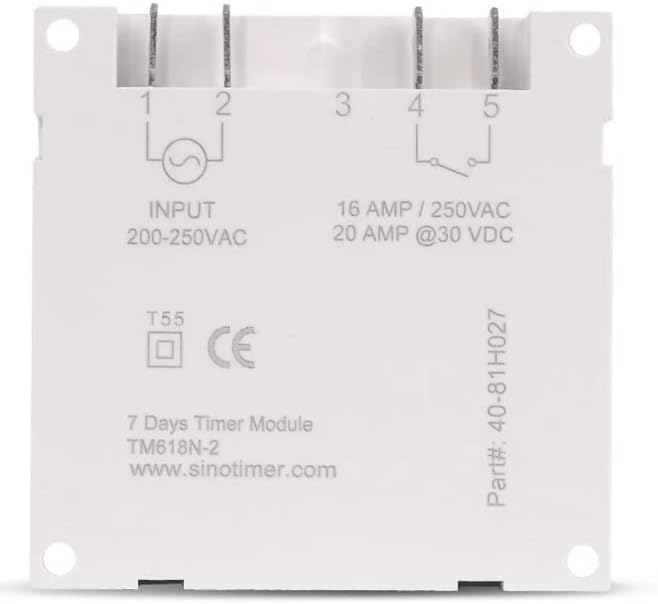
படம் 2: பின் view of the Sinotimer TM618N-2, showing input/output terminals and wiring diagram.
- Input (Terminals 1 & 2): Connect your 200-250VAC power supply to these terminals.
- Output (Terminals 3, 4, & 5):
- முனையம் 3: பொதுவான (COM)
- Terminal 4: Normally Open (NO) - Connect your load here for switched power.
- Terminal 5: Normally Closed (NC) - (Less commonly used for timer applications, but available).
- பவர் ஆன்: Once wiring is complete and secure, restore power to the circuit. The timer display should illuminate.

Figure 3: Technical drawing showing the dimensions of the Sinotimer TM618N-2 timer.
5. இயக்க வழிமுறைகள்
5.1. பொத்தான் செயல்பாடுகள்
- கடிகாரம்: Used to set the current time and day.
- திட்டம்: Enters/exits programming mode for ON/OFF schedules.
- வாரம்: Selects the day(s) of the week during time or program setting.
- மணிநேரம்: Adjusts the hour during time or program setting.
- நிமிடம்: Adjusts the minute during time or program setting.
- நினைவு: Recalls or cancels a program setting.
- கையேடு: Manually overrides the timer's current state (ON/AUTO/OFF).
- R (Reset): Small button (requires a pointed object) to reset the timer to factory defaults.
5.2. தற்போதைய நேரம் மற்றும் நாளை அமைத்தல்
- அழுத்திப் பிடிக்கவும் கடிகாரம் பொத்தான்.
- வைத்திருக்கும் போது கடிகாரம், அழுத்தவும் வாரம் தற்போதைய நாளை அமைக்க (MO, TU, WE, TH, FR, SA, SU).
- வைத்திருக்கும் போது கடிகாரம், அழுத்தவும் மணிநேரம் தற்போதைய நேரத்தை அமைக்க.
- வைத்திருக்கும் போது கடிகாரம், அழுத்தவும் MIN தற்போதைய நிமிடத்தை அமைக்க.
- விடுவிக்கவும் கடிகாரம் அமைப்புகளைச் சேமிக்க பொத்தானை அழுத்தவும்.
5.3. Programming ON/OFF Schedules
The timer supports up to 16 ON and 16 OFF programs. Each program can be set for a specific day or group of days.
- அழுத்தவும் PROG பொத்தானை ஒரு முறை அழுத்தவும். காட்சி "1 ஆன்" என்பதைக் காண்பிக்கும்.
- அழுத்தவும் வாரம் repeatedly to select the desired day(s) for this program (e.g., MO, TU, WE, TH, FR, SA, SU; MO-FR; SA-SU; MO-SA; etc.).
- அழுத்தவும் மணிநேரம் விரும்பிய ON மணிநேரத்தை அமைக்க.
- அழுத்தவும் MIN விரும்பிய ON நிமிடத்தை அமைக்க.
- அழுத்தவும் PROG மீண்டும். காட்சி "1 ஆஃப்" என்பதைக் காண்பிக்கும்.
- Repeat steps 2-4 to set the desired OFF time for the first program.
- அழுத்தவும் PROG to move to the next program ("2 ON", "2 OFF", etc.) and repeat the process for up to 16 programs.
- To exit programming mode and save settings, press the கடிகாரம் பொத்தான்.
5.4. கைமுறை மேலெழுதல்
அழுத்தவும் கையேடு button to cycle through the output modes:
- On: Output is continuously ON, ignoring programs.
- ஆட்டோ: Output follows the programmed schedules.
- முடக்கு: Output is continuously OFF, ignoring programs.
டைமர் இயக்கத்தில் இருப்பதை உறுதிசெய்யவும் ஆட்டோ mode for programmed operation.
5.5. டைமரை மீட்டமைத்தல்
To clear all settings and return the timer to its factory default state, insert a pointed object (like a paperclip) into the small R (Reset) hole and press gently.
6. பராமரிப்பு
The Sinotimer TM618N-2 requires minimal maintenance.
- சாதனத்தை சுத்தமாகவும் தூசி இல்லாமல் வைத்திருக்கவும். சுத்தம் செய்ய மென்மையான, உலர்ந்த துணியைப் பயன்படுத்தவும்.
- சிராய்ப்பு கிளீனர்கள் அல்லது கரைப்பான்களைப் பயன்படுத்த வேண்டாம்.
- Ensure the timer is installed in a dry environment, away from direct moisture or extreme temperatures.
- The internal battery is designed for long life and is not user-replaceable. If the display goes blank or settings are not retained after a power outage, the battery may need professional service.
7. சரிசெய்தல்
| பிரச்சனை | சாத்தியமான காரணம் | தீர்வு |
|---|---|---|
| காட்சி காலியாக உள்ளது. | No power supply; internal battery depleted. | Check power connections. If power is present, the internal battery may need charging (leave connected to power for several hours) or replacement (professional service required). |
| Timer not switching ON/OFF as programmed. | Timer is not in AUTO mode; incorrect program settings; wiring issue. | அழுத்தவும் கையேடு until "AUTO" is displayed. Review and correct program settings. Verify wiring connections. |
| மின்சாரம் நிறுத்தப்பட்ட பிறகு அமைப்புகள் இழக்கப்படும்.tage. | Internal battery is depleted or faulty. | Leave the timer connected to power for at least 4 hours to charge the internal battery. If the problem persists, the battery may need replacement (professional service recommended). |
| பொத்தான்கள் பதிலளிக்கவில்லை. | Temporary software glitch; unit needs reset. | Perform a full reset using the R button. If the issue continues, contact support. |
8. உத்தரவாதம் மற்றும் ஆதரவு
உத்தரவாதத் தகவல் மற்றும் தொழில்நுட்ப ஆதரவுக்கு, உங்கள் கொள்முதலுடன் வழங்கப்பட்ட ஆவணங்களைப் பார்க்கவும் அல்லது உங்கள் சில்லறை விற்பனையாளரைத் தொடர்பு கொள்ளவும். உத்தரவாதக் கோரிக்கைகளுக்கு உங்கள் வாங்கியதற்கான ஆதாரத்தை வைத்திருங்கள்.
Manufacturer: Sinotimer
Ask a question about this manual
Ask about setup, troubleshooting, compatibility, parts, safety, or missing instructions. Manuals+ will review the question and use this page’s manual context to help answer it.