
அறிமுகம்
The LARIAU HCT-366 is an intelligent, rain-proof, and dust-proof automatic watering device designed to simplify your garden irrigation. Featuring a large display and a rain sensor, it offers precise and efficient watering for various plants and gardens. This manual provides detailed instructions for installation, operation, and maintenance to ensure optimal performance of your device.
தயாரிப்பு அம்சங்கள்
- பெரிய காட்சி: Features a large screen for clear visibility and convenient operation.
- மழை சென்சார்: Automatically pauses watering during rainfall, conserving water and preventing over-watering.
- வாட்டர் இன்லெட் ஃபில்டர்: An integrated filter screen effectively prevents impurities from entering the device.
- குழந்தை பூட்டு செயல்பாடு: Prevents accidental button presses or unauthorized changes to settings.
- நிரல்படுத்தக்கூடிய அட்டவணைகள்: Supports 6 groups of programmable timing settings, offering weekly or cyclical modes.
- நெகிழ்வான நிறுவல்: Equipped with a twisted active joint for easy installation on faucets, even those close to a wall.
- Precise Timing: Irrigation duration can be set precisely from 1 second to 99 minutes and 59 seconds.
தொகுப்பு உள்ளடக்கங்கள்
அனைத்து பொருட்களும் இருப்பதை உறுதிசெய்ய தொகுப்பைச் சரிபார்க்கவும்:
- 1 x LARIAU HCT-366 Irrigation Timer
- 1 x பேக்கேஜிங் பெட்டி
- 1 x Accessory Set (e.g., connectors, seals)
அமைவு
1. பேட்டரி நிறுவல்
The device requires two (2) AA alkaline batteries (not included). Ensure correct polarity when inserting the batteries into the compartment, typically located on the back or side of the unit. Close the battery compartment securely to maintain water resistance.
2. சாதன நிறுவல்
- Attach the LARIAU HCT-366 irrigation timer directly to your outdoor faucet. The twisted active joint allows for easy connection, even in tight spaces.
- Ensure the connection is tight to prevent leaks. Use the provided accessory set (e.g., rubber washers) to create a secure, watertight seal.
- Connect your garden hose or irrigation system to the outlet of the watering device.

Image: The LARIAU HCT-366 device connected to a standard outdoor faucet, demonstrating its compact design and easy installation.
3. வாட்டர் இன்லெட் ஃபில்டர்
The device includes a water inlet filter screen to prevent debris from entering and clogging the system. Ensure this filter is properly seated during installation. Regularly check and clean the filter to maintain optimal water flow.

Image: An illustrative diagram of the HCT-366 connected to a water source and distributing water through a drip irrigation system to multiple plants.
இயக்க வழிமுறைகள்
காட்சி முடிந்ததுview

படம்: ஒரு விரிவான view of the HCT-366's LCD screen, displaying various indicators such as current time, day of the week, battery status, rain sensor icon, and active program slots (P1-P6).
The large LCD screen provides all necessary information at a glance. Key indicators include:
- இப்போது: தற்போதைய நேரம்.
- வார நாட்கள்: Indicates active watering days (Su, Mo, Tu, We, Th, Fr, Sa).
- பேட்டரி காட்டி: மீதமுள்ள பேட்டரி ஆயுளைக் காட்டுகிறது.
- Rain Sensor Icon: Indicates if the rain sensor is active or has detected rain.
- சைல்ட் லாக் ஐகான்: Shows if the child lock function is enabled.
- P1-P6: Program slots for setting irrigation schedules.
- ஆரம்பிக்கும் நேரம்: The programmed start time for watering.
- எவ்வளவு காலம்: The programmed duration for watering.
தற்போதைய நேரத்தையும் நாளையும் அமைத்தல்
- அழுத்தவும் "செட்" button (or similar, typically indicated by a clock icon) to enter time setting mode.
- பயன்படுத்தவும் "+" மற்றும் "-" மணிநேரத்தையும் நிமிடத்தையும் சரிசெய்ய பொத்தான்கள்.
- அழுத்தவும் "சரி" to confirm and move to the next setting (e.g., day of the week).
- Adjust the current day using "+" மற்றும் "-", பின்னர் அழுத்தவும் "சரி" சேமிக்க.
Programming Irrigation Schedules (P1-P6)
The device allows for up to 6 independent watering programs. Follow these steps to set a program:
- அழுத்தவும் "பி" button (Program) to select a program slot (P1-P6). Use "+" or "-" to navigate between programs.
- அழுத்தவும் "சரி" to enter the settings for the selected program.
- தொடக்க நேரத்தை அமைக்கவும்: பயன்படுத்தவும் "+" மற்றும் "-" to adjust the desired start time (hour and minute). Press "சரி".
- நீர்ப்பாசன கால அளவை அமைக்கவும்: பயன்படுத்தவும் "+" மற்றும் "-" to set the watering duration from 1 second to 99 minutes 59 seconds. Press "சரி".
- Set Watering Frequency (Days):
- வாராந்திர முறை: Select specific days of the week (Su, Mo, Tu, etc.) using "+" மற்றும் "-". அழுத்தவும் "சரி" to toggle selection for each day.
- சுழற்சி முறை: Some models may offer a cycle mode (e.g., every 2 days). Refer to the on-screen prompts to set the cycle interval.
- அழுத்தவும் "சரி" to save the program settings. Repeat for other programs (P2-P6) as needed.

Image: The HCT-366 display in programming mode, showing placeholders for setting start time and watering duration, along with day selection options.
Rain Sensor Function
The integrated rain sensor automatically detects rainfall. When rain is detected, the device will pause any scheduled watering programs to prevent over-watering. Watering will resume according to the schedule once the sensor is dry. This feature helps conserve water and protects your plants.
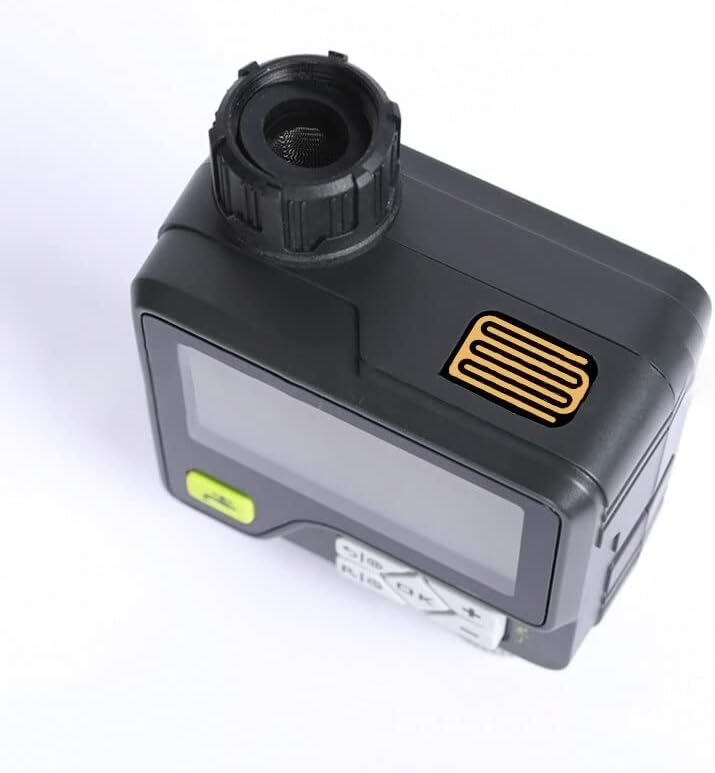
படம்: ஒரு பக்க நிபுணர்file of the HCT-366, clearly showing the rain sensor grid located on the top of the unit, designed to detect precipitation.
குழந்தை பூட்டு செயல்பாடு
To prevent accidental changes to your watering schedule, activate the child lock:
- செயல்படுத்த: அழுத்திப் பிடிக்கவும் "LOCK" button (or a combination like "சரி" மற்றும் "-" simultaneously, refer to the device's button labels) until the lock icon appears on the screen.
- To deactivate: Repeat the action. The lock icon will disappear.
கைமுறை நீர்ப்பாசனம்
To initiate watering outside of the programmed schedule:
- அழுத்தவும் "MANUAL" button (often indicated by a water droplet or faucet icon).
- பயன்படுத்தவும் "+" மற்றும் "-" விரும்பிய கைமுறை நீர்ப்பாசன கால அளவை அமைக்க.
- அழுத்தவும் "சரி" கைமுறையாக நீர்ப்பாசனம் தொடங்க.
- கைமுறை நீர்ப்பாசனத்தை நிறுத்த, அழுத்தவும் "MANUAL" மீண்டும் பொத்தானை அழுத்தவும் அல்லது "ஆஃப்".
பராமரிப்பு
வாட்டர் இன்லெட் ஃபில்டரை சுத்தம் செய்தல்
Periodically check the water inlet filter for debris and sediment. If clogged, carefully remove the filter and rinse it under running water. Reinsert the filter securely before reattaching the device to the faucet.
பேட்டரி மாற்று
When the battery indicator shows low power, replace the two AA alkaline batteries promptly to ensure continuous operation. Always use fresh alkaline batteries for best performance.
குளிர்கால சேமிப்பு
Before the first frost, disconnect the watering device from the faucet and drain any remaining water. Store the device indoors in a dry, frost-free location. Remove batteries if storing for an extended period to prevent leakage.
சரிசெய்தல்
- சாதனம் இயக்கப்படவில்லை: Check if batteries are installed correctly and are not depleted. Replace with fresh batteries if necessary.
- நீர் ஓட்டம் இல்லை:
- குழாய் முழுமையாக திறந்திருப்பதை உறுதி செய்து கொள்ளுங்கள்.
- Check the water inlet filter for clogs and clean if needed.
- Verify that the water pressure is within the operating range (0.05-0.8 MPA).
- Confirm that a watering program is active or manual watering is initiated.
- Watering not starting at scheduled time:
- Check if the current time and day are set correctly on the device.
- Verify that the program's start time and frequency are correctly set.
- Ensure the rain sensor is not wet, pausing the schedule.
- Check if the child lock is active and interfering with settings.
- Rain sensor not working: Ensure the rain sensor area is clean and free from obstructions.
விவரக்குறிப்புகள்
| மாதிரி | HCT-366 |
| நிரல் அளவுருக்கள் | 6 programmable timing groups (Week/Cycle, Dual Mode) |
| இயக்க தொகுதிtage | 2 x ஏஏ அல்கலைன் பேட்டரிகள் (சேர்க்கப்படவில்லை) |
| நீர் அழுத்த வரம்பு | 0.05 - 0.8 MPA |
| நீர்ப்பாசனம் காலம் | 1 second - 99 minutes 59 seconds |
| நிகர எடை | 382 கிராம் (பேட்டரி இல்லாமல்) |
| பரிமாணங்கள் (L x W x H) | 10.1 x 5.5 x 13.6 செ.மீ |
| உற்பத்தியாளர் குறிப்பு | 9444325645163 |
| ASIN | B0B6STPQMH |
உத்தரவாதம் மற்றும் ஆதரவு
For warranty information and technical support, please refer to the retailer's policy or contact LARIAU customer service through their official website or the point of purchase. Keep your purchase receipt as proof of purchase.