
அறிமுகம்
Thank you for choosing the Glorious Gaming Model O Wireless Mouse. This manual provides essential information for setting up, operating, maintaining, and troubleshooting your new gaming mouse. Designed for competitive gaming, the Model O Wireless combines a superlight honeycomb design with lag-free 2.4GHz wireless technology and customizable RGB lighting to enhance your gaming experience.
தயாரிப்பு அம்சங்கள்
- Superlight Design: Weighing only 69 grams, the honeycomb shell reduces weight while maintaining structural integrity and improving airflow.
- Lag-Free 2.4GHz Wireless: Experience ultra-low wireless latency for responsive and crisp clicks, ensuring no unexpected double-clicking.
- நீட்டிக்கப்பட்ட பேட்டரி ஆயுள்: Up to 71 hours of playtime with RGB lighting off, allowing for prolonged gaming sessions without frequent recharging.
- Wired & Wireless Modes: Includes a flexible USB-C Ascended charging cable for continuous performance even while charging.
- Ambidextrous Shape: Ergonomically designed for comfortable use by both left and right-handed users.
- தனிப்பயனாக்கக்கூடிய RGB விளக்குகள்: Personalize your mouse with various lighting effects and colors via the Glorious CORE software.
- High-Precision Optical Sensor: Equipped with a Glorious BAMF sensor, offering up to 19,000 DPI and 400 IPS tracking speed for pinpoint accuracy.
- நீடித்து உழைக்கும் சுவிட்சுகள்: Features switches rated for 80 million clicks, ensuring long-lasting performance.
- G-Skates Premium PTFE Mouse Feet: Provides smooth gliding across any surface with minimal friction.

படம்: மேலிருந்து கீழ் view of the Glorious Model O Wireless Gaming Mouse, showcasing its honeycomb shell and vibrant RGB lighting.
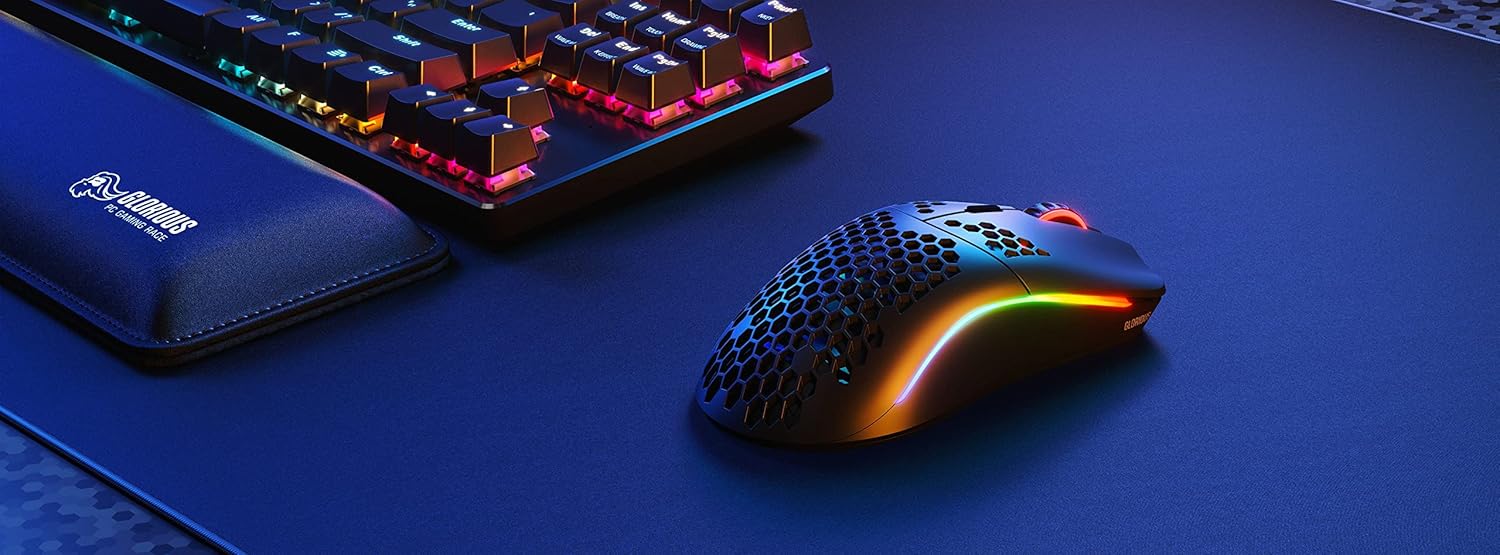
Image: Technical diagram illustrating the dimensions and key specifications of the Glorious Model O Wireless Gaming Mouse.
அமைவு
- அன்பாக்சிங்: Carefully remove the mouse, USB-C Ascended charging cable, and wireless dongle from the packaging.
- Connect Wireless Dongle: Plug the 2.4GHz wireless USB dongle into an available USB port on your computer.
- சுட்டியை இயக்கு: Locate the power switch on the underside of the mouse and slide it to the 'ON' position. The mouse should automatically connect to the dongle.
- ஆரம்ப கட்டணம் (விருப்பத்தேர்வு): For optimal performance, it is recommended to fully charge the mouse before first use. Connect the USB-C Ascended cable to the front of the mouse and the other end to a USB port on your computer or a USB charger.
- Install Glorious CORE Software: Download and install the Glorious CORE software from the official Glorious webதளம் (www.gloriousgaming.com/pages/glorious-core) to customize settings, RGB lighting, and button assignments.
Video: A seller demonstrates the unboxing and initial setup of the Glorious Model O Wireless mouse, highlighting its lightweight design and flexible cable.
இயக்க வழிமுறைகள்
The Glorious Model O Wireless mouse features 6 programmable buttons for versatile control during gaming and general use.
- இடது கிளிக் (பொத்தான் 1): முதன்மை செயல் பொத்தான்.
- வலது கிளிக் (பொத்தான் 2): இரண்டாம் நிலை செயல் பொத்தான்.
- Scroll Wheel Click (Button 3): Often used for middle-click functions or opening new tabs.
- DPI Button (Button 4): Cycles through preset DPI settings. Default settings can be customized via Glorious CORE.
- Side Buttons (Buttons 5 & 6): Typically used for forward/backward navigation in browsers or assigned to in-game actions. These are fully programmable.
For advanced customization of button functions, macros, and DPI levels, refer to the Glorious CORE software.
தனிப்பயனாக்கம்
The Glorious Model O Wireless offers extensive customization options through the Glorious CORE software:
- RGB விளக்குகள்: Choose from various effects (e.g., Seamless Breathing, Glorious Mode, Single Color) and adjust brightness and speed. You can set different lighting for wired and wireless modes.
- DPI அமைப்புகள்: Create and save multiple DPI profiles, allowing you to switch sensitivity on the fly using the dedicated DPI button.
- பட்டன் ஒதுக்கீடு: Remap any of the 6 buttons to perform mouse functions, keyboard commands, custom macros, or multimedia controls.
- வாக்குப்பதிவு விகிதம்: Adjust the polling rate (up to 1000 Hz) for optimal responsiveness.
- Lift-Off Distance (LOD): Fine-tune the distance at which the sensor stops tracking when the mouse is lifted.

Image: Screenshot of the Glorious CORE software, displaying options for customizing RGB lighting effects and colors for the mouse.
பராமரிப்பு
- சுத்தம்: Use a soft, dry cloth to wipe down the mouse. For the honeycomb shell, a can of compressed air can help remove dust and debris. Avoid using harsh chemicals or abrasive materials.
- கேபிள் பராமரிப்பு: Handle the Ascended cable gently to prevent fraying or damage. Avoid sharp bends or excessive pulling.
- சேமிப்பு: பயன்பாட்டில் இல்லாதபோது, தீவிர வெப்பநிலையிலிருந்து விலகி, சுத்தமான, வறண்ட சூழலில் மவுஸை சேமிக்கவும்.
சரிசெய்தல்
| பிரச்சினை | சாத்தியமான தீர்வு |
|---|---|
| சுட்டி பதிலளிக்கவில்லை (வயர்லெஸ்) | Ensure the mouse is powered on and the wireless dongle is securely plugged into a USB port. Try a different USB port. Re-pair the mouse if necessary (refer to Glorious CORE software for pairing instructions). |
| சுட்டி பதிலளிக்கவில்லை (வயர் மூலம்) | Ensure the USB-C cable is securely connected to both the mouse and the computer. Try a different USB port. |
| Lag or stuttering | Ensure the mouse is fully charged. Reduce wireless interference by moving the dongle closer to the mouse or away from other wireless devices. Update mouse firmware via Glorious CORE. |
| RGB விளக்கு வேலை செய்யவில்லை | Check RGB settings in Glorious CORE. Ensure brightness is not set to 0. Update mouse firmware. |
| பொத்தான்கள் சரியாக இயங்கவில்லை | Verify button assignments in Glorious CORE. Reset to default settings if needed. Update mouse firmware. |
விவரக்குறிப்புகள்
| அம்சம் | விவரம் |
|---|---|
| பிராண்ட் | மகிமை |
| மாதிரி | மாடல் ஓ வயர்லெஸ் |
| நிறம் | மேட் பிளாக் |
| இணைப்பு | 2.4GHz Wireless, USB-C Wired |
| சென்சார் | Glorious BAMF Optical Sensor |
| DPI | 19,000 வரை |
| கண்காணிப்பு வேகம் (IPS) | 400 |
| வாக்குப்பதிவு விகிதம் | 1000 Hz (Dual Wired/Wireless) |
| Click Latency | 2.08ms (Internal Testing) |
| எடை | 69 grams (+/- 1.5g) |
| பேட்டரி ஆயுள் | Up to 71 Hours (RGB off) |
| பொத்தான்கள் | 6 (நிரல்படுத்தக்கூடியது) |
| கை நோக்குநிலை | இருதரப்பு |
| சுட்டி அடி | G-Skates Premium PTFE |
| இணக்கமான சாதனங்கள் | விண்டோஸ், மேக், லினக்ஸ் |
உத்தரவாதம் மற்றும் ஆதரவு
The Glorious Gaming Model O Wireless Mouse comes with a 90 நாள் வரையறுக்கப்பட்ட உத்தரவாதம். For warranty claims or technical support, please visit the official Glorious Gaming webதளத்தில் அல்லது அவர்களின் வாடிக்கையாளர் சேவையைத் தொடர்பு கொள்ளவும். உத்தரவாத சரிபார்ப்புக்காக உங்கள் வாங்கியதற்கான ஆதாரத்தை வைத்திருங்கள்.
Video: A seller provides a quick overview of the Glorious Model O Wireless mouse, highlighting its features and suitability for gaming.