
1. அறிமுகம்
This manual provides comprehensive instructions for the installation, operation, and maintenance of your Hoco CA104 Telescopic Gravity Car Phone Holder. Please read this manual carefully before use to ensure proper functionality and safety.
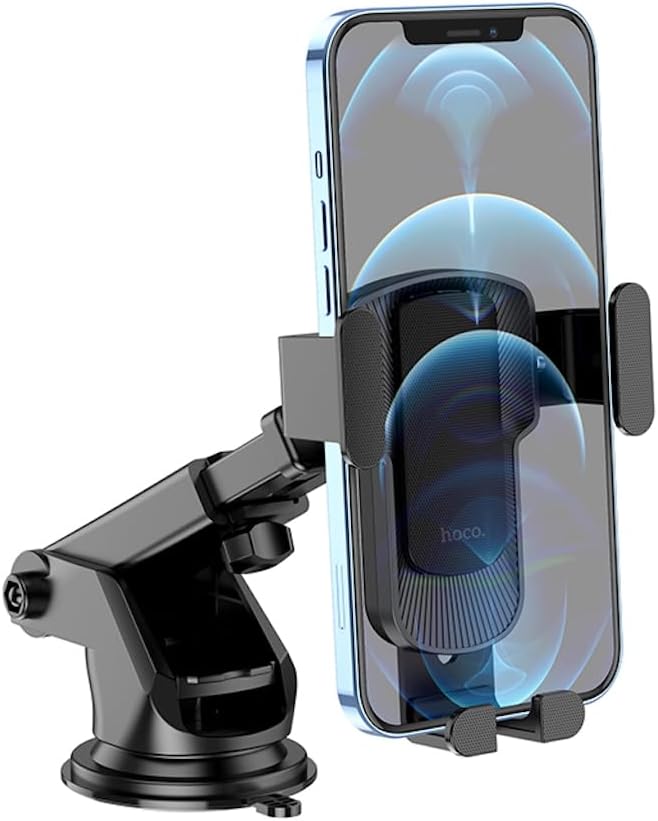
Image 1.1: The Hoco CA104 car phone holder with a smartphone securely held in place, demonstrating its gravity linkage mechanism and adjustable arm.
2. தயாரிப்பு கூறுகள்
The Hoco CA104 holder consists of the following main parts:
- Gravity Linkage Clamp: Automatically adjusts to hold the phone when inserted.
- Telescopic Arm: Allows for extension and retraction to adjust distance.
- Adjustable Ball Joint: Enables 360-degree rotation and angle adjustment of the phone.
- உறிஞ்சும் கோப்பை அடிப்படை: Provides secure attachment to flat surfaces like dashboards or windshields.
- Locking Lever: Activates the suction cup for firm adhesion.

படம் 2.1: View of the Hoco CA104 holder, highlighting the suction cup base and the adjustable telescopic arm before phone insertion.
3. நிறுவல் வழிமுறைகள்
The Hoco CA104 can be installed on either the car dashboard or windshield.
3.1 Dashboard Installation
- மேற்பரப்பை சுத்தம் செய்யுங்கள்: Ensure the dashboard surface is clean and dry.
- ஹோல்டரை நிலைநிறுத்துங்கள்: Place the suction cup base on the desired flat area of your dashboard.
- Secure the Suction Cup: Press down firmly on the suction cup while pushing the locking lever downwards to create a vacuum seal.
- கோணத்தை சரிசெய்யவும்: Use the telescopic arm and ball joint to adjust the holder to your preferred viewing angle. Tighten any adjustment knobs to secure the position.

Image 3.1: The Hoco CA104 holder securely mounted on a car dashboard, providing a stable platform for a smartphone running a navigation application.
3.2 Windshield Installation
- மேற்பரப்பை சுத்தம் செய்யுங்கள்: Ensure the windshield surface is clean and dry.
- ஹோல்டரை நிலைநிறுத்துங்கள்: Place the suction cup base on the desired area of your windshield.
- Secure the Suction Cup: Press down firmly on the suction cup while pushing the locking lever downwards to create a vacuum seal.
- கோணத்தை சரிசெய்யவும்: Use the telescopic arm and ball joint to adjust the holder to your preferred viewing angle. Tighten any adjustment knobs to secure the position.

Image 3.2: The Hoco CA104 holder mounted on a car windshield, offering an alternative placement for optimal viewing of a smartphone's display.
4. இயக்க வழிமுறைகள்
4.1 Inserting Your Phone
- Ensure the gravity linkage arms are open.
- Place your phone into the bottom support arms of the holder.
- As the phone's weight presses down, the side arms will automatically close and secure the phone.

Image 4.1: The Hoco CA104 holder with its gravity linkage arms in the open position, illustrating the mechanism before a phone is placed inside.
4.2 உங்கள் தொலைபேசியை அகற்றுதல்
- Gently lift your phone upwards from the holder.
- The gravity linkage arms will automatically release and open, allowing you to remove the phone.
4.3 சரிசெய்தல் Viewing கோணம்
- Loosen the knob on the ball joint to adjust the phone's angle (horizontal or vertical) and rotation.
- Loosen the knob on the telescopic arm to extend or retract the arm for optimal distance.
- Tighten all knobs after adjustment to secure the holder's position.
5. பராமரிப்பு மற்றும் பராமரிப்பு
- சுத்தம்: ஹோல்டரை மென்மையான, டி துணியால் துடைக்கவும்.amp துணி. சிராய்ப்பு கிளீனர்கள் அல்லது கரைப்பான்களைப் பயன்படுத்த வேண்டாம்.
- உறிஞ்சும் கோப்பை: If the suction cup loses adhesion, rinse it with warm water and let it air dry. This can restore its stickiness.
- சேமிப்பு: When not in use for extended periods, detach the holder and store it in a cool, dry place away from direct sunlight.
- வெப்பநிலை: Avoid exposing the holder to extreme temperatures, as this may affect the material integrity.
6. சரிசெய்தல்
| பிரச்சனை | சாத்தியமான காரணம் | தீர்வு |
|---|---|---|
| Holder does not stick to surface. | Surface is dirty or uneven; suction cup is dirty or dry. | Clean the surface and the suction cup. Ensure the locking lever is fully engaged. Try a different, smoother surface. |
| தொலைபேசி பாதுகாப்பாக வைக்கப்படவில்லை. | Phone size is outside the supported range (4.5-7 inches); phone not fully inserted. | Ensure your phone fits within the 60-85mm clamp range. Push the phone down fully into the holder to activate the gravity linkage. |
| Holder wobbles or moves. | Adjustment knobs are loose; suction cup is not fully sealed. | Tighten all adjustment knobs. Re-engage the suction cup by pressing firmly and locking the lever. |
7. தயாரிப்பு விவரக்குறிப்புகள்
- மாதிரி: CA104
- பொருள்: ஏபிஎஸ், சிலிகான்
- Surface Technology: Sun pattern oil spray
- பரிமாணங்கள்: 100 x 95 x 170 மிமீ
- எடை: 151 கிராம்
- இணக்கமான தொலைபேசி அளவு: 4.5 - 7.0 அங்குலம்
- Clamp வரம்பு: 60 - 85 மி.மீ.
- பொருந்தக்கூடிய காட்சிகள்: Car dashboard, windshield
- சிறப்பு அம்சங்கள்: Telescopic arm, vertical and horizontal adjustment, gravity linkage