
1. அறிமுகம்
This manual provides comprehensive instructions for the setup, operation, maintenance, and troubleshooting of your CHERRY DW2300 Wireless Keyboard and Silent Mouse Set. Please read this manual carefully before using the product to ensure proper functionality and longevity.
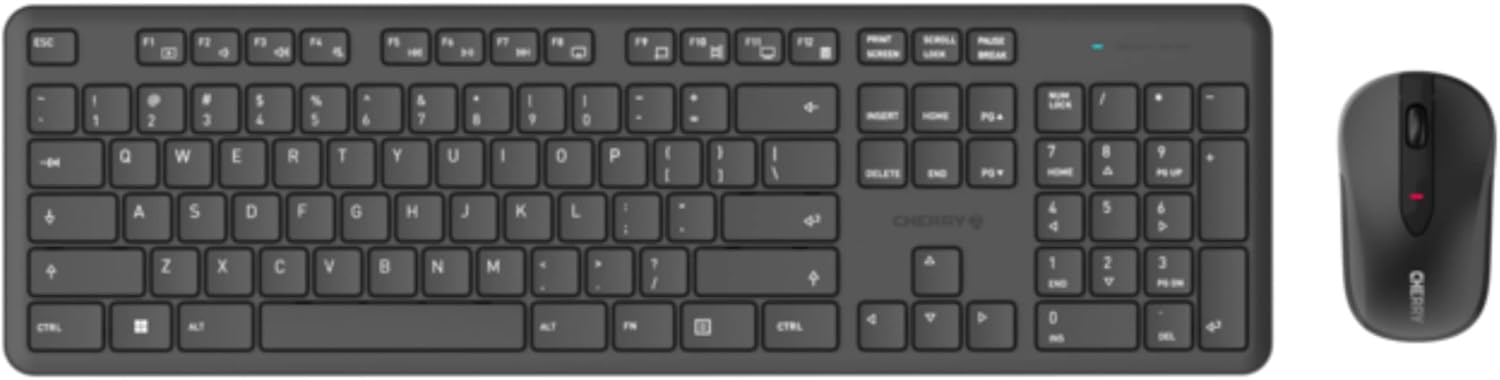
Image 1.1: The CHERRY DW2300 Wireless Keyboard and Silent Mouse Set.
2. தொகுப்பு உள்ளடக்கங்கள்
தொகுப்பில் அனைத்து பொருட்களும் இருப்பதை உறுதி செய்து கொள்ளுங்கள்:
- CHERRY DW2300 Wireless Keyboard
- CHERRY Silent Mouse
- USB வயர்லெஸ் ரிசீவர்
- 1 x AAA Battery (for Keyboard)
- 1 x AA Battery (for Mouse)
- பயனர் கையேடு (இந்த ஆவணம்)
3 அமைவு
3.1 பேட்டரி நிறுவல்
The keyboard requires one AAA battery and the mouse requires one AA battery. Batteries are included in the package.
- விசைப்பலகை மற்றும் சுட்டியின் அடிப்பகுதியில் பேட்டரி பெட்டியைக் கண்டறியவும்.
- பேட்டரி பெட்டியின் அட்டையைத் திறக்கவும்.
- விசைப்பலகையில் AAA பேட்டரியைச் செருகவும், சரியான துருவமுனைப்பை (+/-) உறுதி செய்யவும்.
- சரியான துருவமுனைப்பை (+/-) உறுதிசெய்து, AA பேட்டரியை மவுஸில் செருகவும்.
- பேட்டரி பெட்டியின் அட்டைகளை பாதுகாப்பாக மூடு.
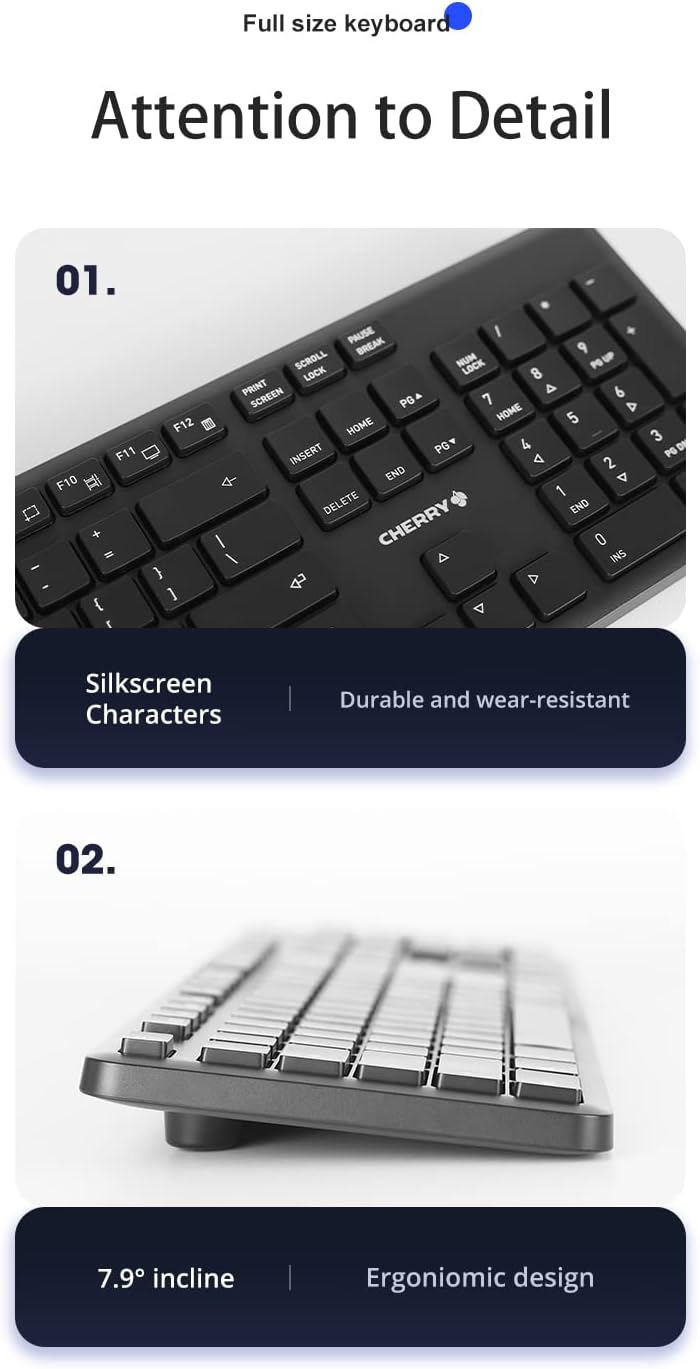
Image 3.1: The keyboard features an integrated battery life indicator that flashes when the battery is low.
3.2 வயர்லெஸ் ரிசீவரை இணைத்தல்
The CHERRY DW2300 set uses a single USB receiver for both the keyboard and mouse.
- Locate the USB wireless receiver, typically stored within the mouse's battery compartment or packaged separately.
- உங்கள் கணினியில் கிடைக்கும் USB போர்ட்டில் USB வயர்லெஸ் ரிசீவரைச் செருகவும்.
- உங்கள் கணினி தானாகவே தேவையான இயக்கிகளைக் கண்டறிந்து நிறுவ வேண்டும். இந்த செயல்முறை சில நிமிடங்கள் ஆகலாம்.
- Once installed, the keyboard and mouse are ready for use.

Image 3.2: The wireless keyboard and mouse connected to a computer via the USB receiver.
4. இயக்க வழிமுறைகள்
4.1 விசைப்பலகை செயல்பாடுகள்
The CHERRY DW2300 keyboard features a full-size QWERTY layout with a numeric keypad and 12 Fn combination keys for enhanced productivity.
- Full-size Key Layout: Provides a complete set of keys, including a dedicated numeric keypad for data entry.
- மல்டிமீடியா செயல்பாட்டு விசைகள்: Access common functions like volume control, media playback, and more using the Fn key in combination with the F-keys (F1-F12).
- பணிச்சூழலியல் வடிவமைப்பு: The keyboard is designed with a 7.9° inclination, providing a comfortable typing angle to support your palm and wrist during extended use.
- Durable Silkscreen Characters: Key legends are applied using a silkscreen process for durability and wear resistance.

Image 4.1: The full-size key layout, highlighting the numeric keypad and multimedia function keys.

Image 4.2: The ergonomic design of the keyboard with a 7.9° incline for comfortable typing.
4.2 சுட்டி செயல்பாடுகள்
The CHERRY Silent Mouse is designed for quiet operation and comfortable use.
- அமைதியான கிளிக்குகள்: Equipped with soft switches, the mouse effectively reduces clicking sounds, minimizing noise disturbance.
- இலகுரக வடிவமைப்பு: Weighing approximately 70g (without battery), the mouse features a symmetrical design for comfortable handling by both left and right-handed users.
- ஆப்டிகல் கண்காணிப்பு: Utilizes optical movement detection technology for precise cursor control.
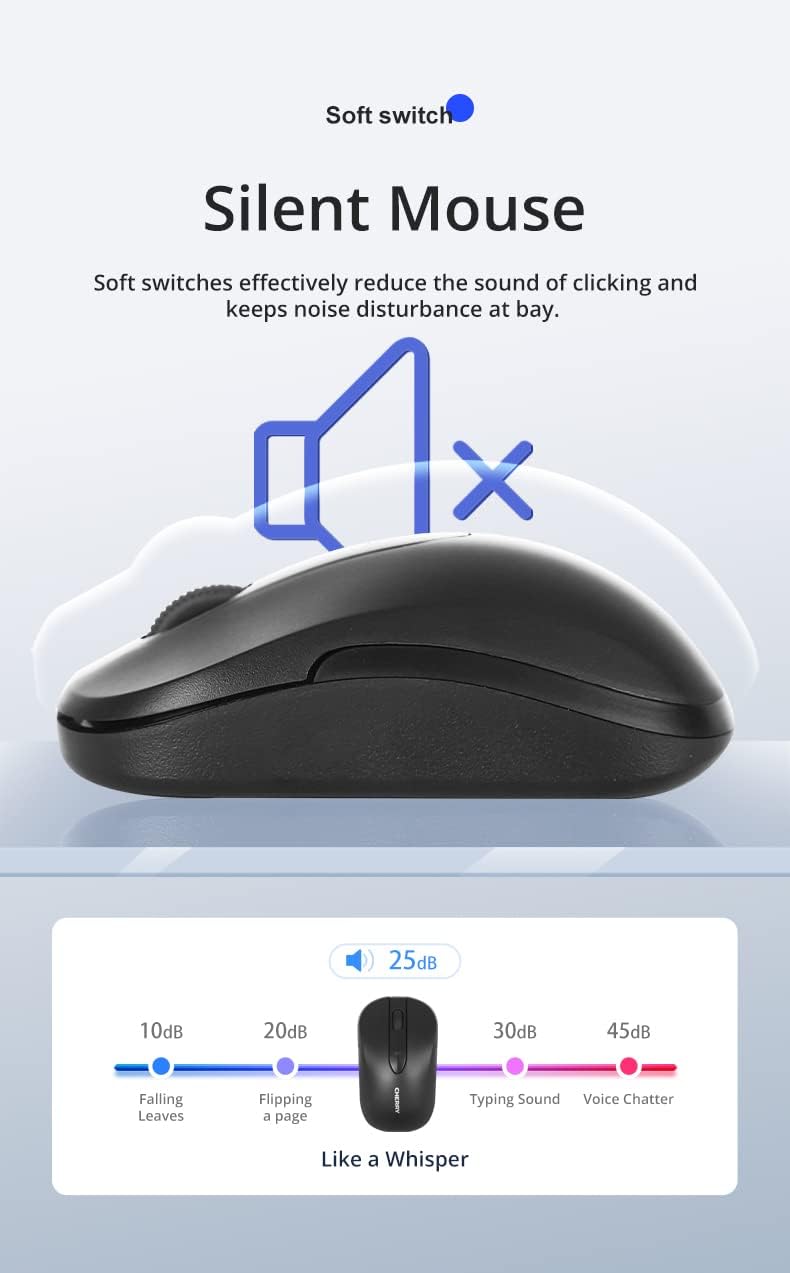
Image 4.3: The silent mouse, illustrating its low noise level (approximately 25dB).

Image 4.4: The lightweight design of the mouse, weighing 70g without the battery.
5. பராமரிப்பு
To ensure the longevity and optimal performance of your CHERRY DW2300 set, follow these maintenance guidelines:
- சுத்தம்: விசைப்பலகை மற்றும் மவுஸின் மேற்பரப்புகளை சுத்தம் செய்ய மென்மையான, உலர்ந்த, பஞ்சு இல்லாத துணியைப் பயன்படுத்தவும். பிடிவாதமான அழுக்குகளுக்கு, சிறிது dampதுணியை தண்ணீர் அல்லது லேசான துப்புரவு கரைசலில் நனைக்கவும். கடுமையான இரசாயனங்கள் அல்லது சிராய்ப்பு பொருட்களைத் தவிர்க்கவும்.
- தூசி அகற்றுதல்: Use compressed air to remove dust and debris from between the keyboard keys and around the mouse sensor.
- பேட்டரி மாற்று: Replace batteries when the low battery indicator flashes on the keyboard or when mouse responsiveness decreases. Always use fresh, high-quality batteries of the correct type (AAA for keyboard, AA for mouse).
- சேமிப்பு: When not in use for extended periods, remove the batteries to prevent leakage. Store the set in a cool, dry place away from direct sunlight and extreme temperatures.
6. சரிசெய்தல்
If you encounter issues with your CHERRY DW2300 set, refer to the following common solutions:
- No Connection / Unresponsive:
- Ensure the USB wireless receiver is securely plugged into a working USB port on your computer.
- விசைப்பலகை மற்றும் மவுஸ் இரண்டிலும் உள்ள பேட்டரிகள் சரியாக நிறுவப்பட்டுள்ளதா என்றும் போதுமான சார்ஜ் உள்ளதா என்றும் சரிபார்க்கவும். தேவைப்பட்டால் அவற்றை மாற்றவும்.
- USB ரிசீவரை வேறு USB போர்ட்டில் செருக முயற்சிக்கவும்.
- உங்கள் கணினியை மறுதொடக்கம் செய்யுங்கள்.
- Ensure the keyboard and mouse are within the effective range of the receiver (typically up to 10 meters).
- பின்தங்கிய அல்லது இடைப்பட்ட இணைப்பு:
- Move the receiver closer to the keyboard and mouse.
- குறுக்கீட்டை ஏற்படுத்தக்கூடிய பிற வயர்லெஸ் சாதனங்களுக்கு (எ.கா. வைஃபை ரவுட்டர்கள், கம்பியில்லா தொலைபேசிகள்) அருகில் ரிசீவரை வைப்பதைத் தவிர்க்கவும்.
- சாதனங்களுக்கும் பெறுநருக்கும் இடையில் பெரிய உலோகப் பொருட்கள் இல்லை என்பதை உறுதிப்படுத்திக் கொள்ளுங்கள்.
- மவுஸ் கர்சர் தாவுகிறது அல்லது துல்லியமற்றது:
- Clean the mouse sensor on the underside of the mouse.
- சுட்டியை சுத்தமான, பிரதிபலிப்பு இல்லாத மேற்பரப்பில் அல்லது சுட்டி அட்டையில் பயன்படுத்தவும்.
- விசைகள் பதிலளிக்கவில்லை:
- Check for debris under the unresponsive key.
- Ensure the keyboard batteries are not depleted.
இந்த படிகள் சிக்கலை தீர்க்கவில்லை என்றால், ஆதரவு பிரிவைப் பார்க்கவும்.
7. விவரக்குறிப்புகள்
| அம்சம் | விவரக்குறிப்பு |
|---|---|
| பிராண்ட் | செர்ரி |
| மாதிரி | DW2300 (JD-0230CN-2) |
| இணைப்பு தொழில்நுட்பம் | வயர்லெஸ் (2.4GHz) |
| இணக்கமான சாதனங்கள் | தனிப்பட்ட கணினி |
| விசைப்பலகை தளவமைப்பு | QWERTY, Full-size |
| Keyboard Key Technology | சவ்வு |
| விசைப்பலகை விசையின் ஆயுட்காலம் | Approx. 5 million key presses |
| Keyboard Power Source | 1 x AAA பேட்டரி (சேர்க்கப்பட்டுள்ளது) |
| Mouse Movement Detection | ஆப்டிகல் |
| சுட்டி உணர்திறன் | 1200 டிபிஐ |
| Mouse Power Source | 1 x AA பேட்டரி (சேர்க்கப்பட்டுள்ளது) |
| Mouse Weight (without battery) | தோராயமாக 70 கிராம் |
| விசைப்பலகை பரிமாணங்கள் (L x W x H) | 445 x 130 x ~35 mm |
| சுட்டி பரிமாணங்கள் (L x W x H) | 105 x 60 x 35 மிமீ |
| மொத்தப் பொருளின் எடை | 1.36 கிலோகிராம் |
| பொருள் | ஏபிஎஸ் |

Image 7.1: Visual representation of the keyboard and mouse dimensions and key specifications.
8. உத்தரவாதம் மற்றும் ஆதரவு
8.1 உத்தரவாதத் தகவல்
The CHERRY DW2300 Wireless Keyboard and Silent Mouse Set comes with a 2 வருட உத்தரவாதம் வாங்கிய தேதியிலிருந்து. இந்த உத்தரவாதமானது சாதாரண பயன்பாட்டின் கீழ் உற்பத்தி குறைபாடுகளை உள்ளடக்கும். உத்தரவாதக் கோரிக்கைகளுக்கு உங்கள் வாங்கியதற்கான ஆதாரத்தை வைத்திருங்கள்.
8.2 தொழில்நுட்ப ஆதரவு
For further assistance, technical support, or to download additional software (such as CHERRY KEYS for key configuration), please visit the official CHERRY webதளம்:
You may also contact CHERRY customer service through their webகுறிப்பிட்ட விசாரணைகளுக்கான தளம்.