
REAL-EL X-770 Portable Speaker User Manual
மாடல்: EL121600004
1. அறிமுகம்
Thank you for choosing the REAL-EL X-770 Portable Speaker. This manual provides essential information for the safe and efficient operation of your device. Please read it thoroughly before use and retain it for future reference.
2. பாதுகாப்பு தகவல்
To ensure safe operation and prevent damage to your device, please observe the following precautions:
- ஸ்பீக்கரை தண்ணீர், ஈரப்பதம் அல்லது அதிக வெப்பநிலைக்கு வெளிப்படுத்த வேண்டாம்.
- பேச்சாளரைக் கீழே தள்ளுவதையோ அல்லது வலுவான தாக்கங்களுக்கு உட்படுத்துவதையோ தவிர்க்கவும்.
- ஸ்பீக்கரை நீங்களே பிரிக்கவோ, பழுதுபார்க்கவோ அல்லது மாற்றியமைக்கவோ முயற்சிக்காதீர்கள். உதவிக்கு தகுதியான சேவை பணியாளர்களைத் தொடர்பு கொள்ளவும்.
- Keep the speaker away from heat sources, direct sunlight, and flammable materials.
- Use only the specified charging cable and power adapter (if included) to charge the device.
- அதிக ஒலி அளவுகளில் நீண்ட நேரம் கேட்பது செவிப்புலன் பாதிப்பை ஏற்படுத்தலாம்.
3. தொகுப்பு உள்ளடக்கங்கள்
பெட்டியை கவனமாக பிரித்து, அனைத்து பொருட்களும் இருப்பதை உறுதிசெய்து கொள்ளுங்கள்:
- REAL-EL X-770 Portable Speaker Unit
- Charging Cable (USB-A to USB-C, or similar, specific type not provided)
- பயனர் கையேடு (இந்த ஆவணம்)
Note: The product data mentioned "Camera Body" as an included component. This is likely an error. The actual included components for a portable speaker typically include the speaker unit and a charging cable.
4. தயாரிப்பு முடிந்துவிட்டதுview
Familiarize yourself with the main components of your REAL-EL X-770 Portable Speaker:
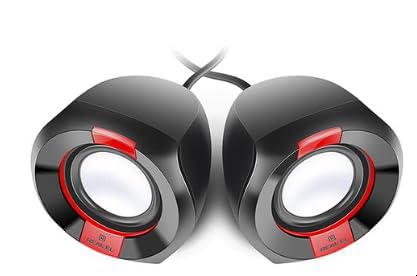
படம் 1: முன் view of the REAL-EL X-770 Portable Speaker. This image displays the speaker's compact design, the main speaker grille, and typical control buttons for power, volume, and playback.
- பவர் பட்டன்: ஸ்பீக்கரை ஆன்/ஆஃப் செய்ய அழுத்திப் பிடிக்கவும்.
- ஒலியளவை அதிகரி/அடுத்து டிராக் பொத்தான்: ஒலியளவை அதிகரிக்க சிறிது நேரம் அழுத்தவும், அடுத்த டிராக்கிற்கு நீண்ட நேரம் அழுத்தவும்.
- ஒலியளவைக் குறை/முந்தைய டிராக் பொத்தான்: ஒலியைக் குறைக்க சுருக்கமாக அழுத்தவும், முந்தைய டிராக்கைக் கேட்க நீண்ட நேரம் அழுத்தவும்.
- ப்ளே/இடைநிறுத்த பட்டன்: ஆடியோவை இயக்க அல்லது இடைநிறுத்த அழுத்தவும்.
- பயன்முறை பொத்தான்: Press to switch between input modes (e.g., Bluetooth, HDMI, AUX).
- சார்ஜிங் போர்ட்: சார்ஜிங் கேபிளை இணைப்பதற்கு.
- HDMI போர்ட்: For audio input from compatible devices.
5 அமைவு
5.1 ஸ்பீக்கரை சார்ஜ் செய்தல்
- Connect the charging cable to the speaker's charging port.
- Connect the other end of the charging cable to a USB power adapter (not included) or a powered USB port.
- ஸ்பீக்கர் சார்ஜ் ஆகிறது என்பதைக் காட்ட, சார்ஜிங் இண்டிகேட்டர் லைட் ஒளிரும் (நிறம் மாறுபடலாம்).
- Once fully charged, the indicator light may change color or turn off. Disconnect the speaker from the charger.
5.2 பவர் ஆன்/ஆஃப்
- To power ON: Press and hold the பவர் பட்டன் for approximately 3 seconds. An indicator light will turn on, and you may hear an audible prompt.
- To power OFF: Press and hold the பவர் பட்டன் for approximately 3 seconds. The indicator light will turn off, and you may hear an audible prompt.
6. ஸ்பீக்கரை இயக்குதல்
6.1 ப்ளூடூத் இணைத்தல்
- Ensure the speaker is powered ON and in Bluetooth pairing mode (usually indicated by a flashing blue LED). If not, press the பயன்முறை பொத்தான் until Bluetooth mode is active.
- On your mobile device (smartphone, tablet, computer), enable Bluetooth and search for available devices.
- Select "REAL-EL X-770" from the list of found devices.
- Once paired, the speaker will emit a confirmation sound, and the Bluetooth indicator light will stop flashing and remain solid.
- இப்போது உங்கள் சாதனத்திலிருந்து ஸ்பீக்கர் மூலம் ஆடியோவை இயக்கலாம்.
6.2 HDMI Audio Input
The REAL-EL X-770 supports audio input via HDMI. This allows connection to devices such as TVs, gaming consoles, or media players that output audio through HDMI.
- Connect an HDMI cable (not included) from the audio output port of your source device to the HDMI input port on the REAL-EL X-770 speaker.
- Power on both the speaker and the source device.
- அழுத்தவும் பயன்முறை பொத்தான் on the speaker until the HDMI input mode is selected.
- Ensure the audio output settings on your source device are configured to send audio via HDMI.
- Adjust the volume on both the speaker and the source device as needed.
6.3 தொகுதி கட்டுப்பாடு
- To increase volume: Short press the வால்யூம் அப்/அடுத்த ட்ராக் பட்டன்.
- To decrease volume: Short press the வால்யூம் டவுன்/முந்தைய ட்ராக் பட்டன்.
6.4 பிளேபேக் கட்டுப்பாடு
- To play/pause: Press the ப்ளே/பாஸ் பட்டன்.
- To skip to the next track: Long press the வால்யூம் அப்/அடுத்த ட்ராக் பட்டன்.
- To go to the previous track: Long press the வால்யூம் டவுன்/முந்தைய ட்ராக் பட்டன்.
7. பராமரிப்பு
7.1 சுத்தம் செய்தல்
- ஸ்பீக்கரின் வெளிப்புறத்தை மென்மையான, உலர்ந்த, பஞ்சு இல்லாத துணியால் துடைக்கவும்.
- Do not use abrasive cleaners, alcohol, benzene, or other chemical solvents, as these may damage the surface.
- எந்த திறப்புகளிலும் ஈரப்பதம் நுழைவதைத் தவிர்க்கவும்.
7.2 சேமிப்பு
- நீண்ட நேரம் பயன்பாட்டில் இல்லாதபோது, ஸ்பீக்கரை குளிர்ந்த, உலர்ந்த இடத்தில், நேரடி சூரிய ஒளி மற்றும் தீவிர வெப்பநிலையிலிருந்து விலகி சேமிக்கவும்.
- It is recommended to charge the speaker at least once every three months to maintain battery health.
8. சரிசெய்தல்
| பிரச்சனை | சாத்தியமான காரணம் | தீர்வு |
|---|---|---|
| ஸ்பீக்கர் இயக்கப்படவில்லை. | பேட்டரி தீர்ந்து விட்டது. | ஸ்பீக்கரை முழுமையாக சார்ஜ் செய்யவும். |
| பேச்சாளரிடமிருந்து எந்த சத்தமும் இல்லை. | ஒலியளவு மிகவும் குறைவாக உள்ளது அல்லது ஒலியடக்கப்பட்டுள்ளது. தவறான உள்ளீட்டு முறை தேர்ந்தெடுக்கப்பட்டது. சாதனம் இணைக்கப்படவில்லை (புளூடூத்). | Increase volume on both speaker and source device. Ensure correct input mode (Bluetooth/HDMI). Re-pair Bluetooth device. |
| புளூடூத் வழியாக இணைக்க முடியாது. | ஸ்பீக்கர் இணைத்தல் பயன்முறையில் இல்லை. சாதனம் வெகு தொலைவில் உள்ளது. குறுக்கீடு. | Ensure speaker is in Bluetooth pairing mode. Move devices closer. Turn off other Bluetooth devices. |
| HDMI audio not working. | Incorrect mode. Cable issue. Source device settings. | Ensure speaker is in HDMI mode. Check HDMI cable connection. Verify source device audio output settings. |
9. விவரக்குறிப்புகள்
| அம்சம் | விவரம் |
|---|---|
| பிராண்ட் | ரியல்-எல் |
| மாதிரி பெயர் | எக்ஸ்-770 |
| மாதிரி எண் | EL121600004 |
| இணைப்பு தொழில்நுட்பம் | HDMI, Bluetooth (assumed for portable speaker) |
| தயாரிப்பு பரிமாணங்கள் | 25.4 x 5.08 x 6.86 செ.மீ |
| பொருளின் எடை | 5.29 கிலோகிராம் |
| நிறம் | பல வண்ணம் |
| பேட்டரிகள் சேர்க்கப்பட்டுள்ளது | இல்லை |
| பேட்டரிகள் தேவை | இல்லை |
Note: While the product data indicates no batteries are included or required, portable speakers typically feature an internal rechargeable battery for wireless operation. This specification might refer to the absence of user-replaceable or external batteries. The speaker is designed to be charged via its charging port. Specifications are subject to change without prior notice. For the most up-to-date information, please refer to the manufacturer's official webதளம்.
10. உத்தரவாதம் மற்றும் ஆதரவு
The REAL-EL X-770 Portable Speaker comes with a manufacturer's warranty. Please refer to the warranty card included with your purchase or visit the official REAL-EL webவிரிவான உத்தரவாத விதிமுறைகள் மற்றும் நிபந்தனைகளுக்கான தளம்.
For technical support, service inquiries, or further assistance, please contact REAL-EL customer service through their official channels. Contact information can typically be found on the product packaging or the manufacturer's webதளம்.