
1. தயாரிப்பு முடிந்துவிட்டதுview
The UMIDIGI C1 Max is an unlocked Android smartphone designed for daily use. It features a large display, a high-capacity battery, and a versatile camera system.
முக்கிய அம்சங்கள்:
- காட்சி: 6.5-inch HD+ Full Screen for an immersive viewஅனுபவம்.
- பேட்டரி: 5150mAh long-lasting battery with fast charging support.
- கேமரா: 50MP Main Camera, 2MP Depth Sensor, and 8MP Front Camera.
- செயல்திறன்: Unisoc T610 Octa-core Processor with 6GB RAM and 128GB internal storage (expandable up to 256GB).
- இயக்க முறைமை: Android 12 for a smooth and secure user experience.
- பாதுகாப்பு: பக்கவாட்டில் பொருத்தப்பட்ட கைரேகை சென்சார் மற்றும் AI ஃபேஸ் அன்லாக்.
- இணைப்பு: Dual SIM support, Global Bands, Bluetooth 5.0, GPS (Glonass, Galileo, Beidou).

படம்: முன் மற்றும் பின் view of the UMIDIGI C1 Max smartphone.
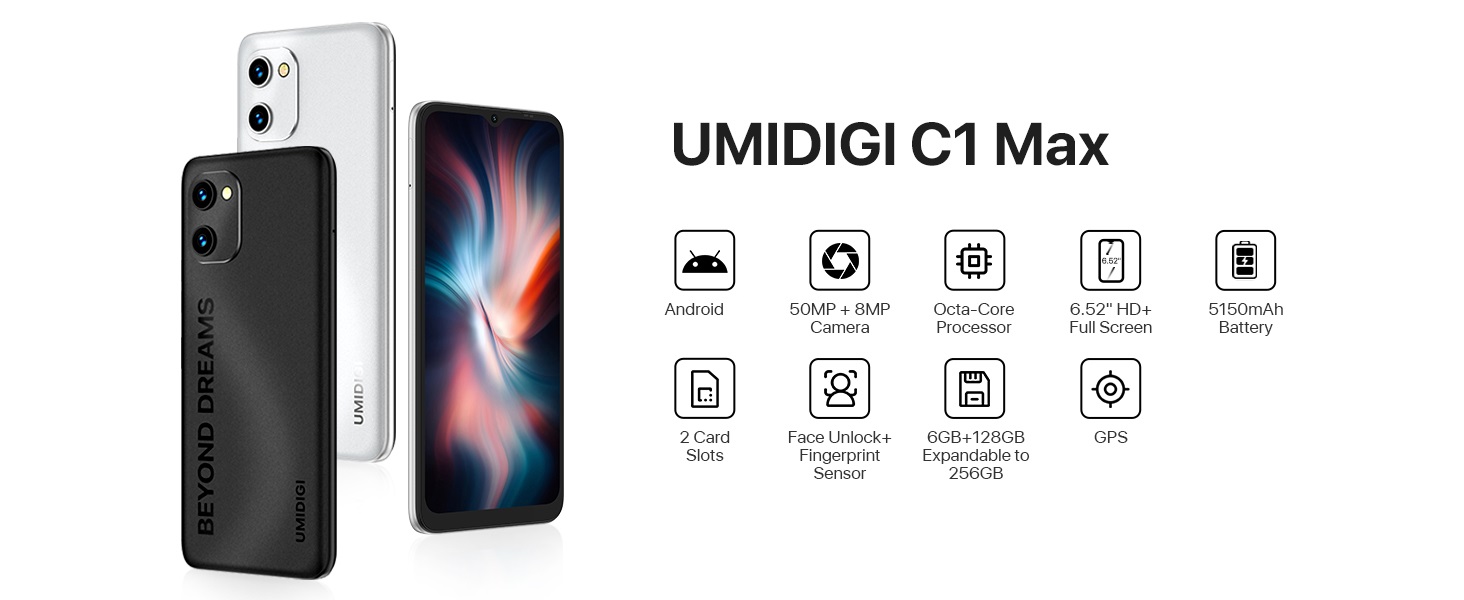
படம்: முடிந்ததுview of UMIDIGI C1 Max key features.
தயாரிப்பு வீடியோக்கள்:
Video: UMIDIGI C1 Max Smartphone Features. This video highlights the main features of the C1 Max smartphone, including its design, camera capabilities, and performance.
Video: UMIDIGI C1 Max Cell Phone Overview. இந்த காணொளி ஒரு பொதுவான விளக்கத்தை வழங்குகிறதுview of the C1 Max cell phone, showcasing its design and user interface.
2. தொகுப்பு உள்ளடக்கங்கள்
உங்கள் தயாரிப்பு தொகுப்பில் அனைத்து பொருட்களும் உள்ளதா என சரிபார்க்கவும்:
- UMIDIGI C1 Max Smartphone
- USB கேபிள்
- Power Adapter (if included in your region)
- சிம் வெளியேற்றும் கருவி
- விரைவு தொடக்க வழிகாட்டி
- பாதுகாப்பு உறை (பிராந்தியத்தைப் பொறுத்து மாறுபடலாம்)
- திரை பாதுகாப்பான் (முன்பே பயன்படுத்தப்பட்டது அல்லது சேர்க்கப்பட்டது)
3. ஆரம்ப அமைப்பு
3.1. சிம் கார்டு(கள்) மற்றும் மைக்ரோ எஸ்டி கார்டைச் செருகுதல்
- உங்கள் மொபைலின் பக்கவாட்டில் சிம் ட்ரேயைக் கண்டறியவும்.
- தட்டுக்கு அடுத்துள்ள சிறிய துளைக்குள் சிம் வெளியேற்றும் கருவியைச் செருகவும், தட்டு வெளியே வரும் வரை உறுதியாக அழுத்தவும்.
- உங்கள் நானோ-சிம் கார்டு(கள்) மற்றும்/அல்லது மைக்ரோ எஸ்டி கார்டை தட்டில் உள்ள நியமிக்கப்பட்ட இடங்களில் வைக்கவும். தங்க நிற தொடர்புகள் கீழ்நோக்கி இருப்பதை உறுதிசெய்யவும்.
- பக்கவாட்டில் நன்றாகப் பொருந்தும் வரை, ட்ரேயை கவனமாக மீண்டும் ஃபோனுக்குள் தள்ளவும்.
3.2. ஆன் / ஆஃப் செய்தல்
- பவர் ஆன் செய்ய: Press and hold the Power button (usually on the right side) until the UMIDIGI logo appears.
- பவர் ஆஃப் செய்ய: பவர் மெனு தோன்றும் வரை பவர் பட்டனை அழுத்திப் பிடித்து, பின்னர் "பவர் ஆஃப்" என்பதைத் தேர்ந்தெடுக்கவும்.
- மறுதொடக்கம் செய்ய: பவர் மெனு தோன்றும் வரை பவர் பட்டனை அழுத்திப் பிடிக்கவும், பின்னர் "மறுதொடக்கம்" என்பதைத் தேர்ந்தெடுக்கவும்.
3.3. ஆரம்ப அமைவு வழிகாட்டி
Upon first power-on, the phone will guide you through the initial setup process. Follow the on-screen instructions to:
- உங்கள் மொழியைத் தேர்ந்தெடுக்கவும்.
- வைஃபை நெட்வொர்க்குடன் இணைக்கவும்.
- Copy data from another device (optional).
- உங்கள் Google கணக்கில் உள்நுழையவும்.
- திரைப் பூட்டை அமைக்கவும் (பின், பேட்டர்ன், கடவுச்சொல், கைரேகை, முகம் திறத்தல்).
- Review மற்றும் விதிமுறைகள் மற்றும் நிபந்தனைகளை ஏற்றுக்கொள்ளுங்கள்.
4. உங்கள் ஸ்மார்ட்போனை இயக்குதல்
4.1. அடிப்படை வழிசெலுத்தல் (ஆண்ட்ராய்டு 12)
Your UMIDIGI C1 Max runs on Android 12, offering an intuitive user interface.
- முகப்புத் திரை: வெவ்வேறு முகப்புத் திரை பேனல்களை அணுக இடது அல்லது வலதுபுறமாக ஸ்வைப் செய்யவும்.
- ஆப் டிராயர்: முகப்புத் திரையின் அடிப்பகுதியில் இருந்து மேல்நோக்கி ஸ்வைப் செய்யவும் view நிறுவப்பட்ட அனைத்து பயன்பாடுகளும்.
- அறிவிப்புகள் & விரைவு அமைப்புகள்: அறிவிப்புகள் மற்றும் விரைவான அமைப்புகளை (வைஃபை, புளூடூத் போன்றவை) அணுக திரையின் மேலிருந்து கீழே ஸ்வைப் செய்யவும்.
- சமீபத்திய பயன்பாடுகள்: Swipe up from the bottom and hold (or tap the square navigation button if enabled) to see recently used applications.

படம்: Examples of the Android 12 user interface.
4.2. கேமரா பயன்பாடு
The UMIDIGI C1 Max features a triple camera system:
- 50MP பிரதான கேமரா: For high-resolution photos.
- 2MP ஆழ சென்சார்: Enhances portrait mode with background blur.
- 8MP முன்பக்க கேமரா: செல்ஃபிகள் மற்றும் வீடியோ அழைப்புகளுக்கு.
கேமராவைப் பயன்படுத்த:
- கேமரா பயன்பாட்டைத் திறக்கவும்.
- உங்களுக்கு விருப்பமான பயன்முறையைத் தேர்ந்தெடுக்கவும் (புகைப்படம், வீடியோ, உருவப்படம், முதலியன).
- படத்தைப் பிடிக்க அல்லது பதிவைத் தொடங்க/நிறுத்த ஷட்டர் பொத்தானைத் தட்டவும்.
- கேமரா சுவிட்ச் ஐகானைப் பயன்படுத்தி முன் மற்றும் பின் கேமராக்களுக்கு இடையில் மாறவும்.

Image: UMIDIGI C1 Max camera specifications and exampலெஸ்.
4.3. பேட்டரி மேலாண்மை
The 5150mAh battery provides extended usage time. To optimize battery life:
- திரையின் பிரகாசத்தை சரிசெய்யவும்.
- தேவைப்படும்போது பேட்டரி சேமிப்பான் பயன்முறையை இயக்கவும்.
- பின்னணியில் இயங்கும் பயன்படுத்தப்படாத பயன்பாடுகளை மூடு.
- பயன்பாட்டில் இல்லாதபோது வைஃபை, புளூடூத் மற்றும் ஜிபிஎஸ் ஆகியவற்றை முடக்கு.
- Use the provided charger for optimal charging speed.

Image: UMIDIGI C1 Max 5150mAh battery capacity and estimated usage.
4.4. சேமிப்பு மற்றும் நினைவகம்
Your device comes with 6GB of RAM for smooth multitasking and 128GB of internal storage for your apps, photos, and files. Storage can be expanded up to 256GB using a MicroSD card.

Image: UMIDIGI C1 Max memory and storage details.
5. பராமரிப்பு மற்றும் பராமரிப்பு
To ensure the longevity and optimal performance of your UMIDIGI C1 Max, follow these maintenance guidelines:
- சுத்தம்: திரை மற்றும் உடலை சுத்தம் செய்ய மென்மையான, பஞ்சு இல்லாத துணியைப் பயன்படுத்தவும். சிராய்ப்பு பொருட்கள் அல்லது கடுமையான இரசாயனங்களைத் தவிர்க்கவும்.
- வெப்பநிலை: Do not expose the phone to extreme temperatures (hot or cold) or direct sunlight for prolonged periods.
- நீர் வெளிப்பாடு: The device is not water-resistant. Avoid contact with water or excessive moisture.
- தாக்கம்: Protect your phone from drops and impacts. Use a protective case and screen protector.
- மென்பொருள் புதுப்பிப்புகள்: உங்கள் சாதனத்தில் சமீபத்திய பாதுகாப்பு இணைப்புகள் மற்றும் செயல்திறன் மேம்பாடுகள் இருப்பதை உறுதிசெய்ய, சிஸ்டம் புதுப்பிப்புகளைத் தொடர்ந்து சரிபார்த்து நிறுவவும்.
6. சரிசெய்தல்
If you encounter issues with your UMIDIGI C1 Max, refer to the following common solutions:
| பிரச்சினை | சாத்தியமான தீர்வு |
|---|---|
| போன் ஆன் ஆகவில்லை | Ensure the battery is charged. Connect to a charger for at least 10 minutes, then try powering on. If unresponsive, press and hold the Power button for 10-15 seconds to force a restart. |
| மோசமான நெட்வொர்க் சிக்னல் | Check if the SIM card is correctly inserted. Try restarting the phone. Verify your location has network coverage. Contact your carrier if the issue persists. |
| பேட்டரி வேகமாகத் தீர்ந்து போகிறது | Reduce screen brightness, close background apps, disable unused connectivity features (Wi-Fi, Bluetooth, GPS). Check battery usage in Settings to identify power-hungry apps. |
| பயன்பாடுகள் உறைதல் அல்லது செயலிழப்பு | Clear the cache and data of the problematic app in Settings > Apps. Update the app to the latest version. If the issue continues, uninstall and reinstall the app. |
| Wi-Fi உடன் இணைக்க முடியவில்லை | Ensure Wi-Fi is enabled on your phone. Restart your router. Forget the network in your phone's Wi-Fi settings and reconnect. |
மிகவும் சிக்கலான சிக்கல்களுக்கு, தொழிற்சாலை மீட்டமைப்பைச் செய்வதை (முதலில் உங்கள் தரவை காப்புப் பிரதி எடுக்கவும்) அல்லது வாடிக்கையாளர் ஆதரவைத் தொடர்புகொள்வதைப் பற்றி பரிசீலிக்கவும்.
7. தொழில்நுட்ப விவரக்குறிப்புகள்
| அம்சம் | விவரக்குறிப்பு |
|---|---|
| பிராண்ட் | உமிடிகி |
| மாதிரி பெயர் | C1 MAX |
| இயக்க முறைமை | ஆண்ட்ராய்டு 12.0 |
| நிறுவப்பட்ட RAM நினைவக அளவு | 6 ஜிபி |
| நினைவக சேமிப்பு திறன் | 128 GB (Expandable up to 256 GB) |
| CPU மாதிரி | Unisoc T610 Octa-core |
| திரை அளவு | 6.52 அங்குலம் |
| தீர்மானம் | 1650 x 720 (HD+) |
| காட்சி வகை | OLED/AMOLED |
| புதுப்பிப்பு விகிதம் | 60 ஹெர்ட்ஸ் |
| Rear Facing Camera Photo Sensor Resolution | 50 MP (Main) |
| Number of Rear Facing Cameras | 3 (50MP Main, 2MP Depth, 2MP Macro - 2MP Macro inferred from common triple camera setups, not explicitly listed as 3rd in JSON but 'Number of Rear Facing Cameras: 3' is present) |
| Front Photo Sensor Resolution | 8 எம்.பி |
| பேட்டரி திறன் | 5150 மில்லிamp மணிநேரம் |
| சிம் கார்டு ஸ்லாட் எண்ணிக்கை | இரட்டை சிம் |
| பயோமெட்ரிக் பாதுகாப்பு அம்சம் | Face Recognition, Fingerprint Sensor |
| இணைப்பு தொழில்நுட்பம் | USB Type C, Wi-Fi, Bluetooth 5.0, LTE |
| பொருளின் பரிமாணங்கள் | 6.46 x 3.01 x 0.34 அங்குலம் |
| பொருளின் எடை | 192 கிராம் |
சாதன அடையாளம்:
The IMEI (International Mobile Equipment Identity) is a unique number for your device. It can be found on the product packaging, in the phone's settings (Settings > About phone > IMEI), or on a label on the back of the phone.
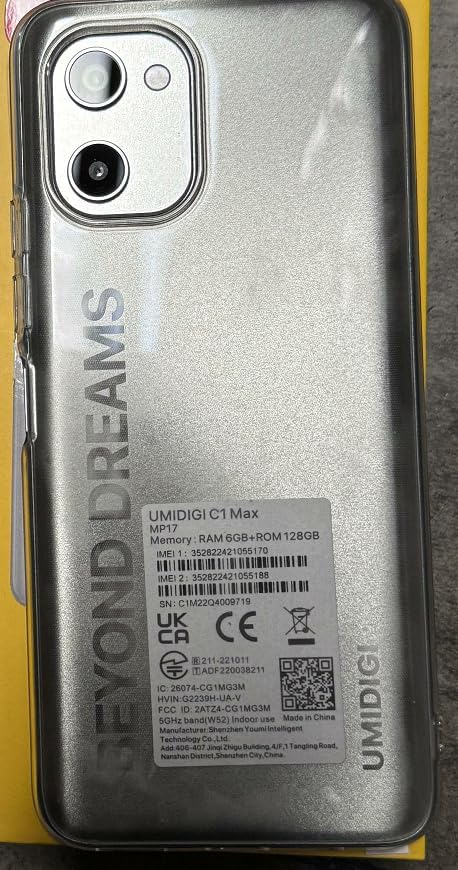
Image: IMEI and regulatory label on the back of the UMIDIGI C1 Max.

Image: Close-up of the IMEI label.
8. உத்தரவாதம் மற்றும் ஆதரவு
8.1. தயாரிப்பு உத்தரவாதம்
Your UMIDIGI C1 Max smartphone is covered by a limited manufacturer's warranty. The specific terms and duration of the warranty may vary by region and retailer. Please refer to the warranty card included in your package or visit the official UMIDIGI webவிரிவான தகவல்களுக்கு தளம்.
8.2. வாடிக்கையாளர் ஆதரவு
For technical assistance, troubleshooting, or warranty claims, please contact UMIDIGI customer support through their official website or the contact information provided in your product documentation. Ensure you have your device's model number and IMEI readily available when seeking support.
Official UMIDIGI Store: Visit UMIDIGI Store on Amazon