
1. முக்கியமான பாதுகாப்பு தகவல்
Please read all safety instructions carefully before using this product. Failure to follow these instructions may result in injury or damage.
- இடம்: Avoid placing the camera in unstable locations or within reach of children or pets.
- சக்தி: Use only the provided AC adapter and power cable. Disconnect power before moving the device.
- சுற்றுச்சூழல்: Keep the camera away from high humidity, dust, and extreme temperatures. This product is not waterproof.
- பராமரிப்பு: Do not attempt to disassemble or repair the camera yourself. Contact customer support for any issues.

Image: General safety guidelines for camera usage.
2. தொகுப்பு உள்ளடக்கங்கள்
உங்கள் தொகுப்பில் அனைத்து பொருட்களும் சேர்க்கப்பட்டுள்ளதா என்பதைச் சரிபார்க்கவும்:
- Galayou G2 Camera Unit
- ஏசி அடாப்டர்
- பவர் கேபிள்
- மவுண்டிங் கிட் (திருகுகள், நங்கூரங்கள்)
- Japanese Instruction Manual

Image: The Galayou G2 camera and a smartphone displaying its live feed.
3. அமைவு வழிகாட்டி
3.1 ஆரம்ப அமைப்பு
- பவர் ஆன்: Connect the camera to power using the provided AC adapter and cable. The indicator light will turn red.
- ஆப் பதிவிறக்கம்: Download the dedicated 'blurams' app from the App Store (iOS) or Google Play Store (Android).
- பயன்பாட்டு அனுமதிகள்: Ensure Bluetooth and Location permissions are enabled for the 'blurams' app in your smartphone settings.
- கேமராவை மீட்டமை: Press and hold the reset button on the camera until you hear a beep sound. The indicator light will flash red and blue alternately, indicating it's ready for network connection.
- பயன்பாட்டில் சாதனத்தைச் சேர்க்கவும்: Open the 'blurams' app, tap 'Add Device' or the '+' icon. Select your camera model (G2 or similar D1 model) and choose 'Wi-Fi connection via Bluetooth'.
- வைஃபை இணைப்பு: Enter your 2.4GHz Wi-Fi network name and password. The camera only supports 2.4GHz Wi-Fi.
- QR குறியீடு ஸ்கேன்: The app will display a QR code. Hold your smartphone in front of the camera lens to scan the QR code. You will hear a beep sound from the camera upon successful scan.
- இணைப்பு உறுதிப்படுத்தல்: The camera will announce 'Connection successful' and then 'Connecting to network'. Once connected, the indicator light will turn solid blue.
3.2 Video Guide: Bluetooth Wi-Fi Connection
Video: This video demonstrates the Bluetooth-assisted Wi-Fi connection method for the D1 camera, which is similar to the G2 model. It shows the steps from app permissions to successful network connection.
3.3 Video Guide: Camera Setup Method
Video: This video provides a general guide on how to set up a Skyworth pet camera, which can be used as a reference for the Galayou G2's setup process.
4. இயக்க வழிமுறைகள்
4.1 நேரலை View மற்றும் பான்/டில்ட் கட்டுப்பாடு
Once connected, you can access the live feed through the 'blurams' app. The camera offers a 355° horizontal rotation and 52° vertical rotation for comprehensive coverage.
- பான்/டில்ட்: கேமராவை தொலைவிலிருந்து சரிசெய்ய, பயன்பாட்டில் உள்ள திசைக் கட்டுப்பாடுகளைப் பயன்படுத்தவும் viewing கோணம்.
- டிஜிட்டல் ஜூம்: The camera supports 4x digital zoom to view விவரங்கள்.

Image: The camera's pan and tilt capabilities, offering a wide field of view.
4.2 வீடியோ தரம் மற்றும் இரவு பார்வை
The G2 camera features 2K high-resolution video (1440p) and a 3-megapixel CMOS sensor for clear images. It also provides advanced night vision capabilities.
- 2K தெளிவுத்திறன்: Enjoy clear and detailed video footage.
- இரவு பார்வை முறைகள்: The camera supports three night vision modes: Smart Night Vision (auto-switches between color and black & white based on motion), Color Night Vision (always color), and Infrared Night Vision (always black & white).
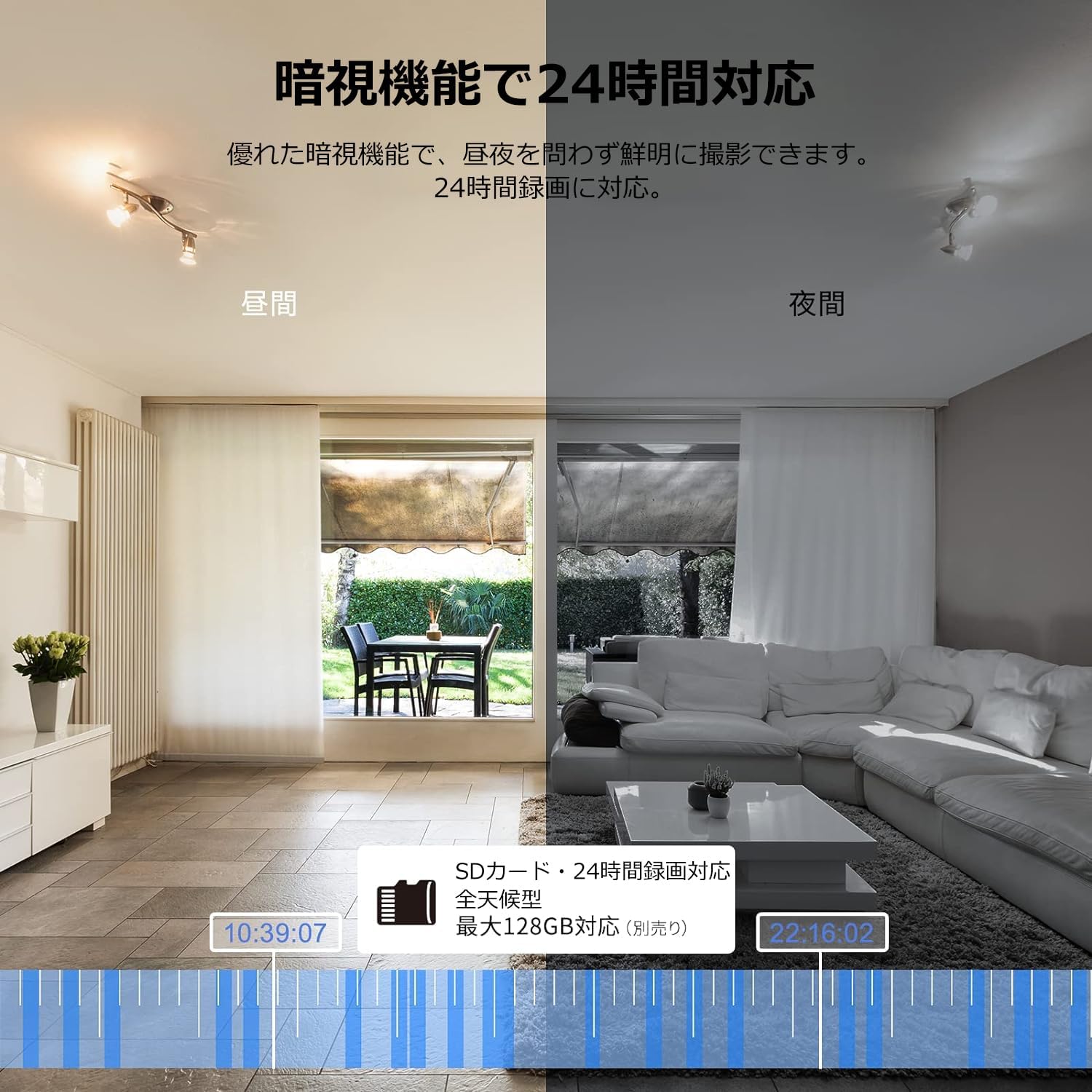
Image: Comparison of day and night vision, demonstrating the camera's ability to record clearly in low light.
4.3 இருவழி ஆடியோ
Equipped with a microphone and speaker, the camera allows for real-time two-way communication.
- Speak and Listen: Talk to family members or pets through the app, and hear their responses.
- சத்தம் குறைப்பு: The two-way audio features noise reduction for clearer sound.

Image: The camera's two-way audio feature, allowing interaction with pets.
4.4 Motion Detection & Automatic Tracking
The camera can detect motion and automatically track subjects within its field of view.
- இயக்க எச்சரிக்கைகள்: இயக்கம் கண்டறியப்படும்போது உங்கள் ஸ்மார்ட்போனில் உடனடி அறிவிப்புகளைப் பெறுங்கள்.
- தானியங்கி கண்காணிப்பு: The camera will follow detected movement, keeping the subject in frame.
- மனித கண்டறிதல்: Advanced AI can differentiate between humans and other moving objects, reducing false alarms.
- அலாரம் செயல்பாடு: Trigger an alarm sound from the camera via the app to deter intruders.

Image: Motion detection and alarm features, showing alerts on a smartphone.
4.5 பதிவு மற்றும் சேமிப்பு
The camera supports both local and cloud storage options for continuous recording.
- மைக்ரோ எஸ்டி கார்டு: Supports up to 128GB microSD cards (sold separately) for 24-hour continuous recording with automatic overwriting.
- கிளவுட் ஸ்டோரேஜ்: Optional paid cloud storage service is available for extended recording and backup.
- வீடியோ சுருக்கம்: Utilizes H.264 and H.265 compression formats for efficient storage.


Images: MicroSD card recording and cloud storage options.
4.6 தனியுரிமை பயன்முறை
Activate privacy mode to physically cover the camera lens, ensuring your privacy when needed.
- One-Tap Activation: Easily turn off the lens via the app.
- Physical Cover: The camera physically rotates its lens downwards, blocking the view.

Image: Privacy mode icon.
4.7 அலெக்சா ஒருங்கிணைப்பு
The Galayou G2 is Alexa-certified, allowing for voice control and viewing the camera feed on compatible Alexa devices.
- குரல் கட்டளைகள்: குரல் கட்டளைகளைப் பயன்படுத்தவும் view the camera feed on an Echo Show or other Alexa-enabled screen.

Image: Alexa integration with the Galayou G2 camera.
4.8 Multi-Camera Support & Sharing
The app supports adding multiple cameras and sharing access with family members.
- பல கேமராக்கள்: Monitor different areas of your home by adding several cameras to the app.
- குடும்ப பகிர்வு: Share camera access with up to 4 family members simultaneously.

Image: Family sharing and multi-camera viewing.
4.9 Video Guide: Product Features
Video: This video showcases various features of a Skyworth pet camera, including its monitoring capabilities, which are comparable to the Galayou G2.
4.10 Video Guide: Blurams 300万画素 見守りカメラ
Video: This video highlights the features of a Blurams 3-megapixel monitoring camera, demonstrating functionalities similar to the Galayou G2.
4.11 Video Guide: JUFLSKY 300万画素 360°PTZ機 (Preview)
காணொளி: ஒரு சிறிய முன்னோட்டம்view காணொளி காட்சிasing a 300-megapixel 360° PTZ camera, similar in functionality to the G2.
5. சரிசெய்தல்
- Wi-Fi உடன் இணைக்க முடியவில்லை:
- உங்கள் வைஃபை நெட்வொர்க் 2.4GHz என்பதை உறுதிப்படுத்திக் கொள்ளுங்கள். கேமரா 5GHz நெட்வொர்க்குகளை ஆதரிக்காது.
- துல்லியத்திற்கு உங்கள் வைஃபை கடவுச்சொல்லைச் சரிபார்க்கவும்.
- கேமராவை உங்கள் வைஃபை ரூட்டருக்கு அருகில் நகர்த்தவும்.
- Perform a factory reset on the camera and try the setup process again.
- No Live Feed:
- உங்கள் இணைய இணைப்பைச் சரிபார்க்கவும்.
- Ensure the camera is powered on and the indicator light is solid blue.
- பயன்பாட்டையும்/அல்லது உங்கள் ஸ்மார்ட்போனையும் மறுதொடக்கம் செய்யுங்கள்.
- மோஷன் கண்டறிதல் வேலை செய்யவில்லை:
- பயன்பாட்டு அமைப்புகளில் இயக்க கண்டறிதல் இயக்கப்பட்டுள்ளதா என்பதைச் சரிபார்க்கவும்.
- இயக்க கண்டறிதல் உணர்திறனை சரிசெய்யவும்.
- கேமராவைத் தடுக்கும் எந்தத் தடைகளும் இல்லை என்பதை உறுதிப்படுத்திக் கொள்ளுங்கள். view.
- மோசமான வீடியோ தரம்:
- Check your internet speed. A stable connection is required for optimal streaming.
- கேமரா லென்ஸ் சுத்தமாக இருப்பதை உறுதி செய்யவும்.
- Adjust the video quality settings in the app (e.g., from SD to 2K).
6. விவரக்குறிப்புகள்
| அம்சம் | விவரக்குறிப்பு |
|---|---|
| மாதிரி பெயர் | G2 |
| மவுண்டிங் வகை | Tabletop and Ceiling Mount |
| வீடியோ பிடிப்பு தீர்மானம் | 1440p (2K) |
| நிறம் | Automatic Tracking Camera |
| உள்ளிட்ட கூறுகள் | Camera body, AC adapter, Japanese instruction manual, mounting set, power cable |
| வயர்லெஸ் கம்யூனிகேஷன் டெக்னாலஜி | வைஃபை (2.4GHz மட்டும்) |
| பயனுள்ள வீடியோ தீர்மானம் | 2 Megapixels (300万画素) |
| புலம் View | 95 டிகிரி |
| நைட் விஷன் ரேஞ்ச் | 7 மீட்டர் |
| பிரேம் வீதம் | 15 fps |
| பொருள் | பிளாஸ்டிக் |
| தயாரிப்பு பரிமாணங்கள் (LxWxH) | 7.2 x 7.2 x 10.9 செ.மீ |
| நீர் எதிர்ப்பு நிலை | நீர்ப்புகா இல்லை |
| ஒளி மூல | அகச்சிவப்பு |
| பரிந்துரைக்கப்பட்ட பயன்பாடு | உட்புற பாதுகாப்பு |
| உட்புறம்/வெளிப்புற பயன்பாடு | உட்புறம் |
| இணக்கமான சாதனங்கள் | ஸ்மார்ட்போன், டேப்லெட், டெஸ்க்டாப், லேப்டாப் |
| சக்தி ஆதாரம் | கம்பியூட்டப்பட்ட மின்சாரம் |
| கட்டுப்படுத்தி வகை | ஆப் |
7. உத்தரவாதம் மற்றும் ஆதரவு
The Galayou G2 camera comes with a manufacturer's warranty and customer support.
- உத்தரவாதம்: 1 வருட உற்பத்தியாளரின் உத்தரவாதம்.
- தொழில்நுட்ப ஆதரவு: For any issues or questions, please contact GALAYOU customer support through the app or visit the official GALAYOU store on Amazon.