
அறிமுகம்
This manual provides comprehensive instructions for the safe and efficient operation of your QWORK WD10229 Foldable Digital Floor Scale. Please read this manual thoroughly before use and retain it for future reference.
பாதுகாப்பு தகவல்
- Ensure the scale is placed on a stable, level surface.
- அதிகபட்ச எடை திறன் 660 பவுண்டுகள் (300 கிலோ) ஐ விட அதிகமாக இருக்கக்கூடாது.
- Avoid dropping or subjecting the scale to severe shocks.
- தண்ணீர் மற்றும் தீவிர வெப்பநிலையிலிருந்து அளவை விலக்கி வைக்கவும்.
- வழங்கப்பட்ட பவர் அடாப்டரை மட்டும் பயன்படுத்தவும்.
- Do not attempt to disassemble or repair the scale yourself. Contact qualified personnel for service.
தொகுப்பு உள்ளடக்கங்கள்
தொகுப்பில் அனைத்து பொருட்களும் உள்ளதா என சரிபார்க்கவும்:
- QWORK WD10229 Digital Floor Scale Platform
- Digital Display Unit with Keypad
- Connecting Pole/Stand
- பவர் அடாப்டர்
- பயனர் கையேடு (இந்த ஆவணம்)
அமைவு வழிமுறைகள்
பேக்கிங்: பேக்கேஜிங்கிலிருந்து அனைத்து கூறுகளையும் கவனமாக அகற்றவும்.
பிளாட்ஃபார்ம் இடம்: Place the scale platform on a firm, level surface. Ensure all four adjustable non-slip feet are in contact with the ground and the platform is stable.

படம்: முன்பக்கம் view of the QWORK WD10229 Digital Floor Scale, showing the platform and display unit.
காட்சி நிலைப்பாட்டை அசெம்பிள் செய்யவும்: Attach the connecting pole to the scale platform and secure it. Then, mount the digital display unit onto the top of the pole. Ensure all connections are firm.

Image: The scale platform separated from its frame, illustrating the internal structure and connection points for assembly.

படம்: நெருக்கமான படம் views of the scale's internal wiring connector, load cell, adjustment knob for the display stand, and power switch.
மின் இணைப்பு: Connect the power adapter to the display unit and plug it into a suitable power outlet. The scale can also operate on its internal rechargeable battery.

Image: The QWORK WD10229 Digital Floor Scale with its display unit, platform, and the included power adapter.
ஆரம்ப பவர் ஆன்: Turn on the scale using the power switch, usually located on the display unit or near the power input. The display will perform a self-test and then show "0.00".
இயக்க வழிமுறைகள்
அடிப்படை எடை
பவர் ஆன்: Ensure the scale is powered on and displays "0.00".
இடம் பொருள்: Carefully place the item to be weighed onto the center of the scale platform.

Image: The digital floor scale in use, showing packages and a crate of produce being weighed on the platform.
எடையைப் படியுங்கள்: The weight will be displayed on the digital screen. Wait for the reading to stabilize.
உருப்படியை அகற்று: Remove the item from the platform. The display should return to "0.00" or a negative value if tare was used.
Unit Conversion (KG/LB)
The scale supports weighing in both kilograms (KG) and pounds (LB).
Locate Unit Button: On the display unit, press the "UNIT" or "KG/LB" button to switch between units.

Image: Close-up of the scale's digital display, illustrating the unit conversion function between kilograms (KG) and pounds (LB).
Verify Unit: The active unit (KG or LB) will be indicated on the display.
தாரே செயல்பாடு
டார் செயல்பாடு ஒரு கொள்கலனின் எடையைக் கழிக்க உங்களை அனுமதிக்கிறது, எனவே உள்ளடக்கங்கள் மட்டுமே எடைபோடப்படுகின்றன.
Place Empty Container: Place the empty container onto the scale platform.
TARE ஐ அழுத்தவும்: Wait for the weight to stabilize, then press the "TARE" button on the display unit. The display will reset to "0.00".
Add Contents: Place the items to be weighed into the container. The display will show only the net weight of the contents.
கொள்கலனை அகற்று: After weighing, remove both the container and its contents. The display will show a negative value equal to the container's weight. Press "TARE" again to clear the tare and return to "0.00".
பூஜ்ய செயல்பாடு
If the display does not show "0.00" when the platform is empty, use the Zero function.
Empty Platform: Ensure nothing is on the scale platform.
ZERO ஐ அழுத்தவும்: Press the "ZERO" button on the display unit. The display should reset to "0.00".
பராமரிப்பு
- சுத்தம்: Wipe the scale platform and display unit with a soft, damp துணி. சிராய்ப்பு கிளீனர்களைப் பயன்படுத்த வேண்டாம் அல்லது யூனிட்டை தண்ணீரில் மூழ்கடிக்க வேண்டாம்.
- சேமிப்பு: When not in use, store the scale in a dry, clean environment. The scale is foldable for convenient storage.
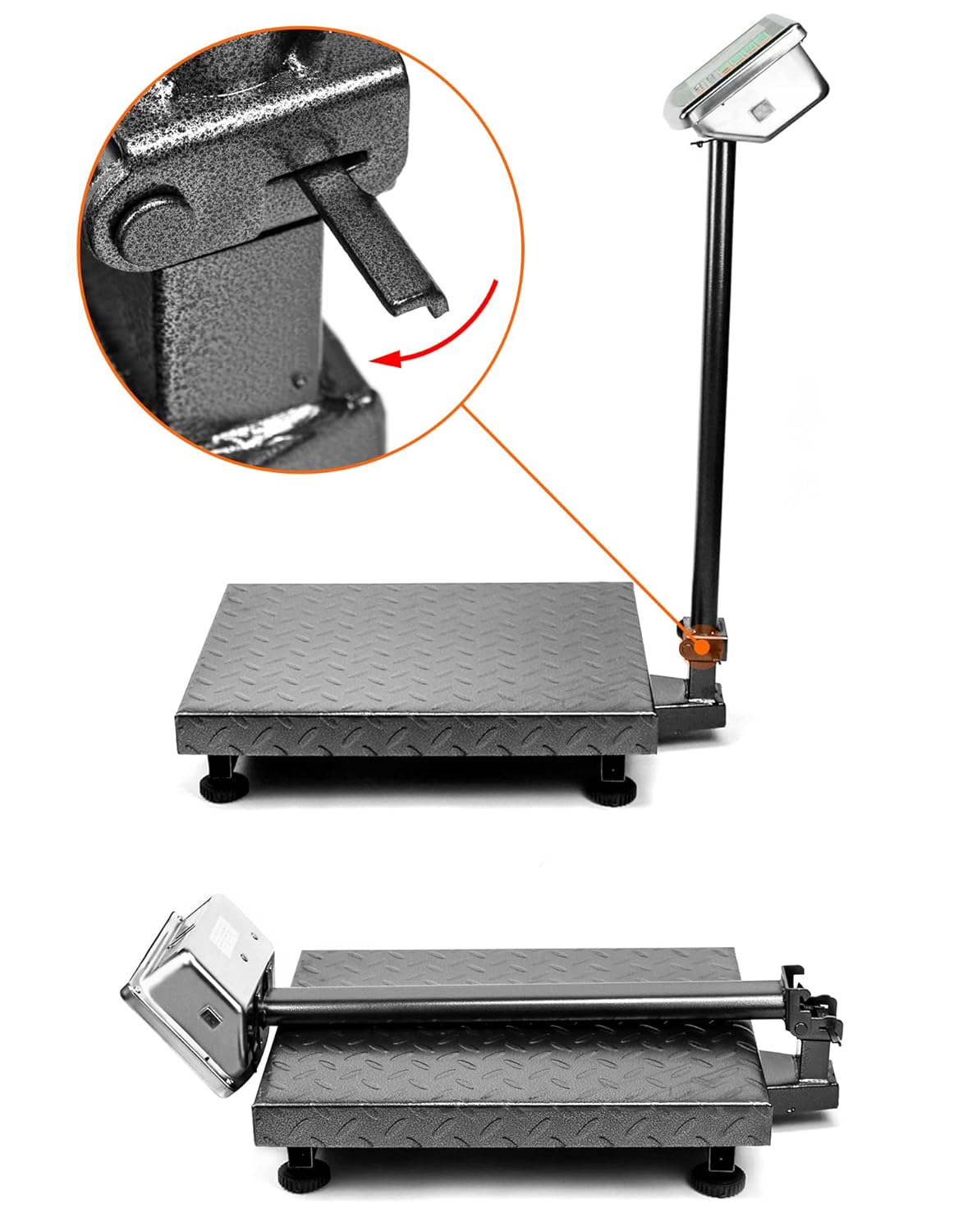
Image: The folding mechanism of the QWORK WD10229 Digital Floor Scale, showing how the display stand can be lowered for compact storage.
- பேட்டரி சார்ஜிங்: If the scale is battery-powered, ensure it is charged regularly to maintain optimal performance.
சரிசெய்தல்
Display shows "Lo" or "Battery Low": The internal battery is low. Connect the scale to the power adapter for charging.
Display shows "O_Ld" or "Err": The scale is overloaded. Remove the item immediately to prevent damage. Ensure the weight does not exceed 660 lbs (300 kg).
தவறான அளவீடுகள்:
- அளவு ஒரு நிலையான, நிலை மேற்பரப்பில் இருப்பதை உறுதிப்படுத்தவும்.
- Check that nothing is touching the platform or interfering with its movement.
- Perform a Zero operation before weighing.
- Avoid strong vibrations or air currents during weighing.
காட்சி இல்லை:
- பவர் அடாப்டர் பாதுகாப்பாக இணைக்கப்பட்டுள்ளதா மற்றும் பவர் அவுட்லெட் செயல்படுகிறதா என சரிபார்க்கவும்.
- பவர் ஸ்விட்ச் "ஆன்" நிலையில் இருப்பதை உறுதிசெய்யவும்.
- பேட்டரி சக்தியைப் பயன்படுத்தினால், பேட்டரி சார்ஜ் செய்யப்பட்டுள்ளதா என்பதை உறுதிப்படுத்திக் கொள்ளுங்கள்.
விவரக்குறிப்புகள்
| அம்சம் | விவரம் |
|---|---|
| பிராண்ட் | QWORK (குறுக்கு வேலை) |
| மாதிரி எண் | WD10229 |
| எடை திறன் | Minimum: 0.050 lb, Maximum: 660 lb (300 kg) |
| மேடை பரிமாணங்கள் | 19.8" x 15.75" (500மிமீ x 400மிமீ) Image: Diagram illustrating the dimensions of the QWORK WD10229 Digital Floor Scale platform and overall height. |
| காட்சி வகை | LCD/LED with Backlit Display |
| பொருள் | அலாய் ஸ்டீல் |
| படிவம் காரணி | மடிக்கக்கூடியது |
| பொருளின் எடை | 9.44 கிலோகிராம் |
| பரிந்துரைக்கப்பட்ட பயன்பாடுகள் | Packages, Envelopes, Warehouse, Shipping, Postal |
உத்தரவாதம் மற்றும் ஆதரவு
For warranty information or technical support, please refer to the contact details provided with your purchase or visit the official QWORK webவாங்கியதற்கான சான்றாக உங்கள் கொள்முதல் ரசீதை வைத்திருங்கள்.