
1. முக்கியமான பாதுகாப்பு வழிமுறைகள்
- தயாரிப்பைப் பயன்படுத்துவதற்கு முன்பு இந்த வழிமுறைகளை முழுமையாகப் படிக்கவும்.
- எதிர்கால குறிப்புக்காக இந்த கையேட்டை வைத்திருங்கள்.
- Do not expose the product to extreme temperatures, humidity, or corrosive environments.
- செவிப்புலன் பாதிப்பைத் தடுக்க நீண்ட காலத்திற்கு அதிக ஒலி அளவுகளில் கேட்பதைத் தவிர்க்கவும்.
- Do not disassemble, repair, or modify the product. Contact authorized service personnel for assistance.
- குழந்தைகள் மற்றும் செல்லப்பிராணிகளிடமிருந்து தயாரிப்புகளை விலக்கி வைக்கவும்.
- உள்ளூர் விதிமுறைகளின்படி தயாரிப்பு மற்றும் அதன் பேட்டரியை பொறுப்புடன் அப்புறப்படுத்துங்கள்.
2. தொகுப்பு உள்ளடக்கங்கள்
தொகுப்பில் அனைத்து பொருட்களும் உள்ளதா என சரிபார்க்கவும்:
- Edifier TO-U6+ True Wireless Earbuds (Left and Right)
- சார்ஜிங் கேஸ்
- USB சார்ஜிங் கேபிள்
- காது குறிப்புகள் (பல்வேறு அளவுகள்)
- பயனர் கையேடு (இந்த ஆவணம்)
3. தயாரிப்பு முடிந்துவிட்டதுview
The Edifier TO-U6+ earbuds are designed for comfortable in-ear fit and provide high-quality audio with touch controls.
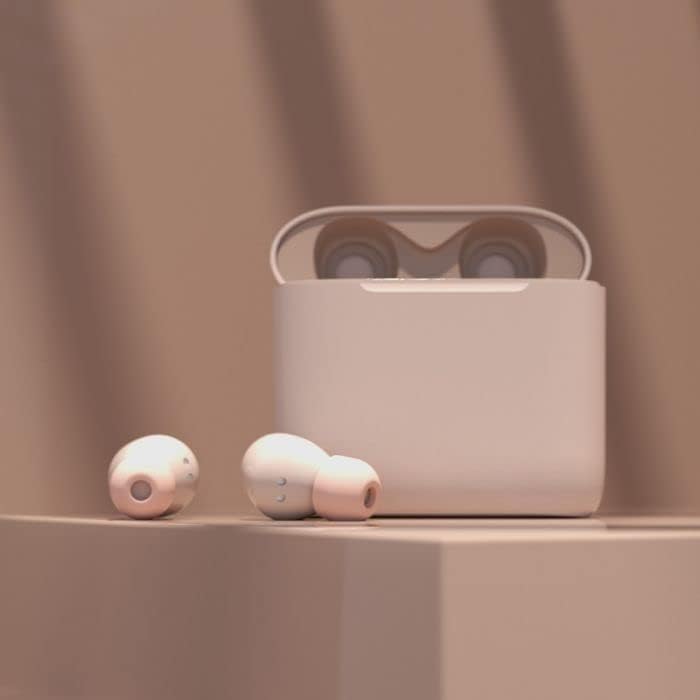
Image: Edifier TO-U6+ Earbuds removed from their open charging case, showcasing அவர்களின் வடிவமைப்பு.

Image: A person wearing Edifier TO-U6+ earbuds, demonstrating their ergonomic fit during use.
The charging case protects the earbuds and provides additional battery life for extended listening.
4 அமைவு
4.1 இயர்பட்ஸ் மற்றும் கேஸை சார்ஜ் செய்தல்
முதல் பயன்பாட்டிற்கு முன், இயர்பட்கள் மற்றும் சார்ஜிங் கேஸை முழுமையாக சார்ஜ் செய்யவும்.
- இயர்பட்களை சார்ஜிங் கேஸில் வைக்கவும். அவை சரியாகப் பொருத்தப்பட்டுள்ளதா என்பதை உறுதிப்படுத்திக் கொள்ளுங்கள்.
- USB சார்ஜிங் கேபிளை கேஸில் உள்ள சார்ஜிங் போர்ட்டுடனும், USB பவர் சோர்ஸுடனும் இணைக்கவும்.
- The indicator light on the charging case will show charging status. A full charge provides up to 8 hours of playback for the earbuds and an additional 24 hours from the case, totaling 32 hours. A 15-minute charge can provide 1 hour of music playback.
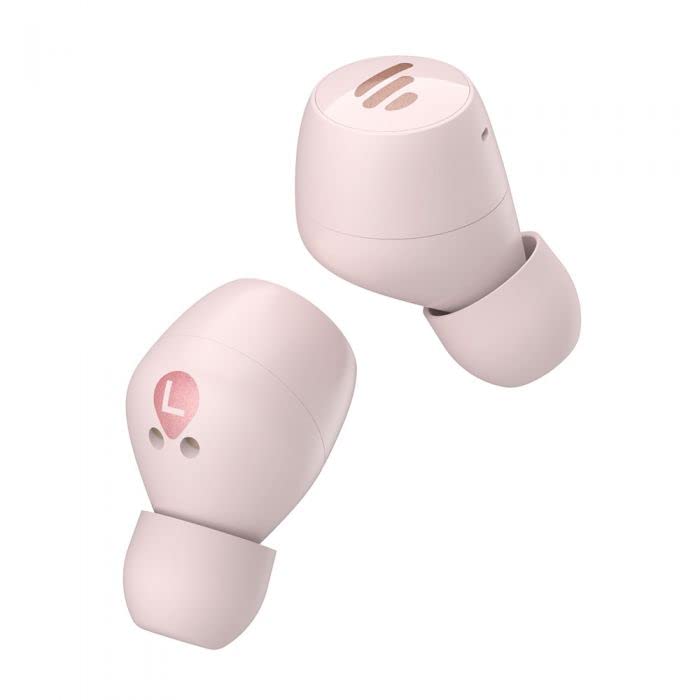
Image: The Edifier TO-U6+ charging case, illustrating its compact design.
4.2 ப்ளூடூத் இணைத்தல்
- சார்ஜிங் கேஸைத் திறக்கவும். இயர்பட்கள் தானாக இணைத்தல் பயன்முறைக்குச் செல்லும், இது இயர்பட்களில் ஒளிரும் விளக்கால் குறிக்கப்படும்.
- உங்கள் சாதனத்தில் (ஸ்மார்ட்போன், டேப்லெட், முதலியன), புளூடூத்தை இயக்கவும்.
- தேடுங்கள் available Bluetooth devices and select "Edifier TO-U6+" from the list.
- Once connected, the earbud indicator lights will turn off or show a steady light, depending on the model.
- If pairing fails, place the earbuds back into the case, close the lid, and then reopen to re-enter pairing mode.
5. இயக்க வழிமுறைகள்
5.1 தொடு கட்டுப்பாடுகள்
The Edifier TO-U6+ earbuds feature intuitive touch controls on each earbud. The touch-sensitive area is located on the outer surface of each earbud.

படம்: மேல் view of the Edifier TO-U6+ earbuds, highlighting the touch control area.
| செயல் | செயல்பாடு |
|---|---|
| ஒற்றைத் தட்டு (இடது/வலது) | இசையை இயக்கு/இடைநிறுத்து, அழைப்பை ஏற்கு/முடி |
| இரட்டைத் தட்டு (வலது இயர்பட்) | அடுத்த ட்ராக் |
| இருமுறை தட்டவும் (இடது இயர்பட்) | குரல் உதவியாளரை இயக்கவும் |
| டிரிபிள் டேப் (வலது இயர்பட்) | முந்தைய ட்ராக் |
| நீண்ட நேரம் அழுத்தவும் (இடது/வலது) | அழைப்பை நிராகரி |
5.2 குரல் அழைப்புகள்
The earbuds feature CVC 8.0 voice call noise cancellation, which reduces ambient noise for clearer conversations. Use the single tap action to answer or end calls, and long press to reject incoming calls.
6. பராமரிப்பு
6.1 சுத்தம் செய்தல்
- காது நுனிகளை மென்மையான, உலர்ந்த துணியால் தவறாமல் சுத்தம் செய்யவும்.
- Wipe the charging contacts on the earbuds and inside the case with a dry cotton swab to ensure proper charging.
- கடுமையான இரசாயனங்கள் அல்லது சிராய்ப்பு பொருட்களை சுத்தம் செய்ய பயன்படுத்த வேண்டாம்.
6.2 சேமிப்பு
- இயர்பட்களைப் பாதுகாக்கவும், அவற்றை சார்ஜ் செய்து வைத்திருக்கவும், பயன்பாட்டில் இல்லாதபோது எப்போதும் அவற்றை அவற்றின் சார்ஜிங் கேஸில் வைக்கவும்.
- நேரடி சூரிய ஒளி மற்றும் தீவிர வெப்பநிலையிலிருந்து விலகி, குளிர்ந்த, உலர்ந்த இடத்தில் தயாரிப்பை சேமிக்கவும்.
6.3 நீர் மற்றும் தூசி எதிர்ப்பு
The Edifier TO-U6+ earbuds are IP55-rated for dust and water resistance. This means they are protected against limited dust ingress and low-pressure water jets from any direction. They are suitable for workouts and light rain, but இல்லை for swimming or submersion in water.
7. சரிசெய்தல்
If you encounter issues with your Edifier TO-U6+ earbuds, refer to the following common solutions:
- ஒலி இல்லை: இயர்பட்கள் சார்ஜ் செய்யப்பட்டுள்ளதா, சரியாக இணைக்கப்பட்டுள்ளதா, இயர்பட்களிலும் உங்கள் சாதனத்திலும் ஒலியளவு சரிசெய்யப்பட்டுள்ளதா என்பதை உறுதிப்படுத்திக் கொள்ளுங்கள்.
- இணைத்தல் சிக்கல்கள்: Turn off Bluetooth on your device, place earbuds back in the case, close and reopen the lid, then try pairing again. Clear previous Bluetooth connections on your device if necessary.
- ஒரு இயர்பட் வேலை செய்யவில்லை: Place both earbuds back in the case, close the lid, wait a few seconds, then take them out again. This often re-syncs them.
- சார்ஜிங் பிரச்சனைகள்: Check the charging cable and power source. Ensure charging contacts on earbuds and case are clean and free of debris.
- மோசமான அழைப்பு தரம்: Ensure earbuds are properly seated in your ears. Check for strong Bluetooth signal.
If problems persist, consult the Edifier support webதளம் அல்லது வாடிக்கையாளர் சேவையை தொடர்பு கொள்ளவும்.
8. விவரக்குறிப்புகள்
| அம்சம் | விவரம் |
|---|---|
| மாதிரி | TO-U6+ |
| இணைப்பு | வயர்லெஸ், புளூடூத் 5.0 |
| புளூடூத் புரோfiles | A2DP, AVRCP, HFP |
| ஆடியோ தொழில்நுட்பம் | குவால்காம் ஆப்டிஎக்ஸ் |
| அழைப்பு இரைச்சல் குறைப்பு | CVC 8.0 |
| விளையாட்டு நேரம் (இயர்பட்ஸ்) | 8 மணி நேரம் வரை |
| மொத்த விளையாட்டு நேரம் (கேஸுடன்) | 32 மணி நேரம் வரை |
| விரைவான கட்டணம் | 15 minutes for 1 hour playback |
| நீர் எதிர்ப்பு | IP55 தூசி மற்றும் நீர்ப்புகா |
| கட்டுப்பாட்டு முறை | தொடவும் |
| தயாரிப்பு பரிமாணங்கள் | 2 x 2 x 3 cm (earbuds); 180 g (total weight) |
| இணக்கமான சாதனங்கள் | ஸ்மார்ட்போன்கள், டேப்லெட்டுகள், மடிக்கணினிகள், டெஸ்க்டாப்புகள் |
9. உத்தரவாதம் மற்றும் ஆதரவு
Edifier products are covered by a limited warranty. For detailed warranty information, please refer to the warranty card included with your purchase or visit the official Edifier webதளம்.
For technical support, product registration, or further inquiries, please visit the Edifier customer support portal or contact their authorized service centers. Keep your proof of purchase for warranty claims.