
1. அறிமுகம்
Thank you for choosing the FOSSiBOT F2400 Portable Power Station. This device is designed to provide reliable power for various applications, including outdoor activities, camping, and emergency backup during power outages. Featuring a 2048Wh LiFePO4 battery and 2400W AC output, the F2400 offers versatile charging options and robust performance. Please read this manual thoroughly before operating the unit to ensure safe and optimal use.

Image: FOSSiBOT F2400 Portable Power Station with an accompanying solar panel, set up outdoors.
2. தயாரிப்பு முடிந்துவிட்டதுview மற்றும் கூறுகள்
The FOSSiBOT F2400 is equipped with multiple ports and controls for efficient power management. Familiarize yourself with the layout and functions of each component.
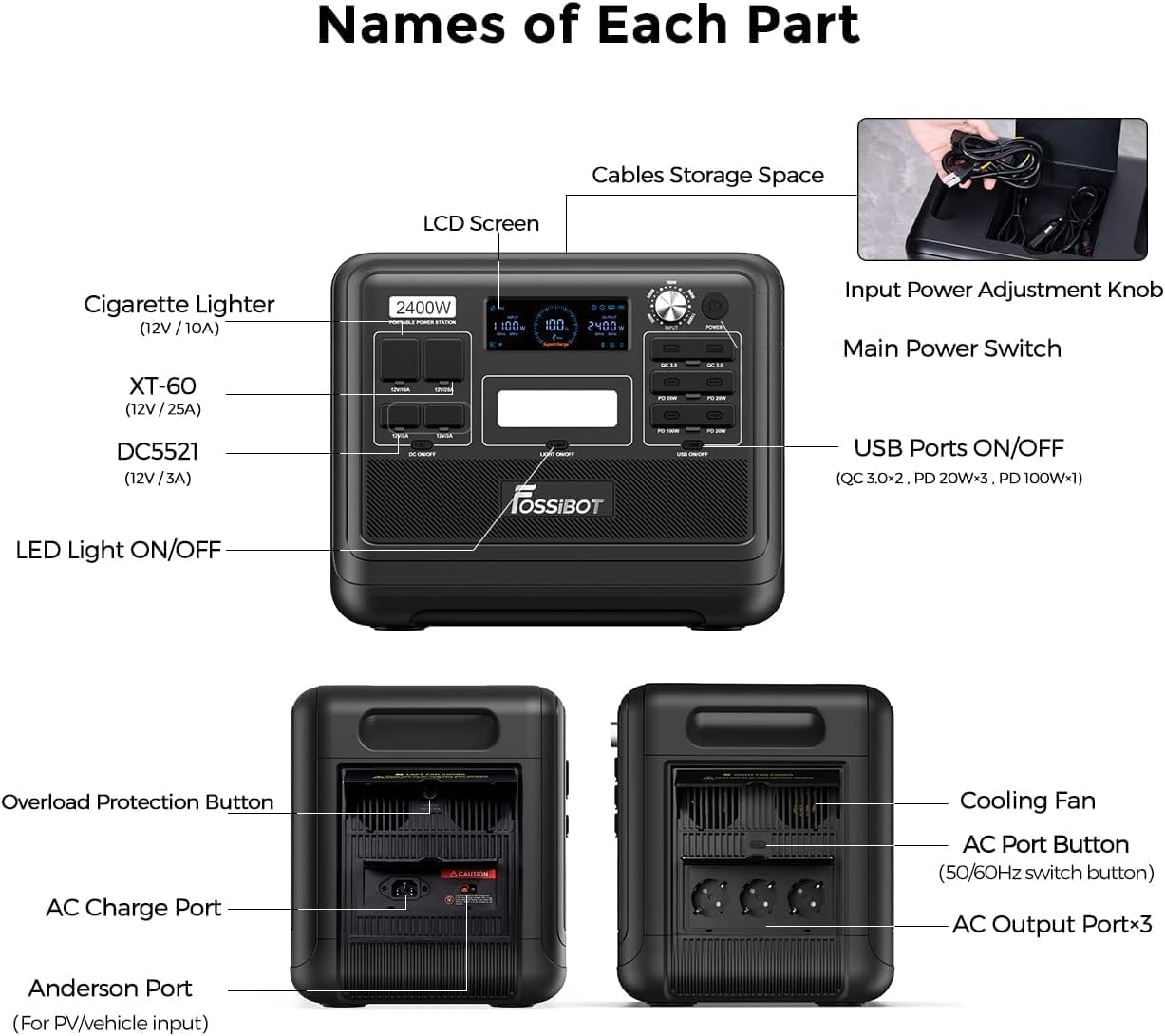
Image: Detailed diagram illustrating the various ports, buttons, and features of the FOSSiBOT F2400, including the LCD screen, input power adjustment knob, main power switch, USB ports, AC output ports, DC5521, XT60, cigarette lighter port, LED light, overload protection button, AC charge port, and Anderson port.
2.1 முக்கிய கூறுகள்
- LCD திரை: Displays real-time power input/output, battery level, and operational status.
- Input Power Adjustment Knob: Allows adjustment of input power (300W, 500W, 700W, 900W, 1100W) to protect the battery and extend its lifespan.
- முதன்மை சக்தி சுவிட்ச்: முழு யூனிட்டையும் ஆன் அல்லது ஆஃப் செய்கிறது.
- ஏசி வெளியீட்டு போர்ட்கள் (x3): Provides 2400W (4800W peak) AC power for household appliances. Includes a 50/60Hz switch button.
- USB போர்ட்கள்: Includes 2 USB-A ports (QC 3.0) and 4 USB-C ports (PD 20W x3, PD 100W x1) for charging mobile devices.
- DC வெளியீட்டு துறைமுகங்கள்: Includes a Cigarette Lighter port (12V/10A), an XT60 port (12V/25A), and two DC5521 ports (12V/3A).
- LED விளக்கு: வெளிச்சத்திற்கான ஒருங்கிணைந்த ஒளி.
- ஓவர்லோட் பாதுகாப்பு பொத்தான்: Resets the unit in case of an overload.
- AC Charge Port: For charging the power station via a standard wall outlet.
- Anderson Port: For solar panel or vehicle input.
- குளிரூட்டும் மின்விசிறி: Activates automatically to dissipate heat during operation.
- Cables Storage Space: Integrated compartment for storing charging cables.
3 அமைவு
3.1 ஆரம்ப கட்டணம்
Before first use, it is recommended to fully charge the FOSSiBOT F2400. Connect the provided AC charging cable to the AC Charge Port and plug it into a standard wall outlet. The LCD screen will indicate the charging status.
3.2 வேலை வாய்ப்பு
Place the power station on a stable, flat surface with adequate ventilation. Ensure that the cooling fan vents are not obstructed. Avoid direct sunlight or extreme temperatures.
4. இயக்க வழிமுறைகள்
4.1 பவர் ஆன்/ஆஃப்
- To turn on the unit, press and hold the முதன்மை சக்தி சுவிட்ச் for a few seconds until the LCD screen illuminates.
- அலகு அணைக்க, அழுத்திப் பிடிக்கவும் முதன்மை சக்தி சுவிட்ச் again until the LCD screen turns off.
4.2 AC வெளியீடுகளைப் பயன்படுத்துதல்
- அழுத்தவும் AC Port Button to activate the AC outlets. The AC indicator on the LCD screen will light up.
- Plug your AC appliances into the AC output ports.
- Ensure the total power consumption of your devices does not exceed 2400W.
- To switch between 50Hz and 60Hz, press the small button located near the AC outlets.
- பயன்பாட்டிற்குப் பிறகு, அழுத்தவும் AC Port Button again to turn off the AC outputs and conserve power.
4.3 DC மற்றும் USB வெளியீடுகளைப் பயன்படுத்துதல்
- அழுத்தவும் USB Ports ON/OFF button to activate the USB-A and USB-C ports.
- அழுத்தவும் DC ஆன்/ஆஃப் button to activate the Cigarette Lighter, XT60, and DC5521 ports.
- உங்கள் சாதனங்களை பொருத்தமான துறைமுகங்களுடன் இணைக்கவும்.
- After use, turn off the DC and USB outputs to conserve power.
4.4 LED ஒளியைப் பயன்படுத்துதல்
- அழுத்தவும் LED லைட் ஆன்/ஆஃப் button to turn on the integrated light.
- Press again to cycle through different brightness modes or turn off.
5. சார்ஜிங் முறைகள்
The FOSSiBOT F2400 offers multiple ways to recharge its internal battery.
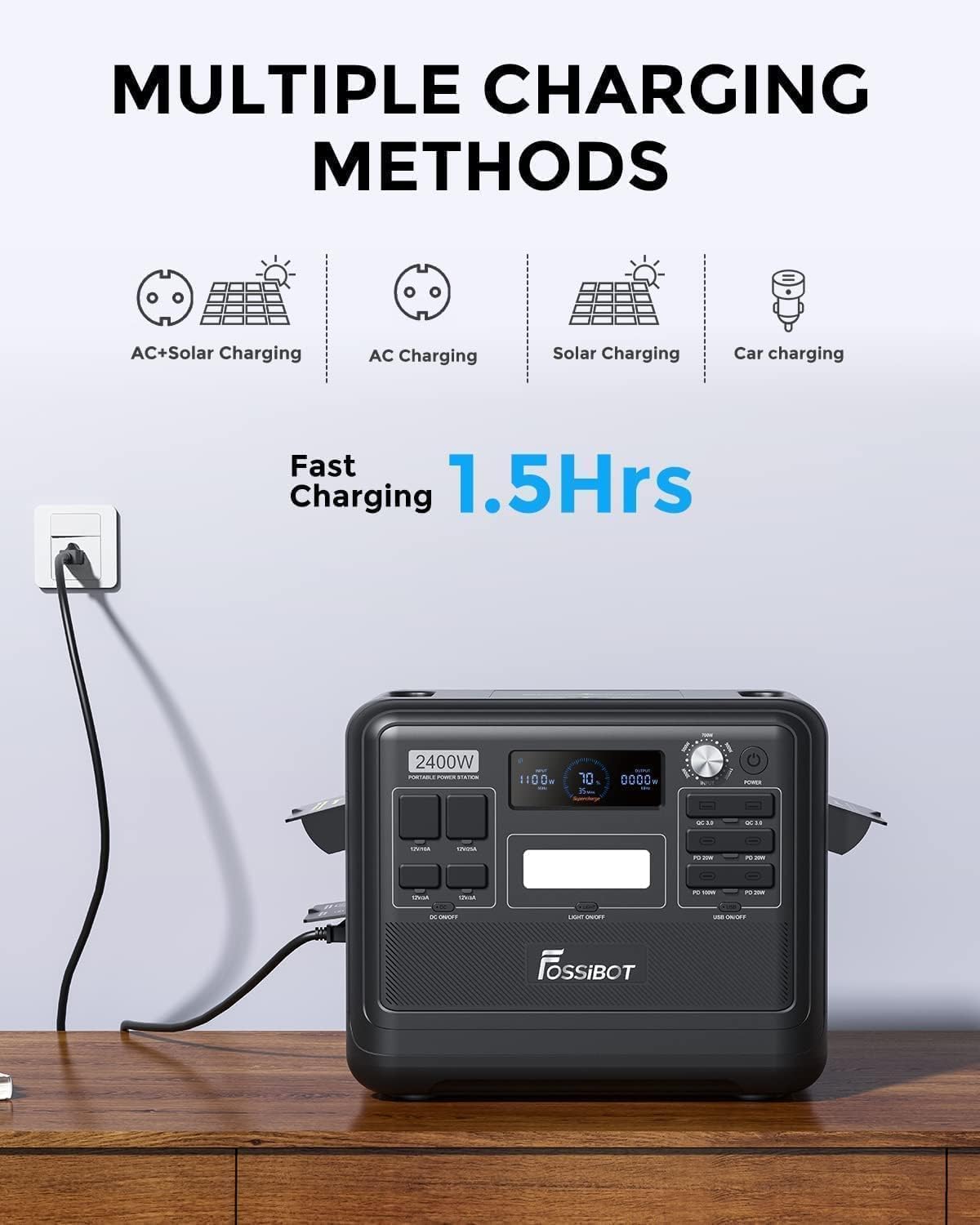
Image: Visual representation of the FOSSiBOT F2400 being charged via various methods, including AC, solar, and car charging, with an emphasis on fast charging capabilities.
5.1 ஏசி சுவர் சார்ஜிங்
- Connect the AC charging cable to the AC Charge Port and a wall outlet.
- The F2400 supports 1100W fast charging, allowing it to charge from 0% to 80% in approximately 1 hour, and fully charge in about 1.5 hours.
- பயன்படுத்தவும் உள்ளீட்டு சக்தி சரிசெய்தல் குமிழ் to select desired input wattage (300W, 500W, 700W, 900W, 1100W) to manage charging speed and battery longevity.
5.2 சோலார் சார்ஜிங்
- Connect compatible solar panels (up to 500W max solar input) to the Anderson Port using the provided solar charging cable.
- Ensure solar panels are placed in direct sunlight for optimal charging efficiency.
- The F2400 can be fully charged in approximately 1.5 hours when combining 1100W AC input with 500W solar input.

Image: The FOSSiBOT F2400 power station connected to a foldable solar panel, positioned in a grassy area with tents in the background, demonstrating solar charging in a campசுற்றுச்சூழல்.
5.3 கார் சார்ஜிங்
- Connect the car charging cable to the Cigarette Lighter port of your vehicle and the F2400's input port.
- Car charging is suitable for topping up the battery while traveling.
6. தடையில்லா மின்சாரம் (UPS) செயல்பாடு
The FOSSiBOT F2400 features an Uninterruptible Power Supply (UPS) function, providing seamless power during outages.

Image: A diagram demonstrating the FOSSiBOT F2400's UPS capability, showing how it automatically switches to internal battery power within 0.008 seconds when the main power supply is interrupted, ensuring continuous operation for connected devices like a computer.
- When connected to a wall outlet and simultaneously powering devices, the F2400 acts as a pass-through power source.
- In the event of a sudden power interruption, the UPS system will automatically switch to the internal battery power within 0.008 seconds. This ensures that sensitive electronics remain powered without interruption.
- This feature is ideal for protecting computers, medical equipment, and other critical devices from data loss or operational disruption during blackouts.
7. பராமரிப்பு
7.1 Battery Care and Lifespan
The FOSSiBOT F2400 utilizes a LiFePO4 battery, known for its safety and long lifespan.

Image: An illustration highlighting the superior lifespan of the FOSSiBOT F2400's LiFePO4 battery, indicating over 3500 charge cycles and more than 10 years of use, in contrast to other battery types.
- The battery is rated for over 3500 charge cycles, providing a reliable power source for more than a decade with proper care.
- The integrated Battery Management System (BMS) offers multiple protection functions, including over-charge, over-discharge, over-current, and short-circuit protection.
- For optimal battery health, avoid completely draining the battery frequently. Recharge it when the level drops below 20%.
7.2 சேமிப்பு
- If storing the unit for an extended period, ensure the battery is charged to approximately 50-80%.
- நேரடி சூரிய ஒளி மற்றும் தீவிர வெப்பநிலையிலிருந்து விலகி, குளிர்ந்த, உலர்ந்த இடத்தில் சேமிக்கவும்.
- Recharge the unit every 3-6 months to prevent deep discharge and maintain battery health.
7.3 சுத்தம் செய்தல்
- Use a soft, dry cloth to clean the exterior of the power station.
- சிராய்ப்பு கிளீனர்கள் அல்லது கரைப்பான்களைப் பயன்படுத்த வேண்டாம்.
- Keep the cooling fan vents free from dust and debris.
8. சரிசெய்தல்
If you encounter issues with your FOSSiBOT F2400, refer to the following common problems and solutions.
| பிரச்சனை | சாத்தியமான காரணம் | தீர்வு |
|---|---|---|
| அலகு இயக்கப்படவில்லை. | Battery is completely drained or Main Power Switch not pressed correctly. | Charge the unit via AC wall outlet. Press and hold the Main Power Switch firmly for a few seconds. |
| ஏசி அவுட்லெட்டுகள் மின்சாரம் வழங்கவில்லை. | AC output not activated, or overload protection triggered. | Press the AC Port Button to activate. If overloaded, disconnect devices, press the Overload Protection Button, then reconnect devices with lower total wattage. Ensure the small button for Schuko outlets is pressed if applicable (as per user review). |
| மெதுவான சார்ஜிங் வேகம். | Input Power Adjustment Knob set to lower wattage, or insufficient solar input. | Adjust the Input Power Adjustment Knob to a higher wattage. For solar charging, ensure panels are in direct sunlight and free from obstructions. |
| அலகு அதிக வெப்பமடைதல். | Cooling fan vents obstructed, or operating in high ambient temperatures. | Ensure vents are clear. Move the unit to a cooler environment. The cooling fan should activate automatically. |
| USB/DC ports not working. | USB/DC output not activated. | Press the respective ON/OFF buttons for USB or DC outputs. |
9. விவரக்குறிப்புகள்
Below are the technical specifications for the FOSSiBOT F2400 Portable Power Station.
| அம்சம் | விவரம் |
|---|---|
| மாதிரி பெயர் | F2400-EU |
| பேட்டரி வகை | LiFePO4 (லித்தியம் இரும்பு பாஸ்பேட்) |
| திறன் | 2048Wh |
| ஏசி வெளியீடு சக்தி | 2400W (Continuous), 4800W (Peak) |
| ஏசி வெளியீடு தொகுதிtage | 230 வோல்ட் (ஏசி) |
| ஏசி வெளியீட்டு அதிர்வெண் | 50/60 Hz (Switchable) |
| மொத்த விற்பனை நிலையங்கள் | 13 (3x AC, 2x USB-A, 4x USB-C, 1x Cigarette Lighter, 1x XT60, 2x DC5521) |
| ஏசி உள்ளீட்டு சார்ஜிங் | Up to 1100W (Adjustable) |
| சூரிய உள்ளீடு சார்ஜிங் | Up to 500W (via Anderson Port) |
| UPS மாற்ற நேரம் | 0.008 வினாடிகள் |
| ஆயுட்காலம் | Over 3500 cycles to 80% capacity |
| பரிமாணங்கள் (L x W x H) | 39L x 29W x 32H செ.மீ |
| எடை | 22.04 கிலோகிராம் |
| பொருள் | Steel, aluminum, plastic, rubber, lithium iron phosphate |
10. உத்தரவாதம் மற்றும் ஆதரவு
10.1 உத்தரவாதத் தகவல்
The FOSSiBOT F2400 Portable Power Station comes with a 2 வருட கவலையற்ற உத்தரவாதம் வாங்கிய தேதியிலிருந்து. இந்த உத்தரவாதமானது உற்பத்தி குறைபாடுகளை உள்ளடக்கியது மற்றும் சாதாரண பயன்பாட்டின் கீழ் நம்பகமான செயல்பாட்டை உறுதி செய்கிறது. உத்தரவாதக் கோரிக்கைகளுக்கு உங்கள் வாங்கியதற்கான ஆதாரத்தை வைத்திருங்கள்.
10.2 வாடிக்கையாளர் ஆதரவு
For any questions, technical assistance, or warranty claims, please contact FOSSiBOT customer support. Refer to the contact information provided with your purchase or visit the official FOSSiBOT webஆதரவு விவரங்களுக்கான தளம்.