
candytech
Generic Candytech Loudy 5W Portable Bluetooth Speaker User Manual
Model: candytech
அறிமுகம்
நன்றி, நன்றி.asing the Generic Candytech Loudy 5W Portable Bluetooth Speaker. This manual provides essential information for setting up, operating, and maintaining your speaker. Please read it carefully before use and retain it for future reference.
பாதுகாப்பு தகவல்
- ஸ்பீக்கரை தீவிர வெப்பநிலை, நேரடி சூரிய ஒளி அல்லது அதிக ஈரப்பதத்திற்கு வெளிப்படுத்த வேண்டாம்.
- பேச்சாளரைக் கீழே தள்ளுவதையோ அல்லது வலுவான தாக்கங்களுக்கு உட்படுத்துவதையோ தவிர்க்கவும்.
- ஸ்பீக்கரை நீங்களே பிரித்தெடுக்கவோ அல்லது சரிசெய்ய முயற்சிக்கவோ வேண்டாம். இது உத்தரவாதத்தை ரத்து செய்து சேதத்தை ஏற்படுத்தக்கூடும்.
- Keep the speaker away from water and other liquids. While it is waterproof, prolonged submersion is not recommended.
- குறிப்பிட்ட சார்ஜிங் அளவை மட்டும் பயன்படுத்தவும்.tagமின் மற்றும் தற்போதைய.
- குழந்தைகளுக்கு எட்டாத இடத்தில் வைக்கவும்.
தொகுப்பு உள்ளடக்கங்கள்
பின்வரும் உருப்படிகளுக்கு பெட்டியை சரிபார்க்கவும்:
- Generic Candytech Loudy 5W Portable Bluetooth Speaker
- சார்ஜிங் கேபிள் (USB)
- பயனர் கையேடு (இந்த ஆவணம்)
தயாரிப்பு முடிந்துவிட்டதுview
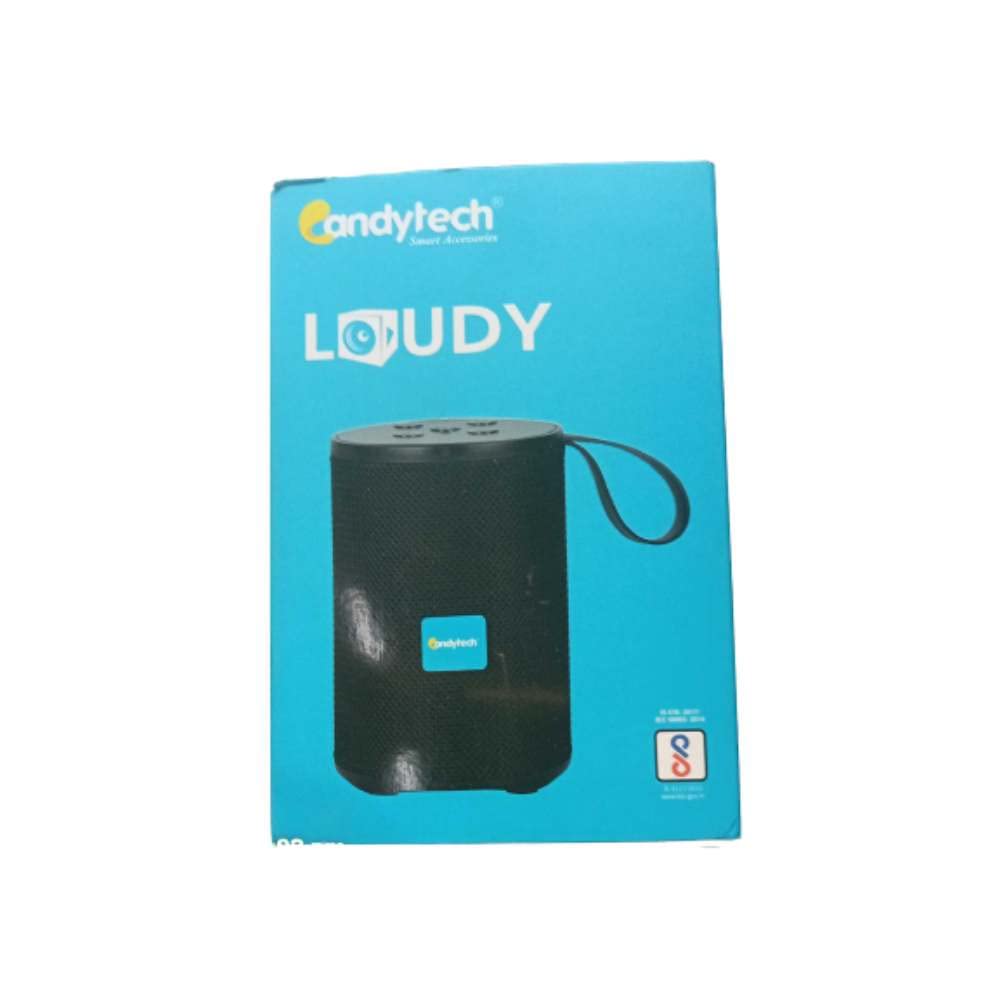
படம்: முன் view of the Generic Candytech Loudy 5W Portable Bluetooth Speaker. It features a black cylindrical design with a mesh grille, a blue Candytech logo on the front, and a black carrying strap attached to the top. The control buttons are located on the top surface.
The Candytech Loudy speaker is designed for portable audio playback with multiple connectivity options. It features a compact, cylindrical design with intuitive controls.
கட்டுப்பாடுகள் மற்றும் துறைமுகங்கள்:
- பவர் பட்டன்: ஆன்/ஆஃப் செய்ய அழுத்திப் பிடிக்கவும்.
- பயன்முறை பொத்தான்: Short press to switch between Bluetooth, FM, AUX, USB, and TF Card modes.
- ப்ளே/இடைநிறுத்த பட்டன்: இசையை இயக்க அல்லது இடைநிறுத்த சுருக்கமாக அழுத்தவும்.
- ஒலியளவை அதிகரிக்கும் / அடுத்த டிராக் பொத்தான்: அடுத்த டிராக்கிற்கு சுருக்கமாக அழுத்தவும், ஒலியை அதிகரிக்க நீண்ட நேரம் அழுத்தவும்.
- ஒலியளவைக் குறை / முந்தைய டிராக் பொத்தான்: முந்தைய டிராக்கைப் பார்க்க சுருக்கமாக அழுத்தவும், ஒலியைக் குறைக்க நீண்ட நேரம் அழுத்தவும்.
- சார்ஜிங் போர்ட்: சார்ஜ் செய்வதற்கான மைக்ரோ USB போர்ட்.
- AUX-இன் போர்ட்: 3.5mm audio input for wired connection.
- USB போர்ட்: USB டிரைவ் பிளேபேக்கிற்கு.
- TF அட்டை ஸ்லாட்: TF (மைக்ரோ SD) கார்டு பிளேபேக்கிற்கு.
அமைவு
1. சபாநாயகரிடம் கட்டணம் வசூலித்தல்
- வழங்கப்பட்ட USB சார்ஜிங் கேபிளை ஸ்பீக்கரின் சார்ஜிங் போர்ட்டுடன் இணைக்கவும்.
- USB கேபிளின் மறுமுனையை USB பவர் அடாப்டருடன் (சேர்க்கப்படவில்லை) அல்லது கணினியின் USB போர்ட்டுடன் இணைக்கவும்.
- சார்ஜ் செய்யும் போது சார்ஜிங் இண்டிகேட்டர் லைட் ஒளிரும்.
- Charging time is approximately 1-2 hours for a full charge. The indicator light will turn off or change color when fully charged.
2. ஆன் / ஆஃப் செய்தல்
- இயக்க: அழுத்திப் பிடிக்கவும் பவர் பட்டன் for 2-3 seconds. You will hear an audible prompt.
- அணைக்க: அழுத்திப் பிடிக்கவும் பவர் பட்டன் for 2-3 seconds. You will hear an audible prompt.
3. புளூடூத் இணைத்தல்
- ஸ்பீக்கர் இயக்கப்பட்டு புளூடூத் பயன்முறையில் இருப்பதை உறுதிசெய்யவும். இல்லையென்றால், சுருக்கமாக அழுத்தவும். பயன்முறை பொத்தான் until you hear the Bluetooth mode prompt. The indicator light will flash, indicating it's ready for pairing.
- உங்கள் ஸ்மார்ட்போன், டேப்லெட் அல்லது பிற புளூடூத்-இயக்கப்பட்ட சாதனத்தில் புளூடூத்தை இயக்கவும்.
- தேடுங்கள் available Bluetooth devices and select "Candytech" or "Loudy" from the list.
- Once paired, the speaker will emit a confirmation sound, and the indicator light will stop flashing.
- சாதனம் வரம்பிற்குள் இருந்து, புளூடூத் இயக்கப்பட்டிருந்தால், ஸ்பீக்கர் இயக்கப்பட்டிருக்கும் போது கடைசியாக இணைக்கப்பட்ட சாதனத்துடன் தானாகவே மீண்டும் இணைக்கப்படும்.
4. துணை (AUX) இணைப்பு
- Connect one end of a 3.5mm audio cable (not included) to the speaker's AUX-in port.
- மறுமுனையை உங்கள் சாதனத்தின் ஆடியோ அவுட்புட் ஜாக்குடன் இணைக்கவும் (எ.கா., MP3 பிளேயர், கணினி).
- சுருக்கமாக அழுத்தவும் பயன்முறை பொத்தான் AUX பயன்முறைக்கு மாற.
- உங்கள் இணைக்கப்பட்ட சாதனத்திலிருந்து பிளேபேக் மற்றும் ஒலியளவைக் கட்டுப்படுத்தவும்.
5. USB / TF கார்டு பிளேபேக்
- Insert a USB drive or a TF (MicroSD) card into the respective port/slot on the speaker.
- ஸ்பீக்கர் தானாகவே USB அல்லது TF கார்டு பயன்முறைக்கு மாறி ஆடியோவை இயக்கத் தொடங்கும். files. If not, short press the பயன்முறை பொத்தான் சரியான பயன்முறையைத் தேர்ந்தெடுக்க.
- Use the speaker's controls for playback (play/pause, next/previous track, volume).
6. FM வானொலி
- சுருக்கமாக அழுத்தவும் பயன்முறை பொத்தான் FM ரேடியோ பயன்முறைக்கு மாற.
- நிலையங்களைத் தானாக ஸ்கேன் செய்ய, அழுத்திப் பிடிக்கவும் ப்ளே/பாஸ் பட்டன். The speaker will scan and save available FM stations.
- பயன்படுத்தவும் அடுத்த ட்ராக் மற்றும் முந்தைய ட்ராக் சேமிக்கப்பட்ட நிலையங்களுக்கு இடையில் செல்ல பொத்தான்கள்.
இயக்க வழிமுறைகள்
இசை பின்னணி
- விளையாடு/இடைநிறுத்தம்: சுருக்கமாக அழுத்தவும் ப்ளே/பாஸ் பட்டன்.
- அடுத்த ட்ராக்: சுருக்கமாக அழுத்தவும் வால்யூம் அப் / அடுத்த ட்ராக் பட்டன்.
- முந்தைய ட்ராக்: சுருக்கமாக அழுத்தவும் வால்யூம் டவுன் / முந்தைய டிராக் பட்டன்.
- ஒலியை பெருக்கு: நீண்ட நேரம் அழுத்தவும் வால்யூம் அப் / அடுத்த ட்ராக் பட்டன்.
- ஒலியை குறை: நீண்ட நேரம் அழுத்தவும் வால்யூம் டவுன் / முந்தைய டிராக் பட்டன்.
Call Handling (Bluetooth Mode)
- பதில் அழைப்பு: சுருக்கமாக அழுத்தவும் ப்ளே/பாஸ் பட்டன் when an incoming call rings.
- அழைப்பை முடிக்கவும்: சுருக்கமாக அழுத்தவும் ப்ளே/பாஸ் பட்டன் ஒரு அழைப்பின் போது.
- அழைப்பை நிராகரி: நீண்ட நேரம் அழுத்தவும் ப்ளே/பாஸ் பட்டன் when an incoming call rings.
பராமரிப்பு
- சுத்தம்: ஸ்பீக்கரின் மேற்பரப்பைத் துடைக்க மென்மையான, உலர்ந்த துணியைப் பயன்படுத்தவும். சிராய்ப்பு கிளீனர்கள் அல்லது கரைப்பான்களைப் பயன்படுத்த வேண்டாம்.
- சேமிப்பு: ஸ்பீக்கரை நீண்ட நேரம் பயன்படுத்தாதபோது நேரடி சூரிய ஒளி மற்றும் அதிக வெப்பநிலையிலிருந்து விலகி குளிர்ந்த, உலர்ந்த இடத்தில் சேமிக்கவும்.
- பேட்டரி பராமரிப்பு: To prolong battery life, fully charge the speaker before first use and recharge it at least once every three months if not used regularly.
சரிசெய்தல்
| பிரச்சனை | தீர்வு |
|---|---|
| ஸ்பீக்கர் இயக்கப்படவில்லை. | ஸ்பீக்கர் சார்ஜ் செய்யப்பட்டுள்ளதா என்பதை உறுதிப்படுத்திக் கொள்ளுங்கள். அதை ஒரு மின் மூலத்துடன் இணைத்து மீண்டும் முயற்சிக்கவும். |
| புளூடூத் வழியாக இணைக்க முடியாது. |
|
| ஒலி இல்லை. |
|
| மோசமான FM வரவேற்பு. | Move the speaker to an open area, away from obstructions or interference. Re-scan for stations. |
விவரக்குறிப்புகள்
| மாதிரி பெயர் | candytech |
| பிராண்ட் | பொதுவான |
| ஸ்பீக்கர் வெளியீட்டு சக்தி | 5 வாட்ஸ் |
| இணைப்பு தொழில்நுட்பம் | துணை, ப்ளூடூத், யுஎஸ்பி |
| வயர்லெஸ் தொழில்நுட்ப வகை | புளூடூத் |
| ஆடியோ வெளியீட்டு முறை | ஸ்டீரியோ |
| கட்டுப்பாட்டு முறை | தொடவும் |
| பேட்டரி ஆயுள் | Up to 6 Hours (Music Playtime) |
| சார்ஜிங் நேரம் | 1-2 மணி நேரம் |
| நீர்ப்புகா | Yes (TRUE) |
| இணக்கமான சாதனங்கள் | ஸ்மார்ட்போன், டேப்லெட் |
| பொருளின் பரிமாணங்கள் (D x W x H) | 20D x 20W x 3H சென்டிமீட்டர்கள் |
உத்தரவாதம் மற்றும் ஆதரவு
This product comes with no explicit warranty description provided in the product information. For any support or service inquiries, please refer to your retailer or the point of purchase.
Ask a question about this manual
Ask about setup, troubleshooting, compatibility, parts, safety, or missing instructions. Manuals+ will review the question and use this page’s manual context to help answer it.