
ஹோகோ எச்.சி5
Hoco HC5 Cool Enjoy Sports Wireless Speaker User Manual
மாடல்: HC5
அறிமுகம்
நன்றி, நன்றி.asing the Hoco HC5 Cool Enjoy Sports Wireless Speaker. This manual provides important information regarding the setup, operation, and maintenance of your new speaker. Please read this manual thoroughly before using the product to ensure proper function and to extend its lifespan.
பாதுகாப்பு தகவல்
- ஸ்பீக்கரை தீவிர வெப்பநிலை, நேரடி சூரிய ஒளி அல்லது அதிக ஈரப்பதத்திற்கு வெளிப்படுத்த வேண்டாம்.
- பேச்சாளரைக் கீழே தள்ளுவதையோ அல்லது வலுவான தாக்கங்களுக்கு உட்படுத்துவதையோ தவிர்க்கவும்.
- ஸ்பீக்கரை நீங்களே பிரிக்கவோ, பழுதுபார்க்கவோ அல்லது மாற்றியமைக்கவோ வேண்டாம். தகுதிவாய்ந்த சேவை பணியாளர்களைப் பார்க்கவும்.
- ஸ்பீக்கரை தண்ணீர் மற்றும் பிற திரவங்களிலிருந்து விலக்கி வைக்கவும்.
- குறிப்பிட்ட சார்ஜிங் கேபிள் மற்றும் அடாப்டரை மட்டும் பயன்படுத்தவும்.
- மென்மையான, உலர்ந்த துணியால் ஸ்பீக்கரை சுத்தம் செய்யவும். கடுமையான இரசாயனங்கள் அல்லது சிராய்ப்பு கிளீனர்களைப் பயன்படுத்த வேண்டாம்.
தொகுப்பு உள்ளடக்கங்கள்

Image: Hoco HC5 speaker in its retail packaging, showing the speaker and its accessories.
தொகுப்பின் உள்ளடக்கங்களை கவனமாகச் சரிபார்க்கவும். ஏதேனும் பொருட்கள் காணவில்லை அல்லது சேதமடைந்திருந்தால், உங்கள் சில்லறை விற்பனையாளரைத் தொடர்பு கொள்ளவும்.
- Hoco HC5 Wireless Speaker
- USB சார்ஜிங் கேபிள்
- AUX கேபிள்
- தோள்பட்டை
- பயனர் கையேடு (இந்த ஆவணம்)
தயாரிப்பு முடிந்துவிட்டதுview
Familiarize yourself with the various parts and controls of your Hoco HC5 speaker.

படம்: முன்பக்கம் view of the Hoco HC5 speaker, showcasing its cylindrical design, speaker grilles, and attached shoulder strap.

படம்: நெருக்கமான படம் view of one end of the Hoco HC5 speaker, highlighting the speaker driver and the robust casing.
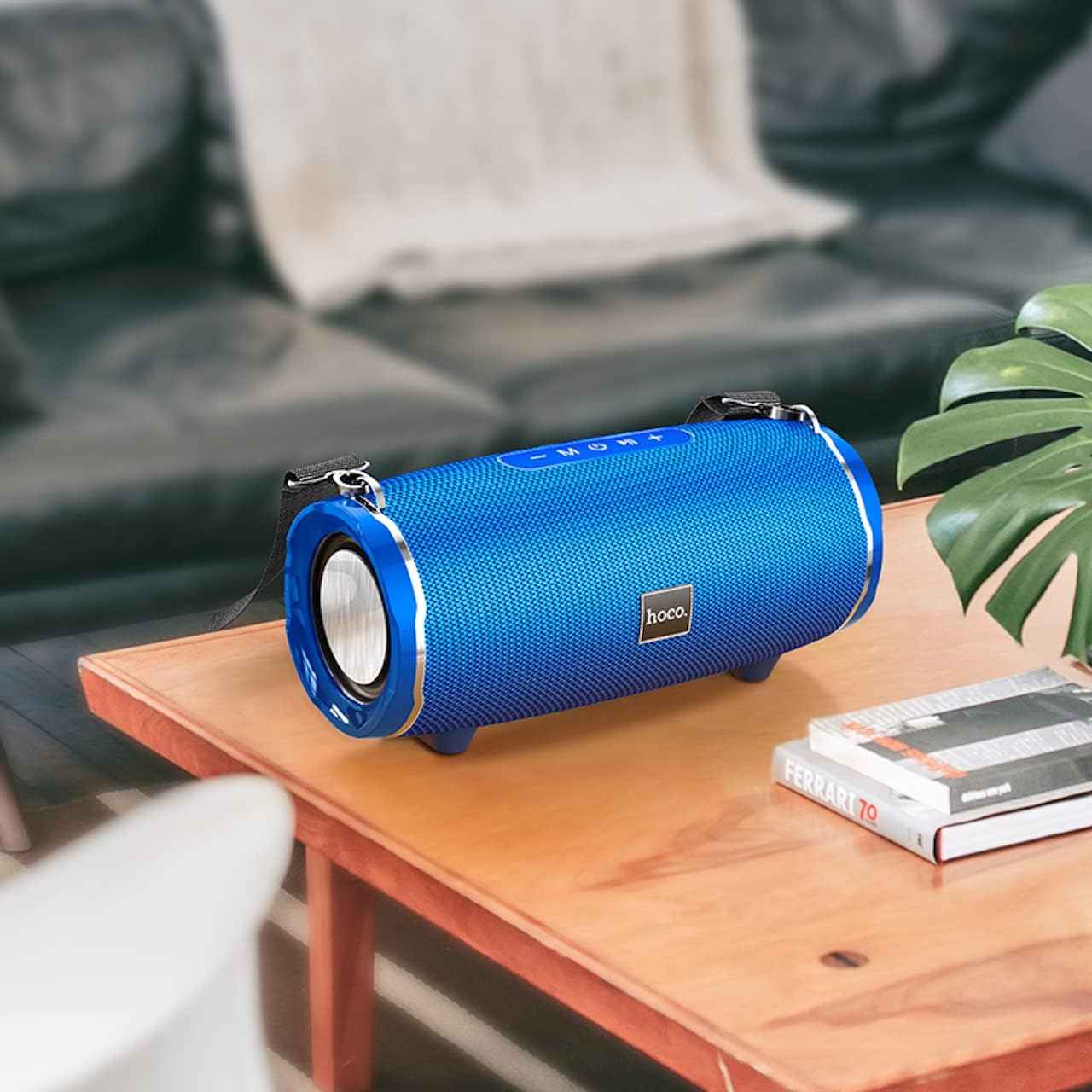
Image: The Hoco HC5 speaker placed on a wooden table, demonstrating its size and how it might appear in a home setting.
Control Panel (Top/Rear)
- பவர் பட்டன்: ஆன்/ஆஃப் செய்ய அழுத்திப் பிடிக்கவும்.
- பயன்முறை பொத்தான் (எம்): Short press to switch between Bluetooth, TF Card, USB, AUX, and FM modes.
- இயக்கு/இடைநிறுத்து பொத்தான் (▶⏸): Short press to play or pause music. In FM mode, short press to auto-scan and save stations.
- ஒலியளவு குறைவு / முந்தைய பாடல் (-): முந்தைய டிராக்கைப் பார்க்க சுருக்கமாக அழுத்தவும். ஒலியளவைக் குறைக்க நீண்ட நேரம் அழுத்தவும்.
- ஒலியளவை அதிகரித்தல் / அடுத்த பாடல் (+): அடுத்த டிராக்கிற்கு சுருக்கமாக அழுத்தவும். ஒலியளவை அதிகரிக்க நீண்ட நேரம் அழுத்தவும்.
Ports (Rear/Side)
- USB போர்ட்: USB ஃபிளாஷ் டிரைவ் பிளேபேக்கிற்கு.
- TF அட்டை ஸ்லாட்: TF (மைக்ரோ SD) கார்டு பிளேபேக்கிற்கு.
- ஆக்ஸ் போர்ட்: For connecting external audio devices via 3.5mm audio cable.
- சார்ஜிங் போர்ட்: ஸ்பீக்கரின் உள் பேட்டரியை சார்ஜ் செய்வதற்கு.
அமைவு
சபாநாயகர் மீது குற்றச்சாட்டு
- USB சார்ஜிங் கேபிளை ஸ்பீக்கரின் சார்ஜிங் போர்ட்டுடன் இணைக்கவும்.
- Connect the other end of the USB cable to a USB power adapter (5V/1A recommended) or a computer's USB port.
- சார்ஜ் ஆகும்போது சார்ஜிங் இண்டிகேட்டர் லைட் ஒளிரும், முழுமையாக சார்ஜ் ஆனதும் அணைந்துவிடும்.
- முழு சார்ஜ் ஏறக்குறைய 3.5 மணி நேரம் ஆகும்.
பவர் ஆன்/ஆஃப்
- பவர் ஆன் செய்ய: Press and hold the Power button for a few seconds until you hear a power-on prompt.
- பவர் ஆஃப் செய்ய: Press and hold the Power button again for a few seconds until you hear a power-off prompt.
இயக்க வழிமுறைகள்
புளூடூத் பயன்முறை
- ஸ்பீக்கரை இயக்கவும். அது தானாகவே ப்ளூடூத் இணைத்தல் பயன்முறையில் நுழையும், இது ஒளிரும் LED விளக்கால் குறிக்கப்படும்.
- உங்கள் சாதனத்தில் (ஸ்மார்ட்போன், டேப்லெட், முதலியன) புளூடூத்தை இயக்கவும்.
- தேடுங்கள் "HC5" in the list of available Bluetooth devices and select it to connect.
- Once connected, the LED indicator will stop flashing, and you will hear a connection tone.
- இப்போது உங்கள் சாதனத்திலிருந்து ஸ்பீக்கர் மூலம் ஆடியோவை இயக்கலாம்.
- Use the Play/Pause, Volume Up/Down, and Previous/Next Track buttons on the speaker or your device to control playback.
TF Card / USB Mode
- Insert a TF (MicroSD) card or USB flash drive into the corresponding slot on the speaker.
- The speaker will automatically switch to TF Card or USB mode and begin playing audio files. If not, short press the "M" (Mode) button to switch.
- உங்கள் ஆடியோவை உறுதிப்படுத்தவும் fileஇணக்கமான வடிவத்தில் (எ.கா., MP3) உள்ளன.
- Use the Play/Pause, Volume Up/Down, and Previous/Next Track buttons to control playback.
AUX பயன்முறை
- Connect one end of the 3.5mm AUX cable to the speaker's AUX port.
- மறுமுனையை உங்கள் வெளிப்புற சாதனத்தின் ஆடியோ வெளியீட்டு ஜாக்குடன் இணைக்கவும் (எ.கா., MP3 பிளேயர், கணினி).
- The speaker will automatically switch to AUX mode. If not, short press the "M" (Mode) button to switch.
- Audio will now play through the speaker. Control playback from your external device.
எஃப்எம் ரேடியோ பயன்முறை
- Short press the "M" (Mode) button until you enter FM radio mode.
- To auto-scan and save available FM stations, short press the Play/Pause button. The speaker will scan and store stations automatically.
- சேமிக்கப்பட்ட நிலையங்களுக்கு இடையில் செல்ல முந்தைய/அடுத்த ட்ராக் பொத்தான்களைப் பயன்படுத்தவும்.
TWS (True Wireless Stereo) Function (If Supported)
The Hoco HC5 speaker supports TWS function, allowing you to pair two HC5 speakers together for a true stereo sound experience.
- Ensure both HC5 speakers are powered on and not connected to any Bluetooth device.
- ஸ்பீக்கர்களில் ஒன்றில் (இது முதன்மை ஸ்பீக்கராக இருக்கும்), TWS இணைத்தல் பயன்முறையைக் குறிக்கும் ஒரு ப்ராம்ட் கேட்கும் வரை Play/Pause பட்டனை நீண்ட நேரம் அழுத்தவும்.
- இரண்டு ஸ்பீக்கர்களும் தானாகவே ஒன்றையொன்று தேடி இணைக்கும். இணைக்கப்பட்டதும், உறுதிப்படுத்தல் தொனியைக் கேட்பீர்கள்.
- Now, connect your device to the primary speaker via Bluetooth as described in the "Bluetooth Mode" section.
- இரண்டு ஸ்பீக்கர்கள் மூலமாகவும் ஆடியோ இப்போது ஸ்டீரியோவில் இயங்கும்.
பராமரிப்பு
- சுத்தம்: Use a soft, dry, lint-free cloth to wipe the surface of the speaker. Do not use liquid cleaners, aerosols, or solvents.
- சேமிப்பு: நீண்ட நேரம் பயன்பாட்டில் இல்லாதபோது, ஸ்பீக்கரை நேரடி சூரிய ஒளி மற்றும் தீவிர வெப்பநிலையிலிருந்து விலகி குளிர்ந்த, உலர்ந்த இடத்தில் சேமிக்கவும்.
- பேட்டரி பராமரிப்பு: பேட்டரி ஆயுளை நீட்டிக்க, பேட்டரியை அடிக்கடி முழுமையாக டிஸ்சார்ஜ் செய்வதைத் தவிர்க்கவும். பயன்பாட்டில் இல்லாவிட்டாலும், ஸ்பீக்கரை தொடர்ந்து சார்ஜ் செய்யவும்.
சரிசெய்தல்
| பிரச்சனை | சாத்தியமான காரணம் | தீர்வு |
|---|---|---|
| ஸ்பீக்கர் இயக்கப்படவில்லை. | பேட்டரி குறைவாக உள்ளது அல்லது தீர்ந்துவிட்டது. | ஸ்பீக்கரை முழுமையாக சார்ஜ் செய்யவும். |
| புளூடூத் சாதனத்துடன் இணைக்க முடியாது. | Speaker is not in pairing mode; device Bluetooth is off; speaker is already connected to another device. | Ensure speaker is in pairing mode (flashing LED). Turn off and on Bluetooth on your device. Disconnect from other devices. |
| ஸ்பீக்கரிலிருந்து சத்தம் இல்லை. | ஒலி அளவு மிகக் குறைவு; தவறான பயன்முறை தேர்ந்தெடுக்கப்பட்டுள்ளது; ஆடியோ மூலப் பிரச்சினை. | Increase speaker and device volume. Press "M" button to select correct mode. Check audio source. |
| எஃப்எம் ரேடியோ வரவேற்பு மோசமாக உள்ளது. | பலவீனமான சமிக்ஞை; சுற்றுச்சூழல் குறுக்கீடு. | Relocate the speaker. Re-scan for stations. |
விவரக்குறிப்புகள்
| அம்சம் | விவரம் |
|---|---|
| மாதிரி | HC5 |
| புளூடூத் பதிப்பு | 5.0 (JL chip) |
| பேச்சாளர் அளவு | 76 மிமீ * 2 |
| ஸ்பீக்கர் பவர் அவுட்புட் | 15W * 2 (மொத்தம் 30W) |
| பேட்டரி திறன் | 3600mAh |
| சார்ஜிங் நேரம் | சுமார் 3.5 மணி நேரம் |
| இசை/பேச்சு நேரம் | 4 மணி நேரம் வரை |
| இணைப்பு விருப்பங்கள் | Bluetooth, TF card, USB, AUX, FM, TWS |
| தயாரிப்பு பரிமாணங்கள் | 292 x 139 x 132 மிமீ |
| தயாரிப்பு எடை | 1.5 கிலோ |
| ஆடியோ வெளியீட்டு முறை | சுற்றிவளைக்கவும் |
| மவுண்டிங் வகை | டேப்லெட் |
உத்தரவாதம் மற்றும் ஆதரவு
The Hoco HC5 speaker comes with a standard manufacturer's warranty. Please refer to the warranty card included in your package for specific terms and conditions. For technical support, troubleshooting assistance, or warranty claims, please contact the retailer where you purchased the product or visit the official HOCO webதொடர்பு தகவலுக்கான தளம்.
உற்பத்தியாளர்: ஹோகோ
பிறப்பிடமான நாடு: சீனா
Ask a question about this manual
Ask about setup, troubleshooting, compatibility, parts, safety, or missing instructions. Manuals+ will review the question and use this page’s manual context to help answer it.