
1. அறிமுகம்
This manual provides detailed instructions for the proper setup, operation, and maintenance of your Radioddity QT40 10 Meter SSB Ham Radio. Please read this manual thoroughly before using the device to ensure safe and optimal performance.
2. பாதுகாப்பு தகவல்
- சரியாக இணைக்கப்பட்ட ஆண்டெனா இல்லாமல் ரேடியோவை இயக்க வேண்டாம்.
- மின்சாரம் வழங்கல் தொகுதியை உறுதி செய்யவும்tage matches the radio's requirements.
- Avoid exposing the radio to extreme temperatures, direct sunlight, or moisture.
- ரேடியோவை பிரிக்கவோ அல்லது மாற்றவோ முயற்சிக்காதீர்கள். அனைத்து சேவைகளையும் தகுதிவாய்ந்த பணியாளர்களிடம் பரிந்துரைக்கவும்.
- Maintain a safe distance from the antenna during transmission to avoid exposure to RF energy.
3. தொகுப்பு உள்ளடக்கங்கள்
உங்கள் தொகுப்பில் அனைத்து பொருட்களும் உள்ளதா என சரிபார்க்கவும்:
- QT40 Radio x 1
- மைக்ரோஃபோன் x 1
- USB Programming Cable x 1
4. தயாரிப்பு முடிந்துவிட்டதுview
The Radioddity QT40 is a 10-meter SSB ham radio designed for reliable communication. It features 40 watts of transmission power, digital noise reduction, and a frequency range of 28.000-29.695MHz.
4.1 முன் குழு கட்டுப்பாடுகள்

This image displays the front panel of the Radioddity QT40, highlighting the various controls and indicators. Key elements include the S-Meter, NB/ANL control, NRC function control, Monitor/10K on/off switch, Echo function control, H/L/WX band switch, TX/RX indicator, Channel Display, 4-Pin Mic Connector, Power/Volume control, Squelch Level control, SSB Frequency FINE function, RF Gain Level, PA/FM/AM/USB/LSB Mode selector, Working Band Selection, Mic Gain Level control, Power Level control, and Channel Switch.
- எஸ்-மீட்டர்: Indicates signal strength and output power.
- NB/ANL Control: Noise Blanker and Automatic Noise Limiter.
- NRC Function Control: Digital Noise Reduction activation.
- Control Monitor/10K on/off: Monitor function and 10KHz step switch.
- ECHO Function Control: Activates and adjusts echo effect.
- H/L/WX Band Switch: High/Low power and Weather band selection.
- TX/RX காட்டி: Shows transmit (TX) or receive (RX) status.
- சேனல் காட்சி: Shows the current operating channel.
- 4-Pin Mic Connector: For connecting the supplied microphone.
- சக்தி/ஒலி அளவு கட்டுப்பாடு: Turns the radio on/off and adjusts audio volume.
- Squelch Level Control: Adjusts the squelch threshold.
- SSB Frequency FINE Function: Fine-tunes SSB frequency.
- RF Gain Level: Adjusts receiver RF gain.
- PA/FM/AM/USB/LSB Mode: Selects the operating modulation mode.
- Working Band Selection: Selects the operating frequency band.
- Mic Gain Level Control: மைக்ரோஃபோன் உள்ளீட்டு உணர்திறனை சரிசெய்கிறது.
- Power Level Control: Adjusts transmit power output.
- சேனல் சுவிட்ச்: Selects operating channels.
4.2 பின்புற பேனல் இணைப்புகள்

This image illustrates the rear panel connections of the Radioddity QT40. These include the SO-239 Antenna Connector, External PA Jack, PC Programming Port, 3.5MM External Speaker Jack, and Power Supply Jack.
- SO-239 Antenna Connector: For connecting your external antenna.
- External PA Jack: For connecting an external Public Address speaker.
- PC Programming Port: For connecting the USB programming cable to a computer.
- 3.5MM External Speaker Jack: For connecting an optional external speaker.
- பவர் சப்ளை ஜாக்: For connecting the DC power cable.
4.3 ஒலிவாங்கி

The included microphone features Channel Up/Down buttons, a Push-To-Talk (PTT) button, the microphone element, and a 4-Pin Microphone Connector for connection to the radio.
- Channel Up: சேனல் எண்ணை அதிகரிக்கிறது.
- Channel Down: சேனல் எண்ணைக் குறைக்கிறது.
- PTT (புஷ்-டு-டாக்): Activates transmission when pressed.
- மைக்: Microphone element.
- மைக்ரோஃபோன் கேபிள்: Connects the microphone to the radio.
- 4-Pin Microphone Connector: Connects to the radio's front panel.
5 அமைவு
5.1 ஆண்டெனா இணைப்பு
Connect a suitable 10-meter antenna to the SO-239 Antenna Connector on the rear panel of the radio. Ensure the connection is secure. An improperly connected or mismatched antenna can damage the radio.
5.2 மின் இணைப்பு
Connect the DC power cable to the Power Supply Jack on the rear panel. Connect the other end of the power cable to a compatible 13.8V DC power source. Observe correct polarity (red to positive, black to negative).
5.3 மைக்ரோஃபோன் இணைப்பு
Plug the 4-Pin Microphone Connector into the corresponding jack on the front panel of the radio.
6. இயக்க வழிமுறைகள்
6.1 அடிப்படை செயல்பாடு
- பவர் ஆன்/ஆஃப்: சுழற்று பவர்/வால்யூம் கண்ட்ரோல் clockwise to turn the radio on. Continue rotating to adjust the audio volume.
- ஸ்கெல்ச் சரிசெய்தல்: சுழற்று Squelch நிலை கட்டுப்பாடு clockwise until background noise disappears. Rotate counter-clockwise to hear weaker signals.
- சேனல் தேர்வு: பயன்படுத்தவும் சேனல் சுவிட்ச் முன் பலகத்தில் உள்ள குமிழ் அல்லது சேனல் மேல்/கீழ் buttons on the microphone to select your desired operating channel.
6.2 Modulation Modes (AM/FM/SSB)
பயன்படுத்தவும் PA/FM/AM/USB/LSB Mode selector to choose your desired modulation mode:
- நான் (Amplitude Modulation): Common for local communication.
- FM (Frequency Modulation): Offers clearer audio over shorter distances.
- USB (Upper Sideband) / LSB (Lower Sideband): Used for long-distance SSB communication. Fine-tune with the SSB Frequency FINE Function.
- PA (Public Address): Outputs audio to an external PA speaker.
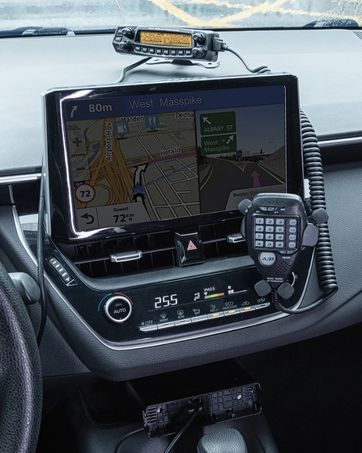
This image shows the Radioddity QT40 radio in a vehicle, illustrating its capability for AM/FM/SSB modulation, crucial for various communication needs.
6.3 Digital Noise Reduction (NRC)
The QT40 features TX and RX digital noise reduction technology. Activate the NRC Function Control to reduce background noise during transmission and reception, improving audio clarity.
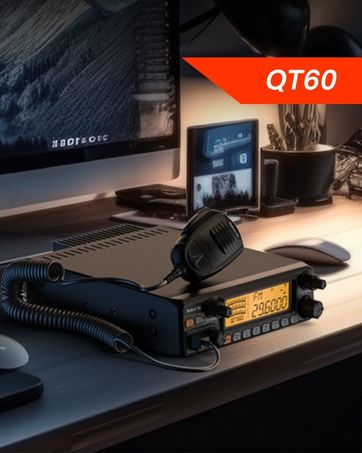
This image depicts the Radioddity QT40 radio installed in a vehicle, emphasizing its digital noise reduction feature for clearer communication in noisy environments.
6.4 Weather Channel and NOAA Alert
To access weather channels and NOAA alerts, use the H/L/WX Band Switch to select the WX band. This feature provides timely weather information and alerts.
6.5 CTCSS/DCS
The radio supports CTCSS (Continuous Tone-Coded Squelch System) and DCS (Digital Coded Squelch) for selective calling. These features can be configured via the programming software.
6.6 VOX செயல்பாடு
The VOX (Voice Operated Transmit) function allows for hands-free operation. When activated, the radio will transmit automatically when it detects your voice. Adjust VOX sensitivity via the programming software.
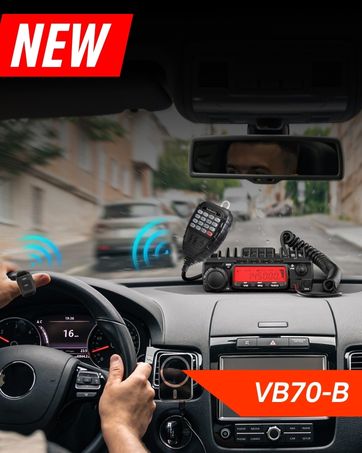
This image shows the Radioddity QT40 microphone mounted in a vehicle, demonstrating the convenience of the VOX hands-free function for drivers.
6.7 பிசி புரோகிராமிங்
The Radioddity QT40 can be customized using PC programming software and the included USB programming cable. This allows for advanced settings adjustments, including CTCSS/DCS codes, VOX levels, and other features. Software and drivers are typically available on the manufacturer's webதளம்.
7. பராமரிப்பு
- சுத்தம்: ஒரு மென்மையான, டி பயன்படுத்தவும்amp வானொலியின் வெளிப்புறத்தை சுத்தம் செய்ய துணியைப் பயன்படுத்தவும். கடுமையான இரசாயனங்கள் அல்லது சிராய்ப்பு கிளீனர்களைப் பயன்படுத்த வேண்டாம்.
- சேமிப்பு: When not in use for extended periods, store the radio in a dry, dust-free environment.
- ஆண்டெனா சோதனை: Periodically inspect antenna connections for corrosion or damage.
8. சரிசெய்தல்
| பிரச்சனை | சாத்தியமான காரணம் | தீர்வு |
|---|---|---|
| சக்தி இல்லை | Power cable disconnected; incorrect voltage; blown fuse. | Check power connections; verify power source; inspect fuse. |
| வரவேற்பு இல்லை | Squelch too high; antenna disconnected; incorrect channel/mode. | Adjust squelch; check antenna connection; verify channel and mode settings. |
| கடத்த முடியாது | Microphone not connected; PTT button faulty; antenna issue. | Ensure microphone is connected; test PTT; check antenna and SWR. |
| மோசமான ஆடியோ தரம் | Low signal strength; high noise; incorrect mode. | Adjust RF Gain; activate NRC; ensure correct modulation mode. |
| E5 பிழைக் குறியீடு | High SWR (Standing Wave Ratio) detected, indicating an antenna mismatch or fault. | Check antenna connection; verify antenna tuning for the operating frequency; inspect antenna cable for damage. Do not transmit with high SWR to prevent radio damage. |
9. விவரக்குறிப்புகள்
| அம்சம் | விவரக்குறிப்பு |
|---|---|
| பிராண்ட் | கதிரியக்கத்தன்மை |
| மாதிரி எண் | QT40 |
| அதிர்வெண் வரம்பு | 28.000-29.7MHz |
| சேனல்களின் எண்ணிக்கை | 40 |
| பரிமாற்ற சக்தி | 40 வாட்ஸ் |
| மாடுலேஷன் முறைகள் | AM, FM, SSB (USB/LSB), PA |
| சிறப்பு அம்சங்கள் | Automatic Squelch, Echo, PC programmable, VOX Function, Digital Noise Reduction, NOAA Alert |
| பொருளின் எடை | 3.3 பவுண்டுகள் (1.5 கிலோ) |
| தயாரிப்பு பரிமாணங்கள் | 11.3 x 7.87 x 2.4 அங்குலம் (287 x 200 x 61 மிமீ) |
| பேசும் வரம்பு அதிகபட்சம் | 10 Miles (approximate, depends on conditions) |
| நீர் எதிர்ப்பு நிலை | வாட்டர் ரெசிஸ்டண்ட் இல்லை |

This image provides a visual representation of the Radioddity QT40's dimensions (11.2 inches length, 7.9 inches width, 2.4 inches height) and weight (3.3 lbs).
10. உத்தரவாதத் தகவல்
The Radioddity QT40 comes with an 18-month warranty from the date of purchase. This warranty covers manufacturing defects. Please retain your proof of purchase for warranty claims. The warranty does not cover damage caused by misuse, unauthorized modifications, or improper installation.
11. ஆதரவு
For technical assistance, troubleshooting beyond this manual, or warranty inquiries, please contact Radioddity customer support. Refer to the official Radioddity webமிகவும் புதுப்பித்த தொடர்புத் தகவல் மற்றும் ஆதரவு ஆதாரங்களுக்கான தளம்.
Official Radioddity Webதளம்: www.radioddity.com