
1. அறிமுகம்
நன்றி, நன்றி.asing the CANYON BSP-8 Bluetooth Speaker. This manual provides essential information for the safe and efficient use of your device. Please read it thoroughly before operation and retain it for future reference.
முக்கிய அம்சங்கள்:
- 10W Audio Output: Delivers clear and powerful sound.
- புளூடூத் 5.2: For stable and energy-efficient wireless connection up to 10 meters.
- RGB பின்னொளி: Integrated lighting for enhanced ambiance.
- உண்மையான வயர்லெஸ் ஸ்டீரியோ (TWS): Connect two BSP-8 speakers for a full stereo sound experience.
- பல பின்னணி விருப்பங்கள்: Supports Bluetooth, AUX, USB, and MicroSD card inputs.
- போர்ட்டபிள் வடிவமைப்பு: Compact size with a convenient hanger for easy transport.
- நீண்ட பேட்டரி ஆயுள்: ஒருமுறை சார்ஜ் செய்தால் 3 மணிநேரம் வரை விளையாடலாம்.
2. பாதுகாப்பு தகவல்
- ஸ்பீக்கரை தீவிர வெப்பநிலை, நேரடி சூரிய ஒளி அல்லது அதிக ஈரப்பதத்திற்கு வெளிப்படுத்த வேண்டாம்.
- பேச்சாளரைக் கீழே தள்ளுவதையோ அல்லது வலுவான தாக்கங்களுக்கு உட்படுத்துவதையோ தவிர்க்கவும்.
- ஸ்பீக்கரை நீங்களே பிரித்தெடுக்கவோ அல்லது சரிசெய்யவோ முயற்சிக்காதீர்கள். தகுதிவாய்ந்த சேவை பணியாளர்களைத் தொடர்பு கொள்ளவும்.
- Keep the speaker away from water and other liquids. It is not waterproof.
- சார்ஜ் செய்வதற்கு வழங்கப்பட்ட சார்ஜிங் கேபிள் அல்லது சான்றளிக்கப்பட்ட டைப்-சி கேபிளை மட்டும் பயன்படுத்தவும்.
- உள்ளூர் விதிமுறைகளின்படி பேட்டரி மற்றும் ஸ்பீக்கரை அப்புறப்படுத்துங்கள்.
3. தொகுப்பு உள்ளடக்கங்கள்
- CANYON BSP-8 Bluetooth Speaker
- யூ.எஸ்.பி டைப்-சி சார்ஜிங் கேபிள்
- பயனர் கையேடு
4. தயாரிப்பு முடிந்துவிட்டதுview
பேச்சாளரின் கூறுகள் மற்றும் கட்டுப்பாடுகளுடன் உங்களைப் பழக்கப்படுத்திக் கொள்ளுங்கள்.
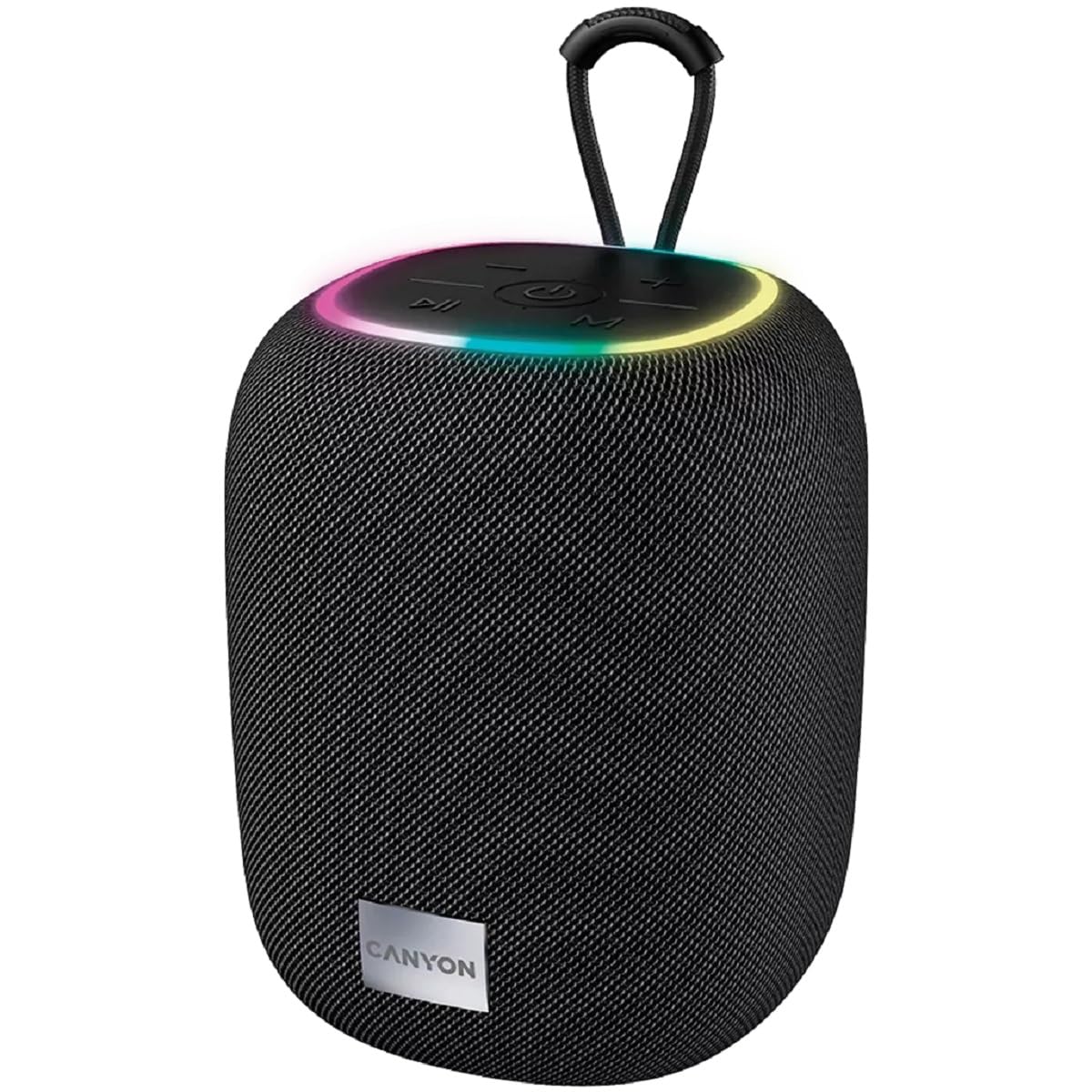
படம் 1: மேல் view of the CANYON BSP-8 speaker, showing the control buttons, RGB backlight, and integrated hanger.
கட்டுப்பாட்டு பொத்தான்கள் (மேல் பலகம்):
- பவர் பட்டன்: Press and hold to turn on/off. Short press to play/pause.
- ஒலியளவைக் குறை / முந்தைய டிராக் பொத்தான்: ஒலியைக் குறைக்க சிறிது நேரம் அழுத்தவும். முந்தைய டிராக்கைப் பார்க்க நீண்ட நேரம் அழுத்தவும்.
- ஒலியளவை அதிகரிக்கும் / அடுத்த டிராக் பொத்தான்: ஒலியளவை அதிகரிக்க சிறிது நேரம் அழுத்தவும். அடுத்த டிராக்கிற்கு நீண்ட நேரம் அழுத்தவும்.
- பயன்முறை பொத்தான் (எம்): Short press to switch between Bluetooth, AUX, USB, and MicroSD modes.

படம் 2: பின்புறம் view of the CANYON BSP-8 speaker, illustrating the various input ports including AUX, USB, TF (MicroSD) card slot, and DC5V Type-C charging port.
Input Ports (Rear Panel):
- ஆக்ஸ் போர்ட்: 3.5மிமீ ஆடியோ கேபிள் வழியாக வெளிப்புற ஆடியோ சாதனங்களை இணைக்க.
- USB போர்ட்: USB ஃபிளாஷ் டிரைவிலிருந்து ஆடியோவை இயக்குவதற்கு.
- TF கார்டு ஸ்லாட் (மைக்ரோ SD): மைக்ரோ எஸ்டி கார்டிலிருந்து ஆடியோவை இயக்குவதற்கு.
- DC5V (Type-C) Port: ஸ்பீக்கரை சார்ஜ் செய்ததற்காக.
5 அமைவு
5.1 ஸ்பீக்கரை சார்ஜ் செய்தல்
- Connect the provided USB Type-C cable to the DC5V port on the speaker.
- Connect the other end of the cable to a USB power adapter (5V/1A recommended) or a computer's USB port.
- சார்ஜிங் இண்டிகேட்டர் லைட் ஒளிரும். முழுமையாக சார்ஜ் ஆனவுடன் அது அணைந்துவிடும் அல்லது நிறம் மாறும்.
குறிப்பு: உகந்த பேட்டரி ஆயுளுக்கு, முதல் பயன்பாட்டிற்கு முன் ஸ்பீக்கரை முழுமையாக சார்ஜ் செய்யவும்.

Image 3: Illustration showing the 1800 mAh battery capacity and up to 3 hours of playtime for the CANYON BSP-8 speaker.
5.2 பவர் ஆன்/ஆஃப்
- பவர் ஆன் செய்ய: Press and hold the Power button for approximately 3 seconds. You will hear an audible prompt.
- பவர் ஆஃப் செய்ய: Press and hold the Power button for approximately 3 seconds. You will hear an audible prompt.
5.3 ப்ளூடூத் இணைத்தல்
- ஸ்பீக்கரை இயக்கவும். அது தானாகவே ப்ளூடூத் இணைத்தல் பயன்முறையில் நுழையும், இது ஒளிரும் LED விளக்கால் குறிக்கப்படும்.
- உங்கள் மொபைல் சாதனத்தில் (ஸ்மார்ட்போன், டேப்லெட், கணினி) புளூடூத்தை இயக்கவும்.
- தேடுங்கள் available Bluetooth devices and select "CANYON BSP-8" from the list.
- Once paired, the LED light will stop flashing, and you will hear a confirmation sound.
Note: The speaker will automatically reconnect to the last paired device if it is within range and Bluetooth is enabled.

Image 4: Illustration highlighting the stable and energy-efficient Bluetooth 5.2 connection with an operating range of up to 10 meters.
5.4 உண்மையான வயர்லெஸ் ஸ்டீரியோ (TWS) இணைத்தல்
To connect two CANYON BSP-8 speakers for a stereo sound experience:
- Ensure both BSP-8 speakers are powered on and not connected to any Bluetooth device.
- ஒரு ஸ்பீக்கரில் (இது முதன்மை ஸ்பீக்கராக இருக்கும்), பவர் பட்டனை இருமுறை அழுத்தவும். அது TWS இணைத்தல் பயன்முறையில் நுழையும்.
- இரண்டு ஸ்பீக்கர்களும் தானாகவே ஒன்றையொன்று தேடி இணைக்கும். இணைக்கப்பட்டதும் உறுதிப்படுத்தல் ஒலியைக் கேட்பீர்கள்.
- Once TWS is established, connect your mobile device to the primary speaker via Bluetooth as described in section 5.3.
Note: TWS mode only works with two identical CANYON BSP-8 speakers.
6. இயக்க வழிமுறைகள்
6.1 ஆடியோவை இயக்குகிறது
- புளூடூத் பயன்முறை: After successful pairing, audio from your connected device will play through the speaker.
- ஆக்ஸ் பயன்முறை: Connect a 3.5mm audio cable from your external audio device to the AUX port on the speaker. Press the 'M' button to switch to AUX mode.
- யூ.எஸ்.பி பயன்முறை: Insert a USB flash drive into the USB port. The speaker will automatically switch to USB mode and begin playing audio files. If not, press the 'M' button.
- மைக்ரோ எஸ்டி கார்டு பயன்முறை: Insert a MicroSD card into the TF card slot. The speaker will automatically switch to MicroSD mode and begin playing audio files. If not, press the 'M' button.
6.2 பிளேபேக் கட்டுப்பாடு
- விளையாடு/இடைநிறுத்தம்: பவர் பட்டனை சுருக்கமாக அழுத்தவும்.
- ஒலியை பெருக்கு: வால்யூம் அப் (+) பட்டனை சுருக்கமாக அழுத்தவும்.
- ஒலியை குறை: ஒலியளவைக் குறைக்கும் (-) பொத்தானைச் சுருக்கமாக அழுத்தவும்.
- அடுத்த ட்ராக்: வால்யூம் அப் (+) பட்டனை நீண்ட நேரம் அழுத்தவும்.
- முந்தைய ட்ராக்: ஒலியளவைக் குறைக்கும் (-) பொத்தானை நீண்ட நேரம் அழுத்தவும்.
6.3 RGB Backlight
The speaker features an integrated RGB backlight on the top panel. The backlight activates automatically when the speaker is powered on. There are no specific controls for changing the RGB pattern or turning it off/on independently of the speaker's power state.


