
1. அறிமுகம்
This manual provides essential information for the proper setup, operation, and maintenance of your HAYEAR HY-900B USB3.0 Digital Microscope Camera. This 8-megapixel camera is designed for various applications including industrial vision, visual inspection, and integration with microscopes and astronomical telescopes. It offers high-speed video transmission and compatibility with multiple operating systems.
2. தொகுப்பு உள்ளடக்கங்கள்
கீழே பட்டியலிடப்பட்டுள்ள அனைத்து பொருட்களும் உங்கள் தொகுப்பில் சேர்க்கப்பட்டுள்ளதா என்பதை சரிபார்க்கவும்:
- 1 x HAYEAR HY-900B USB3.0 Digital Microscope Camera
- 1 x USB3.0 கேபிள்
- 1 x Software Disk
3. தயாரிப்பு முடிந்துவிட்டதுview
The HAYEAR HY-900B is a compact and versatile digital microscope camera. Familiarize yourself with its components:
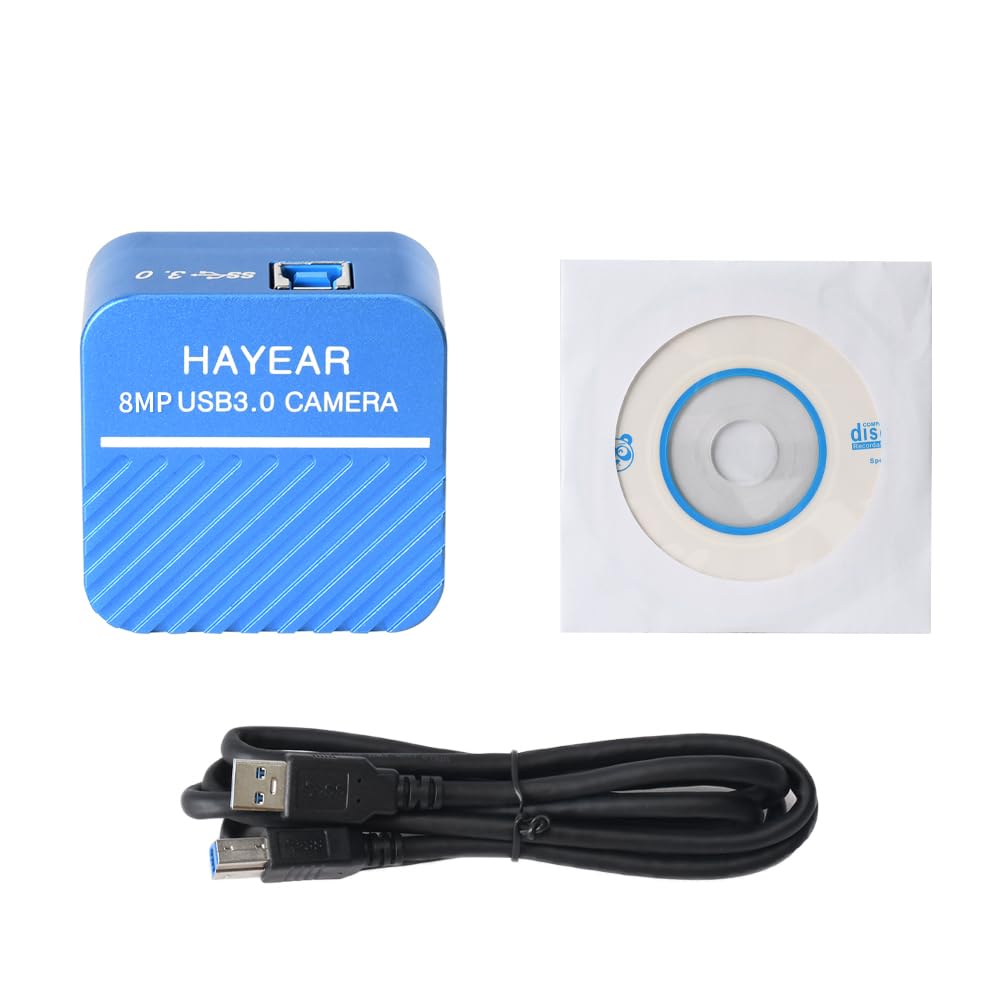
படம் 3.1: முன் view of the HAYEAR HY-900B camera, showing the brand and 8MP USB3.0 Camera label.
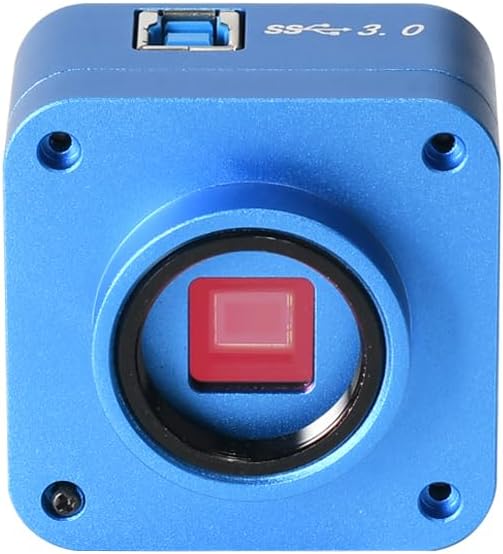
படம் 3.2: முன் view of the camera, highlighting the C-mount lens interface and the sensor.

படம் 3.3: மேல் view of the camera, showing the USB 3.0 port for high-speed data transfer.

படம் 3.4: கோணல் view of the camera with the USB 3.0 cable connected, demonstrating its compact form factor.
4. அமைவு வழிமுறைகள்
Follow these steps to set up your HAYEAR HY-900B camera:
- கேமராவை இணைக்கவும்: Connect the HAYEAR HY-900B camera to your computer using the provided USB3.0 cable. Ensure it is connected to a USB3.0 port on your PC or laptop for optimal performance and to prevent low power issues.
- மென்பொருளை நிறுவவும்: Insert the included software disk into your computer's optical drive. Follow the on-screen instructions to install the HAYEAR measurement software. This software is compatible with Windows, Linux, and Mac OS (UVC compatible).
- இயக்கி நிறுவல்: The camera supports USB Video Class (UVC) protocols, meaning it is generally plug-and-play and does not require separate driver installation on most modern operating systems (WinXP/Win7/Win10/Win11, Linux, Android, MAC-OS X10.4.8 or later).
- மவுண்டிங் (விரும்பினால்): The camera features a standard C-mount. It can be directly attached to compatible monocular zoom lenses or, with a CS ring adapter, to stereo trinocular microscopes, FA machine vision lenses, or other 2D/3D monocular lenses.
5. கேமராவை இயக்குதல்
Once the camera is connected and software is installed, you can begin operation:
- மென்பொருளை துவக்கவும்: Open the HAYEAR measurement software on your computer. The camera's live feed should appear in the software interface.
- அமைப்புகளைச் சரிசெய்யவும்: The software provides controls for various image parameters, including Exposure, Gamma, Color, Gain, Contrast, and Brightness. Adjust these settings to achieve optimal image quality for your specific application.
- கவனம் செலுத்துதல்: If using with a microscope or lens, adjust the focus mechanism of your optical equipment to bring the specimen into sharp view.
- பயன்பாடுகள்: The HY-900B camera is suitable for a wide range of applications, including detailed visual inspection of circuit boards, biological samples, and other microscopic subjects.
வீடியோ 5.1: Demonstration of the HAYEAR 4K Microscope Camera (HY-900B) in use, showcasing its capabilities for inspecting circuit boards and biological samples under magnification.
6. பராமரிப்பு
உங்கள் கேமராவின் நீண்ட ஆயுளையும் உகந்த செயல்திறனையும் உறுதி செய்ய:
- சுத்தம்: Use a soft, dry cloth to clean the camera body. For the lens and sensor, use specialized optical cleaning solutions and cloths to avoid scratches or damage.
- சேமிப்பு: நேரடி சூரிய ஒளி மற்றும் தீவிர வெப்பநிலையிலிருந்து விலகி, குளிர்ந்த, உலர்ந்த இடத்தில் கேமராவை சேமிக்கவும்.
- கையாளுதல்: கேமராவை கீழே போடுவதையோ அல்லது வலுவான தாக்கங்களுக்கு ஆளாக்குவதையோ தவிர்க்கவும்.
7. சரிசெய்தல்
If you encounter issues with your HAYEAR HY-900B camera, refer to the following common solutions:
- Camera Not Detected/Low Power: Ensure the camera is connected to a USB3.0 port on your PC or laptop. USB2.0 ports may not provide sufficient power or data bandwidth, leading to detection issues or poor performance.
- படம் இல்லை/கருப்புத் திரை: Verify that the software is correctly installed and launched. Check all cable connections. Ensure the lens cap (if applicable) is removed and any connected microscope or lens is properly configured.
- மோசமான படத்தின் தரம்: Adjust the focus of your optical equipment. Use the software's image settings (Exposure, Gain, Brightness, Contrast) to optimize the image. Ensure adequate lighting for your specimen.
- மென்பொருள் பதிலளிக்கவில்லை: Close and restart the software. If the issue persists, restart your computer.
8. விவரக்குறிப்புகள்
Technical specifications for the HAYEAR HY-900B USB3.0 Digital Microscope Camera:
| அம்சம் | விவரம் |
|---|---|
| மாதிரி | HY-900B USB3.0 Color CMOS USB camera |
| சென்சார் | 1/2.5" Color CMOS IMX317 |
| சென்சார் அளவு | 8.365mm(H) x 6.615mm(V) |
| பிக்சல் அளவு | 1.62µm(H) x 1.62µm(V) |
| ஸ்பெக்ட்ரல் ரெஸ்பான்ஸ் | 400nm~700nm |
| தீர்மானம் | 3840x2160; 2560x1440; 1920x1080 |
| பட வடிவம் | MJPEG / YUV422 |
| வீடியோ தீர்மானம் | 3840x2160 @30fps; 2560x1440 @30fps; 1920x1080 @30fps; 1280x720 @30fps; 1024x576 @30fps; 640x480 @30fps; 640x360 @30fps |
| டைனமிக் வரம்பு | dB (Linear) - dB (HDR) |
| வெள்ளை இருப்பு | தானியங்கு/கையேடு |
| பட வெளியீடு | USB3.0, 5Gbit/s |
| செயல்பாடுகள் | Exposure, Gamma, Color, Gain, Contrast, Brightness |
| நெறிமுறைகள் | USB வீடியோ வகுப்பு (UVC) |
| கணினி ஆதரவு | WinXP/Win7/Win10/Win11; Linux / Android (compatible UVC), MAC-OS X10.4.8 or latest (compatible UVC) |
| படப்பிடிப்பு முறைகள் | தானியங்கி |
| வெளிப்பாடு கட்டுப்பாடு வகை | கையேடு, தானியங்கி |
| வீடியோ பிடிப்பு தீர்மானம் | 2160p |
| ஊடக வகை | USB |
| நீர் எதிர்ப்பு நிலை | வாட்டர் ரெசிஸ்டண்ட் இல்லை |
| வீடியோ பிடிப்பு வடிவம் | MJPEG |
| எஃபெக்டிவ் ஸ்டில் ரெசல்யூஷன் | 8294400 பிக்சல்கள் |
| Viewகண்டுபிடிப்பாளர் வகை | LCD screen (via connected device) |
| இணக்கமான சாதனங்கள் | மடிக்கணினி, தனிப்பட்ட கணினி |
| ISO வரம்பு | 100-3200 |
| ஆடியோ பதிவு | இல்லை |
| தோற்ற விகிதம் | 16:9 |
| கவனம் வகை | Autofocus or Manual Focus (depending on connected lens) |
| ஆட்டோஃபோகஸ் | Yes (depending on connected lens) |
| ஃபிளாஷ் வகை | Internal (if applicable, typically for illumination) |
| உற்பத்தியாளர் | HAYEAR |
| பொருளின் எடை | 1 கிலோ |
9. உத்தரவாதம் மற்றும் ஆதரவு
உத்தரவாதம்: The HAYEAR HY-900B USB3.0 Digital Microscope Camera comes with a 1-year manufacturer's warranty.
ஆதரவு: For any questions, feedback, or technical assistance, please contact HAYEAR customer support. Your inquiries are welcome.