
1. அறிமுகம்
This instruction manual provides detailed guidance for the assembly, operation, and maintenance of your ONKRON Mobile TV Stand TS2080 Black. This heavy-duty rolling TV stand is designed to support 60-120 inch screens with a maximum load capacity of 331 lbs and is compatible with VESA patterns from 200x200 to 1000x600. Please read this manual thoroughly before installation and use to ensure safe and correct operation.
2 முக்கிய அம்சங்கள்
- Large Screen Compatibility: Supports televisions and interactive panels from 60 to 120 inches.
- அதிக சுமை திறன்: Safely holds screens up to 331 lbs (TV max weight 265 lbs).
- VESA இணக்கம்: Compatible with VESA mounting patterns ranging from 200x200mm to 1000x600mm.
- உயரம் சரிசெய்யக்கூடியது: Screen height can be adjusted from 50.4 inches to 62.3 inches for optimal viewing.
- மொபைல் வடிவமைப்பு: Equipped with smooth-rolling, rubberized casters that feature a locking system for easy relocation and secure positioning.
- ஒருங்கிணைந்த அலமாரிகள்: Includes a main storage shelf with a 55 lbs capacity for accessories like laptops or soundbars, and a camera shelf with an 11 lbs capacity for webcams or PTZ cameras.
- நிலையான கட்டுமானம்: Robust alloy steel frame and reinforced wide legs provide enhanced stability.
3. தொகுப்பு உள்ளடக்கங்கள்
Verify that all components listed below are present and undamaged before beginning assembly. If any parts are missing or damaged, please contact ONKRON customer support.

Figure 3.1: All components included in the ONKRON Mobile TV Stand TS2080 Black package, laid out on a grey surface. The image shows the main frame parts, TV mounting brackets, shelves, wheels, and various screws and tools.
தொகுப்பில் பின்வருவன அடங்கும்:
- Main vertical columns
- Base legs (left and right)
- Horizontal support bar
- டிவி மவுண்டிங் பிராக்கெட்டுகள் (2 துண்டுகள்)
- Main accessory shelf
- Webcam/camera shelf
- காஸ்டர்கள் (4 துண்டுகள்)
- Hardware kit (various screws, washers, spacers, wrenches)
- அறிவுறுத்தல் கையேடு
4. சட்டசபை வழிமுறைகள்
Assembly typically requires two people. Follow the steps carefully to ensure proper and safe installation.
4.1. அடிப்படை சட்டசபை
- Attach the casters to the base legs. Ensure they are securely tightened.
- Connect the two base legs using the horizontal support bar.
4.2. Column and TV Mount Assembly
- Secure the vertical columns to the assembled base.
- Attach the TV mounting plate to the vertical columns at your desired initial height.
- Install the TV mounting brackets onto the back of your television, ensuring they align with the VESA holes. Select appropriate screws and spacers from the hardware kit.
- Carefully lift the television and hook the TV mounting brackets onto the mounting plate on the stand. Secure the TV in place using the safety screws or locking mechanisms.

படம் 4.1: பக்கம் view of the ONKRON Mobile TV Stand TS2080 Black, illustrating its dimensions and stable base.

Figure 4.2: Key specifications for TV compatibility and stand features.
4.3. அலமாரி நிறுவல்
- Attach the main accessory shelf to the designated slots on the vertical columns.
- நிறுவவும் webcam/camera shelf at the top of the vertical column, above the TV.
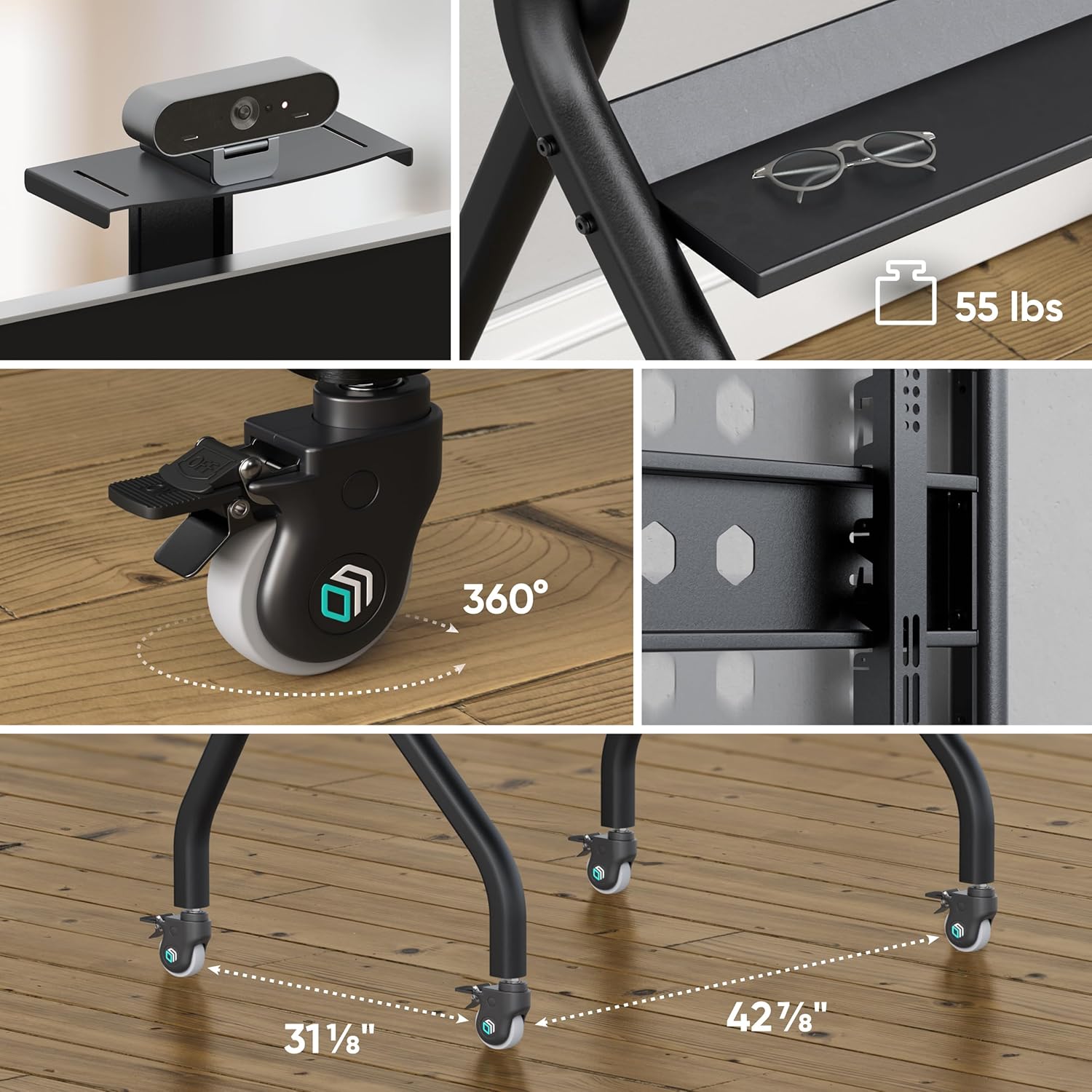
படம் 4.3: விரிவானது view இன் webcam shelf, main accessory shelf, and locking casters.
4.4. அசெம்பிளி வீடியோ வழிகாட்டி
Video 4.1: An official ONKRON promotional video for the TS2080 Mobile TV Stand, demonstrating its features, assembly process, and various applications in educational and office environments. The video highlights the stable base, VESA compatibility, height adjustment, and integrated shelves.
5. இயக்க வழிமுறைகள்
5.1. Adjusting Screen Height
The screen height can be adjusted by repositioning the TV mounting plate on the vertical columns. Ensure the TV is removed before adjusting the mounting plate. Securely fasten all bolts after adjustment.
5.2. Moving the Stand
To move the stand, unlock all four casters by disengaging their locking levers. Gently push the stand to its new location. Avoid sudden movements or pushing over uneven surfaces with a TV mounted.
5.3. Locking the Wheels
Once the stand is in its desired position, engage the locking levers on all four casters to prevent accidental movement and ensure stability.
6. பராமரிப்பு
- Regularly inspect all bolts and connections to ensure they remain tight. Retighten if necessary.
- Clean the stand with a soft, dry cloth. Avoid abrasive cleaners or solvents.
- Check casters periodically for smooth operation and ensure the locking mechanism functions correctly.
7. சரிசெய்தல்
- நிலைப்பாடு நிலையற்றதாக உணர்கிறது: Ensure all assembly bolts are securely tightened. Verify the TV weight and VESA pattern are within the specified limits. Ensure the stand is on a flat, level surface.
- Wheels not locking/moving smoothly: Check for debris in the casters. Ensure the locking levers are fully engaged or disengaged.
- டிவி நிலையாக இல்லை: Adjust the TV mounting brackets slightly to achieve a level screen.
8. விவரக்குறிப்புகள்
| அம்சம் | விவரக்குறிப்பு |
|---|---|
| மவுண்டிங் வகை | மாடி மவுண்ட் |
| இயக்கம் வகை | Fixed (with mobile casters) |
| பிராண்ட் | ஓங்க்ரான் |
| பொருள் | அலாய் ஸ்டீல் |
| நிறம் | கருப்பு |
| இணக்கமான சாதனங்கள் | Monitor, Television |
| Maximum Supported Screen Size | 120 அங்குலம் |
| Minimum Supported Screen Size | 60 அங்குலம் |
| அதிகபட்ச சுமை திறன் | 331 பவுண்ட் |
| VESA இணக்கத்தன்மை | 200x200 - 1000x600 mm |
| உயரம் சரிசெய்தல் வரம்பு | 50.4" முதல் 62.3" வரை |
| Main Shelf Capacity | 55 பவுண்ட் |
| Camera Shelf Capacity | 11 பவுண்ட் |
9. உத்தரவாதம் மற்றும் ஆதரவு
The ONKRON Mobile TV Stand TS2080 Black comes with a 5 வருட உற்பத்தியாளரின் உத்தரவாதம். For any questions regarding assembly, operation, or troubleshooting, please contact ONKRON customer support. Our specialists are available to assist you.
For further information or support, please visit the official ONKRON store: ONKRON Store