
XO F39
XO F39 Portable Bluetooth Speaker User Manual
மாடல்: F39
அறிமுகம்
நன்றி, நன்றி.asing the XO F39 Portable Bluetooth Speaker. This manual provides essential information for setting up, operating, and maintaining your speaker. Please read it carefully to ensure proper use and to maximize your listening experience.

Image: The XO F39 Portable Bluetooth Speaker, showcasing its compact design, integrated handle, and vibrant RGB lighting.
பாதுகாப்பு தகவல்
பாதுகாப்பான செயல்பாட்டை உறுதிசெய்து சேதத்தைத் தடுக்க, பின்வரும் முன்னெச்சரிக்கை நடவடிக்கைகளைக் கவனிக்கவும்:
- ஸ்பீக்கரை தீவிர வெப்பநிலை, நேரடி சூரிய ஒளி அல்லது அதிக ஈரப்பதத்திற்கு வெளிப்படுத்த வேண்டாம்.
- பேச்சாளரைக் கீழே தள்ளுவதையோ அல்லது வலுவான தாக்கங்களுக்கு உட்படுத்துவதையோ தவிர்க்கவும்.
- Do not disassemble, repair, or modify the unit yourself. Contact qualified service personnel for assistance.
- ஸ்பீக்கரை தண்ணீர் அல்லது பிற திரவங்களிலிருந்து விலக்கி வைக்கவும்.
- குறிப்பிட்ட சார்ஜிங் அளவை மட்டும் பயன்படுத்தவும்.tage and current (DC5V/0.5-1A).
தயாரிப்பு முடிந்துவிட்டதுview
தொகுப்பு உள்ளடக்கங்கள்
- XO F39 Portable Bluetooth Speaker
- USB சார்ஜிங் கேபிள் (வகை-C)
- துணை ஆடியோ கேபிள்
- பயனர் கையேடு
கட்டுப்பாடுகள் மற்றும் துறைமுகங்கள்
Familiarize yourself with the speaker's controls and connection ports:

Image: Top panel of the XO F39 speaker, displaying the control buttons including power, volume, mode, and light controls.
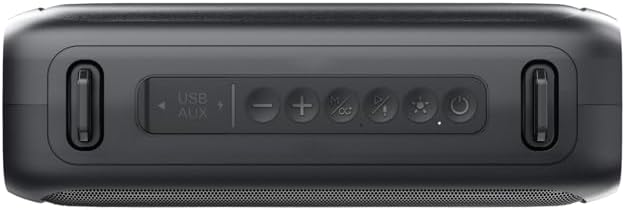
படம்: ஒரு விரிவான view of the control panel on the XO F39 speaker, highlighting the USB and AUX input labels, and individual buttons.
- USB/AUX போர்ட்: For USB drive playback and auxiliary audio input.
- வால்யூம் டவுன் / முந்தைய டிராக்: முந்தைய டிராக்கைப் பார்க்க சுருக்கமாக அழுத்தவும், ஒலியைக் குறைக்க நீண்ட நேரம் அழுத்தவும்.
- Play/Pause / TWS Pairing: Short press to play/pause, long press to initiate TWS pairing.
- வால்யூம் அப் / அடுத்த ட்ராக்: அடுத்த டிராக்கிற்கு சுருக்கமாக அழுத்தவும், ஒலியை அதிகரிக்க நீண்ட நேரம் அழுத்தவும்.
- பயன்முறை பொத்தான்: Press to switch between Bluetooth, FM Radio, USB, and AUX modes.
- RGB ஒளி கட்டுப்பாடு: Press to change or turn off the RGB light effects.
- பவர் பட்டன்: Long press to power on/off. Short press to check battery status (if applicable).

படம்: பின்புறம் view of the XO F39 speaker, showing the charging port and regulatory information labels.
அமைவு
சபாநாயகர் மீது குற்றச்சாட்டு
Before first use, fully charge the speaker. Connect the provided USB charging cable to the speaker's charging port and the other end to a USB power adapter (DC5V/0.5-1A, not included) or a computer's USB port.
- சார்ஜிங் நேரம் தோராயமாக 3 மணி நேரம் ஆகும்.
- A charging indicator light will typically show charging status (e.g., red for charging, off/blue for full).

Image: The XO F39 speaker on a table, with overlaid text indicating FM, USB, Bluetooth modes, a charging time of about 3 hours, and playback times of 7 hours (50% volume) or 3 hours (100% volume).
ஆன்/ஆஃப்
நீண்ட நேரம் அழுத்தவும் பவர் பட்டன் (labeled with a power symbol) for approximately 3 seconds to turn the speaker on or off.
புளூடூத் இணைத்தல்
- ஸ்பீக்கரை இயக்கவும். அது தானாகவே ப்ளூடூத் இணைத்தல் பயன்முறையில் நுழையும், இது ஒளிரும் LED விளக்கால் குறிக்கப்படும்.
- உங்கள் சாதனத்தில் (ஸ்மார்ட்போன், டேப்லெட், முதலியன) புளூடூத்தை இயக்கவும்.
- தேடுங்கள் available Bluetooth devices and select "XO-F39" from the list.
- இணைக்கப்பட்டதும், ஸ்பீக்கர் உறுதிப்படுத்தல் ஒலியை வெளியிடும், மேலும் LED விளக்கு ஒளிர்வதை நிறுத்திவிடும்.
உண்மையான வயர்லெஸ் ஸ்டீரியோ (TWS) இணைத்தல்
To pair two XO F39 speakers for a stereo sound experience:
- Ensure both XO F39 speakers are powered on and not connected to any other Bluetooth device.
- ஸ்பீக்கர்களில் ஒன்றில் (இது முதன்மை ஸ்பீக்கராக இருக்கும்), நீண்ட நேரம் அழுத்தவும் ப்ளே/பாஸ் பட்டன் நீங்கள் ஒரு ஜோடி தொனியைக் கேட்கும் வரை.
- இரண்டு ஸ்பீக்கர்களும் தானாகவே ஒன்றோடொன்று இணைக்கப்படும். உறுதிப்படுத்தல் ஒலி TWS இணைப்பு வெற்றிகரமாக இருப்பதைக் குறிக்கும்.
- இப்போது, "புளூடூத் இணைத்தல்" பிரிவில் விவரிக்கப்பட்டுள்ளபடி, உங்கள் சாதனத்தை புளூடூத் வழியாக முதன்மை ஸ்பீக்கருடன் இணைக்கவும்.
USB பிளேபேக்
MP3 ஆடியோ கொண்ட USB ஃபிளாஷ் டிரைவைச் செருகவும். fileகள் உள்ளே USB/AUX Port. The speaker will automatically switch to USB mode and begin playing music.
AUX உள்ளீடு
Connect one end of the 3.5mm auxiliary audio cable to the USB/AUX Port on the speaker and the other end to the audio output of your device. The speaker will automatically switch to AUX mode.
எஃப்எம் ரேடியோ ஆபரேஷன்
- அழுத்தவும் பயன்முறை பொத்தான் FM ரேடியோ பயன்முறைக்கு மாற.
- நீண்ட நேரம் அழுத்தவும் ப்ளே/பாஸ் பட்டன் to automatically scan and save available FM stations.
- பயன்படுத்தவும் வால்யூம் அப்/அடுத்த ட்ராக் மற்றும் தொகுதி டவுன்/முந்தைய டிராக் சேமிக்கப்பட்ட நிலையங்களுக்கு இடையில் செல்ல பொத்தான்கள்.
RGB ஒளி கட்டுப்பாடு
அழுத்தவும் RGB லைட் கண்ட்ரோல் பட்டன் (labeled with a light bulb symbol) to cycle through different light modes or to turn the lights off.

படம்: இரண்டு views of the XO F39 speaker, one with the RGB lights off and another with the multi-color RGB lights illuminated.
சபாநாயகரை இயக்குதல்
- விளையாடு/இடைநிறுத்தம்: சுருக்கமாக அழுத்தவும் ப்ளே/பாஸ் பட்டன்.
- தொகுதி சரிசெய்தல்: நீண்ட நேரம் அழுத்தவும் வால்யூம் அப்/அடுத்த ட்ராக் பட்டன் to increase volume, and long press the வால்யூம் டவுன்/முந்தைய ட்ராக் பட்டன் அளவைக் குறைக்க.
- தட வழிசெலுத்தல்: சுருக்கமாக அழுத்தவும் வால்யூம் அப்/அடுத்த ட்ராக் பட்டன் for the next track, and short press the வால்யூம் டவுன்/முந்தைய ட்ராக் பட்டன் for the previous track.
- பயன்முறை மாறுதல்: அழுத்தவும் பயன்முறை பொத்தான் to cycle through Bluetooth, FM Radio, USB, and AUX modes.
பராமரிப்பு
- சுத்தம்: ஸ்பீக்கரின் மேற்பரப்பை சுத்தம் செய்ய மென்மையான, உலர்ந்த துணியைப் பயன்படுத்தவும். சிராய்ப்பு கிளீனர்கள் அல்லது கரைப்பான்களைப் பயன்படுத்த வேண்டாம்.
- சேமிப்பு: நீண்ட நேரம் பயன்பாட்டில் இல்லாதபோது, ஸ்பீக்கரை நேரடி சூரிய ஒளி படாத குளிர்ந்த, உலர்ந்த இடத்தில் சேமிக்கவும்.
- பேட்டரி பராமரிப்பு: பேட்டரி ஆயுளை நீட்டிக்க, பேட்டரியை அடிக்கடி முழுமையாக டிஸ்சார்ஜ் செய்வதைத் தவிர்க்கவும். பயன்பாட்டில் இல்லாவிட்டாலும், ஸ்பீக்கரை தொடர்ந்து சார்ஜ் செய்யவும்.
சரிசெய்தல்
| பிரச்சனை | தீர்வு |
|---|---|
| ஸ்பீக்கர் இயக்கப்படவில்லை. | ஸ்பீக்கர் சார்ஜ் செய்யப்பட்டுள்ளதா என்பதை உறுதிப்படுத்திக் கொள்ளுங்கள். அதை ஒரு மின் மூலத்துடன் இணைத்து மீண்டும் முயற்சிக்கவும். |
| புளூடூத் வழியாக இணைக்க முடியாது. |
|
| ஒலி இல்லை அல்லது குறைந்த அளவு. |
|
| எஃப்எம் ரேடியோ வரவேற்பு மோசமாக உள்ளது. |
|
விவரக்குறிப்புகள்

Image: A table detailing the product parameters of the XO F39 speaker, including model, Bluetooth version, battery capacity, play time, charging time, and dimensions.
| அம்சம் | விவரம் |
|---|---|
| மாதிரி | XO-F39 |
| தயாரிப்பு பெயர் | வயர்லெஸ் ஸ்பீக்கர் |
| புளூடூத் பதிப்பு | புளூடூத் V5.1 |
| புளூடூத் வரம்பு | ≤10மீ |
| பேட்டரி திறன் | 1500mAh |
| சார்ஜிங் உள்ளீட்டு தரநிலை | USB-C, DC5V/0.5-1A |
| சார்ஜிங் நேரம் | சுமார் 3 மணி நேரம் |
| விளையாடும் நேரம் | About 7 hours (50% volume), 3 hours (100% volume) |
| அதிகபட்ச ஆற்றல் வெளியீடு | 8W*2 (Total 16W Stereo Sound) |
| தயாரிப்பு பொருள் | பிளாஸ்டிக் + இரும்பு வலை |
| நிறம் | கருப்பு |
| எல்இடி எல்amp விளைவு | Supported (RGB) |
| Support Play Mode | MP3, FM, AUX |
| ஆதரவு நெறிமுறை | A2DP, AVRCP, HFP, HSP |
| தயாரிப்பு பரிமாணங்கள் (L x W x H) | 255 x 87 x 110 மிமீ (25.5 x 8.7 x 11 செ.மீ) |
| எடை | 721g (approx. 880g with packaging) |
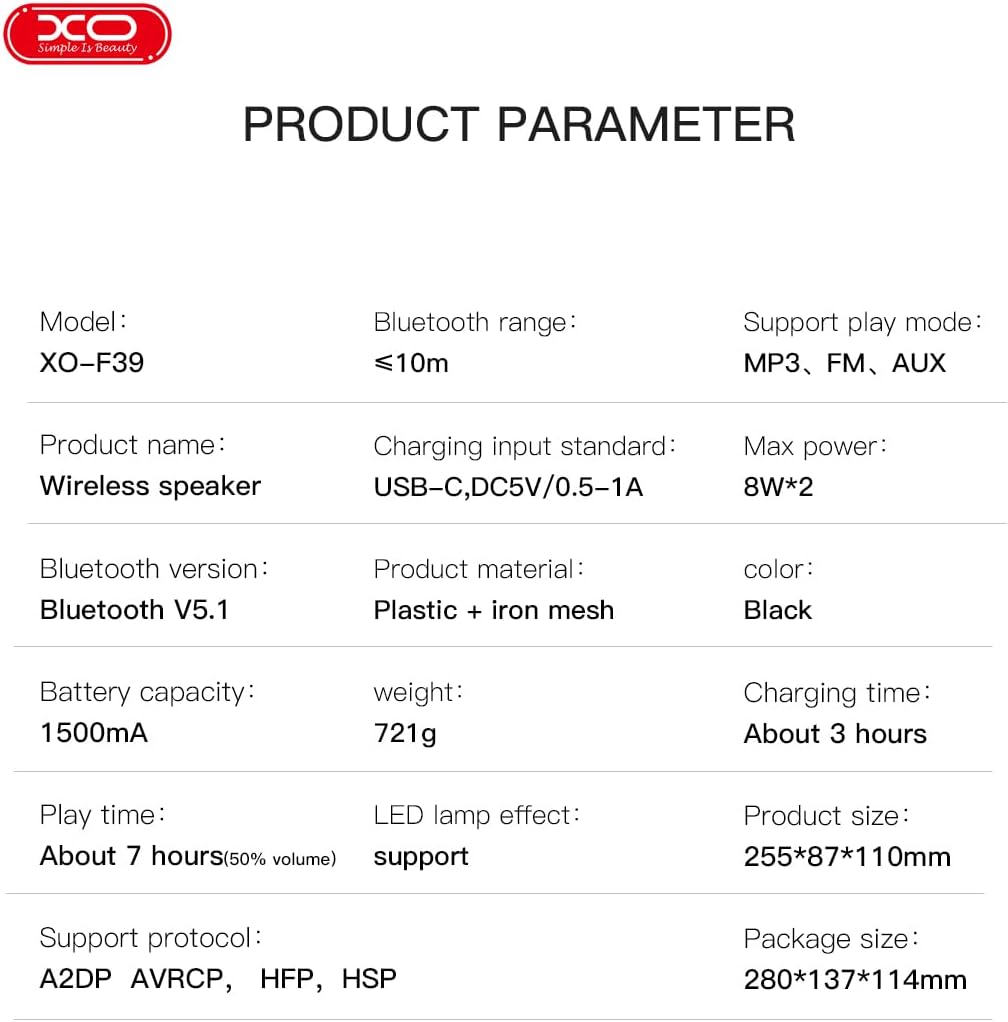
Image: The XO F39 speaker with its length (25.5cm), width (8.71cm), and height (11cm) clearly labeled.
உத்தரவாதம் மற்றும் ஆதரவு
The XO F39 Portable Bluetooth Speaker comes with a standard manufacturer's warranty. Please refer to the warranty card included in your package for specific terms and conditions.
For technical support, troubleshooting assistance, or warranty claims, please contact your retailer or the official XO customer service. Contact information can typically be found on the product packaging or the brand's official webதளம்.
Ask a question about this manual
Ask about setup, troubleshooting, compatibility, parts, safety, or missing instructions. Manuals+ will review the question and use this page’s manual context to help answer it.