
Morpheus 360 HS6500SBT
Morpheus 360 Advantage Stereo Wireless Headset User Manual
Model: HS6500SBT | Brand: Morpheus 360
அறிமுகம்
This manual provides detailed instructions for the setup, operation, and maintenance of your Morpheus 360 Advantage Stereo Wireless Headset. Designed for seamless communication and audio, this headset features Bluetooth 5.3 connectivity, a detachable noise-cancelling boom microphone, and comfortable protein leather ear cushions, making it ideal for both work and gaming environments.

The Morpheus 360 Advantage Stereo Wireless Headset, showcasing its design and included USB-A and USB-C dongles for versatile connectivity.
முக்கிய அம்சங்கள்:
- Seamless Multi-Device Connection: Bluetooth 5.3 technology allows connection to multiple devices, facilitating easy switching between phone calls and video conferences.
- Wear All Day Comfort: Lightweight design with protein leather ear cushions and memory foam for extended wear.
- Noise-Free Communication: Detachable noise-cancelling boom microphone with 120-degree rotation filters background noise for clear calls.
- உலகளாவிய இணக்கத்தன்மை: Complies with UC standard, ensuring seamless operation with communication software like Zoom, Skype, and MS Teams.
- ஒருங்கிணைந்த கட்டுப்பாடுகள்: Built-in call and volume controls for convenient management.
தொகுப்பு உள்ளடக்கங்கள்
உங்கள் தொகுப்பில் அனைத்து பொருட்களும் உள்ளதா என சரிபார்க்கவும்:
- Morpheus 360 Advantage Stereo Wireless Headset
- பிரிக்கக்கூடிய பூம் மைக்ரோஃபோன்
- USB-A Receiver-Dongle
- USB-C Adapter (for USB-A dongle)
- USB சார்ஜிங் கேபிள் (USB-A முதல் USB-C)
- பயனர் கையேடு (இந்த ஆவணம்)
தயாரிப்பு முடிந்துவிட்டதுview
உங்கள் ஹெட்செட்டின் கூறுகளுடன் உங்களைப் பழக்கப்படுத்திக் கொள்ளுங்கள்:

Left earcup with microphone port and control buttons.
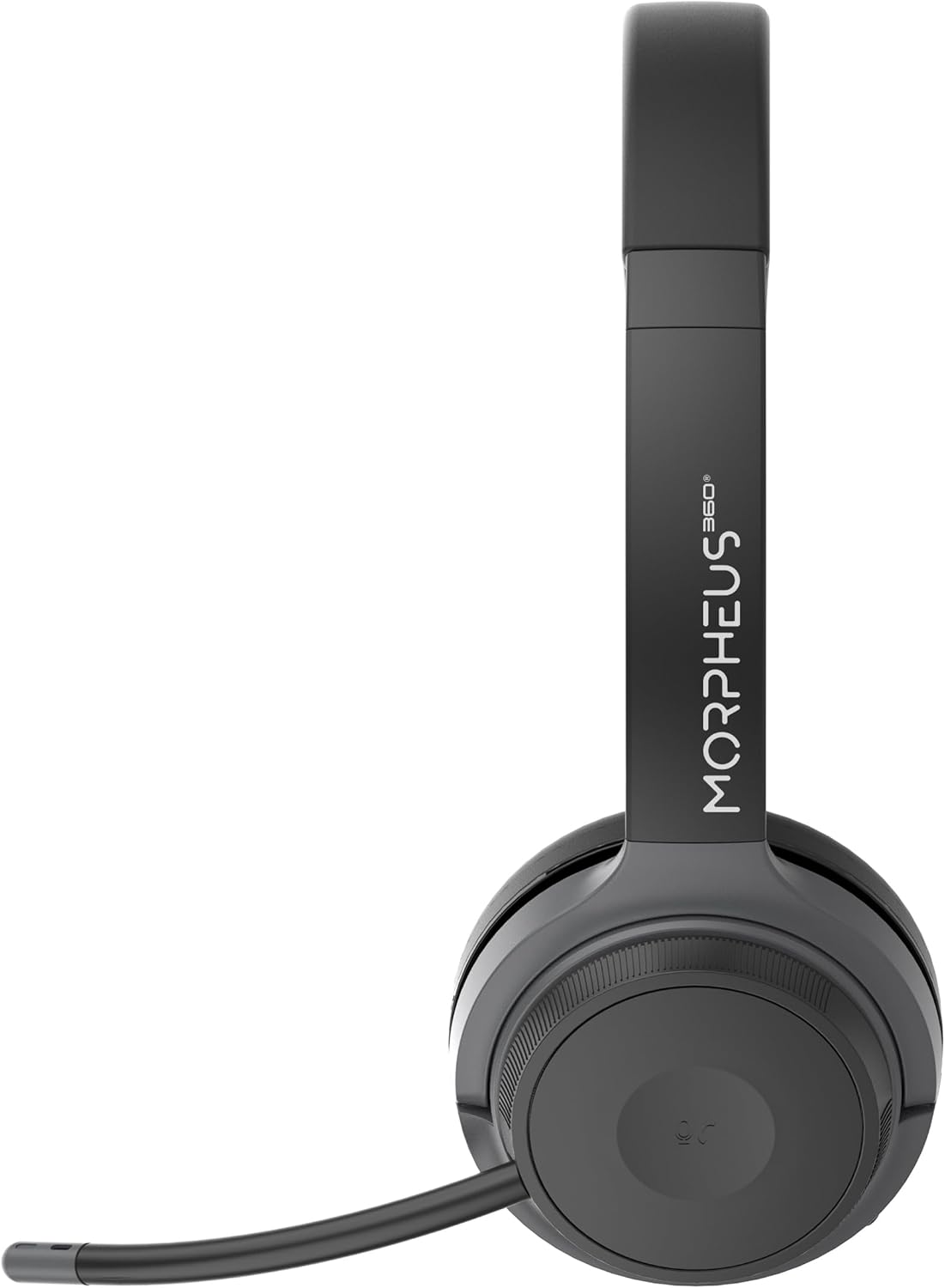
Right earcup featuring the volume control dial and USB-C charging port.
- தலைக்கவசம்: வசதியான பொருத்தத்திற்காக சரிசெய்யக்கூடியது.
- காது மெத்தைகள்: Soft protein leather with memory foam for comfort.
- மைக்ரோஃபோன் போர்ட்: Located on the left earcup for attaching the boom microphone.
- ஆற்றல்/இணைத்தல் பொத்தான்: Controls power and initiates Bluetooth pairing.
- ஒலி கட்டுப்பாட்டு டயல்: Located on the right earcup, allows for precise volume adjustments.
- USB-C சார்ஜிங் போர்ட்: ஹெட்செட் பேட்டரியை சார்ஜ் செய்வதற்கு.
- மீடியா கட்டுப்பாட்டு பொத்தான்கள்: Play/Pause, Next/Previous Track (functionality may vary by device).
- அழைப்பு கட்டுப்பாட்டு பொத்தான்: Answer/End/Reject calls.
அமைவு
1. ஹெட்செட்டை சார்ஜ் செய்தல்
முதல் பயன்பாட்டிற்கு முன், ஹெட்செட்டை முழுமையாக சார்ஜ் செய்யவும். முழுமையாக சார்ஜ் செய்ய தோராயமாக 2 மணிநேரம் ஆகும்.
- Connect the USB charging cable to the USB-C port on the headset.
- கேபிளின் மறுமுனையை USB பவர் சோர்ஸுடன் இணைக்கவும் (எ.கா. கணினி USB போர்ட், சுவர் அடாப்டர்).
- The LED indicator will show charging status (refer to LED indicator section for details).
2. Attaching the Boom Microphone
The boom microphone is detachable and can be inserted into the microphone port on the left earcup. Ensure it clicks securely into place. The microphone can be rotated 120 degrees for optimal positioning.
3. சாதனங்களுடன் இணைத்தல்
Your headset offers two primary connection methods: Bluetooth and 2.4GHz Wireless (via USB dongle).
புளூடூத் இணைப்பு:
- ஹெட்செட் சார்ஜ் செய்யப்பட்டு அணைக்கப்பட்டுள்ளதா என்பதை உறுதிப்படுத்தவும்.
- Press and hold the Power/Pairing button until the LED indicator flashes blue and red, indicating pairing mode.
- உங்கள் சாதனத்தில் (ஸ்மார்ட்போன், டேப்லெட், மடிக்கணினி), புளூடூத்தை இயக்கி புதிய சாதனங்களைத் தேடுங்கள்.
- Select "Morpheus 360 Advantage" from the list of available devices.
- இணைக்கப்பட்டதும், LED காட்டி ஒரு திட நீல ஒளியைக் காண்பிக்கும்.

The headset supports Bluetooth 5.3 for stable connections and Universal Communication (UC) standards for broad compatibility.
2.4GHz வயர்லெஸ் இணைப்பு (USB டாங்கிள் வழியாக):
This method is ideal for devices without Bluetooth or for a more stable connection, particularly with PCs and Macs.
- Plug the USB-A receiver-dongle into an available USB-A port on your computer. If your computer only has USB-C ports, use the included USB-A to USB-C adapter.
- ஹெட்செட்டை இயக்கவும். அது தானாகவே டாங்கிளுடன் இணைக்கப்பட வேண்டும்.
- The LED indicator on both the headset and dongle will show a solid blue light when connected.
- Ensure the Morpheus 360 headset is selected as the default audio input and output device in your computer's sound settings.
இயக்க வழிமுறைகள்
பவர் ஆன்/ஆஃப்:
- பவர் ஆன்: Press and hold the Power/Pairing button for approximately 3 seconds until the LED indicator lights up.
- பவர் ஆஃப்: Press and hold the Power/Pairing button for approximately 5 seconds until the LED indicator turns off.
ஒலியளவு கட்டுப்பாடு:
Rotate the volume control dial on the right earcup:
- ஒலியளவை அதிகரிக்க கடிகார திசையில் சுழற்றவும்.
- ஒலியளவைக் குறைக்க எதிரெதிர் திசையில் சுழற்று.
அழைப்பு மேலாண்மை:
- பதில் அழைப்பு: அழைப்பு கட்டுப்பாட்டு பொத்தானை ஒரு முறை அழுத்தவும்.
- அழைப்பை முடிக்கவும்: Press the Call Control button once during a call.
- அழைப்பை நிராகரி: Press and hold the Call Control button for 2 seconds.

The headset provides comfortable wear for extended periods, ideal for calls and online meetings.
மீடியா பிளேபேக்:
- விளையாடு/இடைநிறுத்தம்: ப்ளே/பாஸ் பட்டனை ஒருமுறை அழுத்தவும்.
- அடுத்த ட்ராக்: அடுத்த ட்ராக் பொத்தானை ஒரு முறை அழுத்தவும்.
- முந்தைய ட்ராக்: முந்தைய ட்ராக் பொத்தானை ஒரு முறை அழுத்தவும்.
மைக்ரோஃபோன் பயன்பாடு:
- முடக்கு/அன்முட்: Use the dedicated mute button on the microphone boom or the headset controls (if available).
- நிலைப்படுத்தல்: Adjust the 120-degree rotatable boom microphone for optimal voice pickup, ensuring it is close to your mouth.
பராமரிப்பு
சுத்தம்:
- மென்மையான, உலர்ந்த, பஞ்சு இல்லாத துணியால் ஹெட்செட்டை துடைக்கவும்.
- For ear cushions, use a slightly damp cloth with mild soap if necessary, then wipe dry immediately.
- சிராய்ப்பு கிளீனர்கள், ஆல்கஹால் அல்லது ரசாயன கரைப்பான்களைப் பயன்படுத்த வேண்டாம்.
சேமிப்பு:
- ஹெட்செட்டை நேரடி சூரிய ஒளி மற்றும் தீவிர வெப்பநிலையிலிருந்து விலகி குளிர்ந்த, உலர்ந்த இடத்தில் சேமிக்கவும்.
- ஹெட்செட்டில் கனமான பொருட்களை வைப்பதைத் தவிர்க்கவும்.
பேட்டரி பராமரிப்பு:
- பேட்டரியின் ஆயுளைப் பராமரிக்க, அடிக்கடி பயன்படுத்தாவிட்டாலும், ஹெட்செட்டைத் தொடர்ந்து சார்ஜ் செய்யவும்.
- பேட்டரியை அடிக்கடி முழுமையாக சார்ஜ் செய்வதைத் தவிர்க்கவும்.
சரிசெய்தல்
| பிரச்சனை | சாத்தியமான காரணம் | தீர்வு |
|---|---|---|
| ஹெட்செட் இயக்கப்படவில்லை. | குறைந்த பேட்டரி. | ஹெட்செட்டை முழுமையாக சார்ஜ் செய்யவும். |
| புளூடூத் வழியாக இணைக்க முடியவில்லை. | Headset not in pairing mode; Device Bluetooth off; Out of range. | Ensure headset is in pairing mode (flashing blue/red). Turn device Bluetooth on. Move headset closer to device (within 10 meters). |
| ஒலி இல்லை அல்லது மோசமான ஒலி தரம். | Volume too low; Incorrect audio output selected; Headset not connected properly. | Increase headset and device volume. Select "Morpheus 360 Advantage" as audio output. Reconnect headset. |
| மைக்ரோஃபோன் வேலை செய்யவில்லை. | Microphone muted; Not properly attached; Incorrect input device selected. | Unmute microphone. Ensure microphone is securely attached. Select "Morpheus 360 Advantage" as audio input in device settings. |
| இடைப்பட்ட இணைப்பு. | குறுக்கீடு; வரம்பிற்கு வெளியே; குறைந்த பேட்டரி. | Move away from other wireless devices. Stay within 10 meters of connected device. Charge headset. |
விவரக்குறிப்புகள்
| அம்சம் | விவரம் |
|---|---|
| மாதிரி பெயர் | HS6500SBT |
| இணைப்பு தொழில்நுட்பம் | Wireless (Bluetooth 5.3, 2.4GHz via USB Dongle) |
| புளூடூத் பதிப்பு | 5.3 |
| புளூடூத் வரம்பு | 10 மீட்டர் (33 அடி) வரை |
| பேட்டரி ஆயுள் | Up to 30 Hours (Talk/Playtime) |
| சார்ஜிங் நேரம் | தோராயமாக 2 மணிநேரம் |
| சத்தம் கட்டுப்பாடு | செயலற்ற இரைச்சல் ரத்து |
| ஒலிவாங்கி | Detachable Noise Cancelling Boom Microphone (120-degree rotation) |
| காது வைப்பு | மேல் காது |
| பொருள் | Faux Leather (Protein Leather Ear Cushions) |
| இணக்கமான சாதனங்கள் | Laptops, Desktops, Tablets, Telephones, Smartphones, Communication Software (UC Standard) |
| தயாரிப்பு பரிமாணங்கள் | 8.75 x 3 x 8.5 அங்குலம் |
| பொருளின் எடை | 9.6 அவுன்ஸ் |
| மின்மறுப்பு | 30 ஓம் |
| UPC | 856816008538 |
உத்தரவாத தகவல்
Morpheus 360 products are designed and manufactured to the highest quality standards. For detailed warranty information, including terms, conditions, and registration, please refer to the official Morpheus 360 webதளம் அல்லது உங்கள் தயாரிப்புடன் சேர்க்கப்பட்டுள்ள உத்தரவாத அட்டை.
உத்திரவாதக் கோரிக்கைகளுக்காக உங்கள் வாங்கியதற்கான ஆதாரத்தை வைத்துக் கொள்ளவும்.
ஆதரவு
For further assistance, technical support, or frequently asked questions, please visit the official Morpheus 360 support webதளம்:
You may also find helpful resources and contact information on the product's Amazon listing page.
Ask a question about this manual
Ask about setup, troubleshooting, compatibility, parts, safety, or missing instructions. Manuals+ will review the question and use this page’s manual context to help answer it.