
1. ஓவர்view
தி மௌக்கி எம்AMP1 is a compact yet powerful 2.0 channel Bluetooth audio stereo amplifier receiver designed for various home audio applications. It delivers 400 watts of maximum power output, providing a high-quality audio experience for karaoke, home theater, acoustic sound systems, and monitor headphones. Featuring multiple input and output modes, EQ controls, Bluetooth 5.0 connectivity, and an HD LED screen, the MAMP1 offers versatile and user-friendly operation.
2. முக்கியமான பாதுகாப்பு தகவல்
- Read and heed all instructions.
- இந்த தயாரிப்பை தண்ணீருக்கு அருகில் பயன்படுத்த வேண்டாம்.
- உலர்ந்த துணியால் மட்டுமே சுத்தம் செய்யவும்.
- தொகுதி உறுதிtage of your local mains supply matches the product's requirements.
- Do not block any ventilation openings. Install according to manufacturer's instructions.
- ரேடியேட்டர்கள், வெப்பப் பதிவேடுகள், அடுப்புகள் அல்லது பிற சாதனங்கள் (உட்பட) போன்ற எந்த வெப்ப மூலங்களுக்கும் அருகில் நிறுவ வேண்டாம் ampலிஃபையர்ஸ்) வெப்பத்தை உற்பத்தி செய்யும்.
- உற்பத்தியாளரால் குறிப்பிடப்பட்ட இணைப்புகள் / துணைக்கருவிகளை மட்டுமே பயன்படுத்தவும்.
- மின்னல் புயல்களின் போது அல்லது நீண்ட காலத்திற்கு பயன்படுத்தப்படாத போது இந்த தயாரிப்பை அவிழ்த்து விடுங்கள்.
- அனைத்து சேவைகளையும் தகுதிவாய்ந்த சேவை பணியாளர்களிடம் பார்க்கவும்.
3. தொகுப்பு உள்ளடக்கங்கள்
- மௌகி எம்AMP1 Audio Stereo Ampஆயுள்
- ரிமோட் கண்ட்ரோல்
- எஃப்எம் ஆண்டெனா
- பவர் கேபிள்
- பயனர் கையேடு
4. தயாரிப்பு அம்சங்கள்
- 400 Watts Max Power: Compact yet powerful 2.0 Channel Bluetooth Audio Stereo Amplifier Receiver, ideal for karaoke, home theater, acoustic sound systems, and monitor headphones.
- Multiple Input and Output Modes: Supports 2 pairs of RCA audio inputs (for CD/DVD players), 2 x 1/4 inch (6.35mm) microphone inputs, USB (Max 64G), SD card (Max 32G), 3.5mm AUX IN, and FM radio. Features RCA Line Out and banana plug speaker outputs. Includes a 1/4 inch (6.35mm) headphone connection.
- EQ கட்டுப்பாடுகள்: Features clear, responsive buttons and knobs for microphone echo/volume, balance, bass, treble, master volume, input source, and unique folder/track control.
- புளூடூத் 5.0 இணைப்பு: Professional indoor stereo receiver with Bluetooth music streaming up to 40 feet / 10 meters or more. Easily pairs with smartphones, tablets, iPads, iPhones, and computers.
- HD LED Screen: Integrated FM radio with built-in LED display and front panel audio control center. FM Antenna and Remote Control included for distant audio adjustments.
5. முன் குழு கட்டுப்பாடுகள்
The front panel provides access to all essential controls for operating your Moukey MAMP1 ampஆயுள்.
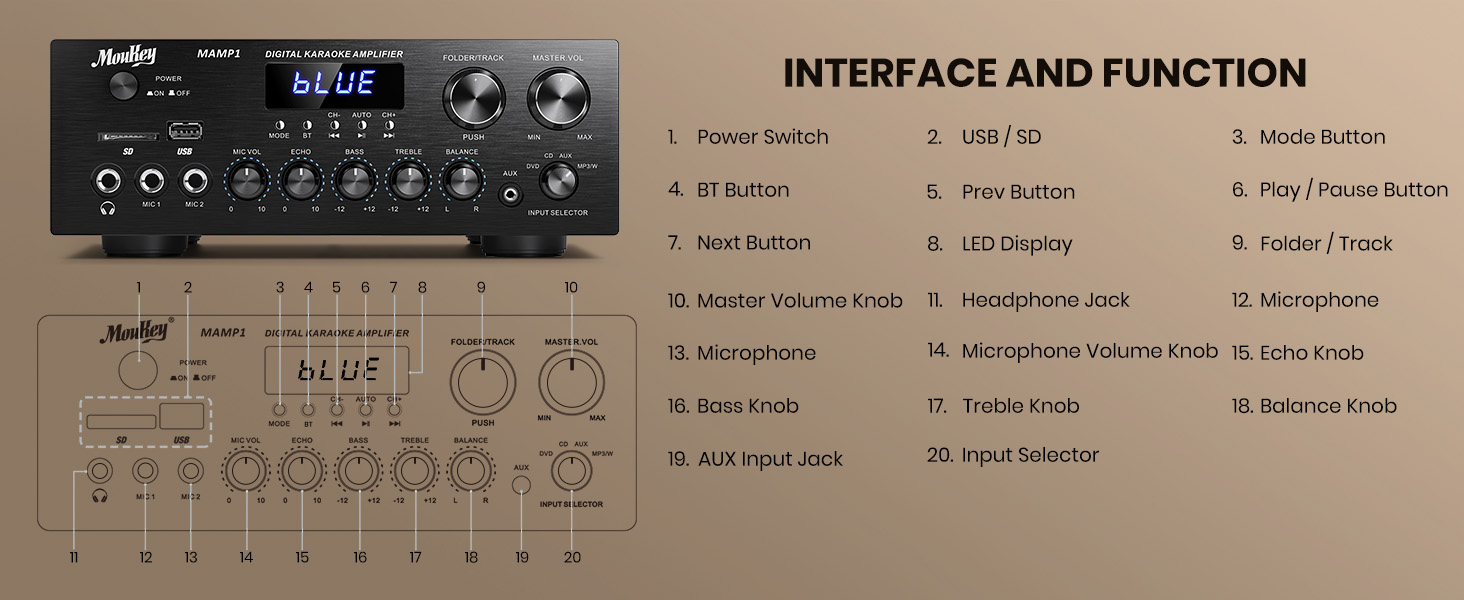
Figure 1: Moukey MAMP1 முன் பலகை அமைப்பு
- மின்விசை மாற்றும் குமிழ்: யூனிட்டை ஆன் அல்லது ஆஃப் செய்ய அழுத்தவும்.
- USB / SD Card Slot: Insert USB flash drives (max 64GB) or SD cards (max 32G) for MP3 playback.
- பயன்முறை பொத்தான்: Press to cycle through input sources (USB/SD, Bluetooth, FM, AUX, CD, DVD).
- பிடி பட்டன்: ப்ளூடூத் பயன்முறையைத் தேர்ந்தெடுக்க அழுத்தவும்.
- Prev/Next Buttons: Navigate tracks in USB/SD/Bluetooth mode or stations in FM mode.
- ப்ளே/இடைநிறுத்த பட்டன்: ஆடியோ பிளேபேக்கை இயக்கு அல்லது இடைநிறுத்து.
- எல்.ஈ.டி காட்சி: Shows current mode, track information, or FM frequency.
- Folder/Track Knob: Select folders or tracks.
- மாஸ்டர் வால்யூம் குமிழ்: ஒட்டுமொத்த வெளியீட்டு அளவை சரிசெய்கிறது.
- ஹெட்ஃபோன் ஜாக் (6.35 மிமீ): தனிப்பட்ட கேட்பதற்கு ஹெட்ஃபோன்களை இணைக்கவும்.
- Microphone Inputs (MIC1, MIC2 - 6.35mm): Connect up to two microphones for karaoke or public address.
- மைக் வால்யூம் குமிழ்: இணைக்கப்பட்ட மைக்ரோஃபோன்களின் ஒலியளவைச் சரிசெய்கிறது.
- எக்கோ குமிழ்: மைக்ரோஃபோன்களுக்கான எதிரொலி விளைவைச் சரிசெய்கிறது.
- பாஸ் குமிழ்: குறைந்த அதிர்வெண் வெளியீட்டை சரிசெய்கிறது.
- ட்ரெபிள் நாப்: உயர் அதிர்வெண் வெளியீட்டை சரிசெய்கிறது.
- இருப்பு குமிழ்: இடது/வலது சேனல் சமநிலையை சரிசெய்கிறது.
- உள்ளீட்டுத் தேர்வி குமிழ்: Manually select input sources (CD, AUX, DVD, MP3/BT).
6. பின்புற பேனல் இணைப்புகள்
The rear panel provides all necessary ports for connecting your audio sources and speakers.

Figure 2: Moukey MAMP1 பின்புற பேனல் தளவமைப்பு
- எஃப்எம் ஆண்டெனா ஜாக்: Connect the included FM antenna for radio reception.
- Audio Input (DVD/CD - RCA): Connect external audio sources like DVD or CD players using RCA cables.
- லைன் அவுட் (RCA): மற்றொன்றுடன் இணைக்கவும் ampஆயுள் அல்லது பதிவு சாதனம்.
- Speaker Output (Banana Plugs): Connect your passive speakers. Ensure correct polarity (+ to + and - to -).
- ஆற்றல் உள்ளீடு: Connect the power cable to a standard AC outlet.
7 அமைவு
7.1 ஸ்பீக்கர் இணைப்பு
To connect your passive speakers to the Moukey MAMP1 ampலைஃபையர், இந்த வழிமுறைகளைப் பின்பற்றவும்:

Figure 3: Speaker Connection Diagram
- உறுதி செய்யவும் ampலிஃபையர் அணைக்கப்பட்டு மின் நிலையத்திலிருந்து துண்டிக்கப்பட்டுள்ளது.
- Identify the positive (+) and negative (-) terminals on both your speakers and the ampஆயுள்.
- For bare wire connections: Rotate and loosen the speaker knob on the amplifier. Insert the bare wire (remove approximately 10mm insulation). Tighten the knobs to secure the wires.
- Connect the positive (+) terminal of your speaker to the positive (+) terminal of the ampஆயுள்.
- Connect the negative (-) terminal of your speaker to the negative (-) terminal of the ampஆயுள்.
- Repeat for all speakers. Ensure all connections are secure to prevent short circuits.
7.2 ஆடியோ மூலங்களை இணைத்தல்
- RCA Devices (CD/DVD Player): Use RCA cables to connect the audio output of your CD or DVD player to the corresponding RCA input jacks on the amplifier's rear panel.
- AUX Devices: Connect devices with a 3.5mm audio output (e.g., smartphone, tablet) to the 3.5mm AUX IN jack on the front panel.
- ஒலிவாங்கிகள்: Plug 1/4 inch (6.35mm) microphones into the MIC1 or MIC2 jacks on the front panel.
- எஃப்.எம் ஆண்டெனா: Connect the included FM antenna to the FM ANT jack on the rear panel for radio reception.
7.3 மின் இணைப்பு
- Ensure all audio and speaker connections are made.
- Connect the power cable to the AC POWER INPUT on the rear panel of the ampஆயுள்.
- மின் கேபிளின் மறுமுனையை பொருத்தமான ஏசி மின் நிலையத்தில் செருகவும்.
8. இயக்க வழிமுறைகள்
8.1 பவர் ஆன்/ஆஃப்
அழுத்தவும் சக்தி switch on the front panel to turn the amplifier ON or OFF. The LED display will illuminate when powered on.
8.2 உள்ளீட்டு மூலத் தேர்வு
பயன்படுத்தவும் பயன்முறை பொத்தான் அல்லது உள்ளீட்டு தேர்வாளர் knob on the front panel to choose your desired audio source (Bluetooth, USB, SD, AUX, FM, CD, DVD).
8.3 ஒலியளவு மற்றும் தொனி கட்டுப்பாடு
- முதன்மை தொகுதி: சுழற்று மாஸ்டர் தொகுதி ஒட்டுமொத்த ஒலி அளவை சரிசெய்ய குமிழ்.
- மைக்ரோஃபோன் வால்யூம்: பயன்படுத்தவும் MIC தொகுதி knob to adjust microphone volume independently.
- எதிரொலி: Adjust the microphone echo effect with the எதிரொலி குமிழ்.
- பாஸ்/டிரெபிள்: Fine-tune the low and high frequencies using the BASS மற்றும் மரம் கைப்பிடிகள்.
- இருப்பு: Adjust the left/right channel balance with the இருப்பு குமிழ்.
8.4 ப்ளூடூத் இணைத்தல்
- அழுத்தவும் பயன்முறை பொத்தான் அல்லது BT button to select Bluetooth mode. The LED display will show "BLUE".
- உங்கள் மொபைல் சாதனத்தில், புளூடூத்தை இயக்கி, கிடைக்கும் சாதனங்களைத் தேடவும்.
- Select "MAMP1" from the list to pair. A confirmation tone will sound upon successful connection.
8.5 USB/SD பிளேபேக்
- Insert a USB flash drive or SD card into the respective slot on the front panel.
- தி amplifier will automatically switch to USB/SD mode and begin playback. If not, press the பயன்முறை அதை தேர்ந்தெடுக்க பொத்தான்.
- பயன்படுத்தவும் முன்/அடுத்து buttons to skip tracks and the விளையாடு/இடைநிறுத்தம் button to control playback.
8.6 FM வானொலி செயல்பாடு
- Ensure the FM antenna is connected to the rear panel.
- அழுத்தவும் பயன்முறை button to select FM radio mode. The LED display will show the frequency.
- அழுத்தவும் ஆட்டோ கிடைக்கக்கூடிய FM நிலையங்களை தானாக ஸ்கேன் செய்து சேமிக்க பொத்தானை அழுத்தவும்.
- பயன்படுத்தவும் CH- மற்றும் CH+ சேமித்த நிலையங்கள் வழியாக செல்ல பொத்தான்கள்.
9. பராமரிப்பு
- ஒரு மென்மையான, உலர்ந்த துணியால் துடைப்பதன் மூலம் அலகு சுத்தமாக வைத்திருங்கள்.
- கடுமையான இரசாயனங்கள் அல்லது சிராய்ப்பு கிளீனர்களைப் பயன்படுத்துவதைத் தவிர்க்கவும்.
- துவாரங்களில் தடைகள் இல்லாமல் வைத்திருப்பதன் மூலம் சரியான காற்றோட்டத்தை உறுதி செய்யவும்.
- சேமிக்கவும் ampநேரடி சூரிய ஒளி மற்றும் தீவிர வெப்பநிலையிலிருந்து விலகி குளிர்ந்த, உலர்ந்த இடத்தில் லிஃபையரை வைக்கவும்.
10. சரிசெய்தல்
| பிரச்சனை | சாத்தியமான காரணம் | தீர்வு |
|---|---|---|
| சக்தி இல்லை | Power cable not connected; Power switch off; Outlet malfunction | Check power cable connection; Turn power switch ON; Test outlet with another device. |
| ஒலி வெளியீடு இல்லை | Incorrect input source; Volume too low; Speaker connections loose/incorrect; Faulty audio cable | Select correct input source; Increase master volume; Check speaker wiring; Replace audio cables. |
| புளூடூத் இணைக்கப்படவில்லை | Not in Bluetooth mode; Device too far; Device already connected to another unit | Switch to Bluetooth mode; Move device closer; Disconnect from other devices and try again. |
| மோசமான எஃப்எம் வரவேற்பு | Antenna not connected; Weak signal | Connect FM antenna; Adjust antenna position for better reception. |
11. விவரக்குறிப்புகள்
| அம்சம் | விவரக்குறிப்பு |
|---|---|
| பிராண்ட் | மௌக்கி |
| மாதிரி | MAMP1 |
| வெளியீட்டு சக்தி | அதிகபட்சம் 400 வாட்ஸ் |
| சேனல்கள் | 2.0 சேனல் |
| புளூடூத் பதிப்பு | 5.0 |
| புளூடூத் வரம்பு | 40 அடி / 10 மீட்டர் வரை |
| உள்ளீட்டு இடைமுகங்கள் | 2x RCA (CD/DVD), 2x 1/4" (6.35mm) MIC, USB, SD, 3.5mm AUX IN, FM Antenna |
| வெளியீடு இடைமுகங்கள் | RCA Line Out, Banana Plug Speaker Outputs, 1/4" (6.35mm) Headphone |
| USB/SD Max Capacity | USB: 64G, SD: 32G |
| அதிர்வெண் பதில் | 20Hz-20kHz |
| ட்யூனர் தொழில்நுட்பம் | FM |
| தயாரிப்பு பரிமாணங்கள் | 81.28 x 78.74 x 43.18 செ.மீ; 3.19 கிலோ |
12. உத்தரவாதம் மற்றும் ஆதரவு
Moukey products are designed and manufactured to the highest quality standards. For detailed warranty information and customer support, please refer to the warranty card included in your package or visit the official Moukey website. If you encounter any issues or have questions regarding your MAMP1 amplifier, please contact Moukey customer service for assistance.