
SUNOL K8
GM20 True Wireless Earbuds User Manual
மாடல்: K8
அறிமுகம்
Thank you for choosing the SUNOL GM20 True Wireless Earbuds. This manual provides detailed instructions on how to set up, operate, and maintain your earbuds to ensure optimal performance and longevity. Please read this manual thoroughly before using the product.
தயாரிப்பு முடிந்துவிட்டதுview

Image: The GM20 True Wireless Earbuds in orange, shown with their matching charging case. The charging case features an LED display indicating battery percentage.
The GM20 True Wireless Earbuds are designed for a superior audio experience with advanced features:
- புளூடூத் 5.3 தொழில்நுட்பம்: Ensures faster pairing, more stable connection, and lower power consumption with an effective range of up to 10 meters.
- ஒருங்கிணைந்த மைக்ரோஃபோன்: High-quality microphone with environmental noise reduction for clear hands-free calls.
- நீட்டிக்கப்பட்ட பிளேபேக்: Up to 48 hours of total playback time with the 600mAh charging case, which can recharge the earbuds four times.
- எல்.ஈ.டி காட்சி: The charging case features an LED display to show the power levels of both the earbuds and the charging case.
- நீர்ப்புகா வடிவமைப்பு: IPX8 waterproof nano-coating makes the earbuds suitable for various activities, including sports.
- வசதியான பொருத்தம்: Ergonomic in-ear design with multiple ear tip sizes for prolonged comfortable wear.
பெட்டியில் என்ன இருக்கிறது
Upon opening your GM20 True Wireless Earbuds package, you should find the following items:
- GM20 True Wireless Earbuds (Left and Right)
- சார்ஜிங் கேஸ்
- சார்ஜிங் கேபிள்
- பல அளவுகளில் காது முனைகள்
- பயனர் கையேடு (இந்த ஆவணம்)
அமைவு
1. இயர்பட்ஸ் மற்றும் கேஸை சார்ஜ் செய்தல்
முதல் பயன்பாட்டிற்கு முன், இயர்பட்கள் மற்றும் சார்ஜிங் கேஸ் இரண்டும் முழுமையாக சார்ஜ் செய்யப்பட்டுள்ளதா என்பதை உறுதிப்படுத்திக் கொள்ளுங்கள்.
- Place the earbuds into the charging case. Ensure they are correctly seated; the LED display on the case will show charging status.
- Connect the charging cable to the charging port on the case and to a USB power source. The LED display will indicate the charging progress of the case.
- A full charge for the case typically takes a few hours. The earbuds will charge automatically when placed inside the powered case.

Image: The GM20 charging case displaying "100" on its LED screen, indicating a full charge. An earbud is shown next to it, ready for use.
2. உங்கள் சாதனத்துடன் இணைத்தல் (ஒரு-படி இணைத்தல்)
The GM20 earbuds feature automatic pairing for convenience.
- ஆரம்ப இணைத்தல்:
- சார்ஜிங் கேஸைத் திறந்து இரண்டு இயர்பட்களையும் வெளியே எடுக்கவும். அவை தானாகவே ஆன் ஆகி இணைத்தல் பயன்முறையில் நுழையும்.
- உங்கள் சாதனத்தில் (ஸ்மார்ட்போன், டேப்லெட், முதலியன), புளூடூத்தை இயக்கவும்.
- தேடுங்கள் Bluetooth devices and select "GM20 TWS" from the list.
- இணைக்கப்பட்டதும், உறுதிப்படுத்தல் தொனியைக் கேட்பீர்கள், மேலும் இயர்பட்கள் பயன்படுத்தத் தயாராக இருக்கும்.
- மீண்டும் இணைத்தல்: The earbuds will automatically connect to the last paired device when taken out of the charging case.
- If the earbuds do not connect automatically, ensure Bluetooth is enabled on your device and select "GM20 TWS" from your Bluetooth settings.
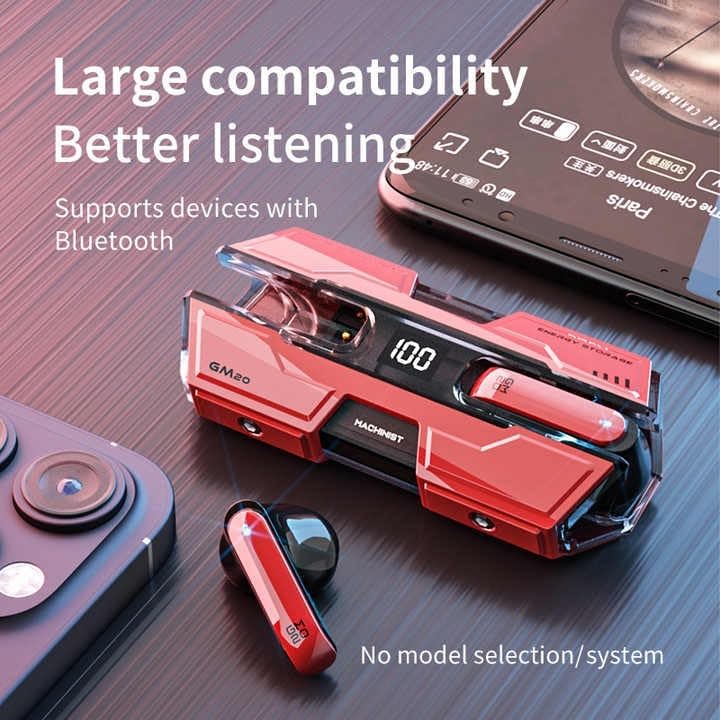
Image: The GM20 earbuds and charging case positioned near a smartphone, emphasizing their broad compatibility with Bluetooth-enabled devices.
இயக்க வழிமுறைகள்
இயர்பட் கட்டுப்பாடுகள்
The GM20 earbuds feature a multifunction button on each earbud for easy control of audio playback and calls.
| செயல் | செயல்பாடு |
|---|---|
| Single Press (Left/Right Earbud) | இசையை இயக்கு/இடைநிறுத்து, அழைப்பை ஏற்கு/முடி |
| இருமுறை அழுத்தவும் (இடது இயர்பட்) | முந்தைய பாடல் |
| இருமுறை அழுத்தவும் (வலது இயர்பட்) | அடுத்த பாடல் |
| நீண்ட அழுத்த (2 வினாடிகள்) | அழைப்பை நிராகரி, குரல் உதவியாளரை செயல்படுத்து |
| நீண்ட அழுத்த (5 வினாடிகள்) | பவர் ஆன்/ஆஃப் |
இயர்பட்ஸ் அணிந்து
For optimal sound quality and comfort, ensure the earbuds are properly seated in your ears. Experiment with the different sizes of ear tips provided to find the best fit for your ears.

படம்: வெடித்தது view diagram of an earbud, illustrating its internal components such as the 13mm moving coil and composite diaphragm, which contribute to high-resolution sound.
பராமரிப்பு
Proper maintenance will extend the life of your GM20 earbuds.
- சுத்தம்: மென்மையான, உலர்ந்த, பஞ்சு இல்லாத துணியால் இயர்பட்கள் மற்றும் சார்ஜிங் கேஸை தவறாமல் சுத்தம் செய்யவும். சிராய்ப்பு கிளீனர்கள் அல்லது கரைப்பான்களைப் பயன்படுத்த வேண்டாம்.
- நீர் எதிர்ப்பு: The earbuds are IPX8 waterproof, meaning they are protected against prolonged immersion in water. However, the charging case is not waterproof. Avoid exposing the charging case to liquids. Always ensure earbuds are dry before placing them back in the charging case.
- சேமிப்பு: பயன்பாட்டில் இல்லாதபோது, இயர்பட்களைப் பாதுகாக்கவும், அவற்றை சார்ஜ் செய்யவும் அவற்றை அவற்றின் சார்ஜிங் கேஸில் சேமிக்கவும். அதிக வெப்பநிலையிலிருந்து விலகி, குளிர்ந்த, உலர்ந்த இடத்தில் சேமிக்கவும்.
- பேட்டரி பராமரிப்பு: பேட்டரி ஆயுளைப் பாதுகாக்க, இயர்பட்களை முழுமையாக சார்ஜ் செய்வதையும், அடிக்கடி சார்ஜ் செய்வதையும் தவிர்க்கவும். தொடர்ந்து பயன்படுத்தாவிட்டாலும், அவற்றைத் தொடர்ந்து சார்ஜ் செய்யவும்.
சரிசெய்தல்
If you encounter issues with your GM20 earbuds, try the following solutions:
- இயர்பட்ஸ் இணைக்கப்படவில்லை:
- இரண்டு இயர்பட்களும் முழுமையாக சார்ஜ் செய்யப்பட்டிருப்பதை உறுதிசெய்யவும்.
- உங்கள் சாதனத்தில் புளூடூத்தை அணைத்துவிட்டு, மீண்டும் இயக்கவும்.
- Forget "GM20 TWS" from your device's Bluetooth settings and attempt to re-pair.
- இயர்பட்களை மீண்டும் கேஸில் வைத்து, மூடியை மூடி, சில வினாடிகள் காத்திருந்து, பின்னர் திறந்து மீண்டும் முயற்சிக்கவும்.
- ஒலி இல்லை அல்லது குறைந்த அளவு:
- உங்கள் சாதனம் மற்றும் இயர்பட்கள் இரண்டிலும் ஒலி அளவைச் சரிபார்க்கவும்.
- இயர்பட்கள் உங்கள் சாதனத்துடன் சரியாக இணைக்கப்பட்டுள்ளதா என்பதை உறுதிப்படுத்தவும்.
- இயர்பட் ஸ்பீக்கர் வலையிலிருந்து ஏதேனும் குப்பைகளை சுத்தம் செய்யவும்.
- Sound distortion or crackling:
- இயர்பட்கள் உங்கள் சாதனத்தின் 10 மீட்டர் புளூடூத் வரம்பிற்குள் இருப்பதை உறுதிசெய்யவும்.
- Reduce interference by moving away from other wireless devices or strong electromagnetic fields.
- இயர்பட்களை மீண்டும் இணைக்க முயற்சிக்கவும்.
- இயர்பட்ஸ் சார்ஜ் ஆகவில்லை:
- சார்ஜிங் கேபிள் கேஸ் மற்றும் பவர் சோர்ஸ் இரண்டிலும் பாதுகாப்பாக இணைக்கப்பட்டுள்ளதா என்பதை உறுதிப்படுத்தவும்.
- கேஸில் உள்ள சார்ஜிங் போர்ட் சுத்தமாகவும் குப்பைகள் இல்லாமல் இருக்கிறதா என்று சரிபார்க்கவும்.
- வேறு சார்ஜிங் கேபிள் அல்லது பவர் அடாப்டரை முயற்சிக்கவும்.
விவரக்குறிப்புகள்
| அம்சம் | விவரம் |
|---|---|
| மாதிரி பெயர் | K8 |
| புளூடூத் பதிப்பு | 5.3 |
| புளூடூத் வரம்பு | 10 மீட்டர் |
| பேட்டரி ஆயுள் (இயர்பட்ஸ்) | Approx. 8-10 hours (single charge) |
| பேட்டரி ஆயுள் (சார்ஜிங் கேஸுடன்) | 48 மணிநேரம் வரை |
| சார்ஜிங் கேஸ் பேட்டரி திறன் | 600mAh |
| நீர் எதிர்ப்பு நிலை | IPX8 (இயர்பட்ஸ் மட்டும்) |
| அதிர்வெண் பதில் | 20 ஹெர்ட்ஸ் - 20 கிலோஹெர்ட்ஸ் |
| மின்மறுப்பு | 32 ஓம் |
| கட்டுப்பாட்டு முறை | தொடு/பொத்தான் |
| பொருள் | அக்ரிலோனிட்ரைல் புடாடீன் ஸ்டைரீன் (ABS) |
| பொருளின் எடை | 14.4 அவுன்ஸ் (மொத்த தொகுப்பு) |
உத்தரவாதம் மற்றும் ஆதரவு
For warranty information and customer support, please refer to the documentation included with your purchase or visit the official SUNOL website. If you experience any issues not covered in this manual, please contact SUNOL customer service for assistance.
உத்திரவாதக் கோரிக்கைகளுக்காக உங்கள் வாங்கியதற்கான ஆதாரத்தை வைத்துக் கொள்ளவும்.
Ask a question about this manual
Ask about setup, troubleshooting, compatibility, parts, safety, or missing instructions. Manuals+ will review the question and use this page’s manual context to help answer it.