
1. அறிமுகம்
Welcome to the user manual for your new SGIN E10P 10-inch Kids Tablet. This guide provides essential information on setting up, operating, maintaining, and troubleshooting your device. Please read this manual thoroughly to ensure proper use and to maximize your tablet's features.
பெட்டியில் என்ன இருக்கிறது
பிரித்தெடுத்தவுடன், கீழே பட்டியலிடப்பட்டுள்ள அனைத்து பொருட்களும் உள்ளனவா என்பதைச் சரிபார்க்கவும்:
- SGIN E10P Kids Tablet (with protective case)
- பயனர் கையேடு
- யூ.எஸ்.பி டைப்-சி கேபிள்
- பவர் அடாப்டர் (சார்ஜர்)
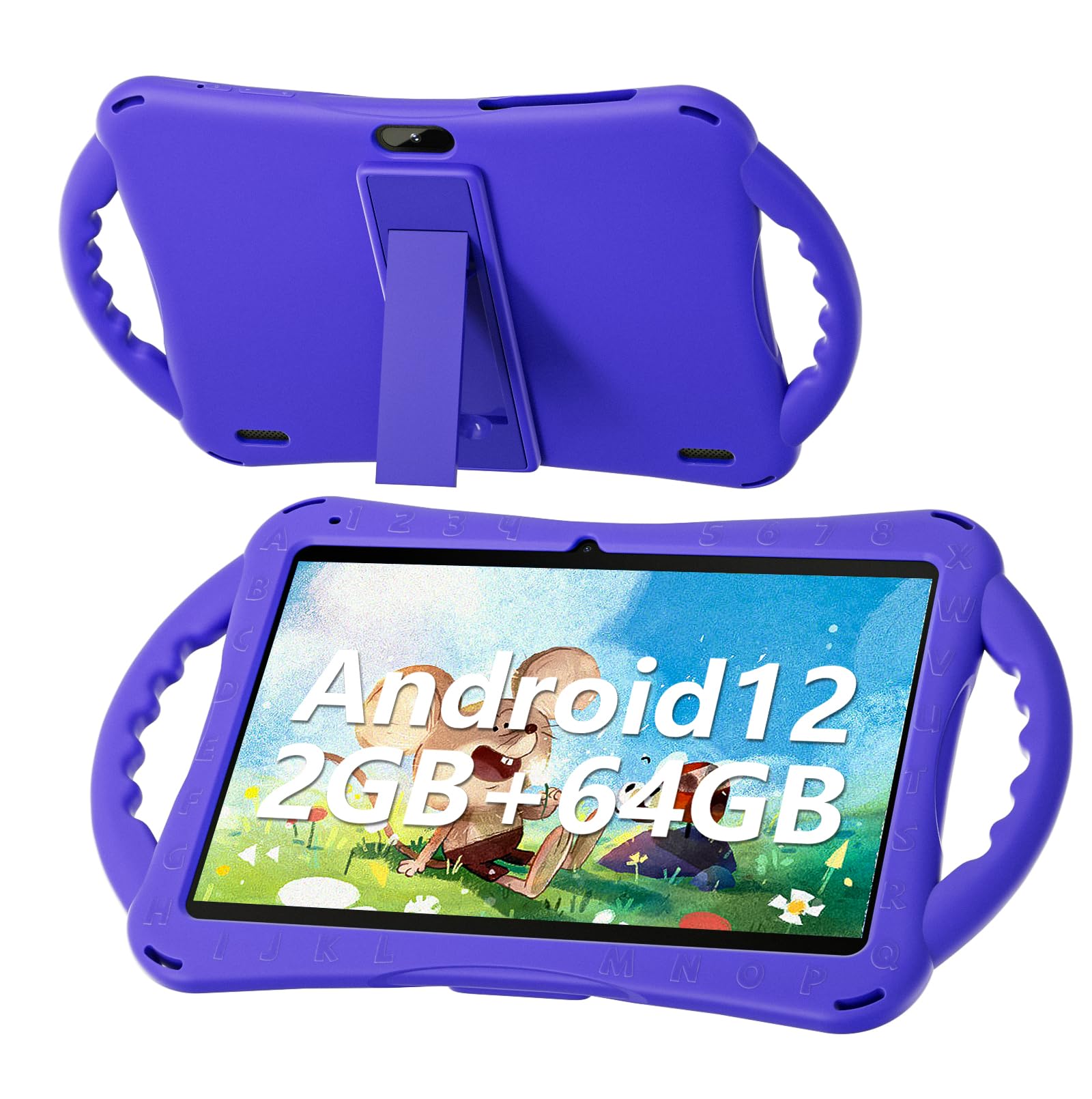
Figure 1: SGIN E10P Kids Tablet with its protective case.
2. தயாரிப்பு முடிந்துவிட்டதுview
Familiarize yourself with the physical components of your SGIN E10P Kids Tablet.

Figure 2: Labeled diagram of the SGIN E10P Kids Tablet components.
- முன் கேமரா: வீடியோ அழைப்புகள் மற்றும் செல்ஃபிகளுக்கு.
- பின்புற கேமரா: புகைப்படங்கள் மற்றும் வீடியோக்கள் எடுப்பதற்காக.
- பேச்சாளர்கள்: ஆடியோ வெளியீடு.
- டைப்-சி போர்ட்: சார்ஜிங் மற்றும் டேட்டா பரிமாற்றத்திற்கு.
- TF அட்டை ஸ்லாட்: For expanding storage with a microSD card.
- தலையணி ஜாக்: வயர்டு ஹெட்ஃபோன்களை இணைப்பதற்கு.
- அளவை அதிகரிக்கும்: Button to raise the audio level.
- ஒலியளவைக் குறைத்தல்: Button to lower the audio level.
- Bracket (Kickstand): Integrated stand for hands-free viewing.
- Armrest (Handle): Ergonomic handles on the protective case for easy gripping.
3 அமைவு
3.1 டேப்லெட்டை சார்ஜ் செய்தல்
Before first use, fully charge the tablet. Connect the USB Type-C cable to the tablet's Type-C port and the other end to the power adapter. Plug the power adapter into a wall outlet. The battery indicator on the screen will show charging status. A full charge typically takes several hours.
3.2 பவர் ஆன்/ஆஃப்
- பவர் ஆன் செய்ய: Press and hold the Power button (usually located on the side or top edge) until the SGIN logo appears on the screen.
- பவர் ஆஃப் செய்ய: Press and hold the Power button until a menu appears. Select "Power off" from the options.
- மறுதொடக்கம் செய்ய: Press and hold the Power button until a menu appears. Select "Restart" from the options.
3.3 ஆரம்ப அமைப்பு
The first time you power on the tablet, you will be guided through an initial setup process:
- மொழி தேர்வு: உங்களுக்கு விருப்பமான மொழியை தேர்வு செய்யவும்.
- வைஃபை இணைப்பு: உங்கள் வைஃபை நெட்வொர்க்கைத் தேர்ந்தெடுத்து, இணையத்துடன் இணைக்க கடவுச்சொல்லை உள்ளிடவும்.
- Google கணக்கு: ஏற்கனவே உள்ள Google கணக்கைப் பயன்படுத்தி உள்நுழையவும் அல்லது புதிய கணக்கை உருவாக்கவும். Google Play Store இலிருந்து பயன்பாடுகளைப் பதிவிறக்குவதற்கு இது அவசியம்.
- தேதி மற்றும் நேரம்: Set the correct date and time, or allow the network to set it automatically.
- பெற்றோர் கட்டுப்பாடுகள்: Configure Google Kids Space or other parental control features to manage content and screen time for children.
4. டேப்லெட்டை இயக்குதல்
4.1 அடிப்படை வழிசெலுத்தல்
The SGIN E10P tablet uses a touch-sensitive screen for navigation:
- தட்டவும்: ஒரு பயன்பாட்டைத் திறக்க, ஒரு பொருளைத் தேர்ந்தெடுக்க அல்லது ஒரு பொத்தானை அழுத்த, திரையை ஒரு முறை தொடவும்.
- தொட்டுப் பிடி: கூடுதல் விருப்பங்களை அணுக அல்லது நகர்த்த ஒரு பொருளை அழுத்திப் பிடிக்கவும்.
- ஸ்வைப்: பக்கங்கள் அல்லது பட்டியல்களை உருட்ட திரை முழுவதும் உங்கள் விரலை இழுக்கவும்.
- பெரிதாக்க பின்ச்: திரையில் இரண்டு விரல்களை வைத்து, பெரிதாக்க அவற்றைப் பிரிக்கவும் அல்லது பெரிதாக்க ஒன்றாக நகர்த்தவும்.
4.2 வைஃபை இணைப்பு
To connect or manage Wi-Fi networks:
- செல்க அமைப்புகள் > நெட்வொர்க் & இணையம் > Wi-Fi.
- வைஃபையை நிலைமாற்று On.
- பட்டியலிலிருந்து உங்களுக்குப் பிடித்த நெட்வொர்க்கைத் தேர்ந்தெடுத்து, கேட்கப்பட்டால் கடவுச்சொல்லை உள்ளிடவும்.

Figure 3: The tablet supports both 2.4GHz and 5GHz Wi-Fi for stable connections.
4.3 Applications and Content
The tablet runs on Android 12 and comes with access to the Google Play Store, allowing you to download a wide range of applications. It is pre-configured for children's use, supporting apps like YouTube Kids, educational games, and other child-friendly content.

Figure 4: The Android 12 interface with various pre-installed and downloadable kids' apps.
4.4 பெற்றோர் கட்டுப்பாடுகள்
Utilize the built-in parental control features to manage your child's tablet experience. This includes setting screen time limits, filtering content, and approving app downloads. Access these settings through the Google Family Link app or directly in the tablet's settings under "Digital Wellbeing & parental controls."
5. பராமரிப்பு
5.1 சுத்தம் செய்தல்
- திரை: மின்னணு சாதனங்களுக்காக பிரத்யேகமாக வடிவமைக்கப்பட்ட மென்மையான, பஞ்சு இல்லாத துணியைப் பயன்படுத்தவும். பிடிவாதமான கறைகளுக்கு, சிறிது dampதுணியை தண்ணீரில் அல்லது திரை சுத்தப்படுத்தும் கரைசலில் நனைக்கவும் (நேரடியாக திரையில் தெளிக்க வேண்டாம்).
- வழக்கு: The silicone protective case can be wiped with a damp cloth and mild soap if necessary. Ensure it is completely dry before reattaching it to the tablet.
- துறைமுகங்கள்: Keep all ports (USB-C, headphone jack, TF card slot) free of dust and debris. Use a soft brush or compressed air if needed.
5.2 பேட்டரி பராமரிப்பு
The tablet is equipped with a 5000mAh battery, providing extended usage time.

Figure 5: The tablet features a 5000mAh battery for prolonged use.
- தீவிர வெப்பநிலையைத் தவிர்க்கவும், ஏனெனில் அவை பேட்டரி ஆயுளைக் குறைக்கும்.
- Use only the provided charger and cable to prevent damage.
- உகந்த பேட்டரி நீண்ட ஆயுளுக்கு, அடிக்கடி பேட்டரியை முழுவதுமாக வெளியேற்றுவதையோ அல்லது நீண்ட காலத்திற்கு 100% சார்ஜில் வைத்திருப்பதையோ தவிர்க்கவும்.
5.3 சேமிப்பு
Store the tablet in a cool, dry place away from direct sunlight and moisture when not in use.
6. சரிசெய்தல்
This section addresses common issues you might encounter with your SGIN E10P tablet.
6.1 டேப்லெட் இயக்கப்படவில்லை
- Ensure the tablet is sufficiently charged. Connect it to the charger for at least 30 minutes before attempting to power it on again.
- கட்டாய மறுதொடக்கம் செய்ய பவர் பட்டனை 10-15 வினாடிகள் அழுத்திப் பிடிக்கவும்.
6.2 வைஃபை இணைப்புச் சிக்கல்கள்
- Check if Wi-Fi is enabled in the tablet's settings.
- Verify that your Wi-Fi router is working correctly and other devices can connect.
- Forget the network in the tablet's Wi-Fi settings and reconnect.
- Restart both the tablet and your Wi-Fi router.
6.3 பயன்பாடுகள் செயலிழக்கின்றன அல்லது உறைகின்றன
- பயன்பாட்டை மூடி மீண்டும் திறக்கவும்.
- பயன்பாட்டின் தற்காலிக சேமிப்பு மற்றும் தரவை அழிக்கவும் அமைப்புகள் > பயன்பாடுகள் > [பயன்பாட்டின் பெயர்] > சேமிப்பகம் & தற்காலிக சேமிப்பு.
- Ensure the app is updated to its latest version via the Google Play Store.
- டேப்லெட்டை மறுதொடக்கம் செய்யுங்கள்.
6.4 மெதுவான செயல்திறன்
- தேவையற்ற பின்னணி பயன்பாடுகளை மூடு.
- Clear cached data from apps and the system.
- Ensure there is sufficient storage space available. Delete unused apps or files.
- Consider performing a factory reset as a last resort (குறிப்பு: இது டேப்லெட்டில் உள்ள எல்லா தரவையும் அழித்துவிடும். காப்புப்பிரதி முக்கியமானது fileமுதலில்).
7. விவரக்குறிப்புகள்
Key technical specifications for the SGIN E10P Kids Tablet:
| அம்சம் | விவரக்குறிப்பு |
|---|---|
| பிராண்ட் | SGIN |
| மாதிரி எண் | E10P |
| திரை அளவு | 10 அங்குலம் |
| திரை தெளிவுத்திறன் | 1280 x 800 |
| செயலி | 1.5 GHz Allwinner Quad-core A133 |
| ரேம் | 2 ஜிபி |
| சேமிப்பகம் (ROM) | 64 ஜிபி |
| விரிவாக்கக்கூடிய சேமிப்பு | TF Card Slot (for additional expansion) |
| இயக்க முறைமை | ஆண்ட்ராய்டு 12 |
| பின்புறம் Webகேமரா தெளிவுத்திறன் | 5 எம்.பி |
| முன் கேமரா | 2 எம்.பி |
| பேட்டரி திறன் | 5000 mAh |
| இணைப்பு | 2.4G/5G WiFi, Bluetooth 4.2 |
| பரிமாணங்கள் (LxWxH) | 10.1 x 6 x 0.4 அங்குலம் |
| பொருளின் எடை | 2.27 பவுண்டுகள் |
8. உத்தரவாதம் மற்றும் ஆதரவு
SGIN provides a 1-year maintenance period from the date of purchase for this product. If you encounter any issues or require assistance, please contact SGIN customer support.
For further support, please refer to the contact information provided with your purchase documentation or visit the official SGIN webதளம்.