
1. அறிமுகம்
Welcome to the KRUPS Sensation C10 EA910A10 Superautomatic Coffee Machine user manual. This guide provides comprehensive instructions for the safe and efficient operation, maintenance, and troubleshooting of your new coffee machine. Please read this manual thoroughly before first use and keep it for future reference.
2. முக்கியமான பாதுகாப்பு வழிமுறைகள்
பாதுகாப்பான செயல்பாட்டை உறுதிசெய்ய, எப்போதும் இந்த அடிப்படை பாதுகாப்பு முன்னெச்சரிக்கை நடவடிக்கைகளைப் பின்பற்றவும்:
- சாதனத்தைப் பயன்படுத்துவதற்கு முன் அனைத்து வழிமுறைகளையும் படிக்கவும்.
- சாதனம், மின் கம்பி அல்லது பிளக்கை தண்ணீரில் அல்லது பிற திரவங்களில் மூழ்கடிக்க வேண்டாம்.
- இந்த சாதனம் வீட்டு உபயோகத்திற்காக மட்டுமே வடிவமைக்கப்பட்டுள்ளது.
- தொகுதி உறுதிtagசாதனத்தில் சுட்டிக்காட்டப்பட்ட e உங்கள் மெயின்ஸ் வால்யூமுக்கு ஒத்திருக்கிறதுtage.
- சுத்தம் செய்வதற்கு முன் அல்லது பயன்பாட்டில் இல்லாதபோது எப்போதும் மின் நிலையத்திலிருந்து சாதனத்தைத் துண்டிக்கவும்.
- பழுதடைந்த தண்டு அல்லது பிளக், அல்லது சாதனம் செயலிழந்த பிறகு அல்லது எந்த வகையிலும் சேதமடைந்த பிறகு, எந்த ஒரு சாதனத்தையும் இயக்க வேண்டாம்.
- செயல்பாட்டின் போது குழந்தைகளை சாதனத்திலிருந்து விலக்கி வைக்கவும்.
- உற்பத்தியாளரால் பரிந்துரைக்கப்பட்ட பாகங்கள் மட்டுமே பயன்படுத்தவும்.
- Avoid contact with hot surfaces, such as the coffee spouts or steam nozzle.
3. தயாரிப்பு கூறுகள்
Familiarize yourself with the main components of your KRUPS Sensation C10 EA910A10 coffee machine:
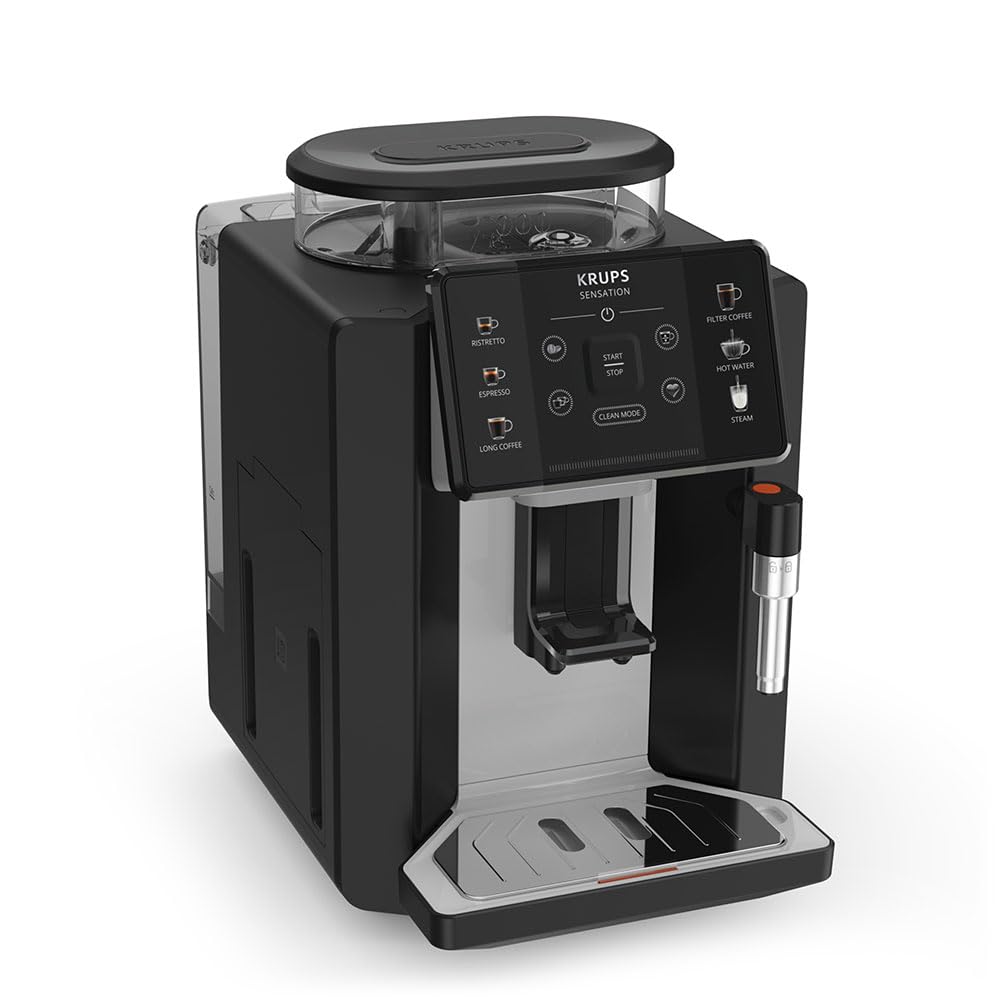
படம்: முன்-வலது view of the KRUPS Sensation C10 EA910A10 Superautomatic Coffee Machine, showing the bean hopper, control panel, coffee spouts, and drip tray. Two cups of coffee are being dispensed.
- மூடியுடன் கூடிய பீன் ஹாப்பர்
- தண்ணீர் தொட்டி
- Control Panel (Touchscreen)
- Coffee Spouts (Adjustable)
- Drip Tray with Grid
- காபி மைதானம் கொள்கலன்
- Steam Nozzle / Hot Water Spout
- பவர் கார்டு இணைப்பு
4. ஆரம்ப அமைப்பு
4.1 பேக்கிங்
- காபி இயந்திரத்தை அதன் பேக்கேஜிங்கிலிருந்து கவனமாக அகற்றவும்.
- Remove all packaging materials, including protective films and stickers.
- நீர் ஆதாரங்கள் மற்றும் வெப்பத்திலிருந்து விலகி, நிலையான, தட்டையான, வெப்ப-எதிர்ப்பு மேற்பரப்பில் இயந்திரத்தை வைக்கவும்.
4.2. முதல் பயன்பாட்டுக்கான தயாரிப்பு
- Rinse the Water Tank: Remove the water tank, rinse it thoroughly with fresh water, and fill it to the MAX level. Reinsert the tank securely.
- பீன் ஹாப்பரை நிரப்பவும்: Open the lid of the bean hopper and fill it with fresh coffee beans. Do not use ground coffee in the bean hopper.
- மின் இணைப்பு: மின் கம்பியை இயந்திரத்தில் செருகவும், பின்னர் தரையிறக்கப்பட்ட மின் கடையில் செருகவும்.
- ஆரம்ப துவைக்க சுழற்சி: The machine will prompt you to perform an initial rinse cycle. Follow the instructions on the touchscreen. This primes the system and cleans internal components.
5. இயக்க வழிமுறைகள்
5.1. கண்ட்ரோல் பேனல் ஓவர்view

Image: A hand interacting with the intuitive touchscreen control panel of the KRUPS Sensation C10 EA910A10, highlighting its ease of use.
The KRUPS Sensation C10 EA910A10 features an intuitive touchscreen control panel for easy operation. Key functions include:
- ரிஸ்ட்ரெட்டோ: For a very short, concentrated espresso.
- எஸ்பிரெசோ: For a classic espresso shot.
- நீண்ட காபி: For a larger volume of coffee.
- Filter Coffee: For a milder, filter-style coffee.
- சூடான நீர்: For tea or other hot beverages.
- நீராவி: பால் நுரைக்கும்.
- ஆரம்பம்/நிறுத்தம்: To begin or end a brewing cycle.
- சுத்தமான பயன்முறை: Initiates cleaning cycles.
- Coffee Strength/Volume Adjustment: Icons to customize your drink.
5.2. காபி தயாரித்தல்
To brew a coffee beverage:
- Ensure the water tank is filled and the bean hopper contains sufficient beans.
- Place a cup under the coffee spouts. Adjust the spout height if necessary.
- Select your desired coffee type (e.g., Espresso, Long Coffee) from the touchscreen.
- Adjust coffee strength and volume using the on-screen options if desired.
- Press the "Start" button to begin brewing.
- இயந்திரம் பீன்ஸை அரைத்து, காபியை காய்ச்சி, உங்கள் கோப்பையில் ஊற்றும்.
- The machine will automatically stop when the brewing is complete.

Image: A selection of coffee beverages, including espresso, long coffee, and a milk-based drink, demonstrating the versatility of the KRUPS Sensation C10 EA910A10.
5.3. சூடான நீர் செயல்பாடு
- சூடான நீரின் கீழ் ஒரு கோப்பை வைக்கவும்.
- Select the "Hot Water" option on the touchscreen.
- Press "Start" to dispense hot water. Press "Stop" to cease dispensing.
5.4. Steam Function (for milk frothing)
- ஒரு குடத்தில் குளிர்ந்த பால் நிரப்பவும்.
- நீராவி முனையை பாலில் வைக்கவும்.
- Select the "Steam" option on the touchscreen.
- Press "Start" to activate the steam. Move the pitcher up and down to froth the milk.
- Press "Stop" when desired froth is achieved.
- முக்கியமானது: Clean the steam nozzle immediately after use to prevent milk residue buildup.
6. பராமரிப்பு மற்றும் சுத்தம்
வழக்கமான சுத்தம் மற்றும் பராமரிப்பு உங்கள் காபி இயந்திரத்தின் உகந்த செயல்திறன் மற்றும் நீண்ட ஆயுளை உறுதி செய்கிறது.
6.1. தினசரி சுத்தம்
- சொட்டுத் தட்டு மற்றும் காபி மைதான கொள்கலன்: Empty and rinse the drip tray and coffee grounds container daily or when prompted by the machine.
- காபி ஸ்பவுட்ஸ்: காபி ஸ்பவுட்களை விளம்பரத்துடன் துடைக்கவும்.amp துணி.
- தண்ணீர் தொட்டி: தண்ணீர் தொட்டியை தினமும் புதிய தண்ணீரில் கழுவவும்.
6.2. குறைத்தல்
The machine will indicate when descaling is required. Follow the on-screen instructions and use a KRUPS-approved descaling solution.

Image: A hand inserting a cleaning tablet into the designated slot of the KRUPS Sensation C10 EA910A10, illustrating the ease of the cleaning process.
6.3. நீர் வடிகட்டி மாற்றீடு
If your machine uses a water filter, replace it every 2-3 months or as indicated by the machine to ensure optimal water quality and prevent limescale buildup.
7. சரிசெய்தல்
பொதுவான பிரச்சினைகள் மற்றும் அவற்றின் தீர்வுகளுக்கு கீழே உள்ள அட்டவணையைப் பார்க்கவும்.
| பிரச்சனை | சாத்தியமான காரணம் / தீர்வு |
|---|---|
| இயந்திரம் இயக்கப்படவில்லை. | Check if the power cord is securely plugged into the machine and the electrical outlet. Ensure the outlet is functional. |
| காபி எதுவும் வழங்கப்படுவதில்லை. | Water tank empty: Fill the water tank. Bean hopper empty: Fill with coffee beans. Coffee grounds container full: Empty and clean. Descaling required: Perform descaling cycle. |
| காபி மிகவும் பலவீனமானது. | Adjust coffee strength settings on the control panel. Check if the bean hopper is sufficiently filled. Ensure fresh beans are used. |
| இயந்திரத்திலிருந்து நீர் கசிவு. | Check if the water tank is correctly inserted. Ensure the drip tray is properly positioned. If leakage persists, contact customer support. |
| "Clean Mode" alert persists. | Perform the indicated cleaning cycle (e.g., descaling, rinsing). Ensure all removable parts are clean and correctly reinserted. |
| Steam nozzle not frothing milk effectively. | Clean the steam nozzle thoroughly after each use to prevent blockages. Ensure cold milk is used. |
| Grinder is unusually loud or not grinding. | Check for foreign objects in the bean hopper. Ensure the bean hopper is not empty. Contact customer support if the issue persists. |
8. தொழில்நுட்ப விவரக்குறிப்புகள்
| அம்சம் | விவரக்குறிப்பு |
|---|---|
| மாதிரி எண் | EA910A10 |
| பிராண்ட் | KRUPS |
| தொகுதிtage | 145 வோல்ட் |
| சக்தி | 1450 வாட்ஸ் |
| பொருள் | எஃகு |
| தயாரிப்பு எடை | 7.5 கிலோ |
| இடைமுகம் | தொடுதிரை |

Image: The KRUPS Sensation C10 EA910A10 coffee machine with indicated dimensions: 24 cm width, 34.6 cm depth, and 36.4 cm height.
9. உத்தரவாதத் தகவல்
Your KRUPS Sensation C10 EA910A10 Superautomatic Coffee Machine is covered by a manufacturer's warranty. Please refer to the warranty card included in your product packaging for specific terms, conditions, and duration. Keep your proof of purchase for warranty claims.
10. வாடிக்கையாளர் ஆதரவு
For further assistance, technical support, or spare parts, please contact KRUPS customer service. Contact details can typically be found on the KRUPS official webதளத்தில் அல்லது உங்கள் சாதனத்துடன் வழங்கப்பட்ட உத்தரவாத ஆவணத்தில்.