
Zenwire A10
Zenwire A10 Mini Portable Projector User Manual
மாதிரி: A10
1. அறிமுகம்
நன்றி, நன்றி.asing the Zenwire A10 Mini Portable Projector. This device is designed to provide a versatile and convenient projection experience, allowing you to display content from various sources, including smartphones, tablets, and computers. Please read this manual carefully before using the projector to ensure proper operation and to maximize its lifespan.
2. முக்கியமான பாதுகாப்பு வழிமுறைகள்
- l இருக்கும்போது ப்ரொஜெக்டர் லென்ஸை நேரடியாகப் பார்க்க வேண்டாம்amp உள்ளது.
- அதிக வெப்பமடைவதைத் தடுக்க ப்ரொஜெக்டரைச் சுற்றி சரியான காற்றோட்டத்தை உறுதி செய்யவும். காற்றோட்ட திறப்புகளைத் தடுக்க வேண்டாம்.
- ப்ரொஜெக்டருடன் வழங்கப்பட்ட பவர் அடாப்டரை மட்டும் பயன்படுத்தவும்.
- Keep the projector away from water, moisture, and flammable materials.
- Do not attempt to disassemble or repair the projector yourself. Contact qualified service personnel for assistance.
- ப்ரொஜெக்டரை ஒரு நிலையான, நிலை மேற்பரப்பில் வைக்கவும்.
- மின்னல் தாக்கும் போது அல்லது நீண்ட நேரம் பயன்படுத்தப்படாத போது ப்ரொஜெக்டரைத் துண்டிக்கவும்.
3. தொகுப்பு உள்ளடக்கங்கள்
பெட்டியை வெளியே எடுத்தவுடன், தொகுப்பின் உள்ளடக்கங்களைச் சரிபார்க்கவும். ஏதேனும் பொருட்கள் காணவில்லை அல்லது சேதமடைந்திருந்தால், உங்கள் சில்லறை விற்பனையாளரைத் தொடர்பு கொள்ளவும்.
- Zenwire A10 Mini Portable Projector
- ரிமோட் கண்ட்ரோல்
- பவர் அடாப்டர்
- பயனர் கையேடு
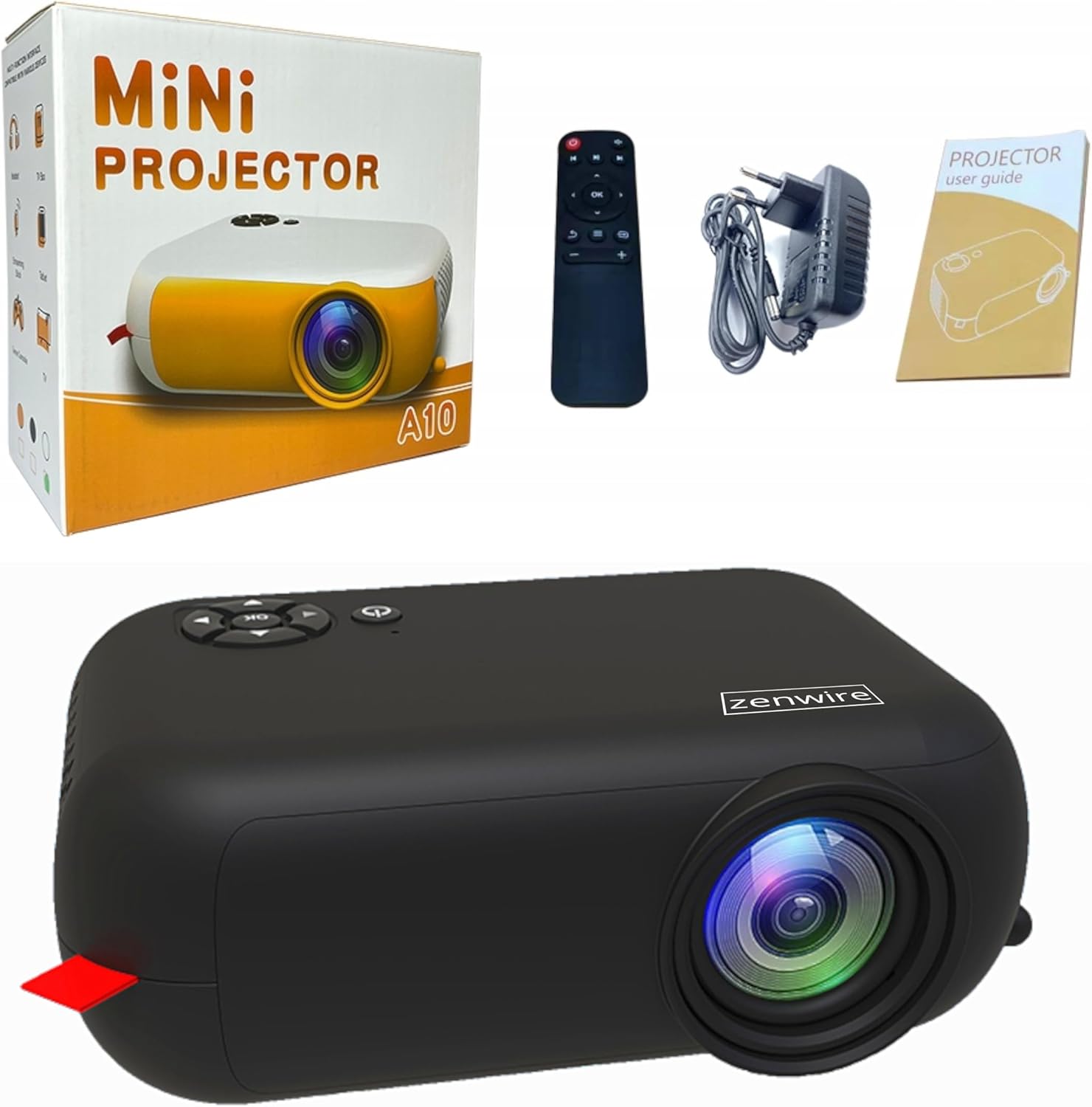
Image: Contents of the Zenwire A10 Mini Projector package, including the projector, remote control, power adapter, and user manual.
4. தயாரிப்பு முடிந்துவிட்டதுview
4.1 Projector Dimensions and Design
The Zenwire A10 is designed for portability, featuring a compact and lightweight form factor. Its dimensions are approximately 14cm x 10cm x 5.5cm, making it easy to carry and set up in various locations.

Image: The Zenwire A10 Mini Projector held in a hand, illustrating its compact size and portability.
4.2 போர்ட்கள் மற்றும் கட்டுப்பாடுகள்
The projector features a range of input and output ports for versatile connectivity, along with intuitive controls.

Image: Rear panel of the Zenwire A10 Mini Projector, showing the 5V-IN DC power input, IR receiver, USB port, 3.5mm audio jack, HDMI port, and SD card slot.
- 5V-IN DC: ப்ரொஜெக்டருக்கான பவர் உள்ளீடு.
- ஐஆர்: ரிமோட் கண்ட்ரோலுக்கான அகச்சிவப்பு ரிசீவர்.
- USB: மீடியா பிளேபேக்கிற்கு USB சேமிப்பக சாதனங்களை இணைக்கவும்.
- ஹெட்ஃபோன் ஜாக் (3.5 மிமீ): வெளிப்புற ஸ்பீக்கர்கள் அல்லது ஹெட்ஃபோன்களை இணைக்கவும்.
- , HDMI: Connect devices such as laptops, gaming consoles, or streaming sticks.
- SD: மீடியா பிளேபேக்கிற்கு மைக்ரோ SD கார்டுகளைச் செருகவும்.
- ஃபோகஸ் வீல்: Adjust image sharpness (located on the side).
- கண்ட்ரோல் பேனல்: Buttons on top for navigation and selection.
5 அமைவு
5.1 மின் இணைப்பு
- வழங்கப்பட்ட பவர் அடாப்டரை இணைக்கவும் 5V-IN DC ப்ரொஜெக்டரில் துறைமுகம்.
- பவர் அடாப்டரை ஒரு சுவர் கடையில் செருகவும்.
- அதை இயக்க ப்ரொஜெக்டர் அல்லது ரிமோட் கண்ட்ரோலில் உள்ள பவர் பட்டனை அழுத்தவும்.
5.2 Placement and Focus Adjustment
- Place the projector on a stable surface or mount it according to your preference. Ensure the projector lens is facing the projection surface (wall or screen).
- Adjust the distance between the projector and the screen to achieve your desired image size. The projector supports screen sizes up to 100 inches.
- Rotate the focus wheel (typically located near the lens) until the projected image appears clear and sharp.

Image: Diagram illustrating the Zenwire A10 Mini Projector's capability to project various screen sizes, from 13 inches up to 100 inches, depending on the projection distance.
6. புரொஜெக்டரை இயக்குதல்
6.1 Wireless Connection (Miracast & Airplay)
The Zenwire A10 supports wireless screen mirroring via 2.4/5GHz WiFi, compatible with Android (Miracast) and iOS (Airplay) devices.
- Ensure your projector and mobile device are connected to the same Wi-Fi network.
- On the projector's main menu, select the 'Screen Mirroring' or 'Wireless Display' option.
- Androidக்கு: On your Android phone/tablet, enable 'Wireless Display', 'Screen Mirroring', 'Smart View', or similar function (names may vary by device). Select the projector from the list of available devices.
- iOSக்கு: On your iPhone/iPad, open Control Center and tap 'Screen Mirroring'. Select the projector from the list of available devices.
- The content from your mobile device should now be mirrored on the projector screen.
6.2 கம்பி இணைப்புகள்
The projector offers multiple wired input options for various devices.

Image: The Zenwire A10 Mini Projector connected to various devices such as smartphones, tablets, laptops, desktop computers, gaming consoles, and media players, highlighting its versatile connectivity.
- , HDMI: Connect a laptop, PC, gaming console (e.g., Xbox, PlayStation), or streaming device (e.g., Amazon Fire TV Stick, Google Chromecast) using an HDMI cable. Select the HDMI input source on the projector.
- USB: Insert a USB flash drive or external hard drive into the USB port. The projector's media player will allow you to browse and play supported video, audio, and image files.
- மைக்ரோ எஸ்டி: Insert a Micro SD card into the SD card slot. Similar to USB, you can access media files through the projector's interface.
- ஆடியோ அவுட் (3.5மிமீ ஜாக்): Connect external speakers or headphones to enhance the audio experience.
6.3 மெனு வழிசெலுத்தல்
Use the remote control or the buttons on the projector to navigate through the on-screen menu. Select input sources, adjust picture settings (brightness, contrast, color), sound settings, and other system preferences.
7. பராமரிப்பு
- லென்ஸ் சுத்தம்: Use a soft, lint-free cloth specifically designed for optical lenses to gently wipe the projector lens. Avoid using abrasive cleaners or excessive force.
- தூசி அகற்றுதல்: Regularly clean the projector's exterior with a soft, dry cloth. Use a small brush or compressed air to clear dust from the ventilation openings to ensure proper airflow.
- சேமிப்பு: When not in use, store the projector in a cool, dry place, away from direct sunlight and extreme temperatures. Use the original packaging or a protective case to prevent dust accumulation and damage.
8. சரிசெய்தல்
If you encounter issues with your Zenwire A10 projector, refer to the following common problems and solutions:
| பிரச்சனை | சாத்தியமான காரணம் | தீர்வு |
|---|---|---|
| திரையில் படம் இல்லை | Power not connected; Incorrect input source; Device not connected properly. | Check power cable; Select correct input source (HDMI, USB, etc.); Reconnect source device. |
| படம் மங்கலாக உள்ளது | கவனம் சரிசெய்யப்படவில்லை; புரொஜெக்டர் திரைக்கு மிக அருகில்/தொலைவில் உள்ளது. | Adjust the focus wheel; Adjust projection distance. |
| ஒலி இல்லை | ஒலி அளவு மிகக் குறைவு; ஒலியடக்கப்பட்டது; வெளிப்புற ஆடியோ சாதனம் இணைக்கப்படவில்லை/தேர்ந்தெடுக்கப்படவில்லை. | Increase volume; Unmute; Check external speaker connection or select internal speaker. |
| வயர்லெஸ் இணைப்பு சிக்கல்கள் | Not on same Wi-Fi network; Device not compatible; Interference. | Ensure both devices are on the same Wi-Fi; Verify device compatibility; Try moving closer to Wi-Fi router. |
9. விவரக்குறிப்புகள்
| அம்சம் | விவரம் |
|---|---|
| பிராண்ட் | ஜென்வைர் |
| மாதிரி எண் | A10 |
| தயாரிப்பு வகை | Compact and Portable Projector |
| நேட்டிவ் ரெசல்யூஷன் | 480 x 360p |
| அதிகபட்ச காட்சி தெளிவுத்திறன் | 1920 x 1080 (முழு எச்டி) |
| பிரகாசம் | 1800lm / 60 ANSI |
| மாறுபாடு விகிதம் | 2000:1 |
| காட்சி வகை | LED |
| இணைப்பு தொழில்நுட்பம் | Wi-Fi (2.4/5GHz), HDMI, USB, Micro SD, 3.5mm Audio Jack |
| வயர்லெஸ் அம்சங்கள் | மிராகாஸ்ட், ஏர்ப்ளே |
| இணக்கமான சாதனங்கள் | Smartphones (Android, iOS), Tablets, Laptops, PCs, Gaming Consoles |
| பரிந்துரைக்கப்பட்ட பயன்பாடுகள் | ஹோம் சினிமா |
| பரிமாணங்கள் (தோராயமாக) | 14cm x 10cm x 5.5cm |
10. உத்தரவாதம் மற்றும் ஆதரவு
The Zenwire A10 Mini Portable Projector comes with a standard manufacturer's warranty. For specific warranty terms and conditions, please refer to the documentation provided at the time of purchase or contact your retailer. For technical support or service inquiries, please reach out to Zenwire customer service through their official webஉங்கள் தயாரிப்புடன் வழங்கப்பட்ட வலைத்தளம் அல்லது தொடர்புத் தகவல்.
Ask a question about this manual
Ask about setup, troubleshooting, compatibility, parts, safety, or missing instructions. Manuals+ will review the question and use this page’s manual context to help answer it.