
1. அறிமுகம்
Thank you for choosing the BOTSLAB 2.5K Front Dash Cam. This device is designed to provide superior video quality and enhanced safety features for your vehicle. With its 2.5K HD resolution, 170° ultra-wide angle lens, and advanced functionalities like 24/7 parking mode, built-in GPS, and driver alerts, it ensures comprehensive coverage and peace of mind on the road. This manual will guide you through the setup, operation, and maintenance of your dash cam.
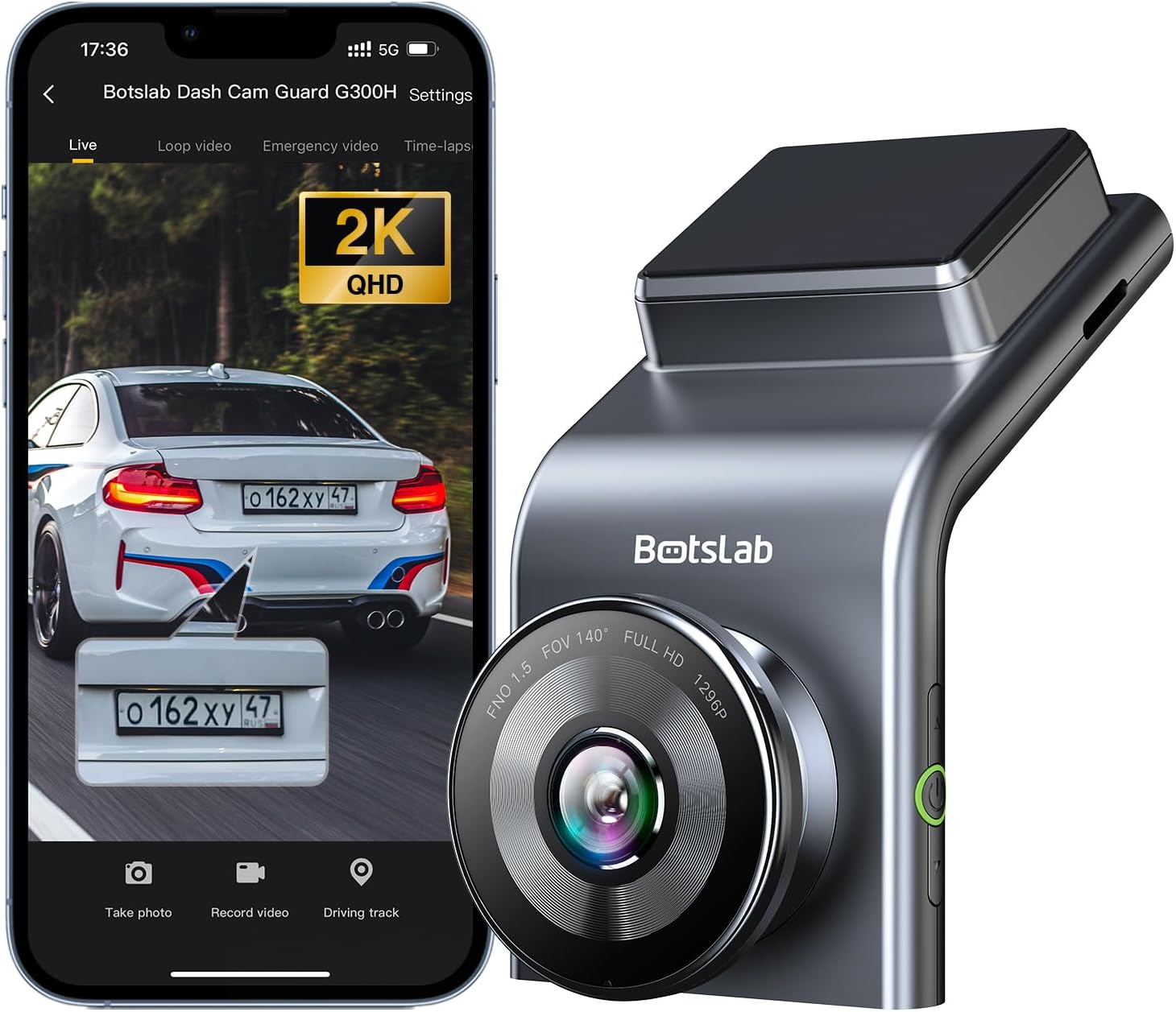
Figure 1: BOTSLAB 2.5K Front Dash Cam Overview
2. பெட்டியில் என்ன இருக்கிறது
அனைத்து பொருட்களும் இருப்பதை உறுதிசெய்ய, தொகுப்பு உள்ளடக்கங்களைச் சரிபார்க்கவும்:
- Front Camera (x1)
- கார் சார்ஜர் (x1)
- USB Power Cord (x1)
- Installation Pry Bar (x1)
- பயனர் கையேடு (x1)
- Electrostatic Film (x1)

படம் 2: தொகுப்பு உள்ளடக்கம்
3. அமைவு மற்றும் நிறுவல்
The BOTSLAB Dash Cam is designed for easy installation with invisible wiring, ensuring a clean and integrated look in your vehicle. Follow these steps for proper setup:
- மவுண்டிங் இடத்தை தேர்வு செய்யவும்: உங்கள் விண்ட்ஷீல்டில் உங்கள் வாகனத்திற்கு இடையூறாக இல்லாத இடத்தைத் தேர்ந்தெடுக்கவும். view சாலையின். பொதுவாக, இது பின்புறம் பின்னால் இருக்கும்view கண்ணாடி.
- சுத்தமான கண்ணாடி: Ensure the chosen area on the windshield is clean and dry.
- எலக்ட்ரோஸ்டேடிக் ஃபிலிமைப் பயன்படுத்துங்கள்: Peel off the protective layer from the electrostatic film and apply it to the cleaned area on your windshield. Smooth out any air bubbles. This film allows for easy removal of the dash cam mount without leaving residue.
- டேஷ் கேம் மவுண்ட்டை இணைக்கவும்: Secure the dash cam mount to the electrostatic film. Ensure it is firmly attached.
- மவுண்ட் டேஷ் கேம்: Slide the dash cam onto its mount until it clicks into place.
- பவர் இணைக்கவும்: Connect the USB power cord to the dash cam and route the cable along the edge of the windshield and dashboard to the car charger. Use the installation pry bar to tuck the cable neatly into the gaps for an invisible wiring setup.
- Plug into Car Charger: Insert the car charger into your vehicle's cigarette lighter socket.
- கோணத்தை சரிசெய்யவும்: Power on the dash cam and adjust its angle to ensure the camera captures the road ahead clearly, covering the desired field of view (170° ultra-wide angle).

Figure 3: Easy Installation and Cable Management
4. இயக்க வழிமுறைகள்
4.1. Power On/Off and Basic Recording
The dash cam will automatically power on and begin recording when your vehicle starts. It will power off automatically when the vehicle is turned off. Ensure a microSD card (not included, supports up to 256GB) is inserted for recording.

Figure 4: MicroSD Card Slot for Storage
4.2. 2.5K HD Video Quality and Night Vision
Experience 2.5K superior HD video quality with a 170° ultra-wide view angle that fully covers all lanes without blind spots. Coupled with clear Night Vision, you'll have full-color, high-quality videos in any lighting condition.

படம் 5: 2.5K தெளிவுத்திறனுடன் மேம்படுத்தப்பட்ட தெளிவு
4.3. 24/7 Parking Mode
When used with the G300H dedicated hard-wired kit (ASIN: B0D3QK86TQ, sold separately), the G300H front dash cam can achieve 24/7 uninterrupted recording. Video is recorded any time there is a collision or accident. Benefit from Time-lapse Recording for uninterrupted 24-hour parking monitoring, utilizing minimal memory space. The Loop Recording feature ensures continuous recording, preserving vital clips while overwriting older videos.

Figure 6: 24/7 Parking Monitoring
4.4. Enhanced Awareness and Safety Features
Stay in sync with traffic through the Front Vehicle Start Reminder and enhance safety with Pedestrian Collision Alert. These features keep you alert to movement around you, automatically triggering notifications for a seamless and vigilant driving experience.
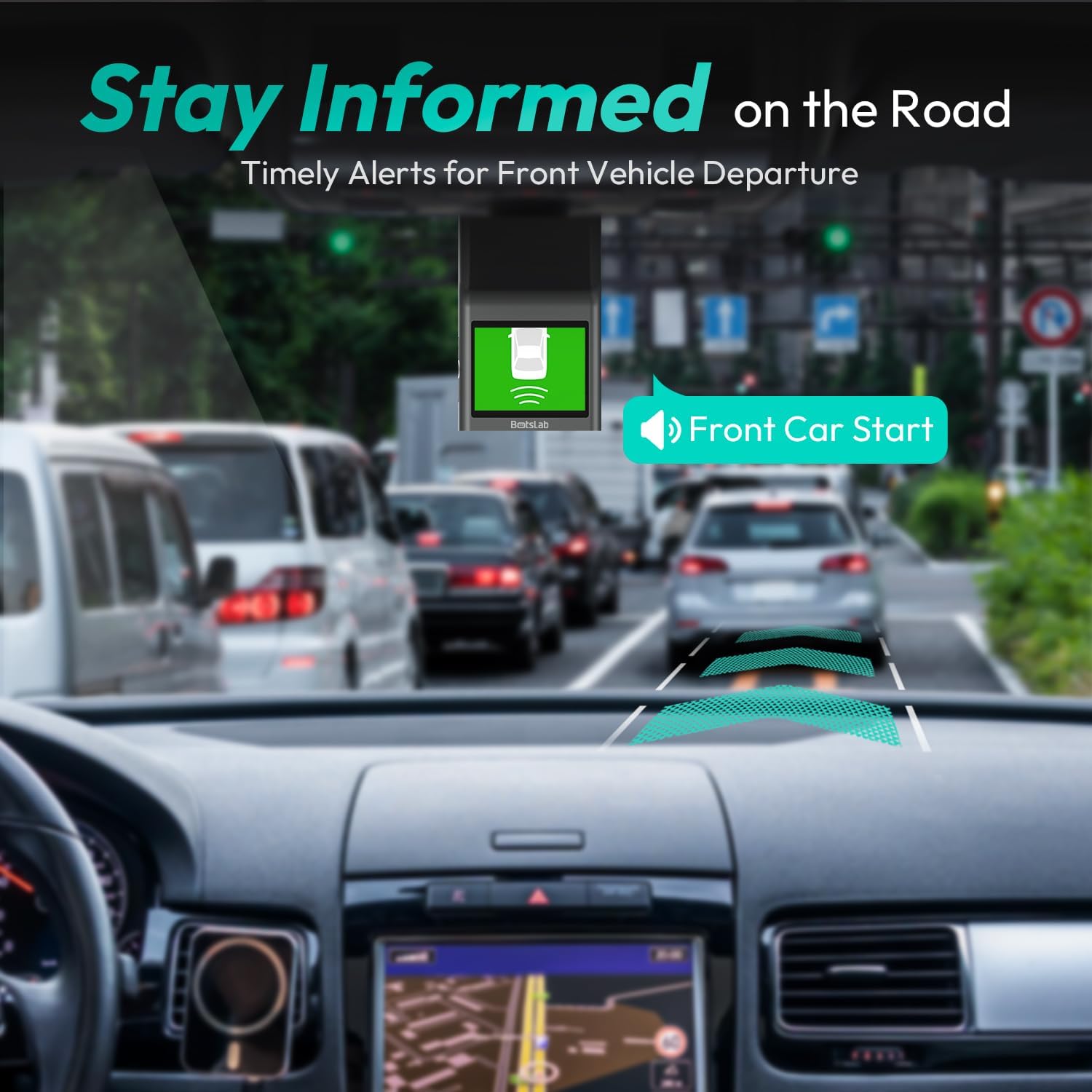
Figure 7: Front Vehicle Start Reminder

Figure 8: Pedestrian Collision Alert
4.5. GPS Integration
Built-in GPS functionality records every detail of your journey, from speed to location. View your personalized routes on Google Maps, right from your phone. It's not just about convenience; it's about keeping your travel data private and secure.

Figure 9: Precise Location Tracking with GPS
4.6. G-Sensor and Emergency Video Protection
In the event of a collision or sudden movement, the G-Sensor automatically locks videos, preventing overwriting. This feature provides the detailed evidence you need for insurance claims or traffic disputes.

Figure 10: Emergency Video Protection
5. பராமரிப்பு
To ensure the longevity and optimal performance of your BOTSLAB Dash Cam, follow these maintenance guidelines:
- லென்ஸை சுத்தம் செய்யுங்கள்: Regularly wipe the camera lens with a soft, lint-free cloth to ensure clear recordings. Avoid using abrasive cleaners.
- Check MicroSD Card: Periodically check the microSD card for errors or corruption. Format the card monthly to maintain optimal performance and prevent data loss. Back up any important footage வடிவமைப்பதற்கு முன்.
- நிலைபொருள் புதுப்பிப்புகள்: Check the BOTSLAB app or website for available firmware updates. Keeping your dash cam's firmware up-to-date ensures you have the latest features and bug fixes.
- வெப்பநிலை கட்டுப்பாடு: Avoid exposing the dash cam to extreme temperatures for prolonged periods. If parked in direct sunlight, consider removing the dash cam or using a sunshade.
- பாதுகாப்பான மவுண்டிங்: Ensure the dash cam remains securely mounted to prevent vibrations that could affect video quality or cause the device to fall.
6. சரிசெய்தல்
உங்கள் டேஷ் கேமராவில் சிக்கல்கள் ஏற்பட்டால், பின்வரும் பொதுவான சிக்கல்கள் மற்றும் தீர்வுகளைப் பார்க்கவும்:
| பிரச்சனை | சாத்தியமான காரணம் | தீர்வு |
|---|---|---|
| டேஷ் கேமரா இயங்கவில்லை. | No power supply; faulty car charger/cable. | Check car charger connection and vehicle's power outlet. Try a different USB cable or car charger. |
| பதிவு நிறுத்தங்கள் அல்லது footage சிதைந்துள்ளது. | MicroSD card full, corrupted, or incompatible. | Format the microSD card regularly. Use a high-quality Class 10 or U3 microSD card. Replace the card if issues persist. |
| வைஃபை இணைப்புச் சிக்கல்கள். | Interference; incorrect app settings. | Ensure you are within range. Restart the dash cam and your smartphone. Reinstall the BOTSLAB app. |
| ஜிபிஎஸ் இருப்பிடத்தைக் கண்காணிக்கவில்லை. | Poor satellite signal; dash cam not receiving GPS data. | டேஷ் கேமராவில் தெளிவான view of the sky. Move away from tall buildings or tunnels. |
| வீடியோ தரம் மோசமாக உள்ளது. | Dirty lens; protective film still on lens; low light conditions. | Clean the camera lens. Remove any protective film. Ensure proper lighting for optimal recording. |
மேலும் உதவிக்கு, ஆதரவு பிரிவைப் பார்க்கவும் அல்லது வாடிக்கையாளர் சேவையைத் தொடர்பு கொள்ளவும்.
7. விவரக்குறிப்புகள்
| அம்சம் | விவரம் |
|---|---|
| தயாரிப்பு பரிமாணங்கள் | 0.59 x 0.98 x 2.17 அங்குலம் |
| பொருளின் எடை | 14.9 அவுன்ஸ் |
| மாதிரி எண் | ஜி 300 எச் |
| இணைப்பு தொழில்நுட்பம் | 2.4GHz வைஃபை |
| சிறப்பு அம்சங்கள் | Pedestrian Collision Alert, Built-In GPS, 24/7 Parking Monitoring |
| வீடியோ பிடிப்பு தீர்மானம் | 2.5K |
| நிறம் | வெளிர் நீலம் |
| உற்பத்தியாளர் | 360 Smart Network |
| முதல் தேதி கிடைக்கும் | நவம்பர் 23, 2023 |
| நோக்குநிலை | முன் |
| வாகன சேவை வகை | Bus, Car, Truck |
| மவுண்டிங் வகை | விண்ட்ஷீல்ட் மவுண்ட் |
8. உத்தரவாதம் மற்றும் ஆதரவு
BOTSLAB is committed to providing high-quality AI-Vision security products and excellent customer service. Your dash cam comes with comprehensive support to ensure your satisfaction.
8.1. உத்தரவாதத் தகவல்
The BOTSLAB Dash Cam G300H includes a 365 நாள் தர உத்தரவாதம். For detailed terms and conditions, please refer to the official warranty documentation or contact customer support.
8.2. தொழில்நுட்ப ஆதரவு
நாங்கள் வழங்குகிறோம் வாழ்நாள் தொழில்நுட்ப உதவி for your product. If you encounter any issues or have questions, please utilize the following support channels:
- நேரலை அரட்டை: Download the Botslab APP, register and sign in, then navigate to 'Me' > 'Support' > 'Live Chat' for 24-hour assistance.
- அதிகாரி Webதளம்: வருகை குளோபல்.போட்ஸ்லாப்.காம் தயாரிப்பு தகவல், அடிக்கடி கேட்கப்படும் கேள்விகள் மற்றும் ஆதரவு ஆதாரங்களுக்கு.
- மின்னஞ்சல் ஆதரவு: Send your inquiries to Service@botslab.com. We aim for 48 மணிநேர வேகமான ஆதரவு.
- பயனர் சமூகம்: Join the Botslab Users Group for peer support and discussions.


Figure 11: BOTSLAB Support and Care Information
For a complete digital version of this manual, you can access the பயனர் கையேடு (PDF).