
1. அறிமுகம்
This manual provides essential information for the installation, operation, and maintenance of your SYLVOX 43-inch Outdoor Signage TV (Model SS43A0KAGD). Please read this manual thoroughly before using the product to ensure proper function and safety. This television is designed for commercial outdoor use, offering high brightness and robust weather protection.
2. பாதுகாப்பு தகவல்
தயாரிப்புக்கு சேதம் ஏற்படாமல் தடுக்கவும், பயனர் பாதுகாப்பை உறுதி செய்யவும் பின்வரும் பாதுகாப்பு முன்னெச்சரிக்கை நடவடிக்கைகளைக் கவனியுங்கள்:
- மின்சாரம்: சக்தி மூலமானது தொகுதியுடன் பொருந்துகிறது என்பதை உறுதிப்படுத்தவும்tagதயாரிப்பு லேபிளில் குறிப்பிடப்பட்டுள்ள மின் தேவைகள்.
- நீர் மற்றும் ஈரப்பதம்: While the TV is IP55 waterproof, avoid direct high-pressure water jets. Ensure all port covers are securely closed when not in use.
- காற்றோட்டம்: Do not block ventilation openings. Adequate airflow is necessary to prevent overheating.
- மவுண்டிங்: Use appropriate mounting hardware and follow VESA standards (400 x 200 mm) for secure installation. Professional installation is recommended for outdoor environments.
- சுத்தம்: சுத்தம் செய்வதற்கு முன் மின்சாரத்தை துண்டிக்கவும். மென்மையான, டி-க்ளாஸ்ட்டைப் பயன்படுத்தவும்.amp துணி. கடுமையான இரசாயனங்கள் தவிர்க்கவும்.
- வெப்பநிலை: Operate the TV within the specified temperature range (-4°F to 113°F).
3. தொகுப்பு உள்ளடக்கங்கள்
தொகுப்பில் அனைத்து பொருட்களும் உள்ளதா என சரிபார்க்கவும்:
- SYLVOX 43-inch Outdoor Signage TV
- ரிமோட் கண்ட்ரோல் (2 AAA பேட்டரிகள் சேர்க்கப்பட்டுள்ளன)
- பவர் கார்ட்
- பயனர் கையேடு
- உத்தரவாத அட்டை
- Screws for mounting (BM8X14MM for full motion cantilever mount, BM8X28MM & Gasket for fixed wall mount)

Figure 3.1: Included accessories with the SYLVOX 43-inch Outdoor Signage TV.
4. தயாரிப்பு முடிந்துவிட்டதுview
4.1 முக்கிய அம்சங்கள்
- காட்சி: 43-inch 4K UHD (3840x2160) LED display with 1000 nits brightness and 1.07 Billion Colors.
- ஆயுள்: IP55 waterproof rating, corrosion-resistant and scratch-resistant metal casing. Designed for 7x24 hour operation with temperature protection.
- இயக்க முறைமை: Linux-based system with pre-installed applications (Netflix, Pandora, Facebook, YouTube, Twitter). Note: Signage 1.0 series does not support downloading additional apps.
- இணைப்பு: Built-in ATSC & NTSC tuners, Bluetooth, 2.4G WiFi.
- ஆடியோ: Built-in speakers.

Figure 4.1: SYLVOX 43-inch Outdoor Signage TV in a commercial setting, showcasing its bright 4K display.

Figure 4.2: The TV's IP55 waterproof and wide temperature range capabilities.

Figure 4.3: Visual representation of 4K UHD picture quality and color depth.

படம் 4.4: மேல்view of the Linux system and integrated features.
4.2 போர்ட்கள் மற்றும் இணைப்புகள்
The TV offers a variety of input and output ports for versatile connectivity:
- RS232
- USB Input x 2 (USB 1.0, USB 2.0, USB 3.0 compatible)
- RJ45 (ஈதர்நெட்)
- HDMIx3
- ஆப்டிகல் அவுட்
- Audio L/R In
- YPbPr In
- Antenna In (ATSC/NTSC Tuner)
- இயர்போன் அவுட்
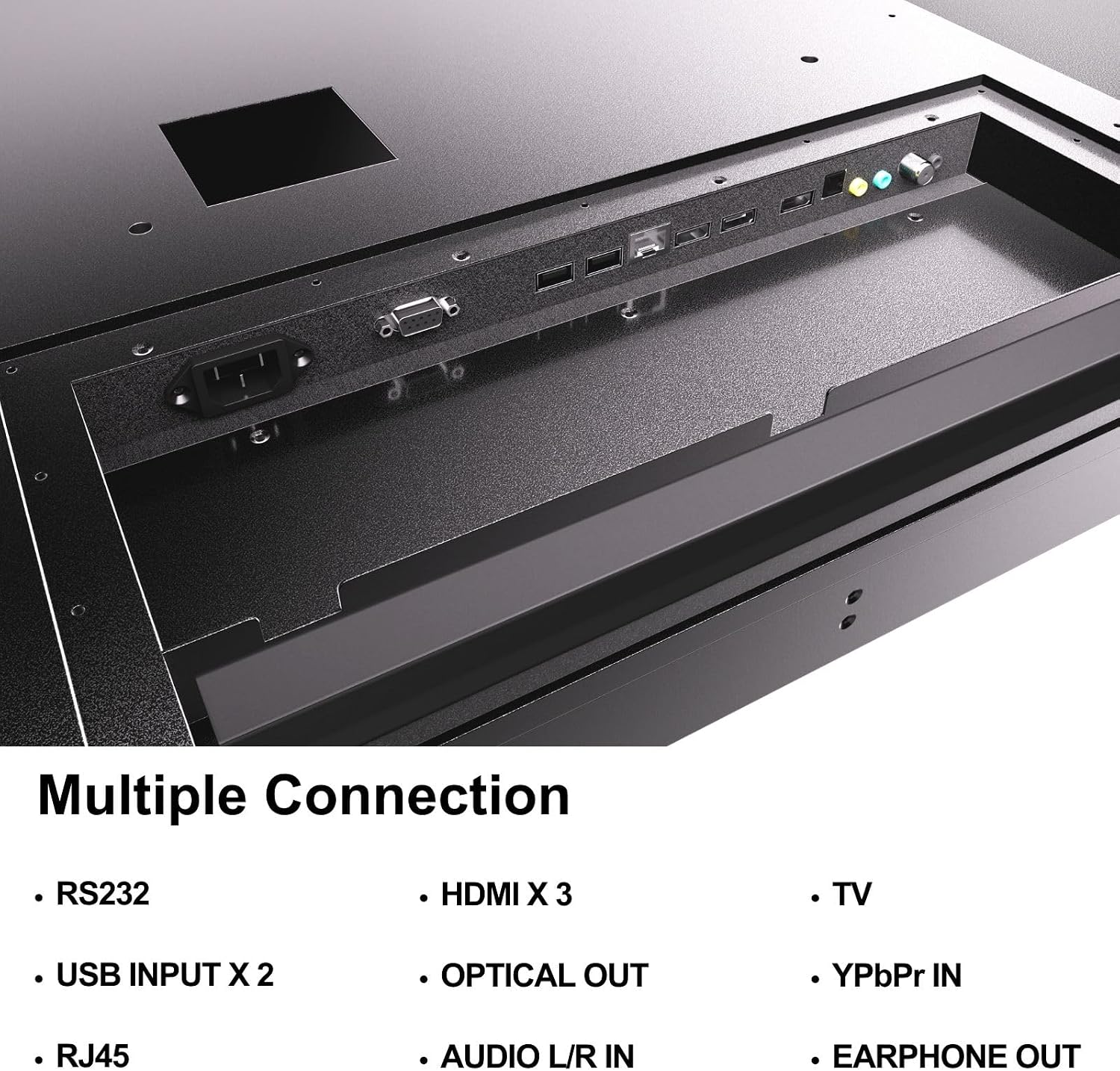
Figure 4.5: Rear panel connections of the SYLVOX Outdoor Signage TV.
5 அமைவு
5.1 டிவியை பொருத்துதல்
The SYLVOX Outdoor Signage TV supports wall mounting. Ensure the mounting surface is sturdy enough to support the TV's weight and is suitable for outdoor conditions.
- ஒரு இடத்தை தேர்வு செய்யவும்: உகந்த இடத்தைத் தேர்ந்தெடுக்கவும் viewing and protection from extreme weather, even with the TV's waterproof rating.
- சுவர் ஏற்றத்தை நிறுவவும்: Attach a VESA-compatible wall mount (400 x 200 mm) to the desired location according to the mount manufacturer's instructions. Use the provided screws (BM8X14MM for full motion, BM8X28MM with gasket for fixed mount).
- Attach TV to Mount: Carefully lift the TV and secure it to the installed wall mount. Ensure all connections are tight and secure.
5.2 ஆரம்ப பவர் ஆன்
- பவர் இணைக்கவும்: Plug the power cord into the TV's power input and then into a grounded outdoor-rated power outlet.
- பேட்டரிகளைச் செருகவும்: Open the remote control battery compartment and insert the two AAA batteries, observing polarity.
- பவர் ஆன்: ரிமோட் கண்ட்ரோல் அல்லது டிவியில் உள்ள பவர் பட்டனை அழுத்தவும்.
- ஆரம்ப அமைவு வழிகாட்டி: Follow the on-screen instructions to select language, time zone, and perform initial channel scanning.
5.3 பிணைய இணைப்பு
To access smart TV features and streaming applications, connect the TV to your network.
- வைஃபை இணைப்பு: Navigate to the TV's settings menu, select 'Network', then 'Wi-Fi'. Choose your network from the list and enter the password.
- ஈதர்நெட் இணைப்பு: Connect an Ethernet cable from your router to the RJ45 port on the TV. The TV will automatically detect the wired connection.
- புளூடூத்: For connecting audio devices, go to the Bluetooth settings, enable Bluetooth, and pair with your desired device.
6. இயக்க வழிமுறைகள்
6.1 அடிப்படை டிவி செயல்பாடுகள்
- சக்தி: அழுத்தவும் சக்தி button on the remote to turn the TV on or off.
- உள்ளீடு மூலம்: அழுத்தவும் உள்ளீடு button to cycle through available input sources (HDMI 1/2/3, TV, YPbPr, USB).
- தொகுதி: பயன்படுத்தவும் தொகுதி +/- ஒலி அளவை சரிசெய்ய பொத்தான்கள்.
- சேனல்: பயன்படுத்தவும் சேனல் +/- buttons to change channels when using the built-in tuner.
- வழிசெலுத்தல்: Use the directional arrows and OK மெனுக்களுக்குச் செல்ல பொத்தானை அழுத்தவும்.
6.2 ஸ்மார்ட் டிவி அம்சங்கள்
The TV runs on a Linux operating system and comes with several pre-installed applications:
- Access the home screen to view and launch applications like Netflix, Pandora, Facebook, YouTube, and Twitter.
- Use the remote control's dedicated app buttons (if available) for quick access.
- Note that the Signage 1.0 series does not support downloading additional applications.
6.3 Screencasting (Android Only)
The TV supports screencasting from Android mobile phones:
- Ensure your Android device and the TV are connected to the same Wi-Fi network.
- On your Android phone, enable the screen mirroring or screencasting feature (names may vary by device, e.g., 'Smart View', 'Cast', 'Wireless Display').
- Select your SYLVOX TV from the list of available devices.
6.4 Vertical/Horizontal Display
The TV can be installed and operated in both horizontal (landscape) and vertical (portrait) orientations. When using the screen vertically, the display direction is adjusted by the input device or content source.
7. பராமரிப்பு
Proper maintenance ensures the longevity and performance of your outdoor TV:
- திரையை சுத்தம் செய்தல்: மென்மையான, பஞ்சு இல்லாத துணியால் திரையை மெதுவாகத் துடைக்கவும். பிடிவாதமான அடையாளங்களுக்கு, சிறிது dampen the cloth with water. Do not spray cleaners directly onto the screen.
- C-ஐ சுத்தம் செய்தல்asing: ஒரு மென்மையான, டி பயன்படுத்தவும்amp cloth to clean the metal casing. சிராய்ப்பு கிளீனர்கள் அல்லது கரைப்பான்களைத் தவிர்க்கவும்.
- துறைமுக உறைகள்: Regularly check that all unused port covers are securely sealed to maintain the IP55 waterproof rating.
- சுற்றுச்சூழல் சோதனைகள்: Periodically inspect the TV and mounting hardware for any signs of wear, corrosion, or damage, especially after severe weather conditions.
- மென்பொருள் புதுப்பிப்புகள்: Check for available software updates through the TV's settings menu to ensure optimal performance and security.
8. சரிசெய்தல்
If you encounter issues with your SYLVOX Outdoor Signage TV, refer to the following common problems and solutions:
| பிரச்சனை | சாத்தியமான காரணம் | தீர்வு |
|---|---|---|
| சக்தி இல்லை | Power cord disconnected; no power from outlet; remote batteries dead. | Check power cord connection; test outlet; replace remote batteries. |
| படம் இல்லை, ஆனால் ஒலி உள்ளது. | தவறான உள்ளீட்டு மூலத்தைத் தேர்ந்தெடுத்துள்ளீர்கள்; வெளிப்புற சாதனப் பிரச்சினை. | Press 'Input' button to select correct source; check external device connections. |
| ஒலி இல்லை, ஆனால் படம் உள்ளது. | ஒலியளவு குறைக்கப்பட்டுள்ளது அல்லது மிகவும் குறைவாக உள்ளது; வெளிப்புற ஆடியோ சாதனத்தில் சிக்கல். | Unmute volume or increase level; check audio cables for external devices. |
| Wi-Fi connection unstable or disconnected | Router issue; TV too far from router; incorrect password. | Restart router; move TV closer or use a Wi-Fi extender; re-enter Wi-Fi password. |
| ரிமோட் கண்ட்ரோல் வேலை செய்யவில்லை | Batteries dead or incorrectly inserted; obstruction between remote and TV. | Replace batteries; ensure clear line of sight to TV's IR receiver. |
If the problem persists after trying these solutions, please contact SYLVOX customer support.
9. விவரக்குறிப்புகள்
| மாதிரி பெயர் | SS43A0KAGD |
| திரை அளவு | 43 அங்குலம் |
| காட்சி தொழில்நுட்பம் | LED |
| தீர்மானம் | 4K (3840x2160) |
| புதுப்பிப்பு விகிதம் | 60 ஹெர்ட்ஸ் |
| Maximum Display Brightness | 1000 நிட் |
| மாறுபாடு விகிதம் | 3000:1 |
| பதில் நேரம் | 8 மில்லி விநாடிகள் |
| நீர்ப்புகா மதிப்பீடு | IP55 |
| இயக்க முறைமை | லினக்ஸ் |
| இணைப்பு தொழில்நுட்பம் | Wireless (Bluetooth, Wi-Fi), Wired (HDMI, USB, RJ45, RS232) |
| ஆடியோ உள்ளீடு | HDMI, Optical, USB, Audio L/R In |
| சமிக்ஞை வடிவம் | ATSC, NTSC |
| Total Number of HDMI Ports | 3 |
| மொத்த USB போர்ட்கள் | 2 |
| தயாரிப்பு பரிமாணங்கள் (அளவு x அளவு x அளவு) | 3.4"டி x 38.6"அடி x 22.4"ஹெட் |
| VESA மவுண்ட் தரநிலை | 400 x 200 மிமீ |
| வாட்tage | 120 வாட்-மணிநேரம் |
| உற்பத்தியாளர் | Kontech Electronics Co., Ltd. |
| UPC | 810079224838 |
10. உத்தரவாதம் மற்றும் ஆதரவு
10.1 உத்தரவாதத் தகவல்
SYLVOX provides a 2 வருட உற்பத்தியாளரின் உத்தரவாதம் for this product. This warranty covers defects in materials and workmanship under normal use. Please retain your proof of purchase for warranty claims.
10.2 வாடிக்கையாளர் ஆதரவு
If you require assistance with installation, operation, troubleshooting, or warranty service, please contact SYLVOX customer support. We recommend checking the product upon receipt to ensure it is in good condition and functions normally.
For further support, please visit the official SYLVOX webதளத்தில் அல்லது உங்கள் உத்தரவாத அட்டையில் வழங்கப்பட்டுள்ள தொடர்புத் தகவலைப் பார்க்கவும்.