
1. அறிமுகம்
This manual provides essential instructions for the safe and efficient operation of your GROVIEW Mini Projector Bluetooth, Model Groview-B2D-US. Please read this manual thoroughly before using the projector and retain it for future reference.
தி க்ரோview-B2D-US is a compact and portable projector featuring electric focus, Bluetooth 5.1 connectivity, and a fully sealed optical engine designed for reduced noise and extended lifespan. It supports Full HD 1080P input with a native 720P resolution and offers a digital zoom function.
2. பாதுகாப்பு தகவல்
- l இருக்கும்போது ப்ரொஜெக்டர் லென்ஸை நேரடியாகப் பார்க்க வேண்டாம்amp உள்ளது.
- அதிக வெப்பமடைவதைத் தடுக்க ப்ரொஜெக்டரைச் சுற்றி சரியான காற்றோட்டத்தை உறுதி செய்யவும். காற்றோட்ட திறப்புகளைத் தடுக்க வேண்டாம்.
- ப்ரொஜெக்டருடன் வழங்கப்பட்ட பவர் அடாப்டரை மட்டும் பயன்படுத்தவும்.
- மழை, ஈரப்பதம் அல்லது அதிக வெப்பநிலைக்கு ப்ரொஜெக்டரை வெளிப்படுத்த வேண்டாம்.
- நிலையற்ற பரப்புகளில் ப்ரொஜெக்டரை வைப்பதைத் தவிர்க்கவும்.
- Do not attempt to disassemble or repair the projector yourself. Contact qualified service personnel for assistance.
- ப்ரொஜெக்டரை குழந்தைகள் மற்றும் செல்லப்பிராணிகளிடமிருந்து விலக்கி வைக்கவும்.
3. பெட்டியில் என்ன இருக்கிறது
அனைத்து பொருட்களும் பேக்கேஜிங்கில் உள்ளதா என சரிபார்க்கவும்:
- 1 x Groview Electric Focus Projector
- 1 x HDMI கேபிள்
- 1 x பவர் கார்டு
- 1 x ரிமோட் கண்ட்ரோல்
- 1 x பயனர் கையேடு (இந்த ஆவணம்)
4. தயாரிப்பு முடிந்துவிட்டதுview
4.1 ப்ரொஜெக்டர் கூறுகள்
The following image illustrates the main components of the Groview Mini Projector.

4.2 உள்ளீடு/வெளியீட்டு போர்ட்கள்
The rear panel of the projector features various ports for connecting external devices.
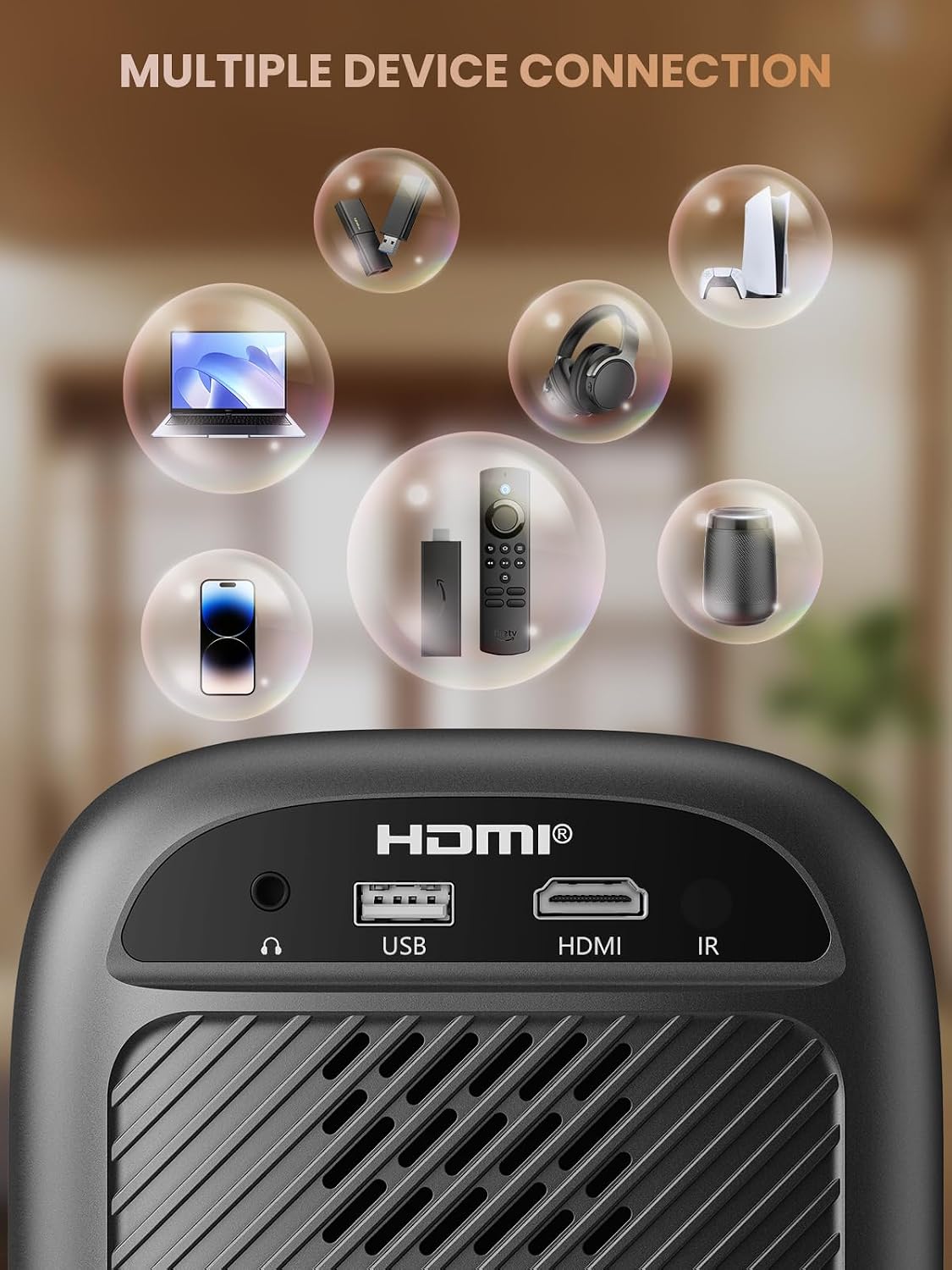
- HDMI போர்ட்: Connects to devices such as TV sticks, laptops, game consoles, and Blu-ray players.
- USB போர்ட்: Connects to USB flash drives for media playback.
- Audio Port (3.5mm Jack): வெளிப்புற ஸ்பீக்கர்கள் அல்லது ஹெட்ஃபோன்களுடன் இணைக்கிறது.
- ஐஆர் ரிசீவர்: ரிமோட் கண்ட்ரோல் சிக்னல்களுக்கு.
5 அமைவு
5.1 மின் இணைப்பு
- ப்ரொஜெக்டரின் பவர் உள்ளீட்டுடன் பவர் கார்டை இணைக்கவும்.
- பவர் கார்டின் மறுமுனையை ஒரு பவர் அவுட்லெட்டில் செருகவும்.
5.2 ப்ரொஜெக்டர் இடம்
Place the projector on a stable, flat surface. For optimal image quality, position the projector perpendicular to the projection surface (wall or screen). The projector can create a large image from a relatively short distance.
5.3 கவனம் சரிசெய்தல்
தி க்ரோview-B2D-US features electric focus, allowing for precise image clarity adjustment using the remote control.

- ப்ரொஜெக்டரை இயக்கவும்.
- Point the remote control at the projector.
- Press the dedicated focus buttons (usually marked with 'F+' and 'F-' or similar icons) on the remote until the projected image is sharp and clear.
5.4 கீஸ்டோன் திருத்தம்
The projector includes a keystone adjustment slider on the rear panel. This allows you to correct trapezoidal distortion if the projector is not perfectly aligned with the screen. Adjust the slider until the image appears rectangular.
5.5 ஆரம்ப பவர் ஆன்
Press the power button on the projector or the remote control to turn on the device. The projector will boot up and display the main interface.
6. இயக்க வழிமுறைகள்
6.1 இணைக்கும் சாதனங்கள்
ப்ரொஜெக்டர் பல இணைப்பு விருப்பங்களை வழங்குகிறது:
- , HDMI: Connect an HDMI cable from your source device (e.g., TV Stick, laptop, game console) to the projector's HDMI port. Select the HDMI input source from the projector's menu.
- USB: Insert a USB flash drive into the USB port. The projector's media player will typically detect the drive automatically, allowing you to browse and play supported media files.
- புளூடூத் 5.1: Connect to external Bluetooth speakers or headphones for enhanced audio.

- Enable Bluetooth on your external audio device and set it to pairing mode.
- ப்ரொஜெக்டரில், புளூடூத் அமைப்புகள் மெனுவிற்குச் செல்லவும்.
- இணைக்க கிடைக்கக்கூடிய சாதனங்களின் பட்டியலிலிருந்து உங்கள் சாதனத்தைத் தேர்ந்தெடுக்கவும்.
Note: Bluetooth does not support smartphone mirroring.
6.2 Smartphone Connection Methods
To connect a smartphone, an adapter is required:

- iOS சாதனங்கள்: Use a Lightning to HDMI adapter cable.
- Android சாதனங்கள்: Use a Micro USB/Type C to HDMI adapter cable or a Google Chromecast.
6.3 வழிசெலுத்தல் மற்றும் மெனு
Use the arrow buttons on the remote control to navigate through the projector's on-screen menu. The 'OK' or 'Enter' button confirms selections, and the 'Back' or 'Return' button goes back to the previous menu.
6.4 Digital Zoom Function
The projector features a digital zoom function, allowing you to adjust the image size from 75% to 100% without moving the projector.

Access the zoom settings through the projector's menu and use the remote control to adjust the desired size.
6.5 ரிமோட் கண்ட்ரோல் பயன்பாடு
The included remote control operates the projector's functions. Ensure batteries are correctly installed. Note: A coin may be needed to open the battery compartment.
7. பராமரிப்பு
7.1 சுத்தம் செய்தல்
- லென்ஸ்: ஒளியியல் மேற்பரப்புகளுக்காக பிரத்யேகமாக வடிவமைக்கப்பட்ட மென்மையான, பஞ்சு இல்லாத துணியால் லென்ஸை மெதுவாகத் துடைக்கவும். சிராய்ப்பு கிளீனர்களைப் பயன்படுத்த வேண்டாம்.
- வெளிப்புறம்: ப்ரொஜெக்டரின் வெளிப்புறத்தை மென்மையான, உலர்ந்த துணியால் துடைக்கவும். பிடிவாதமான அடையாளங்களுக்கு, சிறிது damp துணியைப் பயன்படுத்தலாம், அதைத் தொடர்ந்து உலர்ந்த ஒன்றைப் பயன்படுத்தலாம்.
7.2 Dust-proof Design
தி க்ரோview-B2D-US features a fully sealed optical engine, which helps prevent dust and debris from entering the projector and affecting image quality or lifespan.

7.3 சேமிப்பு
When not in use, store the projector in a cool, dry place, away from direct sunlight and extreme temperatures. Use the lens cap to protect the lens from dust and scratches.
8. சரிசெய்தல்
- உருவம் இல்லை: Check power connection, input source selection, and ensure the lens cap is removed. Verify the connected device is powered on and outputting a signal.
- மங்கலான படம்: Adjust the electric focus using the remote control. Ensure the projector is placed at an appropriate distance from the screen.
- ஒலி இல்லை: Check the volume settings on both the projector and the connected source device. If using Bluetooth, ensure the external audio device is properly paired and its volume is up.
- ரிமோட் கண்ட்ரோல் வேலை செய்யவில்லை: Check the batteries in the remote control and ensure there are no obstructions between the remote and the projector's IR receiver.
- அதிக வெப்பம் எச்சரிக்கை: Ensure ventilation openings are not blocked. Turn off the projector and allow it to cool down before restarting.
For further assistance, please contact Groview வாடிக்கையாளர் ஆதரவு.
9. விவரக்குறிப்புகள்
| அம்சம் | விவரக்குறிப்பு |
|---|---|
| பிராண்ட் | Groview |
| மாதிரி எண் | Groview-B2D-US |
| நேட்டிவ் ரெசல்யூஷன் | 1280 x 720 பிக்சல்கள் |
| ஆதரிக்கப்படும் தீர்மானம் | 1080 பி முழு எச்டி |
| இணைப்பு தொழில்நுட்பம் | 3.5mm Jack, Bluetooth 5.1, HDMI, USB |
| சிறப்பு அம்சங்கள் | Electric Focus, Fully Sealed Optical Engine, Mini size & Lightweight, 150" Display, Digital Zoom (75%-100%) |
| பரிந்துரைக்கப்பட்ட பயன்பாடுகள் | உட்புறம்/வெளிப்புறம் |
| பொருளின் எடை | 2.99 பவுண்டுகள் |
| தயாரிப்பு பரிமாணங்கள் | 4.8 x 5.7 x 6.9 அங்குலம் |
| நிறம் | சாம்பல் |
10. உத்தரவாதம் மற்றும் ஆதரவு
Groview products are designed for reliability and performance. For information regarding warranty coverage and customer support, please refer to the warranty card included with your purchase or visit the official Groview website. Our service team is available to assist with any product-related inquiries.