
1. அறிமுகம்
This manual provides detailed instructions for the installation, operation, and maintenance of your NOPAARD 52-YJ682 Smart Ceiling Fan with Light. Please read this manual thoroughly before installation and use to ensure safe and efficient operation. Keep this manual for future reference.
2. பாதுகாப்பு தகவல்
WARNING: To reduce the risk of fire, electric shock, or personal injury, always follow these safety precautions:
- நிறுவுதல் அல்லது சேவை செய்வதற்கு முன் சர்க்யூட் பிரேக்கரில் மின்சாரம் நிறுத்தப்பட்டுள்ளதா என்பதை உறுதிப்படுத்திக் கொள்ளுங்கள்.
- அனைத்து வயரிங்களும் தேசிய மற்றும் உள்ளூர் மின் குறியீடுகளுக்கு இணங்க வேண்டும்.
- நிறுவல் ஒரு தகுதி வாய்ந்த எலக்ட்ரீஷியனால் செய்யப்பட வேண்டும்.
- Mount the fan directly to a structural ceiling joist or an outlet box marked "Acceptable for Fan Support of 35 lbs (15.9 kg) or less".
- Do not bend blade holders during installation, balancing, or cleaning.
- Keep foreign objects clear of rotating fan blades.
- இந்த ரசிகர் டிamp-rated for covered outdoor patios, but should not be exposed to direct water.
3. தொகுப்பு உள்ளடக்கங்கள்
நிறுவலைத் தொடங்குவதற்கு முன் அனைத்து கூறுகளும் உள்ளனவா என்பதைச் சரிபார்க்கவும்.
- சீலிங் ஃபேன் மோட்டார் அசெம்பிளி
- மின்விசிறி கத்திகள் (3)
- டவுன்ரோட்ஸ் (6-இன்ச் மற்றும் 10-இன்ச்)
- பெருகிவரும் அடைப்புக்குறி
- விதானம்
- ரிமோட் கண்ட்ரோல்
- எல்.ஈ.டி லைட் கிட்
- வன்பொருள் தொகுப்பு (திருகுகள், கம்பி கொட்டைகள், முதலியன)
- பயனர் கையேடு
4. அமைவு மற்றும் நிறுவல்
4.1 மவுண்டிங் இடத்தை தேர்வு செய்தல்
Select a location where the fan blades will have at least 7 feet (2.1 meters) of clearance from the floor and 30 inches (76 cm) from any walls or obstructions.
4.2 மவுண்டிங் விருப்பங்கள்
This fan supports two mounting options: standard downrod mount and sloped ceiling mount (up to 20 degrees).
பட விளக்கம்: A diagram illustrating the NOPAARD 52-inch ceiling fan's dimensions, including its 52-inch width and adjustable height with 6-inch and 10-inch downrods. It also shows icons for flat ceiling mounting and sloped ceiling mounting (up to 20 degrees), along with recommended room sizes (130-300 sq. ft.) and damp rating for covered locations.
4.3 சட்டசபை படிகள்
- பவரை அணைக்கவும்: Before starting, ensure the power supply is disconnected at the main circuit breaker.
- மவுண்டிங் பிராக்கெட்டை நிறுவவும்: Secure the mounting bracket to the ceiling outlet box. Ensure the box is rated for fan support.
- டவுன்ரோடை அசெம்பிள் செய்யவும்: Choose the appropriate downrod (6-inch or 10-inch) for your ceiling height. Feed the motor wires through the downrod.
- மின்விசிறி உடலை இணைக்கவும்: Carefully lift the fan motor assembly and hang it from the mounting bracket.
- கம்பி இணைப்புகள்: Connect the fan wires to the household electrical wires according to the wiring diagram provided in the separate wiring guide (not included in this manual, refer to product packaging for full wiring instructions). Ensure all connections are secure with wire nuts.
- பாதுகாப்பான விதானம்: விதானத்தை உச்சவரம்பு வரை சறுக்கி, திருகுகள் மூலம் மவுண்டிங் பிராக்கெட்டில் பாதுகாக்கவும்.
- கத்திகளை இணைக்கவும்: Securely attach the three fan blades to the motor housing.
- லைட் கிட்டை நிறுவவும்: Connect the LED light kit wires and attach the light kit to the bottom of the fan motor housing.
5. இயக்க வழிமுறைகள்
5.1 கட்டுப்பாட்டு முறைகள்
Your NOPAARD Smart Ceiling Fan can be controlled via the included remote, the Tuya Smart App, or voice commands through Alexa and Google Assistant.

பட விளக்கம்: An illustration detailing the four control methods for the NOPAARD ceiling fan: a remote control, a smartphone displaying the Tuya app, a microphone icon for voice control (Alexa and Google Assistant), and a wall switch. A note indicates that wall control can only turn the fan and lights on/off together and cannot adjust settings separately.
5.2 ரிமோட் கண்ட்ரோல் ஆபரேஷன்
The remote control allows for basic fan and light functions.
- மின்விசிறி ஆன்/ஆஃப்: மின்விசிறியை இயக்க அல்லது அணைக்க மின்விசிறி பொத்தானை அழுத்தவும்.
- மின்விசிறி வேகம்: Use the speed buttons (1-6) to adjust fan speed.
- விளக்கு ஆன்/ஆஃப்: ஒளியை ஆன் அல்லது ஆஃப் செய்ய லைட் பட்டனை அழுத்தவும்.
- ஒளி மங்கலாக்குதல்: Hold the light button to dim or brighten the light.
- வண்ண வெப்பநிலை: Press the color temperature button to cycle through 3000K (warm yellow), 4000K (bright daylight), and 5000K (cool white).
- டைமர்: Set a 2-hour timer for the fan to automatically turn off.
- தலைகீழ் செயல்பாடு: Press the reverse button to change blade direction for summer (downward airflow) or winter (upward airflow).
5.3 Smart App Control (Tuya Smart)
- பயன்பாட்டைப் பதிவிறக்குக: உங்கள் சாதனத்தின் ஆப் ஸ்டோரிலிருந்து "Tuya Smart" செயலியைப் பதிவிறக்கவும்.
- பதிவு/உள்நுழைவு: ஒரு கணக்கை உருவாக்கவும் அல்லது உள்நுழையவும்.
- சாதனத்தைச் சேர்: Follow the in-app instructions to add your NOPAARD ceiling fan. Ensure your phone is connected to a 2.4GHz Wi-Fi network.
- கட்டுப்பாட்டு செயல்பாடுகள்: Use the app to control fan speed, light brightness, color temperature, timer, and reverse function.
5.4 குரல் கட்டுப்பாடு (அலெக்சா & கூகிள் உதவியாளர்)
- இணைப்பு கணக்கு: In your Alexa or Google Home app, link your Tuya Smart account.
- சாதனங்களைக் கண்டறியவும்: Allow the smart assistant to discover your NOPAARD ceiling fan.
- குரல் கட்டளைகள்: இது போன்ற கட்டளைகளைப் பயன்படுத்தவும்:
- "Alexa, turn on the fan."
- "Hey Google, set fan speed to 3."
- "Alexa, turn off the light."
- "Hey Google, dim the fan light to 50%."
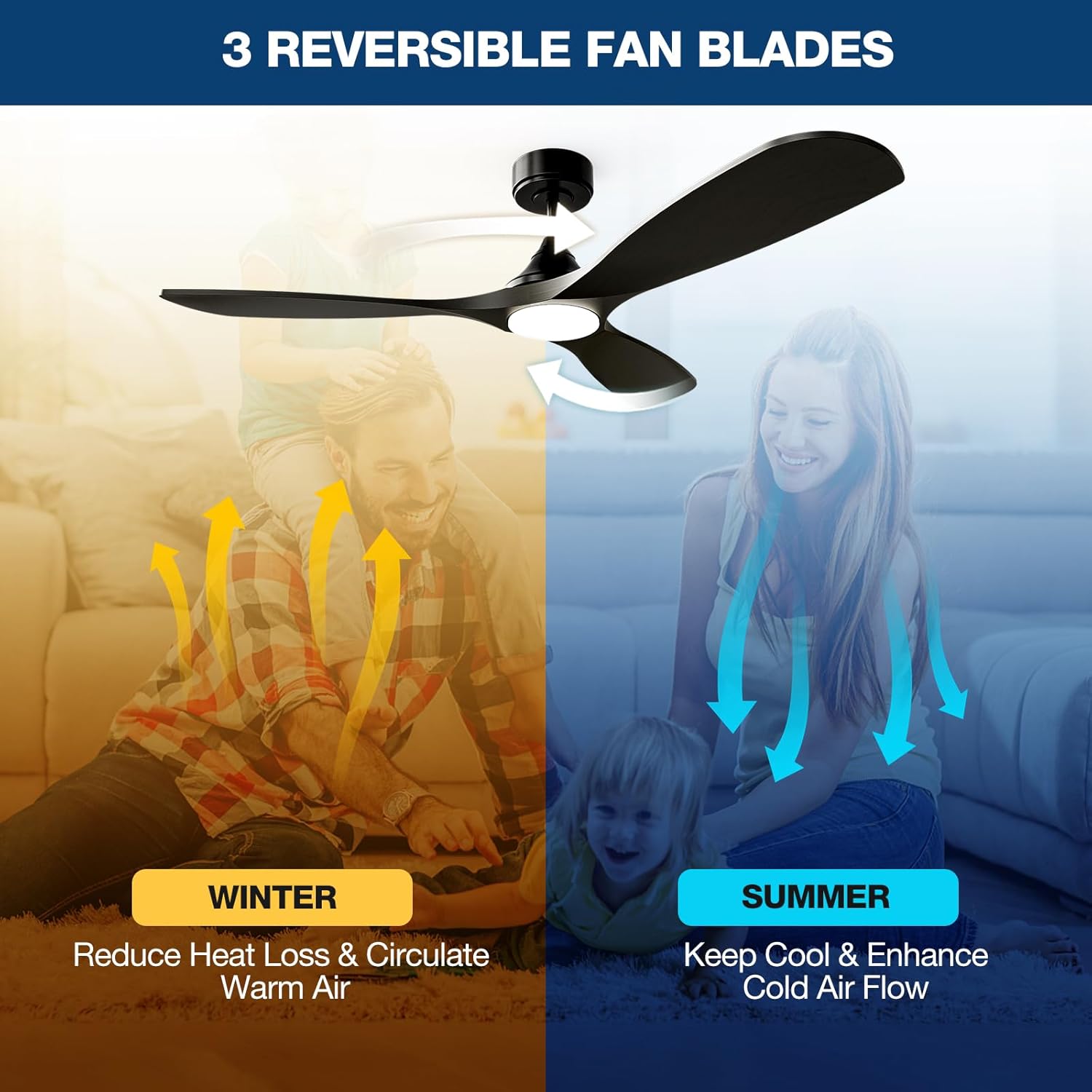
5.5 Reversible Blades Function

பட விளக்கம்: An illustration demonstrating the reversible blade function. In "SUMMER" mode, blue arrows show downward airflow for cooling. In "WINTER" mode, yellow arrows show upward airflow to circulate warm air.
The fan features a reversible DC motor to optimize air circulation for different seasons:
- கோடை முறை: கத்திகள் எதிரெதிர் திசையில் சுழன்று, காற்றை கீழ்நோக்கித் தள்ளி குளிர்ச்சியான காற்றை உருவாக்குகின்றன.
- குளிர்கால முறை: கத்திகள் கடிகார திசையில் சுழன்று, கூரைக்கு அருகில் சிக்கியுள்ள சூடான காற்றைச் சுற்றுவதற்கு காற்றை மேல்நோக்கி இழுக்கின்றன.
6. பராமரிப்பு
வழக்கமான பராமரிப்பு உகந்த செயல்திறனை உறுதிசெய்து உங்கள் சீலிங் ஃபேனின் ஆயுளை நீட்டிக்கிறது.
- சுத்தம்: ஒரு மென்மையான, டி பயன்படுத்தவும்amp விசிறி கத்திகள் மற்றும் மோட்டார் ஹவுசிங்கை சுத்தம் செய்ய துணியைப் பயன்படுத்தவும். சிராய்ப்பு கிளீனர்கள் அல்லது கரைப்பான்களைப் பயன்படுத்த வேண்டாம்.
- கத்தி இறுக்கம்: தள்ளாட்டம் மற்றும் சத்தத்தைத் தடுக்க அனைத்து பிளேடு திருகுகளையும் அவ்வப்போது சரிபார்த்து இறுக்கவும்.
- லைட் கிட்: The integrated LED light is designed for long life and is not user-replaceable.
- தூசுதல்: Dust the fan regularly to prevent buildup that can affect performance.
7. சரிசெய்தல்
| பிரச்சனை | சாத்தியமான காரணம் | தீர்வு |
|---|---|---|
| மின்விசிறி தொடங்கவில்லை |
|
|
| மின்விசிறி தள்ளாடுகிறது |
|
|
| விளக்கு வேலை செய்யாது |
|
|
| Cannot connect to App/Voice Control |
|
|
8. விவரக்குறிப்புகள்
| அம்சம் | விவரம் |
|---|---|
| மாதிரி எண் | 52-YJ682 |
| பிராண்ட் | நோபார்டு |
| அளவு | 52 அங்குலம் |
| நிறம் | கருப்பு |
| பொருள் | உலோகம், மரம் |
| மோட்டார் வகை | DC மோட்டார் |
| கட்டுப்பாட்டு முறைகள் | Remote, Tuya App, Alexa, Google Assistant |
| விசிறி வேகம் | 6 variable speeds |
| காற்று ஓட்டம் திறன் | 6872 CFM வரை |
| இரைச்சல் நிலை | Less than 35dB (speeds 1-2) |
| ஒளி வகை | ஒருங்கிணைந்த மங்கலான LED |
| ஒளி பிரகாசம் | 0-2000 லுமன்ஸ் |
| வண்ண வெப்பநிலை | 3000K (Warm Yellow), 4000K (Bright Daylight), 5000K (Cool White) |
| தொகுதிtage | 110 வோல்ட் |
| வாட்tage | 50 வாட்ஸ் |
| Downrod Sizes | 6-இன்ச், 10-இன்ச் |
| Damp மதிப்பீடு | Covered Damp Location (Indoor/Covered Outdoor) |
| சான்றிதழ்கள் | ETL பட்டியலிடப்பட்டது |
9. உத்தரவாதம் மற்றும் ஆதரவு
NOPAARD offers a 24 மாத தர உத்தரவாதம் for this product and a 10 வருட உத்தரவாதம் for the DC motor.
If you encounter any issues with installation, operation, or product quality, please contact NOPAARD customer support for assistance. Refer to your purchase documentation for contact details.