
voominhtec PSL-400W4P
Voominhtec 400W Portable Solar Panel User Manual
Model: PSL-400W4P
1. அறிமுகம்
Thank you for choosing the Voominhtec 400W Portable Solar Panel. This high-efficiency, foldable solar charger is designed to provide reliable power for your off-grid adventures, power stations, and various outdoor applications. Featuring monocrystalline ETFE technology, it offers excellent conversion rates and durability. Please read this manual thoroughly before use to ensure proper operation and maximize the lifespan of your solar panel.

Image 1.1: The Voominhtec 400W Portable Solar Panel in its unfolded, ready-to-use configuration, showcasing its four panels and integrated kickstand.
2. பாதுகாப்பு தகவல்
- Do not attempt to disassemble or modify the solar panel.
- Avoid dropping or subjecting the panel to severe impacts.
- Keep the panel away from open flames, heat sources, and corrosive materials.
- Ensure all connections are secure and correct before operation.
- Do not immerse the panel in water, despite its IP65 rating, to prevent damage to connectors.
- Handle with care, especially when folding or unfolding, to avoid pinching fingers.
3. தயாரிப்பு கூறுகள்
The Voominhtec 400W Portable Solar Panel package includes the following items:
- 1 x Voominhtec 400W Portable Solar Panel
- 1 x Multi-connector cable (MC4 to various DC adapters)
- 8 x Carabiners (for securing the panel)
Image 3.1: The complete package contents, including the folded solar panel, the multi-connector cable with various adapters, and eight carabiners for versatile mounting.

படம் 3.2: விரிவானது view of the folded solar panel, highlighting the integrated handle, accessory pocket, and the robust kickstand mechanism.
4. விவரக்குறிப்புகள்
| அளவுரு | மதிப்பு |
|---|---|
| உச்ச சக்தி (Pmax) | 400W |
| அதிகபட்ச சக்தி தொகுதிtagஇ (Vmp) | 40V |
| அதிகபட்ச மின்னோட்டம் (Imp) | 10A |
| திறந்த சுற்று தொகுதிtagஇ (Voc) | 48V |
| ஷார்ட் சர்க்யூட் கரண்ட் (Isc) | 11A |
| பொருள் | ETFE, Monocrystalline Silicon, Aluminum |
| திறன் | 24% வரை |
| நீர்ப்புகா மதிப்பீடு | IP65 |
| Folded Dimensions (L x W) | 27.3 x 30.7 அங்குலம் |
| Unfolded Dimensions (L x W) | 111 x 30.7 அங்குலம் |
| பொருளின் எடை | 27.7 பவுண்டுகள் (தோராயமாக 12.5 கிலோ) |
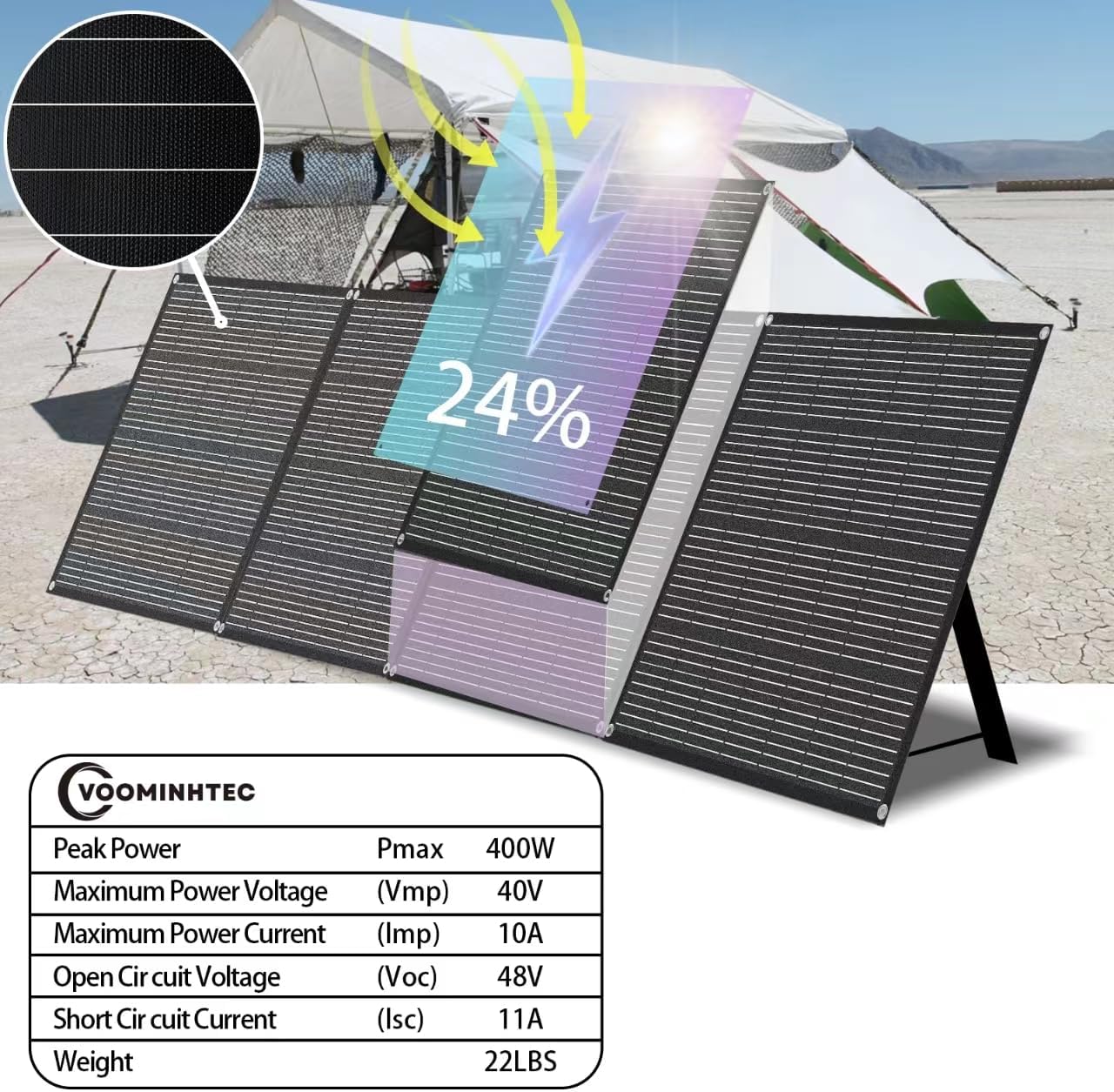
Image 4.1: A visual representation of the solar panel with key electrical specifications overlaid, including Peak Power, Voltage, and Current ratings.

Image 4.2: Diagram illustrating the precise dimensions of the solar panel when folded and fully unfolded, including the optimal kickstand angle of 70 degrees.
5 அமைவு
- பலகையை விரிக்கவும்: Carefully unfold the solar panel completely on a flat, stable surface.
- கிக்ஸ்டாண்டை நிலைநிறுத்தவும்: Extend the integrated kickstand at the back of the panel. Adjust it to achieve an optimal angle (approximately 70 degrees from the ground) to face the sun directly. This angle maximizes solar energy absorption.
- பேனலைப் பாதுகாக்கவும் (விரும்பினால்): For windy conditions or uneven terrain, use the provided carabiners to secure the panel through its grommets to stakes, ropes, or other stable anchors.
- சாதனத்துடன் இணைக்கவும்: Locate the MC4 connectors on the solar panel. Use the included multi-connector cable to connect the solar panel to your portable power station, solar generator, or 12V/24V battery system. Ensure the correct adapter is used for your device.

Image 5.1: The solar panel set up next to an RV, demonstrating the use of the kickstand to achieve the recommended 70-degree angle for optimal sun exposure.
6. இயக்க வழிமுறைகள்
Once set up, the solar panel will begin converting sunlight into electrical energy. The charging process will vary depending on the connected device (power station, battery, etc.) and its specific charging requirements.
- சூரிய ஒளி வெளிப்பாடு: Ensure the solar panel is positioned in direct sunlight with no shadows obstructing the panels. Even partial shading can significantly reduce efficiency.
- கண்காணிப்பு கட்டணம்: Monitor the charging status on your connected power station or solar charge controller.
- இணக்கத்தன்மை: The panel is designed for wide compatibility, including various portable power stations and 12V/24V battery systems. It includes a 4-in-1 universal connector (MC4, DC5525, DC7909/8mm, Anderson, TX60) to support most devices.

Image 6.1: An illustration showing the solar panel connected via MC4 connectors and various adapters to a portable power station, demonstrating its broad compatibility.

Image 6.2: A detailed diagram illustrating the various output connectors (DC5525, DC7909/8mm, Anderson, TX60) that allow the solar panel to connect to a wide range of portable power stations.
7. பராமரிப்பு
- சுத்தம்: சூரிய மின்கலங்களின் மேற்பரப்பை மென்மையான, d துணியால் தொடர்ந்து துடைக்கவும்.amp cloth to remove dust, dirt, or debris. A clean surface ensures maximum light absorption and efficiency. Do not use harsh chemicals or abrasive materials.
- ஆய்வு: Periodically inspect the panel for any physical damage, such as cracks, dents, or frayed cables. Ensure all connectors are clean and free of corrosion.
- சேமிப்பு: When not in use, fold the solar panel and store it in a dry, cool place away from direct sunlight and extreme temperatures. Use the integrated handle for easy transport.

Image 7.1: The solar panel shown in a rainy environment, highlighting its IP65 waterproof rating, which indicates protection against dust and low-pressure water jets.
8. சரிசெய்தல்
| பிரச்சனை | சாத்தியமான காரணம் | தீர்வு |
|---|---|---|
| No power output / Low charging speed | போதிய சூரிய ஒளி இல்லாதது Panel partially shaded தவறான கோணம் அழுக்கு பேனல் மேற்பரப்பு தளர்வான அல்லது தவறான இணைப்பு மேகமூட்டமான வானிலை | நேரடி சூரிய ஒளி படும் இடத்தில் பலகையை நகர்த்தவும். எந்த தடைகளையும் அகற்றவும் Adjust panel angle towards the sun பேனல் மேற்பரப்பை சுத்தம் செய்யவும் அனைத்து கேபிள் இணைப்புகளையும் சரிபார்க்கவும் Charging efficiency will be reduced in cloudy conditions |
| Panel not recognized by device | பொருந்தாத அடாப்டர் பழுதடைந்த கேபிள் Device input limit exceeded | Ensure correct adapter is used Try a different cable if available Verify your device's input specifications |
| Physical damage to panel | தாக்கம் அல்லது முறையற்ற கையாளுதல் | Contact customer support for assistance. Do not attempt to repair. |
9. உத்தரவாதம் மற்றும் ஆதரவு
The Voominhtec 400W Portable Solar Panel is covered by a standard manufacturer's warranty. Please refer to the warranty card included with your purchase or visit the official Voominhtec webவிரிவான உத்தரவாத விதிமுறைகள் மற்றும் நிபந்தனைகளுக்கான தளம்.
For technical support, troubleshooting assistance, or warranty claims, please contact Voominhtec customer service through the contact information provided on the official brand webதளம் அல்லது உங்கள் கொள்முதல் தளம்.
Voominhtec Official Store: Visit the Voominhtec Store on Amazon
Ask a question about this manual
Ask about setup, troubleshooting, compatibility, parts, safety, or missing instructions. Manuals+ will review the question and use this page’s manual context to help answer it.