
1. அறிமுகம்
Thank you for choosing the RIGOL DS1102Z-E Digital Oscilloscope. This manual provides essential information for the safe and efficient use of your device. Please read it thoroughly before operation and keep it for future reference.
The DS1102Z-E is a high-performance digital oscilloscope designed for various applications including research and development, education, maintenance, and industrial testing. It features a 100 MHz bandwidth, 1 GSa/s sample rate, and a 24 Mpts memory depth, enabling precise analysis of complex waveforms.
2. தயாரிப்பு முடிந்துவிட்டதுview
The RIGOL DS1102Z-E is a versatile measurement instrument integrating a frequency counter and supporting protocol decoding for RS232/UART, I2C, and SPI. It also includes FFT analysis and automatic measurement functions to enhance testing efficiency.
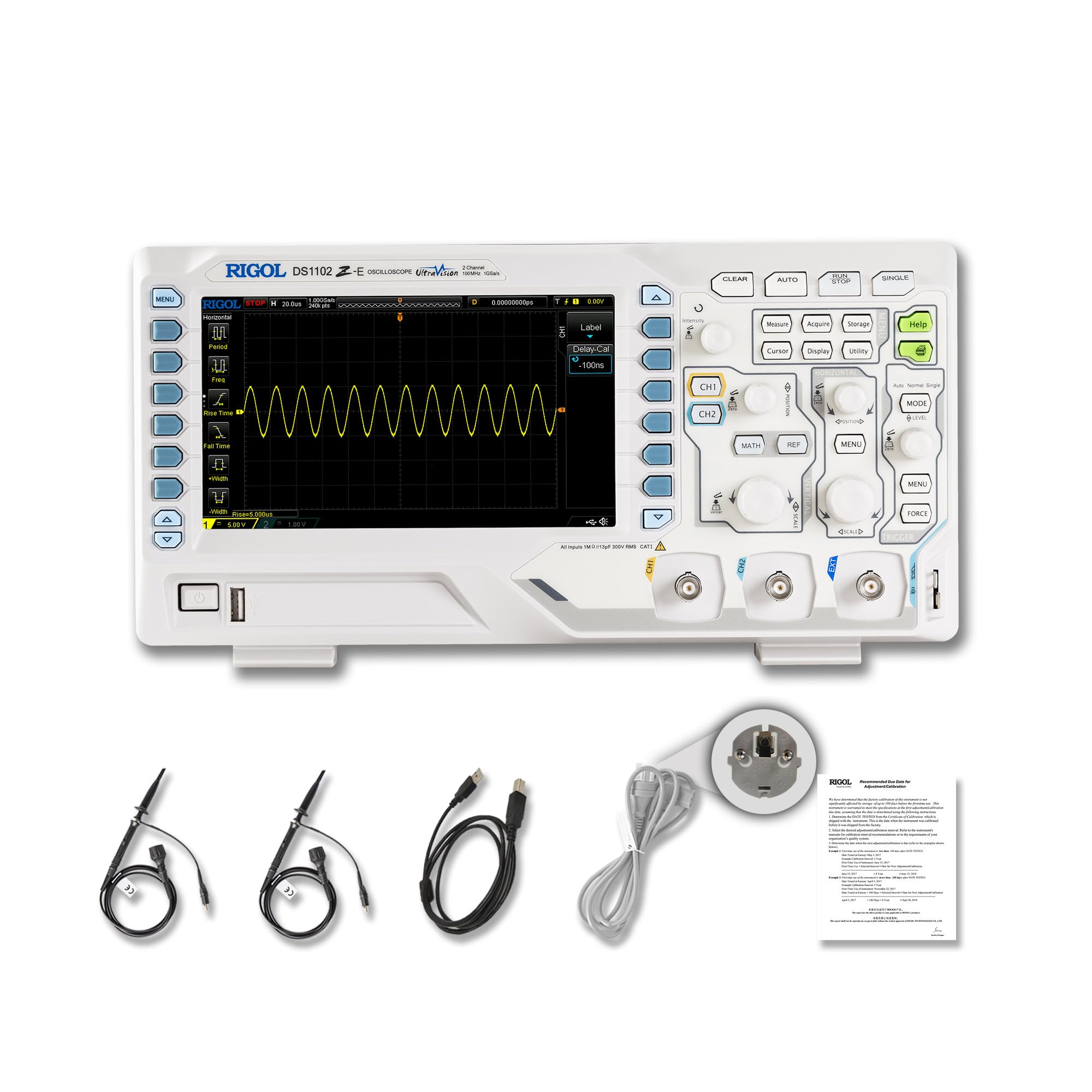
படம் 2.1: முன் view of the RIGOL DS1102Z-E Digital Oscilloscope.
2.1 முக்கிய அம்சங்கள்
- 100 MHz Bandwidth, 1 GSa/s Sample விகிதம்: Captures signals with high precision.
- 24 Mpts Memory Depth: Allows for extended signal capture and detailed waveform analysis.
- Multi-function Measurement Device: Includes frequency counter, protocol decoding (RS232/UART, I2C, SPI), FFT analysis, and automatic measurement functions.
- Waveform Recording and Playback: Records signal variations and replays them for fault identification.
- உயர் வரையறை காட்சி: 7-inch TFT screen with 256-level grayscale, offering a phosphor-like display effect for clear waveform details.
- Remote Control & Secondary Development Support: Equipped with USB and LAN ports for PC remote control, compatible with SCPI commands, LabVIEW, Visual Basic, and Visual C++.
2.2 பெட்டியில் என்ன இருக்கிறது

Figure 2.2: Contents included with the DS1102Z-E Oscilloscope.
- 1x Main Unit (DS1102Z-E Digital Oscilloscope)
- 2x Passive Probes (150MHz)
- 1x Power Cable (EU plug)
- 1x USB A-B Cable
- 1x உத்தரவாத அட்டை
- 1x Calibration Certificate
- 1x Declaration of Conformity
3 அமைவு
Follow these steps to set up your RIGOL DS1102Z-E oscilloscope:
- பேக்கிங்: Carefully remove all components from the packaging. Inspect the device for any signs of damage.
- மின் இணைப்பு: Connect the provided power cable to the oscilloscope's power input and then to a suitable AC power outlet.
- ஆய்வு இணைப்பு: Connect the passive probes to the BNC input connectors (CH1, CH2) on the front panel. Ensure a secure connection.
- அடிப்படை: Always ensure the oscilloscope is properly grounded through the power cable.
- USB/LAN Connection (Optional): If you plan to use remote control or secondary development, connect the USB cable to a PC or the LAN cable to your network.

படம் 3.1: மேல்view of the oscilloscope's physical dimensions and ports.
4. இயக்க வழிமுறைகள்
This section covers the basic operation of your oscilloscope.
4.1 பவர் ஆன்/ஆஃப்
- பவர் ஆன்: Press the power button located on the front panel. The device will perform a self-test and display the main interface.
- பவர் ஆஃப்: சாதனம் மூடப்படும் வரை ஆற்றல் பொத்தானை அழுத்திப் பிடிக்கவும்.
4.2 அடிப்படை அலைவடிவக் காட்சி
After powering on, connect a signal to one of the input channels (e.g., CH1). Adjust the vertical scale (Volts/Div) and horizontal scale (Time/Div) knobs to display the waveform clearly. Use the ஆட்டோ button for automatic setup of the waveform display.

படம் 4.1: எ.காample of a waveform displayed on the oscilloscope screen.
4.3 மேம்பட்ட செயல்பாடுகள்
- அளவீட்டு செயல்பாடுகள்: அழுத்தவும் அளவீடு button to access automatic measurements like frequency, period, peak-to-peak voltagஈ, முதலியன
- தூண்டுதல் அமைப்பு: Use the trigger controls to stabilize repetitive waveforms. Adjust the trigger level and mode (Edge, Pulse, Video, Slope, etc.) as needed.
- Waveform Recording: The oscilloscope allows recording and replaying waveforms. Access this feature through the menu to capture transient events.
- Protocol Decoding: For serial bus analysis (RS232/UART, I2C, SPI), configure the decoding settings via the menu.
- FFT Analysis: Perform Fast Fourier Transform (FFT) to analyze the frequency components of your signal.

Figure 4.2: Complex waveform analysis with measurement data.

Figure 4.3: Multiple waveforms displayed simultaneously for comparison.
5. பராமரிப்பு
Proper maintenance ensures the longevity and accuracy of your oscilloscope.
- சுத்தம்: Use a soft, dry cloth to clean the exterior of the oscilloscope. For stubborn dirt, a slightly damp cloth with mild detergent can be used. Avoid abrasive cleaners or solvents.
- திரை பராமரிப்பு: Clean the display screen with a soft, lint-free cloth. Do not use excessive force or harsh chemicals.
- சேமிப்பு: When not in use, store the oscilloscope in a clean, dry environment, away from direct sunlight, extreme temperatures, and excessive dust.
- ஆய்வு பராமரிப்பு: Handle probes carefully. Avoid bending or stressing the probe tips. Store them properly to prevent damage.
- அளவுத்திருத்தம்: For optimal performance, periodic calibration by qualified personnel is recommended. Refer to the official RIGOL website for calibration services.
6. சரிசெய்தல்
இந்தப் பிரிவு நீங்கள் சந்திக்கும் பொதுவான பிரச்சினைகளுக்கான தீர்வுகளை வழங்குகிறது.
| பிரச்சனை | சாத்தியமான காரணம் | தீர்வு |
|---|---|---|
| No power when turned on. | Power cable not connected, power outlet faulty, or power button issue. | Check power cable connection. Test the power outlet. Ensure the power button is fully pressed. |
| எந்த அலைவடிவமும் காட்டப்படவில்லை. | No signal input, probe not connected correctly, vertical/horizontal scale incorrect, or trigger not set. | Verify signal source. Check probe connections. Adjust Volts/Div and Time/Div. Press ஆட்டோ or adjust trigger settings. |
| Waveform is unstable. | Incorrect trigger settings. | Adjust trigger level, mode, and source to stabilize the waveform. |
| ரிமோட் கண்ட்ரோல் வேலை செய்யவில்லை. | USB/LAN cable issue, incorrect network settings, or software driver not installed. | Check cable connections. Verify network configuration. Install necessary drivers and software (e.g., UltraScope). |
If the problem persists, please contact RIGOL technical support.
7. விவரக்குறிப்புகள்
Detailed technical specifications for the RIGOL DS1102Z-E Digital Oscilloscope.

Figure 7.1: Visual representation of key technical specifications.
| அம்சம் | விவரக்குறிப்பு |
|---|---|
| பிராண்ட் | ரிகோல் |
| மாதிரி | DS1102Z-E |
| அலைவரிசை | 100 மெகா ஹெர்ட்ஸ் |
| சேனல்கள் | 2 Channels + EXT |
| Sample விகிதம் | 1 ஜிஎஸ்ஏ/வி |
| நினைவக ஆழம் | 24 Mpts |
| Waveform Capture Rate | 30,000 wfms/s |
| செங்குத்து தீர்மானம் | 8 பிட் |
| குறைந்தபட்ச உணர்திறன் | 1 mV/டிவி |
| Minimum Time Base | 2 ns/div |
| டிகோடிங் ஆதரவு | RS232/UART, I2C, SPI |
| FFT பகுப்பாய்வு | தரநிலை |
| காட்சி | 7-இன்ச் TFT (800x480) |
| இணைப்பு | USB Host, USB Device, LAN |
| சக்தி ஆதாரம் | ஏசி அடாப்டர் |
| நிறம் | சாம்பல் / வெள்ளை |
| பொருளின் எடை | 2.9 கிலோகிராம் |
| பரிமாணங்கள் (L x W x H) | 31.31 x 16.08 x 12.24 சென்டிமீட்டர்கள் |
| இணக்கமான தரநிலைகள் | CE, RoHS |
| உற்பத்தியாளர் பகுதி எண் | DS1102Z-E |
| பிறப்பிடமான நாடு | சீனா |
8. உத்தரவாதம் மற்றும் ஆதரவு
RIGOL is committed to providing high-quality products and excellent customer service.
- உத்தரவாதம்: The RIGOL DS1102Z-E Digital Oscilloscope comes with a 3 வருட உத்தரவாதம் வாங்கிய தேதியிலிருந்து. இந்த உத்தரவாதமானது சாதாரண பயன்பாட்டின் கீழ் பொருட்கள் மற்றும் வேலைப்பாடுகளில் உள்ள குறைபாடுகளை உள்ளடக்கும்.
- தொழில்நுட்ப ஆதரவு: RIGOL offers 24/7 தொழில்நுட்ப ஆதரவு to assist you with any questions or issues you may encounter. Please refer to the official RIGOL webதொடர்புத் தகவல் மற்றும் ஆதரவு ஆதாரங்களுக்கான தளம்.
- ஆன்லைன் ஆதாரங்கள்: Visit the official RIGOL website for product documentation, software updates (e.g., UltraScope), and additional support materials.

Figure 8.1: RIGOL oscilloscopes support multiple languages for user convenience.