
1. அறிமுகம்
Thank you for choosing the Hoco HC17 Mini Portable Speaker. This manual provides essential information for the safe and efficient operation of your device. Please read it carefully before use and retain it for future reference.
2. பாதுகாப்பு தகவல்
- ஸ்பீக்கரை தீவிர வெப்பநிலை, நேரடி சூரிய ஒளி அல்லது அதிக ஈரப்பதத்திற்கு வெளிப்படுத்த வேண்டாம்.
- பேச்சாளரைக் கீழே தள்ளுவதையோ அல்லது வலுவான தாக்கங்களுக்கு உட்படுத்துவதையோ தவிர்க்கவும்.
- சாதனத்தை நீங்களே பிரிக்கவோ, பழுதுபார்க்கவோ அல்லது மாற்றவோ வேண்டாம். உதவிக்கு தகுதியான சேவை பணியாளர்களைத் தொடர்பு கொள்ளவும்.
- ஸ்பீக்கரை தண்ணீர் மற்றும் பிற திரவங்களிலிருந்து விலக்கி வைக்கவும்.
- வழங்கப்பட்ட சார்ஜிங் கேபிள் அல்லது அதற்கு சமமானதை மட்டும் பயன்படுத்தவும்.
3. தொகுப்பு உள்ளடக்கங்கள்
தொகுப்பில் அனைத்து பொருட்களும் இருப்பதை உறுதி செய்து கொள்ளுங்கள்:
- Hoco HC17 Mini Portable Speaker
- USB சார்ஜிங் கேபிள்
- பயனர் கையேடு (இந்த ஆவணம்)

Image: The Hoco HC17 Mini Portable Speaker shown in its retail packaging, highlighting its compact size and clip design.
4. தயாரிப்பு முடிந்துவிட்டதுview
The Hoco HC17 is a compact and versatile portable speaker designed for on-the-go audio. It features Bluetooth 5.3 connectivity, a built-in microphone for hands-free calls, and multiple playback options including FM radio, TF card, and USB flash drive support. Its clip design enhances portability.

படம்: ஒரு விரிவான view of the grey Hoco HC17 speaker, showcasing its textured grille, control buttons, and integrated carabiner clip.

Image: A display of the Hoco HC17 speaker available in multiple vibrant color options, each with a metallic carabiner clip.
5 அமைவு
5.1 ஸ்பீக்கரை சார்ஜ் செய்தல்
- வழங்கப்பட்ட USB சார்ஜிங் கேபிளை ஸ்பீக்கரின் சார்ஜிங் போர்ட்டுடன் இணைக்கவும்.
- USB கேபிளின் மறுமுனையை USB பவர் அடாப்டருடன் (சேர்க்கப்படவில்லை) அல்லது கணினியின் USB போர்ட்டுடன் இணைக்கவும்.
- சார்ஜிங் இண்டிகேட்டர் லைட் ஒளிரும். முழுமையாக சார்ஜ் ஆனவுடன், லைட் நிறம் மாறலாம் அல்லது அணைந்து போகலாம்.
- முழுமையாக சார்ஜ் செய்தால் 2 மணிநேரம் வரை விளையாட முடியும்.
5.2 பவர் ஆன்/ஆஃப்
- To power on: Press and hold the Power button for a few seconds until you hear an audible prompt or see an indicator light.
- To power off: Press and hold the Power button again for a few seconds until the speaker powers down.
5.3 ப்ளூடூத் இணைத்தல்
- ஸ்பீக்கர் இயக்கப்பட்டிருப்பதையும், புளூடூத் இணைத்தல் பயன்முறையில் இருப்பதையும் உறுதிசெய்து கொள்ளுங்கள் (பொதுவாக ஒளிரும் LED மூலம் குறிக்கப்படும்).
- உங்கள் சாதனத்தில் (ஸ்மார்ட்போன், டேப்லெட், முதலியன), புளூடூத்தை இயக்கி, கிடைக்கக்கூடிய சாதனங்களைத் தேடவும்.
- Select "HC17" from the list of found devices.
- இணைக்கப்பட்டதும், ஸ்பீக்கர் கேட்கக்கூடிய ப்ராம்ட் மூலம் உறுதிப்படுத்தும், மேலும் LED இண்டிகேட்டர் ஒளிர்வதை நிறுத்தும்.
- The speaker will automatically reconnect to the last paired device when powered on, if within range.
5.4 TF கார்டு / USB ஃபிளாஷ் டிரைவ் பிளேபேக்
- Insert a TF card or USB flash drive (with supported audio files) into the corresponding slot on the speaker.
- The speaker will automatically detect the storage device and begin playing music.
- Use the speaker's control buttons to navigate tracks and adjust volume.
5.5 FM வானொலி செயல்பாடு
- Switch the speaker to FM radio mode (this might be a dedicated button or a mode cycle button).
- Press the Play/Pause button to initiate an automatic station scan. The speaker will save available stations.
- Use the Next/Previous track buttons to switch between saved FM stations.
6. ஸ்பீக்கரை இயக்குதல்
6.1 இசை பின்னணி கட்டுப்பாடுகள்
- விளையாடு/இடைநிறுத்தம்: ப்ளே/பாஸ் பட்டனை ஒருமுறை அழுத்தவும்.
- அடுத்த ட்ராக்: "+" பொத்தானை அழுத்தவும்.
- முந்தைய ட்ராக்: "-" பொத்தானை அழுத்தவும்.
- ஒலியை பெருக்கு: "+" பொத்தானை அழுத்திப் பிடிக்கவும்.
- ஒலியை குறை: "-" பொத்தானை அழுத்திப் பிடிக்கவும்.
6.2 ஹேண்ட்ஸ்-ஃப்ரீ அழைப்பு
புளூடூத் வழியாக ஸ்மார்ட்போனுடன் இணைக்கப்படும்போது:
- பதில் அழைப்பு: உள்வரும் அழைப்பு ஒலிக்கும்போது இயக்கு/இடைநிறுத்து பொத்தானை ஒரு முறை அழுத்தவும்.
- அழைப்பை முடிக்கவும்: அழைப்பின் போது இயக்கு/இடைநிறுத்து பொத்தானை ஒரு முறை அழுத்தவும்.
- அழைப்பை நிராகரி: உள்வரும் அழைப்பு ஒலிக்கும்போது, Play/Pause பொத்தானை 2 வினாடிகள் அழுத்திப் பிடிக்கவும்.
- The built-in microphone allows for clear communication.
7. பராமரிப்பு
- சுத்தம்: ஸ்பீக்கரின் மேற்பரப்பை சுத்தம் செய்ய மென்மையான, உலர்ந்த துணியைப் பயன்படுத்தவும். சிராய்ப்பு கிளீனர்கள் அல்லது கரைப்பான்களைப் பயன்படுத்த வேண்டாம்.
- சேமிப்பு: ஸ்பீக்கரை நீண்ட நேரம் பயன்படுத்தாதபோது நேரடி சூரிய ஒளி மற்றும் அதிக வெப்பநிலையிலிருந்து விலகி குளிர்ந்த, உலர்ந்த இடத்தில் சேமிக்கவும்.
- பேட்டரி பராமரிப்பு: பேட்டரி ஆயுளை நீட்டிக்க, பேட்டரியை அடிக்கடி முழுமையாக டிஸ்சார்ஜ் செய்வதைத் தவிர்க்கவும். பயன்பாட்டில் இல்லாவிட்டாலும், ஸ்பீக்கரை தொடர்ந்து சார்ஜ் செய்யவும்.
8. சரிசெய்தல்
| பிரச்சனை | சாத்தியமான காரணம் | தீர்வு |
|---|---|---|
| ஸ்பீக்கர் இயக்கப்படவில்லை. | குறைந்த பேட்டரி. | ஸ்பீக்கரை முழுமையாக சார்ஜ் செய்யவும். |
| புளூடூத் வழியாக இணைக்க முடியாது. | ஸ்பீக்கர் இணைத்தல் பயன்முறையில் இல்லை; சாதன புளூடூத் முடக்கப்பட்டுள்ளது; மிகத் தொலைவில் உள்ளது. | Ensure speaker is in pairing mode. Turn on Bluetooth on your device. Move speaker closer to device (within 10 meters). |
| பிளேபேக்கின் போது ஒலி இல்லை. | Volume too low; speaker not connected; incorrect source. | Increase volume on both speaker and connected device. Re-pair Bluetooth. Ensure correct input source (Bluetooth, TF, USB, FM) is selected. |
| மோசமான எஃப்எம் வானொலி வரவேற்பு. | பலவீனமான சமிக்ஞை; சுற்றுச்சூழல் குறுக்கீடு. | Move to an open area. Try rescanning for stations. |
9. விவரக்குறிப்புகள்
- மாதிரி: HC17
- புளூடூத் பதிப்பு: 5.3
- பேச்சாளர் அலகு: 45மிமீ
- பேட்டரி திறன்: 500mAh
- விளையாட்டு நேரம்: 2 மணி நேரம் வரை
- இணைப்பு: Bluetooth, FM, TF Card, USB Flash Drive
- உள்ளமைக்கப்பட்ட மைக்ரோஃபோன்: ஆம் (ஹேண்ட்ஸ்-ஃப்ரீ அழைப்பிற்கு)
- பரிமாணங்கள்: Approximately 13.3D x 8.5W x 4.9H centimetres
- சேர்க்கப்பட்ட கூறுகள்: USB Charger (cable)
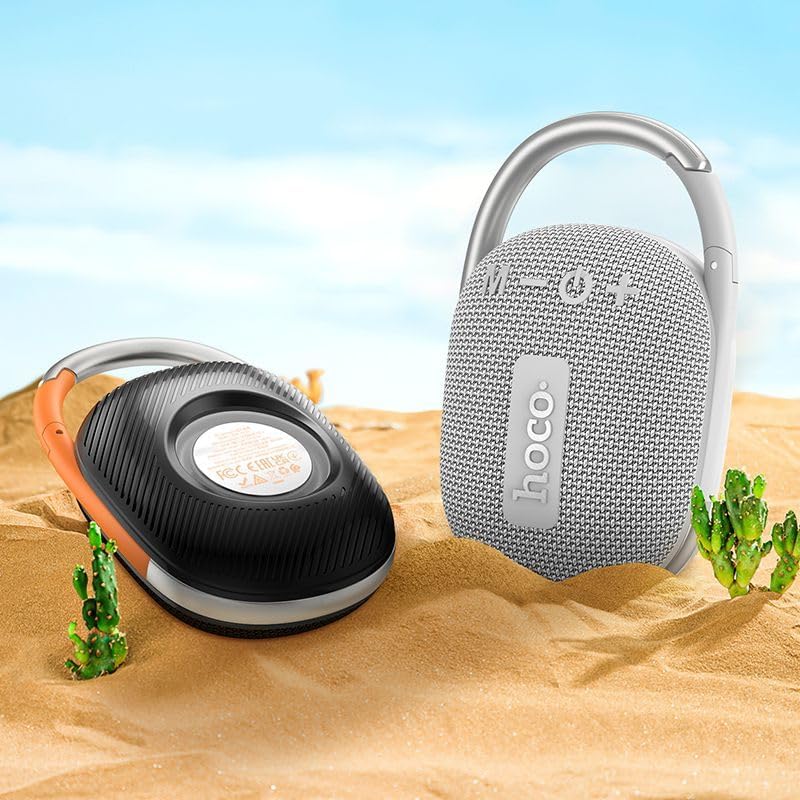
Image: The Hoco HC17 speaker positioned on sand with small cacti, illustrating its portability and suitability for outdoor use.
10. உத்தரவாதம் மற்றும் ஆதரவு
This product comes with a standard manufacturer's warranty. For detailed warranty terms and conditions, please refer to the warranty card included with your purchase or contact your retailer. For technical support or service inquiries, please contact the point of purchase or the official Hoco support channels.


